

 WhitewaterFoundry
Bash environment problem "--login" vs "bash"
Describe the bug "bash --login" vs "bash" when we execute "Wlinux" from Windows App list
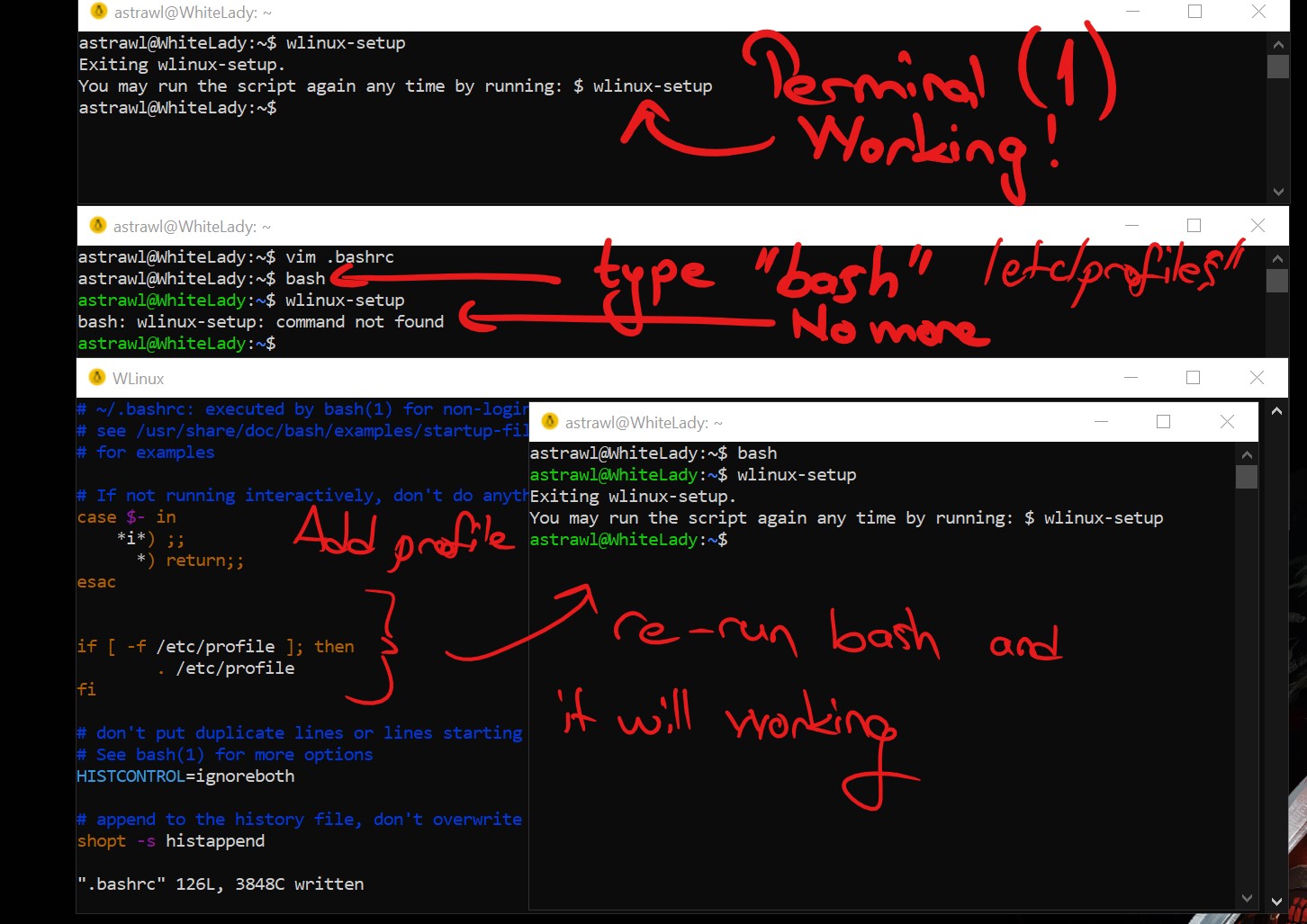
To Reproduce 1-) Execute "Wlinux" It will run "bash --login" and we gonna have "no color style". I re-run bash then it will load ".bashrc" in my user folders. a - ) No "wlinux-setup" command until I run "bash --login" again. b - ) wsl-utilities commands also not working until I run "bash --login" again.
My fix was : I just added a tiny extra script in to my .bashrc and I just typed "bash" It will load ".bashrc,.bash_profiles" also It will go load "/etc/profiles/ as well.
Expected behavior It should be load "normal bash" login with proper "color" and profiles and also "proper environment variables"
Screenshots
Basic Troubleshooting Checklist
[x] I have searched Google for the error message. [x] I have checked official WSL troubleshooting documentation: https://docs.microsoft.com/en-us/windows/wsl/troubleshooting#confirm-wsl-is-enabled. [x] I have searched the official Microsoft WSL issues page: https://github.com/Microsoft/WSL/issues. [x] I have searched the WLinux issues page: https://github.com/WhitewaterFoundry/WLinux/issues. [x] I have reset WLinux: Settings->Apps->Apps & features->WLinux->Advanced Options->Reset. [x] I have disabled and re-enabled WSL in Windows Features. [x] I have run Windows 10 updates and restarted.
What other troubleshooting have you attempted?
Insert here:
WLinux Version
Find: Settings->Apps->Apps & features->WLinux->Advanced Options->Version.
Insert here: 1.1.25.0
Windows Build
Run 'systeminfo | findstr /C:"OS"' in Command Prompt and insert here:
OS Name: Microsoft Windows 10 Pro Insider Preview OS Version: 10.0.18282 N/A Build 18282
For help on retrieving: https://docs.microsoft.com/en-us/windows/wsl/troubleshooting#check-your-build-number
Note : In first thought It was happening because of windows 10 insider but I checked on my other windows 10 pro machine which is "stable latest" and It will happening for some weird reason. I guess that could be something with changing "fish/zsh" shell as well. It started happening after I change my shell to "bash" via using "chsh" but I'm not sure yet.
Thank you.


You can configure your terminal to run default shell in login mode.
I.e. for https://github.com/mintty/wsltty you can use - (single dash) argument. From manual:
- wslty usage is
mintty [OPTION]... [ - | PROGRAM [ARG]... ]. - If a single dash is specified instead of a program name, the shell is invoked as a login shell.
