

 Webklex
Cannot access to Microsoft mailboxes via OAuth2 - Please help me
Hi, I'm trying to read mailboxes using this library, obtaining the correct access token, but when I try to use the token I got the error "NO AUTHENTICATE failed". I have configured the app in AD as the guide indicated in the link https://docs.microsoft.com/en-us/azure/active-directory/develop/v2-oauth2-client-creds-grant-flow. Does anyone is able to read mailboxes messages using OAuth authentication?
The access token param are:
'form_params' => [
                'client_id' => GraphHelper::$clientId,
                'client_secret' => GraphHelper::$clientSecret,
                'grant_type' => 'client_credentials',
                'scope' => 'https://graph.microsoft.com/.default',
            ]
and the following request is:
$cm = new ClientManager($options = ["options" => ["debug" => true]]);
$client = $cm->make([
	'host'          => 'outlook.office365.com',
	'port'          => 993,
	'encryption'    => 'ssl',
	'validate_cert' => true,
	'username'      => $username,
	'password'      => $access_token,
	'protocol'      => 'imap',
	'authentication' => "oauth"
]);
$client->connect();
We tried to add many permission to the app registration, as you can see in the attached screenshot.
Do you have any idea to correct the problem?
Kind regard
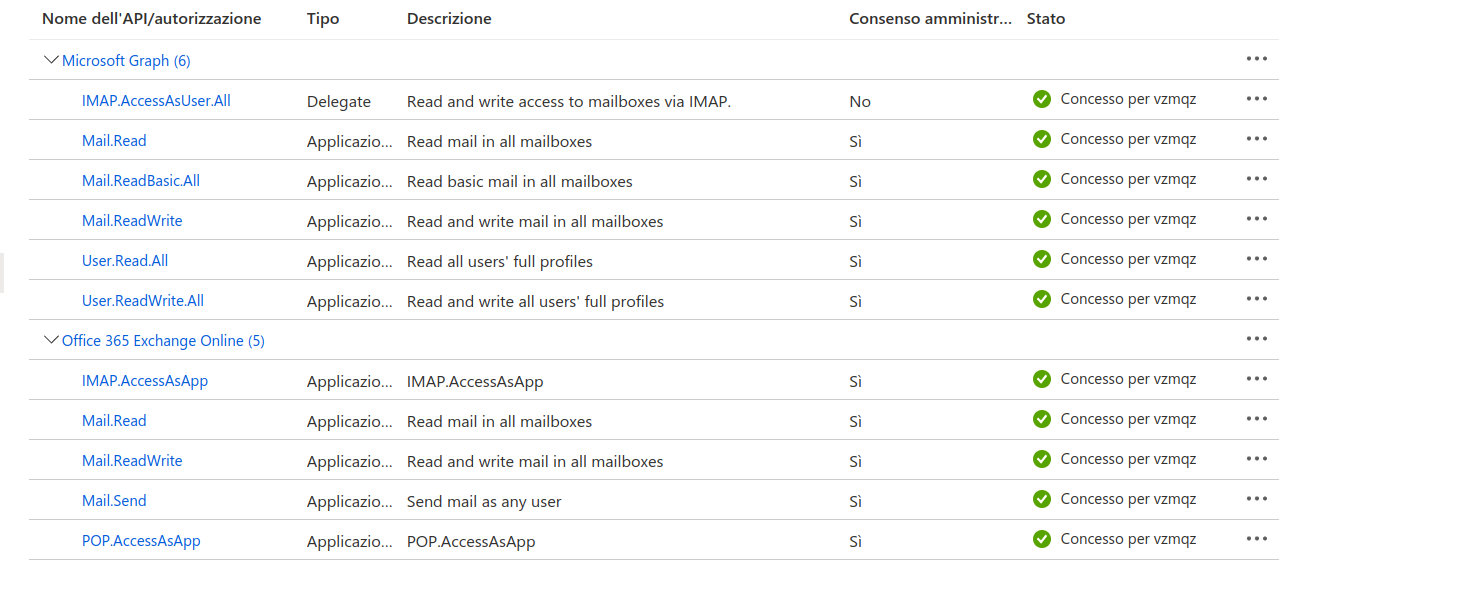

Hi @francescodiperna , a few things I can thingk of which could cause this problem:
- You have to grant these permissions: IMAP.AccessAsUser.All and potentially (email, offline_access, User.Read)
- You need to add a client secret under "certificates and secrets".
- You need to have "https://outlook.office365.com/IMAP.AccessAsUser.All" inside your scope while generating the token
I've tested it successfully with a slightly different scope "offline_access%20https%3A%2F%2Foutlook.office365.com%2FIMAP.AccessAsUser.All%20https%3A%2F%2Foutlook.office365.com%2FSMTP.Send" - but I don't believe they are all required. In fact I believe just "https://outlook.office365.com/IMAP.AccessAsUser.All" is required.
I hope this helps you :)
Best regards & happy coding,

Thanks for fast replay, we are unable to use your scope because the server complain with the following message
AADSTS1002012: The provided value for scope XXXXXXXXXXXXXXXXX is not valid. Client credential flows must have a scope value with /.default suffixed to the resource identifier (application ID URI).
(we cannot use multiple scope in the parameter, the server doesn't recognize the scope).
We are using "OAuth 2.0 Client Credentials flow", maybe you are using a different one? Kind regards
Hi @francescodiperna , I'm using this method to generate an auth token:
#!/bin/bash

CLIENT_ID="redacted"
CLIENT_SECRET="redacted"
TENANT="redacted"

SCOPE="offline_access%20https%3A%2F%2Foutlook.office365.com%2FIMAP.AccessAsUser.All%20https%3A%2F%2Foutlook.office365.com%2FSMTP.Send"
STATE="12345"
REDIRECT_URI="http%3A%2F%2Flocalhost"

echo "Open this url inside your browser:"
echo ""
echo "https://login.microsoftonline.com/${TENANT}/oauth2/v2.0/authorize?client_id=${CLIENT_ID}&response_type=code&redirect_uri=${REDIRECT_URI}&response_mode=query&scope=${SCOPE}&state=${STATE}"

echo ""
echo "..you'll get redirected to ${REDIRECT_URI} with the required code & session_state attached within the uri."
echo "Edit this file and update the CODE and SESSION variable and remove the first 'exit 0'."

# Remove this line, if you've acquired the code and session state values
exit 0
echo ""

# -> http://localhost/
# ?code=redacted
# &state=12345
# &session_state=aa88c.....#

CODE="0.AWcAfY9hQ-vwo0y1eqaPE....."
SESSION="aa88c12b-3e...."
REFRESH_TOKEN=""

echo "Trying to authenticate the session.."
RESPONSE=$( curl -XPOST https://login.microsoftonline.com/${TENANT}/oauth2/v2.0/token -d "client_id=${CLIENT_ID}&scope=${SCOPE}&code=${CODE}&state=${STATE}&session_state=${SESSION}&redirect_uri=${REDIRECT_URI}&client_secret=${CLIENT_SECRET}&refresh_token=${REFRESH_TOKEN}&grant_type=authorization_code" )

# {
#       "token_type":"Bearer",
#       "scope":"https://outlook.office365.com/IMAP.AccessAsUser.All https://outlook.office365.com/SMTP.Send",
#       "expires_in":3955,
#       "ext_expires_in":3955,
#       "access_token":"redacted",
#       "refresh_token":"redacted"
# }

echo ""
echo "Auth response.."
echo "$RESPONSE"

ACCESS_TOKEN=$( echo "$RESPONSE" | jq -r .access_token  )
REFRESH_TOKEN=$( echo "$RESPONSE" | jq -r .refresh_token )

echo ""
echo "Access token: ${ACCESS_TOKEN}"
echo ""
echo "Refresh token: ${REFRESH_TOKEN}"
echo ""
echo ""
My working example
//https://github.com/jumbojett/OpenID-Connect-PHP
$oidc = new \Jumbojett\OpenIDConnectClient('https://login.microsoftonline.com/{tenantId}/v2.0/',
'{clientId}',
'{clientSecret');
//v2.0 in URL is important!!!

$oidc->addScope(['profile','openid','email','offline_access','https://outlook.office.com/IMAP.AccessAsUser.All','User.Read']);

$oidc->authenticate();

$username = $oidc->requestUserInfo('preferred_username');
//or use static $username='[email protected]';
$token = $oidc->getAccessToken();

$cm = new ClientManager();
$client = $cm->make([
	'host' => 'outlook.office365.com',
	'port' => 993,
	'encryption' => 'ssl', // 'tls',
	'validate_cert' => true,
	'username' => $username,
	'password' => $token,
	'protocol' => 'imap',
	'authentication' => "oauth",
]);
$client->connect();

$folders = $client->getFolders();
var_dump($folders);

Webklex
Hi @Webklex, we are working in a deamon application and we cannot use the browser for the autenthication. The access token got using your code has an expiration time of 1 hour only.
Using your procedure I got this error:
BAD User is authenticated but not connected.
Kind regards
Hi @francescodiperna , you can refresh the token with a call like this:
curl -XPOST https://login.microsoftonline.com/${TENANT}/oauth2/v2.0/token -d "client_id=${CLIENT_ID}&scope=${SCOPE}&refresh_token=${REFRESH_TOKEN}&grant_type=refresh_token&client_secret=${CLIENT_SECRET}"
If you can't authenticate the user via browser, perhaps @eisolutions suggestion works better for your use case. Checkout the mentioned repository: https://github.com/jumbojett/OpenID-Connect-PHP
I'm not familiar with the error message BAD User is authenticated but not connected.. I suggest you enable the debug mode inside your config file, to see whats being send and received. This might give some insight into whats happening :)
https://github.com/Webklex/php-imap/blob/master/src/config/imap.php#L152
If you are using the laravel wrapper, the imap.php file should be inside the config folder if you've published the package.
You can authorize user in browser, then save access token and refresh token eg. in database and transfer to your daemon app. Daemon app can refresh access token when it expires, using refresh token (there is method refreshToken in OpenID-Connect-PHP)
Webklex
Hi @Webklex, we are working in a deamon application and we cannot use the browser for the autenthication. The access token got using your code has an expiration time of 1 hour only.
Using your procedure I got this error:
BAD User is authenticated but not connected.Kind regards
I was getting the same error. It looks to have been because IMAP was disabled on the account
