
Exchangis
 Exchangis copied to clipboard
 WeBankFinTech
The task is configured with nodes. After executing the task, an error is reported, and the execution node cannot be found.
 2.
2.
 3.
3.
 4.error message
报错信息
com.webank.wedatasphere.exchangis.route.exception.NoAvailableServerException: No available candidate servers
at com.webank.wedatasphere.exchangis.route.MachineLoadRule.choose(MachineLoadRule.java:108)
at com.webank.wedatasphere.exchangis.route.MachineLoadRule.choose(MachineLoadRule.java:65)
4.error message
报错信息
com.webank.wedatasphere.exchangis.route.exception.NoAvailableServerException: No available candidate servers
at com.webank.wedatasphere.exchangis.route.MachineLoadRule.choose(MachineLoadRule.java:108)
at com.webank.wedatasphere.exchangis.route.MachineLoadRule.choose(MachineLoadRule.java:65)

This is because of the lack of configuration in exchange is-executor, which leads to the mismatch between the two sides of the program getHost.
这个是因为在exchangis-executor里面缺少配置,导致程序getHost的时候两边不匹配。

- first look at the value of address in your table.
- Check ip with ip r on your server
- Then add the following configuration in the conf/application.yml of exchange is-executor
1.你先看你的这个表里面的address的值是什么 2在你的服务器上用ip r 查看ip 3.接着在exchangis-executor 的conf/application.yml 添加如下配置
executor: network: interface: name: eth0 I'm using eth0 here. As for your actual situation, please fill in the corresponding value according to your step 2. Generally speaking, it should be eth0. 我这边用的是eth0,至于你的实际情况要看你步骤2的情况填相应的值。一般来说应该就是eth0

Borrow your issue. The third point of exechangis-executor should be to modify the conf/bootstrap.yml file, and change the name ""at the bottom of the file to name "eth0 "(the ip read should be the same as that registered by eureka), and then restart the executor module. Thanks to the big boss's issue for the tip.Borrow Big Brother issue. The third point of exechangis-executor should be to modify the conf/bootstrap.yml file, and change the name ""at the bottom of the file to name "eth0 "(the ip read should be the same as that registered by eureka), and then restart the executor module. Thanks to the big boss's issue for the tip.
借大佬issue。 第三点exechangis-executor应该是修改conf/bootstrap.yml文件,将文件底部的name "" 修改为 name "eth0"(读取到的ip应该和eureka注册的ip一致),修改完重启executor模块。感谢大佬的issue给了提示

借大佬issue。 第三点exechangis-executor应该是修改conf/bootstrap.yml文件,将文件底部的name "" 修改为 name "eth0"(读取到的ip应该和eureka注册的ip一致),修改完重启executor模块。感谢大佬的issue给了提示
hello, if it's deployed to k8s container, the ip will change every time you redeploy it, so it won't work. Is there any good solution? Thanks! 大佬,如果是部署到k8s容器上,每次重新部署ip都会变,这样就没效果了,有什么好的解决方案吗,谢谢!

根据指定ip获取网卡名称,脚本如下: 1、比如你需要绑定的executor的ip是10.0.0.14 2、获取网卡名称如下:
#!/bin/bash
ip="10.0.0.14"
interfaces=(`ip l | awk -F":"  '/^[^ ]/{print $2}'| awk '{print $1}'`)
for interface in ${interfaces[*]};do
     rs=`ip a show $interface| grep $ip`
     if [ -n "$rs"   ];then
         echo $interface
         break
     fi
done
3、将获取的网卡名字,比如第二步输出的结果是“em1”
4、将第3步骤的结果配置到/wedatasphere-exchangis-0.5.0.RELEASE/modules/exchangis-executor/conf/bootstrap.yml的
network:
    interface:
      name: "em1"
5、重启exchangis-executor、以及exchangis-service服务
./bin/start.sh -m exchangis-executor
./bin/start.sh -m exchangis-service
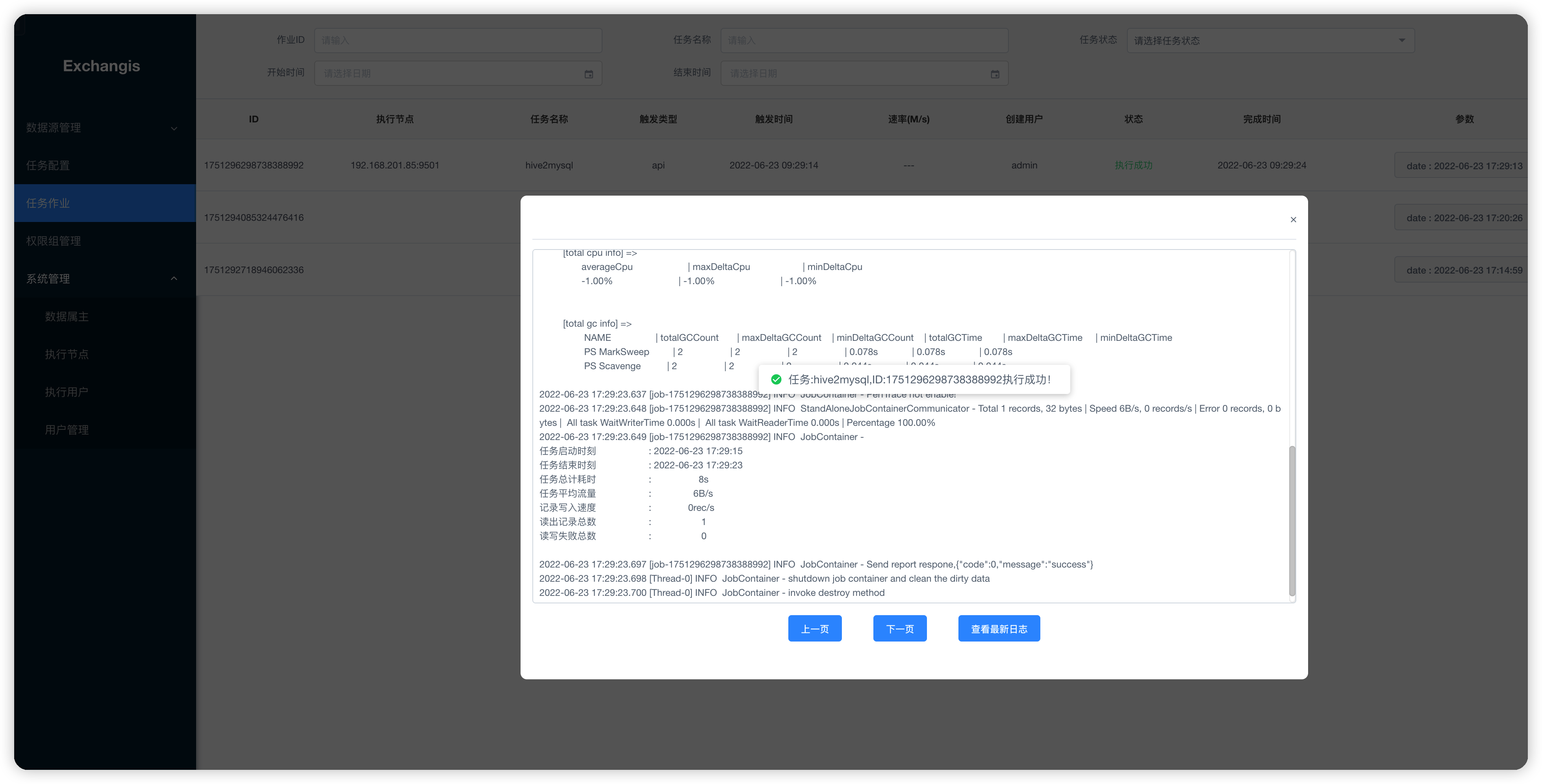
6、大功告成,附上一张测试成功的截图(hive同步mysql,一条数据)

The latest version is exchangis1.1.1 and had supported MySQL、Hive、MongoDB、ElasticSearch and Oracle. You can pay attention to it.
