

 WarmUpTill
Can't Trigger AppleScripts
Describe the bug When trying to run an AppleScript app from the "Run" Command, Mac shows error:
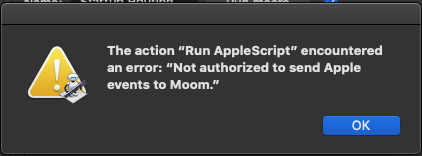
Version information OSX 10.15.7
- OBS Version 29.0.2
- Plugin Version 1.20.4
Additional context Already mentioned in the Discussion of Forum, but issue still persists.

Thanks for reporting the issue here again - makes tracking it a bit easier. I have the suspicion that the location where the plugin is installed makes the difference, but I haven't gotten around to testing it yet.
Update: Installing the plugin in /Library instead of ~/Library also does not seem to make a difference Sorry for being so slow in tracking this down ... :(

Checking in again. Any possible work around? Is no one else using apple scripts...
I also suspect that it is related to the entitlements.
Adding the corresponding permissions to the plugin does not seem to have any effect however.
So it might be that the entitlements set of OBS itself needs to be adjusted.
Unfortunately I am not sure how to test / confirm this yet.
I am unable to modify the existing entitlements of the OBS package without it becoming unusable for some reason.
Disabling the signature checking is also not possible in the VM setup I am using as entering the recovery mode of MacOS does not seem to work.
I will try to look into it further once I figure this out.
Unfortunately I am at a bit of a loss on how to continue here.
I tried adding the following entitlements to OBS itself or to the plugin, but both resulted in the application no longer being able to start at all (even when compiling OBS and the plugin locally in the VM where I am attempting to start it).
<key>com.apple.security.automation.apple-events</key>
<true/>
<key>NSAppleEventsUsageDescription</key>
<string>Advanced scene switcher needs additional permissions to be able to run AppleScript applications</string>
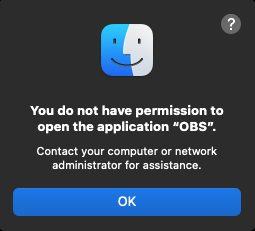
I am not sure what lead to this change in behaviour, but for now I have no clue how to re-enable the functionality to run apple scripts from within OBS / the plugin.
If anyone is more experienced in regards to this and reads this, any help or hints would be much appreciated. :)
Lua scripts can be used to run AppleScripts and other commands.
I modified a lua script that Advanced Scene Switcher can use to send command lines.
Please try this gist.
https://gist.github.com/UUoocl/8aca085e91eb48c3a8284d9d632319d4
I've successfully tested several command-lines.
Example Macro
Script sequence diagram
sequenceDiagram
    Adv.SS->>Text Source: Set text to command-line
    Adv.SS->>Lua Script: Run the Hotkey Command Script
    Lua Script->>Text Source: Get command-line text
    Lua Script->> Lua Script: Run Command-line
