

 WarmUpTill
Conditions (fullscreen etc.) in scene switcher macros --> macOS
In the scene switcher macros the conditions (focused, fullscreen, maximized and foreground window changed) are ignored on macOS
Version information
- OS: macOS 12.3.1
- OBS Version 27.2.2
- Plugin Version 1.17.5

I tried played around with the "Window" condition type and the above settings seem to work when using the "TextEdit" application with some caveats.
- The fullscreen check seems to only return true if the window/screen is actually visible
- The maximized check seems to only return true if the window actually spans the entire screen (meaning the dock must be hidden)
- A maximized window does not equal a fullscreen window on MacOS and both being active at the same time is never true
Does that match your observations?
Also note that I recently fixed a major memory leak for the MacOS build with 4d65956f2512145300342886a8763709bbc604b5. Maybe this also has some effect on the functionality of the OS specific window status checks.
If you want to give this build a try just use the most recent one from the master branch: https://github.com/WarmUpTill/SceneSwitcher/actions/runs/2345319501 (You will have to be logged into GitHub to be able to download it)

I'm using Safari, sometimes with multiple tabs opened in the same window, which is covering the full screen (not maximized using the green fullscreen button). The action is only executed, if the tab in safari is visible. But if I change the focus to another application, which is covering the same screen area and sitting above Safari, the action is still executed.
If I don't check any of the option fields, the actions are lighting up green, as expected (Screenshot 1).
If I just check the "is focused" option in the if-condition, the action below is executed anyway.
If I maximize the window (using the green fullscreen button) the behavior is the same...
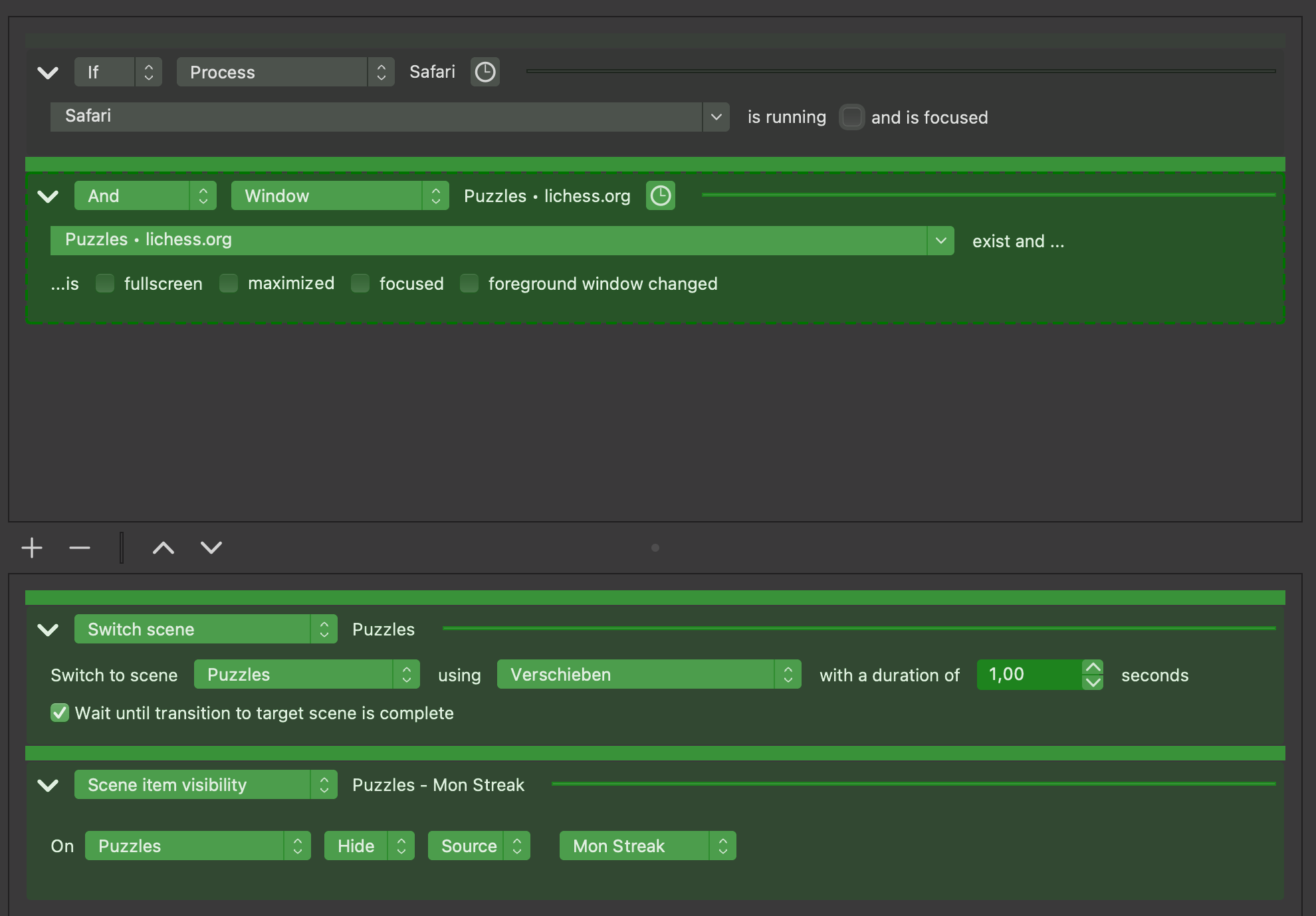
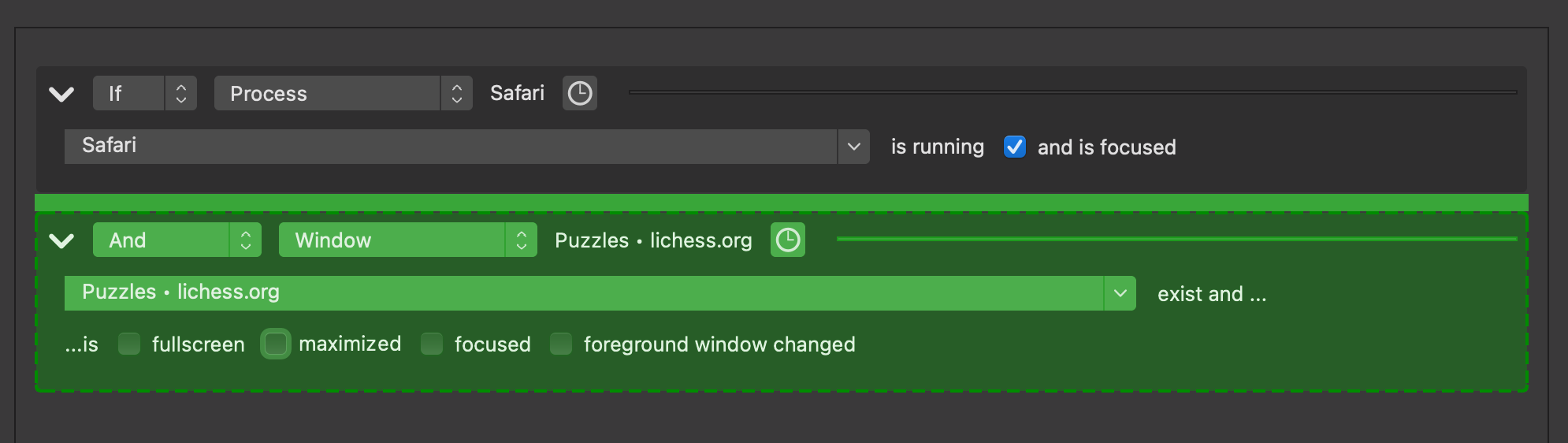
Sorry I didn't manage to look into this further yet.
The action is only executed, if the tab in safari is visible
Isn't that to be expected? If the tab is no longer visible then the window title title of the application changes accordingly. Let me know if I am misunderstanding something here.
But if I change the focus to another application, which is covering the same screen area and sitting above Safari, the action is still executed. If I don't check any of the option fields, the actions are lighting up green, as expected (Screenshot 1). If I just check the "is focused" option in the if-condition, the action below is executed anyway. If I maximize the window (using the green fullscreen button) the behavior is the same...
Are you referring to the focused option of the "Window" or the "Process" condition type here or the combination of both?
It seems, that we don't understand each other. I can provide my settings in which my problems occur.
As said, the "is focused" option is completly ignored.
By the way, I'm not a native english speaker - I'm german...
I played a bit around with an additional Process option, but this didn't really changed anything. I may misunderstand the options fullscreen, maximized, focused and foreground window changed, too. At least in the MacOS environment...
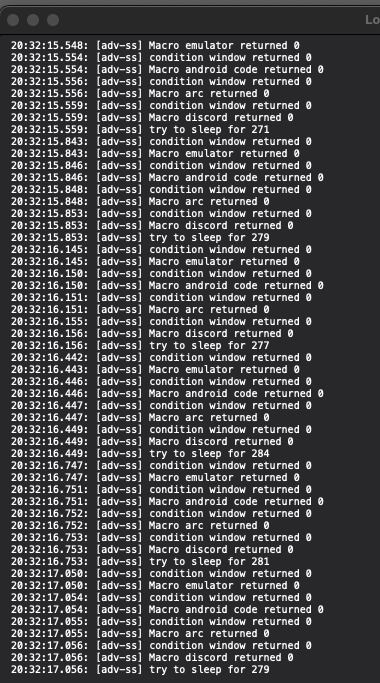
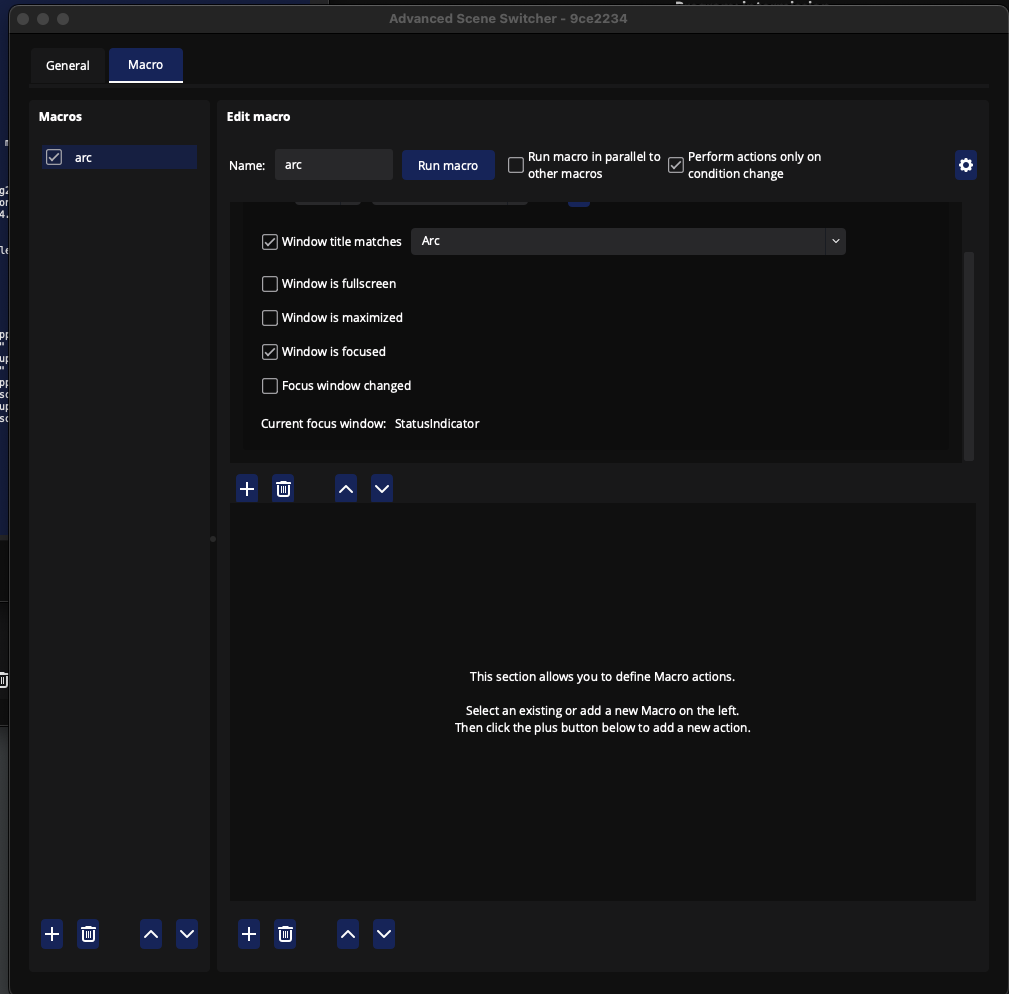
I just installed this plugin and when trying to use a macro that checks if a window condition, only the fullscreen option is working. the maximized, focused and foreground window changed always return 0 in the logs. I have tried using Safari, Arc, Intellij, Android Studio and Discord. I am unsure if I am doing something wrong or not. I have tried to enable/disable "Run macro in parallel to other macros" and "Perform actions only on condition change". leaving one or the other on/off does not change either. I attached screen shots of my logs, even though they dont say much and a screen shot of my macro settings for discord. I am on OBS 29.0.2 and have a M2 Mac Pro chip. Running MacOS 13.2
I also thought maybe it was an issue with privacy settings because MacOS is a stickler for allowing permission for certain things. I tested with OBS access to full disk, screen recording and input monitoring.
But the obs built in automatic scene switcher is able to switch scenes for changing focus on windows (but the built in one does not support different windows for same app)
Let me know if I can check anything else or if you have would like any clarification on my issue.
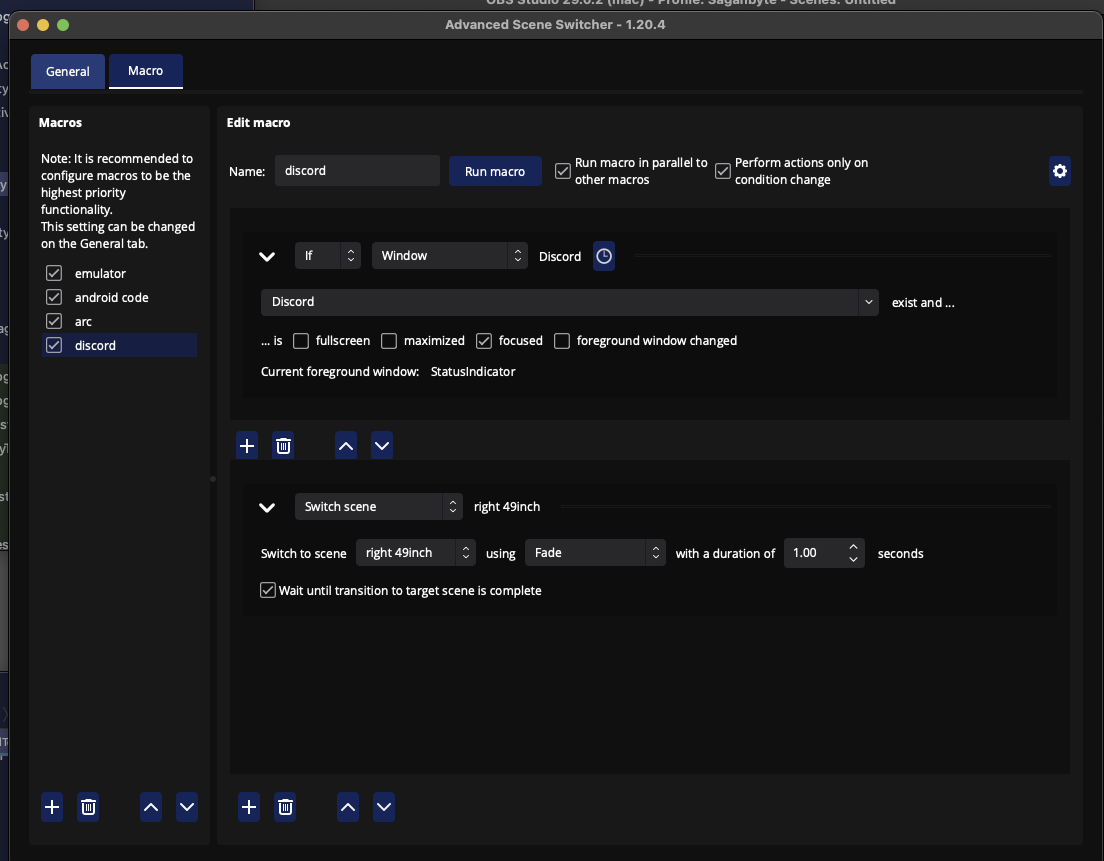
Editing because I posted a screen shot of an old version because I was trying to see if an older version showed the same issues. it does, but here is the settings from the newest version in releases.
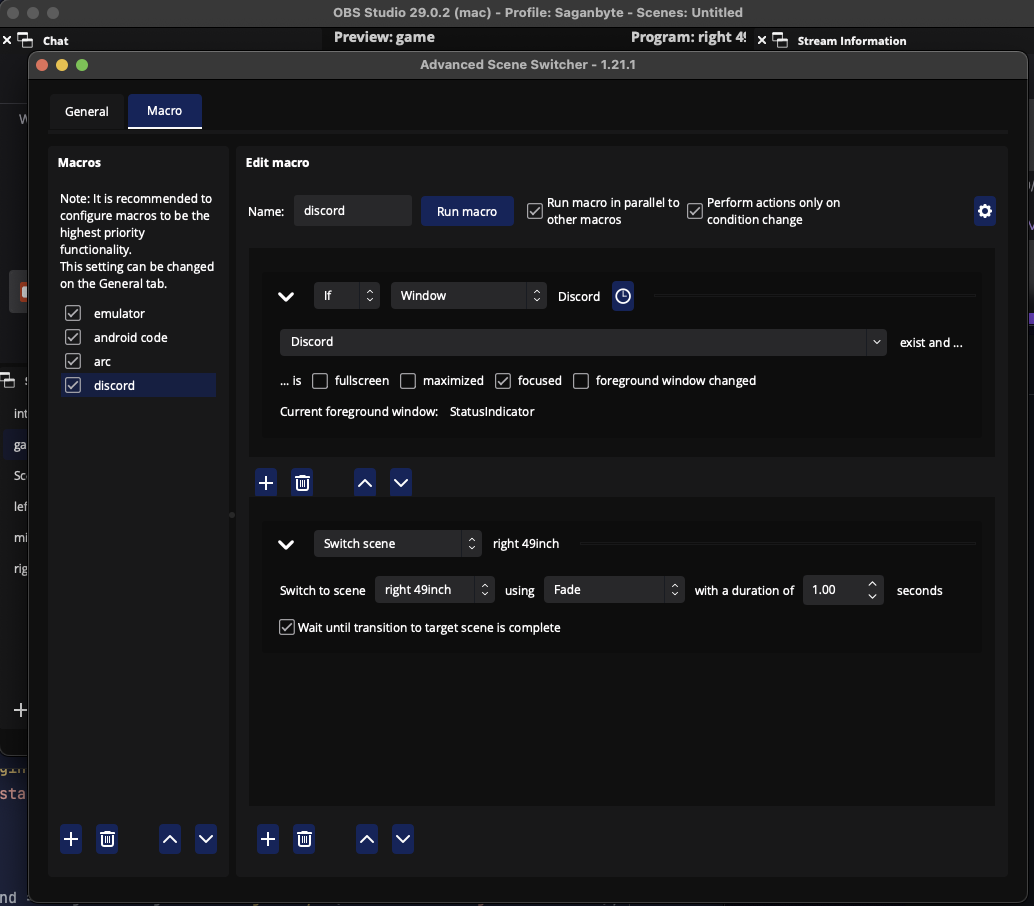

Does the Current foreground window: text ever change or does it always stay at StatusIndicator?
Unfortunately I was never able to reproduce these issues myself in the VM environment I was testing in so I am not sure how to best investigate this further.
Can you give the following version a try and check if this makes any difference? https://github.com/WarmUpTill/SceneSwitcher/actions/runs/4811105463?pr=730 But before updating please export your current settings to a file just in case something breaks.
it always says StatusIndicator. and i actually noticed that you made that a couple days ago and already tried it and nothing changed
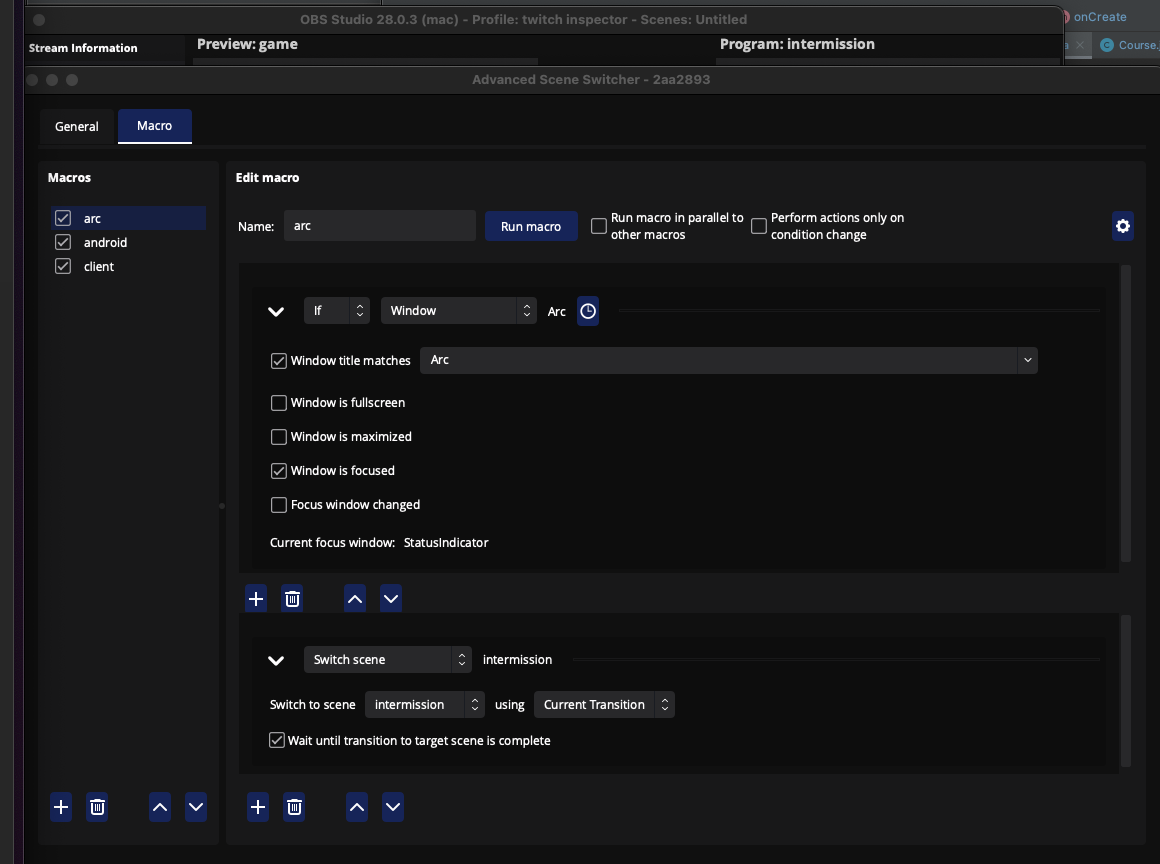
Seems like this mysterious StatusIndicator window is intended to be used to display the status of the microphone.
So I think it should be safe to skip over this window.
A build where this strange window should be ignored should be available here in a few minutes: https://github.com/WarmUpTill/SceneSwitcher/actions/runs/4844848672/jobs/8633386690?pr=730
I would appreciate if you could give this build a try and report back if this changes anything regarding the focus window being displayed.
Current focus window:
is always blank now. and in logs condition returns 0 for Focus Window changed and window is focused.
I also tried it with the parent name such as "Arc" and also the child window, which is the name of the open tab. both produced same result.
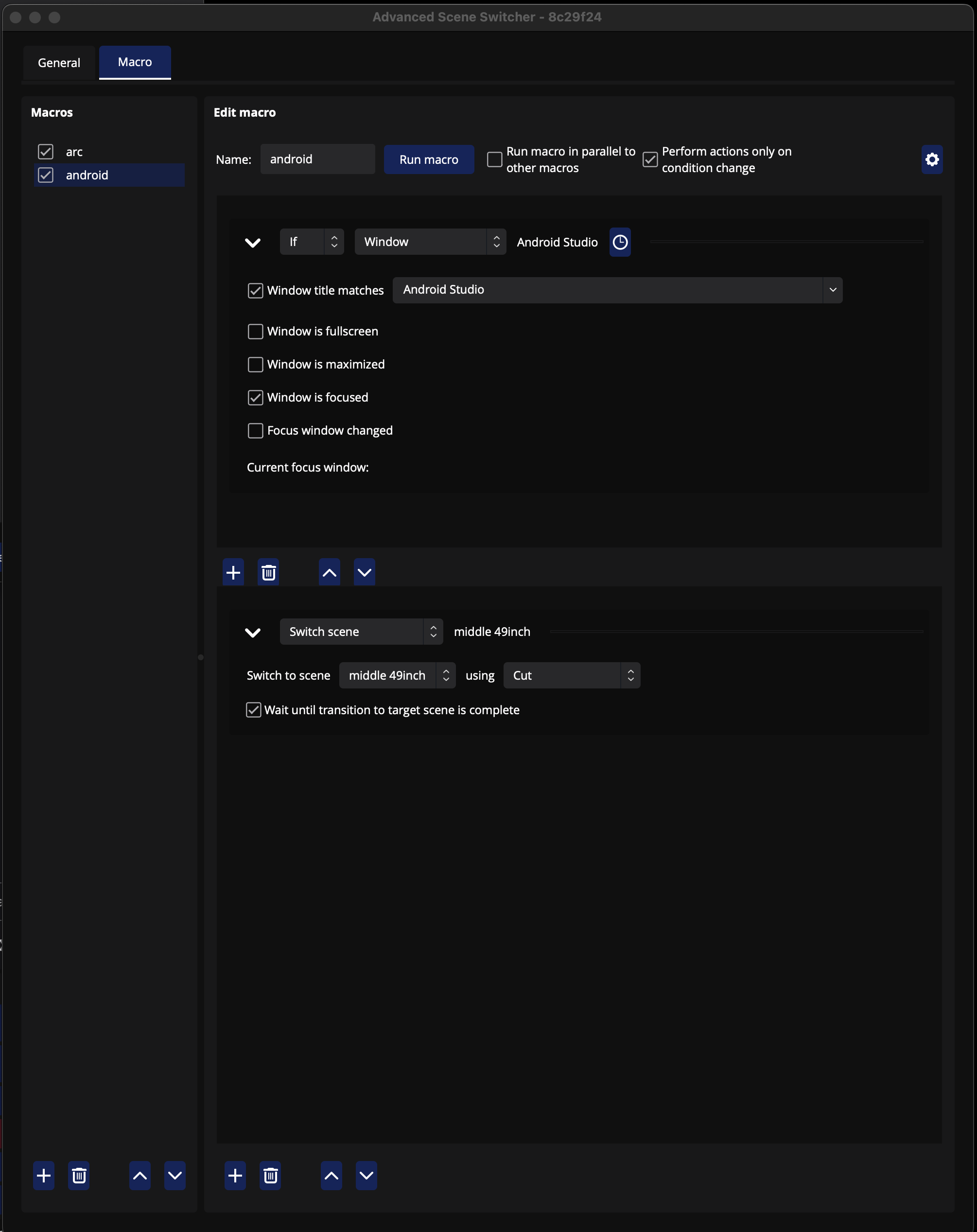
Thanks a lot for your support in testing / getting this sorted out! :)
Seems like I misunderstood the layer terminology slightly so the previous attempt did not work.
I gave working around this StatusIndicator window another shot:
https://github.com/WarmUpTill/SceneSwitcher/actions/runs/4851415607?pr=730
Please let me know if this changes anything regarding the focus window.
the "Current focus window: " not is not changing from StatusWindow again.
and the logs show the window is focused condition is still returning 0 for all apps
i also have no idea if this helps you or not, but i have done some python obj c code in the past with macs, so i made a script that was able to get the frontmost window and ignoring StatusIndicator. The python script is below. i tried to add it to your project but with c++ i was having a very hard time.
but it seems like eventhough StatusIndicator is on layer 0, the next app isnt layer 1 like i thought it would be. so i just get the next front most window if the window name is statusindicator.
from Quartz import (
    CGWindowListCopyWindowInfo,
    kCGWindowListOptionOnScreenOnly,
    kCGNullWindowID,
)
import time


def get_frontmost_app_window_titles():
    window_titles = []
    frontmost_app_name = ""
    window_list = CGWindowListCopyWindowInfo(
        kCGWindowListOptionOnScreenOnly, kCGNullWindowID)

    for window in window_list:

        layer = window.get("kCGWindowLayer", None)
        owner_name = window.get("kCGWindowOwnerName", "")
        window_name = window.get("kCGWindowName", "")
        bounds = window.get("kCGWindowBounds", None)
        alpha = window.get("kCGWindowAlpha", 1)

        if bounds and (bounds["Width"] != 0 or bounds["Height"] != 0) and alpha > 0:

        # True if the window is frontmost
            if layer == 0 and window_name.lower() not in ["statusindicator"]:
                frontmost_app_name = owner_name
                break

    # this for loop will get all windows for the app that is fronmost.
    for window in window_list:
        layer = window.get("kCGWindowLayer", None)
        owner_name = window.get("kCGWindowOwnerName", "")
        window_name = window.get("kCGWindowName", "")
        bounds = window.get("kCGWindowBounds", None)
        alpha = window.get("kCGWindowAlpha", 1)

        if owner_name == frontmost_app_name and bounds and (bounds["Width"] != 0 or bounds["Height"] != 0) and alpha > 0:
            print(window_name, layer)
            if window_name:
                window_titles.append(window_name)
    return window_titles


if __name__ == "__main__":
    while True:
        getFrontmostWindows = get_frontmost_app_window_titles()
        time.sleep(1)
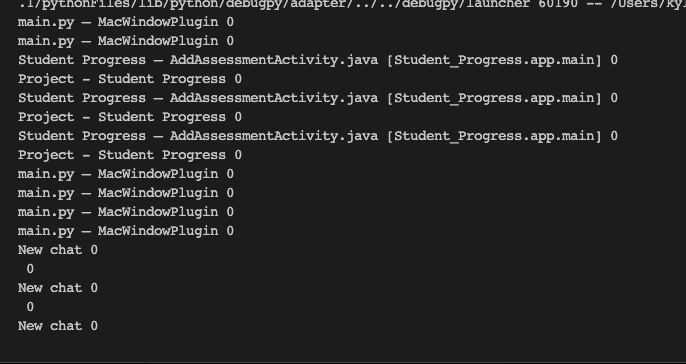
above is a screen shot of the print statements from my script if it helps at all.
if nothing here helps then i apologize for wasting your time lol
the "Current focus window: " not is not changing from StatusWindow again.
and the logs show the window is focused condition is still returning 0 for all apps
Hm strange ... can you share an OBS log while using this particular version of the plugin? (Just want to check that the correct version is running)
i also have no idea if this helps you or not, but i have done some python obj c code in the past with macs, so i made a script that was able to get the frontmost window and ignoring StatusIndicator. The python script is below. i tried to add it to your project but with c++ i was having a very hard time.
[...]
above is a screen shot of the print statements from my script if it helps at all.
if nothing here helps then i apologize for wasting your time lol
Thanks I appreciate it! :)
but it seems like eventhough StatusIndicator is on layer 0, the next app isnt layer 1 like i thought it would be. so i just get the next front most window if the window name is statusindicator.
That is exactly the problem I also ran into.
I also simply used the next layer 0 window instead in this new build.
So I am a bit confused why it does not work on your end.
I tested it by creating by saving a document with the name StatusIndicator in the TextEdit and that had the desired effect of it begin ignored and instead the "second top most" window being returned.
I will prepare another build with additional debugging logs to understand what is going wrong - should hopefully be done soon: https://github.com/WarmUpTill/SceneSwitcher/actions/runs/4853071756
Thanks again for your help! :)
13:11:31.593: [macOS] Permission for audio device access granted.
13:11:31.595: [macOS] Permission for video device access granted.
13:11:31.598: [macOS] Permission for accessibility granted.
13:11:31.603: [macOS] Permission for screen capture granted.
13:11:31.603: CPU Name: Apple M1 Pro
13:11:31.603: Physical Cores: 8, Logical Cores: 8
13:11:31.603: Physical Memory: 16384MB Total
13:11:31.603: OS Name: macOS
13:11:31.604: OS Version: Version 13.1 (Build 22C65)
13:11:31.604: Rosetta translation used: false
13:11:31.604: Kernel Version: 22.2.0
13:11:31.605: hotkeys-cocoa: Using layout 'com.apple.keylayout.US'
13:11:31.605: Current Date/Time: 2023-05-01, 13:11:31
13:11:31.605: Browser Hardware Acceleration: true
13:11:31.605: Qt Version: 6.4.1 (runtime), 6.4.1 (compiled)
13:11:31.605: Portable mode: false
13:11:31.701: OBS 29.0.2 (mac)
13:11:31.701: ---------------------------------
13:11:31.701: ---------------------------------
13:11:31.701: audio settings reset:
13:11:31.701: samples per sec: 48000
13:11:31.701: speakers: 2
13:11:31.701: max buffering: 960 milliseconds
13:11:31.701: buffering type: dynamically increasing
13:11:31.702: ---------------------------------
13:11:31.702: Initializing OpenGL...
13:11:31.739: Loading up OpenGL on adapter Apple Apple M1 Pro
13:11:31.739: OpenGL loaded successfully, version 4.1 Metal - 83, shading language 4.10
13:11:31.888: ---------------------------------
13:11:31.888: video settings reset:
13:11:31.888: base resolution: 1920x1080
13:11:31.888: output resolution: 1920x1080
13:11:31.888: downscale filter: Lanczos
13:11:31.888: fps: 60/1
13:11:31.888: format: NV12
13:11:31.888: YUV mode: Rec. 709/Partial
13:11:31.888: NV12 texture support not available
13:11:31.888: P010 texture support not available
13:11:31.890: Audio monitoring device:
13:11:31.890: name: Default
13:11:31.890: id: default
13:11:31.890: ---------------------------------
13:11:31.893: No AJA devices found, skipping loading AJA UI plugin
13:11:31.893: Failed to initialize module 'aja-output-ui'
13:11:31.895: No AJA devices found, skipping loading AJA plugin
13:11:31.895: Failed to initialize module 'aja'
13:11:31.896: Failed to load 'en-US' text for module: 'decklink-captions'
13:11:31.897: Failed to load 'en-US' text for module: 'decklink-output-ui'
13:11:31.898: A DeckLink iterator could not be created. The DeckLink drivers may not be installed
13:11:31.898: Failed to initialize module 'decklink'
13:11:33.016: [VideoToolbox encoder]: Adding VideoToolbox encoders
13:11:33.035: [obs-browser]: Version 2.19.0
13:11:33.035: [obs-browser]: CEF Version 103.0.5060.134 (runtime), 103.61.23+g2fe5a76+chromium-103.0.5060.134 (compiled)
13:11:33.045: [obs-websocket] [obs_module_load] you can haz websockets (Version: 5.1.0 | RPC Version: 1)
13:11:33.045: [obs-websocket] [obs_module_load] Qt version (compile-time): 6.4.1 | Qt version (run-time): 6.4.1
13:11:33.045: [obs-websocket] [obs_module_load] Linked ASIO Version: 101201
13:11:33.048: [obs-websocket] [obs_module_load] Module loaded.
13:11:33.055: [vlc-video]: VLC 3.0.17.3 Vetinari found, VLC video source enabled
13:11:33.059: <StreamDeck> Plugin version 5.5.0.0
13:11:33.059: <StreamDeck> [Server] Listening on '127.0.0.1:28186'.
13:11:33.091: [adv-ss] version: 9ce2234
13:11:33.091: [adv-ss] version: 9ce2234cedbb37ba60ea6d1633a40cf378ed0cf9
13:11:33.091: [adv-ss] curl loaded successfully
13:11:33.091: [adv-ss] found curl library
13:11:33.092: [adv-ss] attempting to load "/Users/kyle/Library/Application Support/obs-studio/plugins/advanced-scene-switcher.plugin/Contents/MacOS/adv-ss-plugins/advanced-scene-switcher-midi.so"
13:11:33.095: [adv-ss] successfully loaded "/Users/kyle/Library/Application Support/obs-studio/plugins/advanced-scene-switcher.plugin/Contents/MacOS/adv-ss-plugins/advanced-scene-switcher-midi.so"
13:11:33.095: [adv-ss] attempting to load "/Users/kyle/Library/Application Support/obs-studio/plugins/advanced-scene-switcher.plugin/Contents/MacOS/adv-ss-plugins/advanced-scene-switcher-opencv.so"
13:11:33.104: [adv-ss] successfully loaded "/Users/kyle/Library/Application Support/obs-studio/plugins/advanced-scene-switcher.plugin/Contents/MacOS/adv-ss-plugins/advanced-scene-switcher-opencv.so"
13:11:33.156: ---------------------------------
13:11:33.156: Loaded Modules:
13:11:33.156: advanced-scene-switcher
13:11:33.156: StreamDeckPlugin
13:11:33.156: vlc-video
13:11:33.156: text-freetype2
13:11:33.156: rtmp-services
13:11:33.156: obs-x264
13:11:33.156: obs-websocket
13:11:33.156: obs-vst
13:11:33.156: obs-transitions
13:11:33.156: obs-outputs
13:11:33.156: obs-filters
13:11:33.156: obs-ffmpeg
13:11:33.156: obs-browser
13:11:33.156: mac-virtualcam
13:11:33.156: mac-videotoolbox
13:11:33.156: mac-syphon
13:11:33.156: mac-capture
13:11:33.156: mac-avcapture
13:11:33.156: image-source
13:11:33.156: frontend-tools
13:11:33.156: decklink-output-ui
13:11:33.156: decklink-captions
13:11:33.156: coreaudio-encoder
13:11:33.157: ---------------------------------
13:11:33.157: ==== Startup complete ===============================================
13:11:33.168: Switched to Preview/Program mode
13:11:33.168: ------------------------------------------------
13:11:33.200: All scene data cleared
13:11:33.200: ------------------------------------------------
13:11:33.993: capture card: Could not initialize device with unique ID '0x2230000fd90082'
13:11:34.165: coreaudio: Device 'Wave Link Stream' [96000 Hz] initialized
13:11:34.166: [Media Source 'Media Source']: settings:
13:11:34.166: input: /Users/kyle/inter grey 2_2.mov
13:11:34.166: input_format: (null)
13:11:34.166: speed: 100
13:11:34.166: is_looping: yes
13:11:34.166: is_linear_alpha: no
13:11:34.166: is_hw_decoding: no
13:11:34.166: is_clear_on_media_end: yes
13:11:34.166: restart_on_activate: yes
13:11:34.166: close_when_inactive: yes
13:11:34.166: ffmpeg_options:
13:11:34.167: Failed to open file '/Users/kyle/Untitled-1.png': No such file or directory
13:11:34.167: gs_image_file_init_internal: Failed to load file '/Users/kyle/Untitled-1.png'
13:11:34.167: [image_source: 'cam overlay'] failed to load texture '/Users/kyle/Untitled-1.png'
13:11:34.167: webcam: Could not initialize device with unique ID '0x2400000fd90078'
13:11:34.183: coreaudio: Device 'Wave Link Stream' [96000 Hz] initialized
13:11:34.185: coreaudio: failed to find device uid: AppleUSBAudioEngine:Elgato:Game Capture HD60 X:6928202411029002:3, waiting for connection
13:11:34.190: [Media Source 'kwed transition (Stinger)']: settings:13:11:34.190: Set FFmpeg options:
13:11:34.190: [Media Source 'kwed transition (Stinger)']: settings:13:11:34.190: Set FFmpeg options:
13:11:34.190: input: /Users/kyle/kyel transition only.mov
13:11:34.190: input_format: (null)
13:11:34.190: speed: 100
13:11:34.190: is_looping: no
13:11:34.190: is_linear_alpha: no
13:11:34.190: is_hw_decoding: yes
13:11:34.190: is_clear_on_media_end: yes
13:11:34.190: restart_on_activate: yes
13:11:34.190: close_when_inactive: no
13:11:34.190: ffmpeg_options:
13:11:34.190: MP: Failed to open media: '/Users/kyle/kyel transition only.mov'
13:11:34.190: [Media Source 'Stinger (Stinger)']: settings:
13:11:34.190: input:
13:11:34.190: input_format: (null)
13:11:34.190: speed: 100
13:11:34.190: is_looping: no
13:11:34.190: is_linear_alpha: no
13:11:34.190: is_hw_decoding: yes
13:11:34.190: is_clear_on_media_end: yes
13:11:34.190: restart_on_activate: yes
13:11:34.190: close_when_inactive: no
13:11:34.190: ffmpeg_options:
13:11:34.191: Switched to scene 'game'
13:11:34.191: [adv-ss] trying to reconnect to in 10 seconds.
13:11:34.192: ------------------------------------------------
13:11:34.192: Loaded scenes:
13:11:34.192: - scene 'intermission':
13:11:34.192: [adv-ss] started
13:11:34.192: - source: 'webcam' (av_capture_input)
13:11:34.192: [adv-ss] try to sleep for 300
13:11:34.192: - source: 'Media Source' (ffmpeg_source)
13:11:34.192: - source: 'Audio Input Capture' (coreaudio_input_capture)
13:11:34.192: - source: 'chat' (browser_source)
13:11:34.192: - source: 'Game Capture Audio' (coreaudio_input_capture)
13:11:34.192: - scene 'game':
13:11:34.192: - source: 'capture card' (av_capture_input)
13:11:34.192: - source: 'cam group' (group)
13:11:34.192: - source: 'background cam' (color_source_v3)
13:11:34.192: - source: 'webcam' (av_capture_input)
13:11:34.192: - source: 'cam overlay' (image_source)
13:11:34.192: - source: 'stream' (coreaudio_input_capture)
13:11:34.192: - source: 'Game Capture Audio' (coreaudio_input_capture)
13:11:34.192: - scene 'Scene 2':
13:11:34.192: - source: 'macOS Screen Capture' (screen_capture)
13:11:34.192: ------------------------------------------------
13:11:34.192: [adv-ss] current scene: intermission
13:11:34.192: [adv-ss] previous scene:
13:11:34.206: Set FFmpeg options:
13:11:34.206: MP: Failed to open media: '/Users/kyle/inter grey 2_2.mov'
13:11:34.502: [adv-ss] condition window returned 0
13:11:34.502: [adv-ss] Macro arc returned 0
13:11:34.503: [adv-ss] try to sleep for 290
13:11:34.801: [adv-ss] condition window returned 0
13:11:34.801: [adv-ss] Macro arc returned 0
13:11:34.802: [adv-ss] try to sleep for 293
13:11:35.118: [adv-ss] condition window returned 0
13:11:35.118: [adv-ss] Macro arc returned 0
13:11:35.119: [adv-ss] try to sleep for 276
13:11:35.406: [adv-ss] condition window returned 0
13:11:35.406: [adv-ss] Macro arc returned 0
13:11:35.407: [adv-ss] try to sleep for 289
13:11:35.704: [adv-ss] condition window returned 0
13:11:35.704: [adv-ss] Macro arc returned 0
13:11:35.705: [adv-ss] try to sleep for 293
13:42:07.406: [macOS] Permission for audio device access granted.
13:42:07.408: [macOS] Permission for video device access granted.
13:42:07.411: [macOS] Permission for accessibility granted.
13:42:07.415: [macOS] Permission for screen capture granted.
13:42:07.415: CPU Name: Apple M1 Pro
13:42:07.415: Physical Cores: 8, Logical Cores: 8
13:42:07.415: Physical Memory: 16384MB Total
13:42:07.415: OS Name: macOS
13:42:07.416: OS Version: Version 13.1 (Build 22C65)
13:42:07.416: Rosetta translation used: false
13:42:07.416: Kernel Version: 22.2.0
13:42:07.417: hotkeys-cocoa: Using layout 'com.apple.keylayout.US'
13:42:07.418: Current Date/Time: 2023-05-01, 13:42:07
13:42:07.418: Browser Hardware Acceleration: true
13:42:07.418: Qt Version: 6.4.1 (runtime), 6.4.1 (compiled)
13:42:07.418: Portable mode: false
13:42:07.564: OBS 29.0.2 (mac)
13:42:07.564: ---------------------------------
13:42:07.565: ---------------------------------
13:42:07.565: audio settings reset:
13:42:07.565: samples per sec: 48000
13:42:07.565: speakers: 2
13:42:07.565: max buffering: 960 milliseconds
13:42:07.565: buffering type: dynamically increasing
13:42:07.568: ---------------------------------
13:42:07.568: Initializing OpenGL...
13:42:07.608: Loading up OpenGL on adapter Apple Apple M1 Pro
13:42:07.608: OpenGL loaded successfully, version 4.1 Metal - 83, shading language 4.10
13:42:07.760: ---------------------------------
13:42:07.760: video settings reset:
13:42:07.760: base resolution: 1920x1080
13:42:07.760: output resolution: 1920x1080
13:42:07.760: downscale filter: Lanczos
13:42:07.760: fps: 60/1
13:42:07.760: format: NV12
13:42:07.760: YUV mode: Rec. 709/Partial
13:42:07.760: NV12 texture support not available
13:42:07.760: P010 texture support not available
13:42:07.763: Audio monitoring device:
13:42:07.763: name: Default
13:42:07.763: id: default
13:42:07.763: ---------------------------------
13:42:07.773: No AJA devices found, skipping loading AJA UI plugin
13:42:07.773: Failed to initialize module 'aja-output-ui'
13:42:07.785: No AJA devices found, skipping loading AJA plugin
13:42:07.785: Failed to initialize module 'aja'
13:42:07.788: Failed to load 'en-US' text for module: 'decklink-captions'
13:42:07.790: Failed to load 'en-US' text for module: 'decklink-output-ui'
13:42:07.791: A DeckLink iterator could not be created. The DeckLink drivers may not be installed
13:42:07.791: Failed to initialize module 'decklink'
13:42:08.930: [VideoToolbox encoder]: Adding VideoToolbox encoders
13:42:08.997: [obs-browser]: Version 2.19.0
13:42:08.997: [obs-browser]: CEF Version 103.0.5060.134 (runtime), 103.61.23+g2fe5a76+chromium-103.0.5060.134 (compiled)
13:42:09.024: [obs-websocket] [obs_module_load] you can haz websockets (Version: 5.1.0 | RPC Version: 1)
13:42:09.024: [obs-websocket] [obs_module_load] Qt version (compile-time): 6.4.1 | Qt version (run-time): 6.4.1
13:42:09.024: [obs-websocket] [obs_module_load] Linked ASIO Version: 101201
13:42:09.029: [obs-websocket] [obs_module_load] Module loaded.
13:42:09.040: [vlc-video]: VLC 3.0.17.3 Vetinari found, VLC video source enabled
13:42:09.045: <StreamDeck> Plugin version 5.5.0.0
13:42:09.046: <StreamDeck> [Server] Listening on '127.0.0.1:28186'.
13:42:09.091: [adv-ss] version: bba028e
13:42:09.091: [adv-ss] version: bba028e8653230bbaf73209be9819aaf67f98848
13:42:09.092: [adv-ss] curl loaded successfully
13:42:09.092: [adv-ss] found curl library
13:42:09.094: [adv-ss] attempting to load "/Users/kyle/Library/Application Support/obs-studio/plugins/advanced-scene-switcher.plugin/Contents/MacOS/adv-ss-plugins/advanced-scene-switcher-midi.so"
13:42:09.099: [adv-ss] successfully loaded "/Users/kyle/Library/Application Support/obs-studio/plugins/advanced-scene-switcher.plugin/Contents/MacOS/adv-ss-plugins/advanced-scene-switcher-midi.so"
13:42:09.099: [adv-ss] attempting to load "/Users/kyle/Library/Application Support/obs-studio/plugins/advanced-scene-switcher.plugin/Contents/MacOS/adv-ss-plugins/advanced-scene-switcher-opencv.so"
13:42:09.126: [adv-ss] successfully loaded "/Users/kyle/Library/Application Support/obs-studio/plugins/advanced-scene-switcher.plugin/Contents/MacOS/adv-ss-plugins/advanced-scene-switcher-opencv.so"
13:42:09.177: ---------------------------------
13:42:09.177: Loaded Modules:
13:42:09.177: advanced-scene-switcher
13:42:09.177: StreamDeckPlugin
13:42:09.177: vlc-video
13:42:09.177: text-freetype2
13:42:09.177: rtmp-services
13:42:09.177: obs-x264
13:42:09.177: obs-websocket
13:42:09.177: obs-vst
13:42:09.177: obs-transitions
13:42:09.177: obs-outputs
13:42:09.177: obs-filters
13:42:09.177: obs-ffmpeg
13:42:09.177: obs-browser
13:42:09.177: mac-virtualcam
13:42:09.177: mac-videotoolbox
13:42:09.177: mac-syphon
13:42:09.177: mac-capture
13:42:09.177: mac-avcapture
13:42:09.177: image-source
13:42:09.177: frontend-tools
13:42:09.177: decklink-output-ui
13:42:09.177: decklink-captions
13:42:09.177: coreaudio-encoder
13:42:09.177: ---------------------------------
13:42:09.177: ==== Startup complete ===============================================
13:42:09.191: Switched to Preview/Program mode
13:42:09.191: ------------------------------------------------
13:42:09.238: All scene data cleared
13:42:09.238: ------------------------------------------------
13:42:09.782: coreaudio: failed to find device uid: AppleUSBAudioEngine:Elgato:Game Capture HD60 X:6928202411029002:3, waiting for connection
13:42:09.838: coreaudio: Device 'Wave Link Stream' [96000 Hz] initialized
13:42:09.872: webcam: Could not initialize device with unique ID '0x2400000fd90078'
13:42:09.877: Failed to open file '/Users/kyle/Untitled-1.png': No such file or directory
13:42:09.877: gs_image_file_init_internal: Failed to load file '/Users/kyle/Untitled-1.png'
13:42:09.877: [image_source: 'cam overlay'] failed to load texture '/Users/kyle/Untitled-1.png'
13:42:09.877: [Media Source 'Media Source']: settings:
13:42:09.877: input: /Users/kyle/inter grey 2_2.mov
13:42:09.877: input_format: (null)
13:42:09.877: speed: 100
13:42:09.877: is_looping: yes
13:42:09.877: is_linear_alpha: no
13:42:09.877: is_hw_decoding: no
13:42:09.877: is_clear_on_media_end: yes
13:42:09.877: restart_on_activate: yes
13:42:09.877: close_when_inactive: yes
13:42:09.877: ffmpeg_options:
13:42:09.883: coreaudio: Device 'Wave Link Stream' [96000 Hz] initialized
13:42:10.081: capture card: Could not initialize device with unique ID '0x2230000fd90082'
13:42:10.098: Set FFmpeg options:
13:42:10.098: Set FFmpeg options:
13:42:10.098: input: /Users/kyle/kyel transition only.mov
13:42:10.098: input_format: (null)
13:42:10.098: speed: 100
13:42:10.098: is_looping: no
13:42:10.098: is_linear_alpha: no
13:42:10.098: is_hw_decoding: yes
13:42:10.098: is_clear_on_media_end: yes
13:42:10.098: restart_on_activate: yes
13:42:10.098: close_when_inactive: no
13:42:10.098: MP: Failed to open media: '/Users/kyle/kyel transition only.mov'
13:42:10.098: ffmpeg_options:
13:42:10.098: MP: Failed to open media: '/Users/kyle/kyel transition only.mov'
13:42:10.098: [Media Source 'Stinger (Stinger)']: settings:
13:42:10.098: input:
13:42:10.098: input_format: (null)
13:42:10.098: speed: 100
13:42:10.098: is_looping: no
13:42:10.098: is_linear_alpha: no
13:42:10.098: is_hw_decoding: yes
13:42:10.098: is_clear_on_media_end: yes
13:42:10.098: restart_on_activate: yes
13:42:10.098: close_when_inactive: no
13:42:10.098: ffmpeg_options:
13:42:10.099: Switched to scene 'game'
13:42:10.099: [adv-ss] trying to reconnect to in 10 seconds.
13:42:10.114: Set FFmpeg options:
13:42:10.114: MP: Failed to open media: '/Users/kyle/inter grey 2_2.mov'
13:42:11.552: [adv-ss] started
13:42:11.552: ------------------------------------------------
13:42:11.552: [adv-ss] try to sleep for 300
13:42:11.552: Loaded scenes:
13:42:11.552: [adv-ss] try to sleep for 300
13:42:11.552: - scene 'intermission':
13:42:11.552: - source: 'webcam' (av_capture_input)
13:42:11.552: - source: 'Media Source' (ffmpeg_source)
13:42:11.552: - source: 'Audio Input Capture' (coreaudio_input_capture)
13:42:11.552: - source: 'chat' (browser_source)
13:42:11.552: - source: 'Game Capture Audio' (coreaudio_input_capture)
13:42:11.552: - scene 'game':
13:42:11.552: - source: 'capture card' (av_capture_input)
13:42:11.552: - source: 'cam group' (group)
13:42:11.552: - source: 'background cam' (color_source_v3)
13:42:11.552: - source: 'webcam' (av_capture_input)
13:42:11.552: - source: 'cam overlay' (image_source)
13:42:11.552: - source: 'stream' (coreaudio_input_capture)
13:42:11.552: - source: 'Game Capture Audio' (coreaudio_input_capture)
13:42:11.552: - scene 'Scene 2':
13:42:11.552: - source: 'macOS Screen Capture' (screen_capture)
13:42:11.552: ------------------------------------------------
13:42:11.552: [adv-ss] current scene: intermission
13:42:11.552: [adv-ss] previous scene:
13:42:11.854: [adv-ss] window: StatusIndicator - owner: Window Server - layer 0 - level 0
13:42:11.854: [adv-ss] exit with title StatusIndicator
13:42:11.856: [adv-ss] window: StatusIndicator - owner: Window Server - layer 0 - level 0
13:42:11.856: [adv-ss] window: StatusIndicator - owner: Window Server - layer 0 - level 1
13:42:11.856: [adv-ss] exit with title StatusIndicator
13:42:11.861: [adv-ss] condition window returned 0
13:42:11.861: [adv-ss] Macro arc returned 0
13:42:11.862: [adv-ss] try to sleep for 291
13:42:12.156: [adv-ss] window: StatusIndicator - owner: Window Server - layer 0 - level 0
13:42:12.156: [adv-ss] exit with title StatusIndicator
13:42:12.156: [adv-ss] window: StatusIndicator - owner: Window Server - layer 0 - level 0
13:42:12.156: [adv-ss] window: StatusIndicator - owner: Window Server - layer 0 - level 1
13:42:12.156: [adv-ss] exit with title StatusIndicator
13:42:12.162: [adv-ss] condition window returned 0
13:42:12.162: [adv-ss] Macro arc returned 0
13:42:12.167: [adv-ss] try to sleep for 287
13:42:12.457: [adv-ss] window: StatusIndicator - owner: Window Server - layer 0 - level 0
13:42:12.457: [adv-ss] exit with title StatusIndicator
13:42:12.457: [adv-ss] window: StatusIndicator - owner: Window Server - layer 0 - level 0
13:42:12.457: [adv-ss] window: StatusIndicator - owner: Window Server - layer 0 - level 1
13:42:12.457: [adv-ss] exit with title StatusIndicator
13:42:12.465: [adv-ss] condition window returned 0
13:42:12.465: [adv-ss] Macro arc returned 0
13:42:12.466: [adv-ss] try to sleep for 290
13:42:12.757: [adv-ss] window: StatusIndicator - owner: Window Server - layer 0 - level 0
13:42:12.757: [adv-ss] exit with title StatusIndicator
13:42:12.758: [adv-ss] window: StatusIndicator - owner: Window Server - layer 0 - level 0
13:42:12.758: [adv-ss] window: StatusIndicator - owner: Window Server - layer 0 - level 1
13:42:12.758: [adv-ss] exit with title StatusIndicator
13:42:12.767: [adv-ss] condition window returned 0
13:42:12.767: [adv-ss] Macro arc returned 0
13:42:12.768: [adv-ss] try to sleep for 289
13:42:13.058: [adv-ss] window: StatusIndicator - owner: Window Server - layer 0 - level 0
13:42:13.058: [adv-ss] exit with title StatusIndicator
13:42:13.059: [adv-ss] window: StatusIndicator - owner: Window Server - layer 0 - level 0
13:42:13.059: [adv-ss] window: StatusIndicator - owner: Window Server - layer 0 - level 1
13:42:13.059: [adv-ss] exit with title StatusIndicator
13:42:13.067: [adv-ss] condition window returned 0
13:42:13.067: [adv-ss] Macro arc returned 0
13:42:13.067: [adv-ss] try to sleep for 291
13:42:13.360: [adv-ss] window: StatusIndicator - owner: Window Server - layer 0 - level 0
13:42:13.360: [adv-ss] exit with title StatusIndicator
13:42:13.360: [adv-ss] window: StatusIndicator - owner: Window Server - layer 0 - level 0
13:42:13.360: [adv-ss] window: StatusIndicator - owner: Window Server - layer 0 - level 1
13:42:13.360: [adv-ss] exit with title StatusIndicator
13:42:13.367: [adv-ss] condition window returned 0
13:42:13.367: [adv-ss] Macro arc returned 0
13:42:13.368: [adv-ss] try to sleep for 292
13:42:13.661: [adv-ss] window: StatusIndicator - owner: Window Server - layer 0 - level 0
13:42:13.662: [adv-ss] exit with title StatusIndicator
13:42:13.662: [adv-ss] window: StatusIndicator - owner: Window Server - layer 0 - level 0
13:42:13.662: [adv-ss] window: StatusIndicator - owner: Window Server - layer 0 - level 1
13:42:13.662: [adv-ss] exit with title StatusIndicator
13:42:13.668: [adv-ss] condition window returned 0
13:42:13.668: [adv-ss] Macro arc returned 0
13:42:13.669: [adv-ss] try to sleep for 292
13:42:13.967: [adv-ss] window: StatusIndicator - owner: Window Server - layer 0 - level 0
13:42:13.967: [adv-ss] exit with title StatusIndicator
13:42:13.967: [adv-ss] window: StatusIndicator - owner: Window Server - layer 0 - level 0
13:42:13.967: [adv-ss] window: StatusIndicator - owner: Window Server - layer 0 - level 1
13:42:13.967: [adv-ss] exit with title StatusIndicator
13:42:13.973: [adv-ss] condition window returned 0
13:42:13.973: [adv-ss] Macro arc returned 0
13:42:13.973: [adv-ss] try to sleep for 289
13:42:14.264: [adv-ss] window: StatusIndicator - owner: Window Server - layer 0 - level 0
13:42:14.264: [adv-ss] exit with title StatusIndicator
13:42:14.266: [adv-ss] window: StatusIndicator - owner: Window Server - layer 0 - level 0
13:42:14.266: [adv-ss] window: StatusIndicator - owner: Window Server - layer 0 - level 1
13:42:14.266: [adv-ss] exit with title StatusIndicator
13:42:14.273: [adv-ss] condition window returned 0
13:42:14.273: [adv-ss] Macro arc returned 0
here are the logs from the new version
I see ... so there are multiple top level windows named StatusIndicator.
I adjusted the StatusIndicator skip accordingly once again:
https://github.com/WarmUpTill/SceneSwitcher/actions/runs/4855415747/jobs/8653937823?pr=730
Thank you for your patience and support! :)