SetScreenBrightness

SetScreenBrightness copied to clipboard
 WangLeto
Win10台式机运行后报错
系统版本:Windows10专业版 1909 显示器型号:AOC U2790B (已开启DDC/CI) 软件版本:2.6.3
错误描述:
双击运行SetBrightness.exe后弹出Microsoft .NET Framework错误提示框,显示如下:
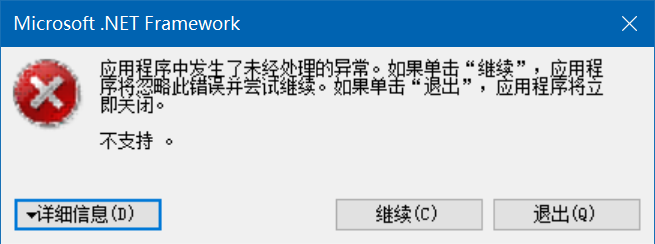
错误详细信息:
有关调用实时(JIT)调试而不是此对话框的详细信息,
请参见此消息的结尾。

************** 异常文本 **************
System.Management.ManagementException: 不支持
   在 System.Management.ManagementException.ThrowWithExtendedInfo(ManagementStatus errorCode)
   在 System.Management.ManagementObjectCollection.ManagementObjectEnumerator.MoveNext()
   在 SetBrightness.WmiMonitorManager.WmiOperation(String className, Action`1 action, String id)
   在 SetBrightness.WmiMonitorManager.ListWmiMonitors()
   在 SetBrightness.AllMonitorManager.GetAllMonitors()
   在 SetBrightness.MonitorsManager.<RefreshMonitors>b__5_0()
   在 System.Threading.Tasks.Task.InnerInvoke()
   在 System.Threading.Tasks.Task.Execute()
--- 引发异常的上一位置中堆栈跟踪的末尾 ---
   在 System.Runtime.CompilerServices.TaskAwaiter.ThrowForNonSuccess(Task task)
   在 System.Runtime.CompilerServices.TaskAwaiter.HandleNonSuccessAndDebuggerNotification(Task task)
   在 System.Runtime.CompilerServices.TaskAwaiter.GetResult()
   在 SetBrightness.MonitorsManager.<RefreshMonitors>d__5.MoveNext()
--- 引发异常的上一位置中堆栈跟踪的末尾 ---
   在 System.Runtime.CompilerServices.AsyncMethodBuilderCore.<>c.<ThrowAsync>b__6_0(Object state)


************** 已加载的程序集 **************
mscorlib
    程序集版本:4.0.0.0
    Win32 版本:4.8.4150.0 built by: NET48REL1LAST_C
    基本代码:file:///C:/Windows/Microsoft.NET/Framework/v4.0.30319/mscorlib.dll
----------------------------------------
SetBrightness
    程序集版本:2.6.3.0
    Win32 版本:2.6.3.0
    基本代码:file:///C:/apps/others/SetScreenBrightness/SetBrightness.exe
----------------------------------------
System.Windows.Forms
    程序集版本:4.0.0.0
    Win32 版本:4.8.4150.0 built by: NET48REL1LAST_C
    基本代码:file:///C:/Windows/Microsoft.Net/assembly/GAC_MSIL/System.Windows.Forms/v4.0_4.0.0.0__b77a5c561934e089/System.Windows.Forms.dll
----------------------------------------
System
    程序集版本:4.0.0.0
    Win32 版本:4.8.4001.0 built by: NET48REL1LAST_C
    基本代码:file:///C:/Windows/Microsoft.Net/assembly/GAC_MSIL/System/v4.0_4.0.0.0__b77a5c561934e089/System.dll
----------------------------------------
System.Drawing
    程序集版本:4.0.0.0
    Win32 版本:4.8.3752.0 built by: NET48REL1
    基本代码:file:///C:/Windows/Microsoft.Net/assembly/GAC_MSIL/System.Drawing/v4.0_4.0.0.0__b03f5f7f11d50a3a/System.Drawing.dll
----------------------------------------
System.Configuration
    程序集版本:4.0.0.0
    Win32 版本:4.8.3752.0 built by: NET48REL1
    基本代码:file:///C:/Windows/Microsoft.Net/assembly/GAC_MSIL/System.Configuration/v4.0_4.0.0.0__b03f5f7f11d50a3a/System.Configuration.dll
----------------------------------------
System.Core
    程序集版本:4.0.0.0
    Win32 版本:4.8.4121.0 built by: NET48REL1LAST_C
    基本代码:file:///C:/Windows/Microsoft.Net/assembly/GAC_MSIL/System.Core/v4.0_4.0.0.0__b77a5c561934e089/System.Core.dll
----------------------------------------
System.Xml
    程序集版本:4.0.0.0
    Win32 版本:4.8.3752.0 built by: NET48REL1
    基本代码:file:///C:/Windows/Microsoft.Net/assembly/GAC_MSIL/System.Xml/v4.0_4.0.0.0__b77a5c561934e089/System.Xml.dll
----------------------------------------
System.Management
    程序集版本:4.0.0.0
    Win32 版本:4.8.3752.0 built by: NET48REL1
    基本代码:file:///C:/Windows/Microsoft.Net/assembly/GAC_MSIL/System.Management/v4.0_4.0.0.0__b03f5f7f11d50a3a/System.Management.dll
----------------------------------------
mscorlib.resources
    程序集版本:4.0.0.0
    Win32 版本:4.8.3752.0 built by: NET48REL1
    基本代码:file:///C:/Windows/Microsoft.Net/assembly/GAC_MSIL/mscorlib.resources/v4.0_4.0.0.0_zh-Hans_b77a5c561934e089/mscorlib.resources.dll
----------------------------------------
System.Windows.Forms.resources
    程序集版本:4.0.0.0
    Win32 版本:4.8.3752.0 built by: NET48REL1
    基本代码:file:///C:/Windows/Microsoft.Net/assembly/GAC_MSIL/System.Windows.Forms.resources/v4.0_4.0.0.0_zh-Hans_b77a5c561934e089/System.Windows.Forms.resources.dll
----------------------------------------

************** JIT 调试 **************
要启用实时(JIT)调试,
该应用程序或计算机的 .config 文件(machine.config)的 system.windows.forms 节中必须设置
jitDebugging 值。
编译应用程序时还必须启用
调试。

例如:

<configuration>
    <system.windows.forms jitDebugging="true" />
</configuration>

启用 JIT 调试后,任何未经处理的异常
都将被发送到在此计算机上注册的 JIT 调试程序,
而不是由此对话框处理。
点击继续后,点击右下脚程序托盘图标后,显示如下: