

 WalletWasabi
[VDG] tooltip background box whitespace
Tooltips have a white background box in i3wm. It would be nice to at least remove the large whitespace at the top.
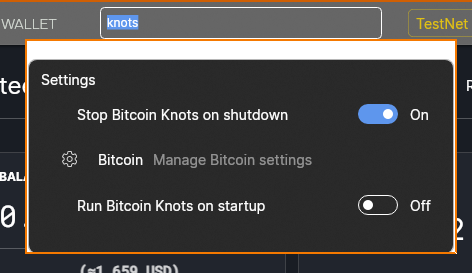
Low priority

I think this is an inherent problem on Qubes/i3 since it forces windows to be visible against a rectangular border for security purposes iirc.

I think this is an inherent problem on Qubes/i3 since it forces windows to be visible against a rectangular border for security purposes iirc.
Probably, but at least removing the extra whitespace seems reasonable.
I think this is an inherent problem on Qubes/i3 since it forces windows to be visible against a rectangular border for security purposes iirc.
Probably, but at least removing the extra whitespace seems reasonable.
It can be decreased a bit, but definitely not removed. It would look ugly.

This has been automatically marked as stale because it has not had recent activity. It will be closed if no further activity occurs. Thank you for your contributions.
![stale[bot] avatar](https://avatars.githubusercontent.com/in/1724?v=4 "Published by a pub.dev verified publisher")
This occurred for a user on 2.0.7 as well - "I'm testing Wasabi on debian with openbox as window manager (it's not a 'normal' debian desktop though. It's stripped down a lot and running in docker, so it's pretty niche), but it looks like this. I figure it has something to do with the transparency effect of the Avalonia control. But I don't have much experience with that, or even linux desktop/window managers, x11 and stuff, to know if this is normal behavior or I need something on the linux box to get the transparency effect. Any clues?"

That was me and I figured it out.
I was testing on a minimal debian docker container with openbox window manager. But there was no 'compositor' running. Which is needed for transparency effects like this.
I tried 'picom', but got some ugly artifacts. I tried 'compton' and it now looks like this:
Solution: make sure there is a compositer daemon running. (Qubes does not have one by default I suppose)
