

 WICG
WICG
User Stories and Examples
I'm opening this issue to collect known use cases of apps using the chrome SerialPort api, electron + node serialport and any other arrangements of technologies to get a serial port working with web technologies.
From user support of node SerialPort I know of a few use cases off the top of my head. I apologize in advance for not having links for most of these applications.
I want to note that the npm package serialport is currently in the top 1-2% of all npm packages so there's bound to be a lot being built that we don't know about.
- @bcjordan is using a chrome app approach to make a blocks based Johnny-Five to controll the Adafruit Circuit Playground to teach both programming and electronics for Code.org which provides curiculum to thousands of schools across the united states. (He might have more to say about it but is currently on vacation)
- Many SMS gateways and Cellular modems expose a SerialPort API these are often used for automation of devices, interfacing with custom systems, and bridging disparate networks. Most common use cases seem to be in developing countries.
- Forklifts have usage and safety data, there is at least one application that uses electron and node SerialPort to download, processes and display forklift data and then sends it to a remote host.
- Medical sensors harness for sports medicine are being sold in Australia that have a SerialPort interface and are used to judge player performance, safety and improvement.
- Web based kiosks of many varieties make use of SerialPorts to do anything from cutting keys to a membership based water bottle refilling station.
- CNC server the basis behind many cnc machines and plotting devices including the AxiDraw and PancakeBot
Hardware ranges from custom usb devices to generic "virtual Serial Ports" (ftdi based for example) with a heavy slant towards the generic.

I'm adding codebender's stuff here:
- codebender.cc is a Cloud IDE for Arduino with 90,000 users, which allows people to write code & program their Arduino-based embedded devices over Serial (& USB) using Chrome.serial, Chrome.USB, and an NPAPI plugin for Firefox. Features relevant to this discussion are:
- A generic Serial Monitor that talks to Serial devices such as Arduinos, CISCO Routers' Terminal ports, 3D Printers
- Flashing protocols for Arduino (stk500, stk500v2, avr90)
- Flashing protocols for various chip vendors like Atmel, Microchip, Dialog, Espressif
- graphite.codebender.cc is a Graph interface built on top of the Serial Monitor for Serial devices that output sensor values from the environment - (Example)
- BabelFish (internal, soon to be open-sourced) is our suite of a javascript library & browser plugins that translate the various APIs for Serial & USB access such as chrome.serial, our Firefox NPAPI plugin, and the node.js serial plugin, into one abstracted API similar to the chrome.serial API, so that developers can write applications that works with any browser that can talk to serial devices without having to care about each implementation

Also the Espruino project (JavaScript interpreter for microcontroller with Arduino-inspired API, incl. a board) has a Chrome App editor, which is using the serial API for interactive REPL-style controlling of the board, writing scripts to the board's non-volatile memory, as well as flashing of the firmware.

Adding in a few I know of:
- The C.H.I.P. folks have an excellent chrome app which transfers entire operating system images to their Linux based board. It makes life very easy for the onboarding process.
- bq's 'coding blocks' product Bitbloq is close to being released, and uses avrgirl-arduino within a Chrome app to flash a myriad of microcontrollers.
- A teacher who I have communicated with in the past uses a Chrome app + browserdude to run interactive Arduino coding classes at his school.
- There is a project called LiteBrite launching late this year which also flashes their custom boards via avrgirl-arduino within a Chrome app.
- The Arduboy community has made a Chrome app to flash game 'roms' to the device. That community is also heavily into using Codebender for this.
- @monteslu has a project called Page Nodes which uses a Chrome app to flash the microcontrollers their platform supports.
- A Chrome app is my current recommendation I give out to folks wanting to use avrgirl-arduino in a browser, and I have an example app for folks to clone. So I'm sure there might be more that I just don't know about.
I'll update this if I remember more, hope this helps 😁
I have a small list of electron apps too which I'll round up.

Here's a few more open source apps that could make use of WebSerial.
-
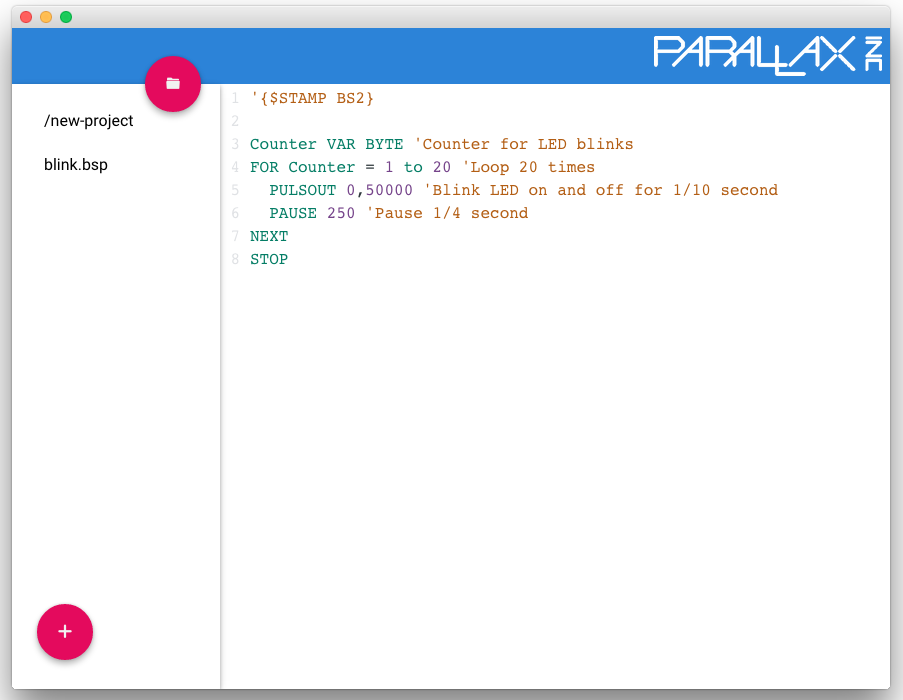
Parallax IDE is a fully self contained IDE that can be used to program the Parallax Basic Stamp microcontrollers. A really cool feature is that the BASIC compiler was converted to javascript via emscripten. It can run completely offline and uses chrome.serial to flash the compiled programs to the chip.
-
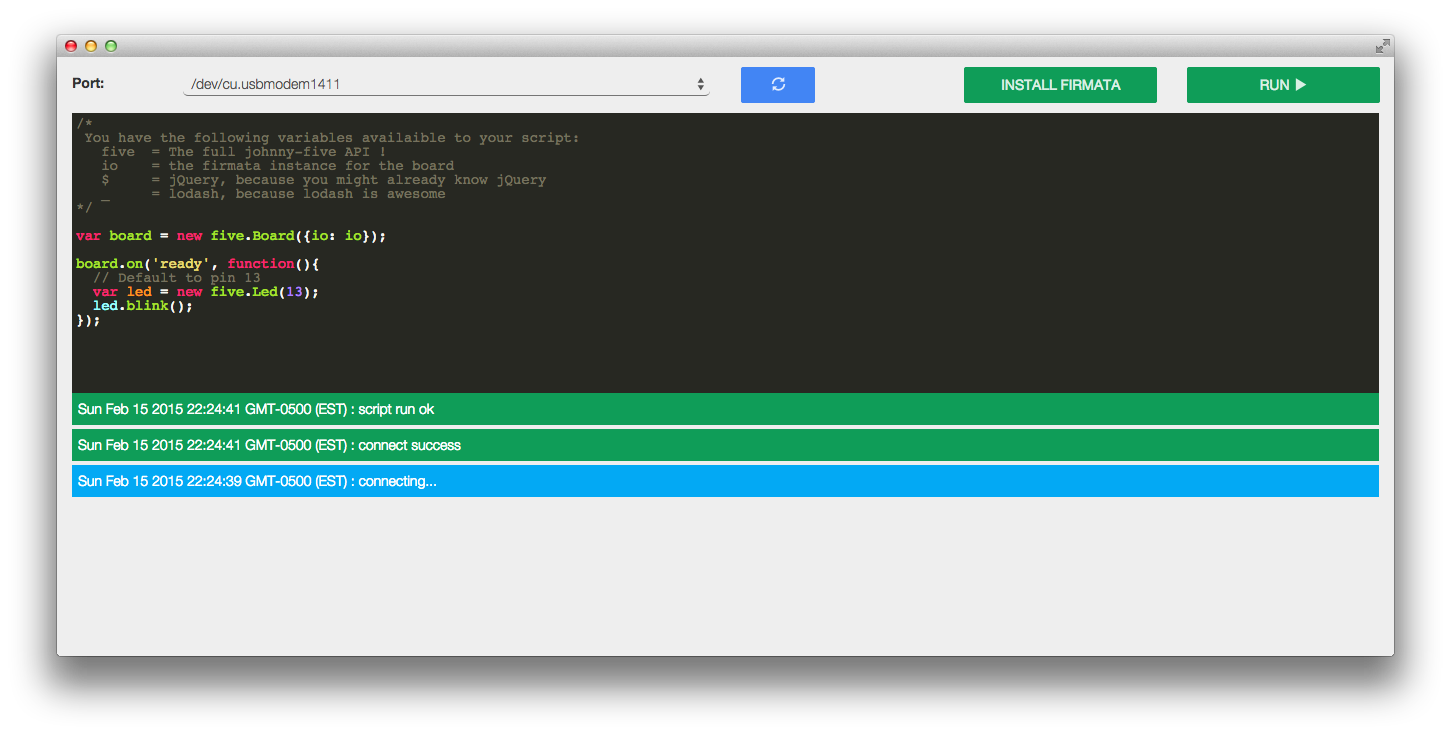
Chromebots is a chrome packaged app that allows you to run johnny-five NodeBots code with an arduino plugged in. It also uses chrome.serial to write firmware to the arduino and to rx/tx sensors and actuators. More about this here: http://iceddev.com/blog/chromebots-lowering-the-barrier-to-entry/
-
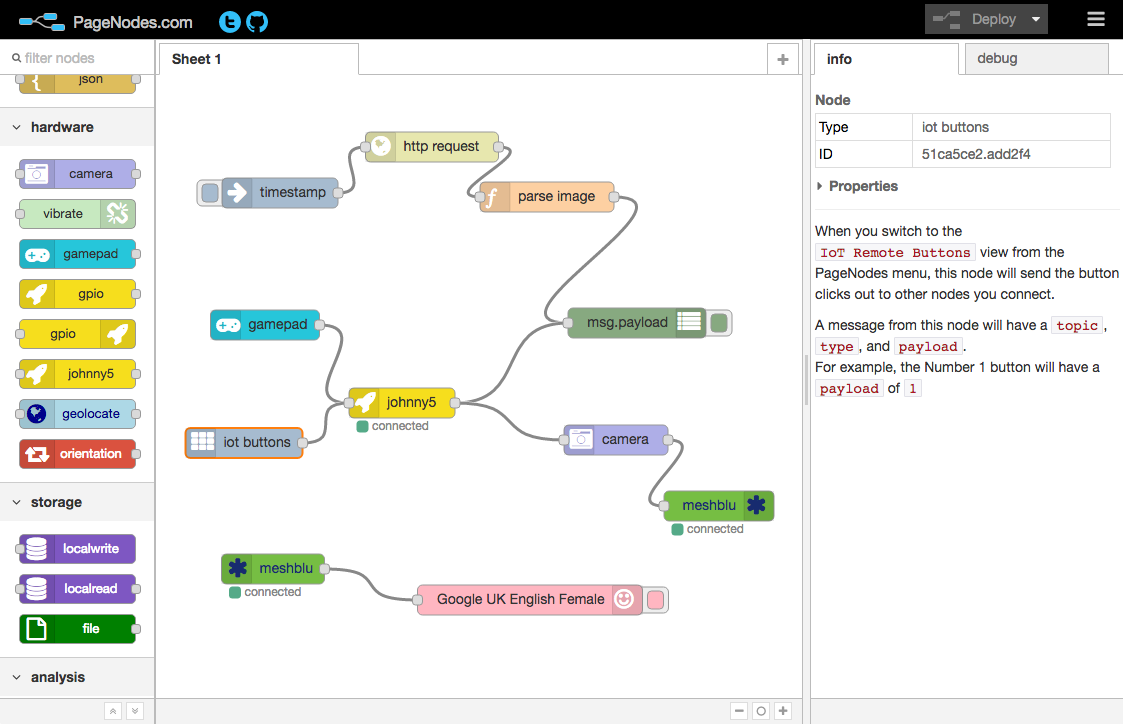
PageNodes like @noopkat mentioned, uses chrome.serial to write firmware. The method is somewhat unconventional as it is messaging a pacakged app (no chrome.serial in standard extensions). PageNodes is sort of the successor to Chromebots as it also ties in other new browser APIs such as WebUSB to do in-browser Internet of Things routing.
-
Robotnik Is a node app that does johnny-five Nodebots using 100% visual programming. It doesn't use electron or chrome.serial, but could optionally be convertable to a PWA if we had WebSerial

Tidepool uses chrome.serial in its https://github.com/tidepool-org/chrome-uploader application to read diabetes device data.
Like Espruino, MicroPython exposes its REPL through a USB-serial interface. You can also program the firmware using the DFU protocol over USB.
Currently, I use a terminal emulator (written in python) and a DFU programmer (also written in python).
I'd like to be able to both of those things using a web browser, so that I can create a nice UI/IDE.
For DFU mode, the VID/PID changes when in DFU mode and then changes back once MicroPython is running. My terminal emulator that I've written in python is able to detect when this happens and automatically closes the serial port when the serial device goes away and reopens it when it comes back.
I also have a CNC router which I currently control using a web based app called ChiliPeppr (http://chilipeppr.com/) It can control the CNC router and also reflash the firmware in the CNC Router. Because the web browsers don't have decent serial interfaces they chose to write a small socket server (they call it Serial Port JSON Server) which basically takes a stream from a socket and pipes it through the serial port.
It would be REALLY nice not to have to install the serial server and be able to do everything using the browser.
I guess I fail to see the difference between sockets and serial.
On Wed, Aug 24, 2016 at 1:14 PM, Luis Montes [email protected] wrote:
Tidepool uses chrome.serial in its https://github.com/tidepool- org/chrome-uploader application to read diabetes device data.
— You are receiving this because you are subscribed to this thread. Reply to this email directly, view it on GitHub https://github.com/whatwg/serial/issues/36#issuecomment-242193141, or mute the thread https://github.com/notifications/unsubscribe-auth/AAHyDGpAmq0B4rKimMeG6CAhRivX4fYsks5qjKYIgaJpZM4JsAgC .
Dave Hylands Shuswap, BC, Canada http://www.davehylands.com

Thanks for the Maker API / Circuit Playground shout out @reconbot, sorry for the delay, was out on vacation last week. While Chrome Apps on Windows / OS X's deprecation may be causing a bit of alarm, it is nice how it's given us all an opportunity to gather in one GitHub Issue 😄.
The App Lab Maker APIs are a set of Johnny-Five-backed APIs being exposed in the Computer Science Discoveries curriculum’s Unit 6: Programming: The Internet of Things. This curriculum uses the Adafruit Circuit Playground (or a fallback in-browser simulator, & eventually other firmata-compatible boards) to allow students to learn to control pre-wired color LEDs, a piezo speaker, buttons, and output pins based on inputs from capacitive touch sensors, a microphone, light sensor, thermometer, etc. Students and teachers have already been making their own “smart home” projects, games, and rimshot-o-matics with the IDE, and the curriculum will be used by Code.org’s partner districts and presented to teachers in nationwide professional development sessions.
🎥 Making a fruit piano in a minute (video)

Driving a drawing turtle in a few lines of code:


At many schools in the 2017 pilot and beyond, IT departments will be tasked with getting computers set up over the summer to support this curriculum. We currently have a setup page which guides them along the path to setting up.
On OS X and Chromebooks, the steps are currently (1) install the Chrome App (based off of @jacobrosenthal's chrome-serialport), and (2) plug the board in. (On Windows, there’s one additional step to install the required native driver for the board.)
If the steps were to become just “plug the board in”, or “plug the board in, and press Allow”, that would be fantastic, and would likely make school IT departments jobs easier.
Our pilot teachers will be testing the curriculum in the Spring of 2017, and some school IT departments have installed the Chrome App in preparation for the school year.
In any event I'll be tasked with finding a seamless way to make this curriculum usable continuously, whether supporting WebSerial in the latest Chrome (ideal), moving to an Extension (better than an App) or even if we need some sort of native serial<>websocket bridge (which @tzikis noted is ultimately nightmarish to set up / support on school machines with software firewalls/locked down permissions) or separate Electron app requiring students to re-log-in to access their projects (less good).
It would be a huge boon to ease of setup & getting started with physical computing to support the same connection/serial model across Chromebooks, OS X, and Windows (and other browsers? 😇🙏).

RC flight controllers are using NW.js/Chrome Apps to configure them and manage them. A web based version would make keeping users up to date easier.


We have a payment processing platform. Today, we use WebUSB to talk to a PinPad/Card reader device to do EMV card transactions.

Test site running on WASM with Blazor and Blazor.Extensions.WebUSB
The device is actually a Serial Port, so Today we need a special driver on Windows in order to make that work.
As soon as we have SerialPort support we will roll out an update that will not need the driver anymore.
Looking forward to have the feature enabled soon!

I’m looking to make a signal analyzer-ish app (think a small subset of what sigrok does) using Electron. I can use node-serialport, but there is developer overhead in using a native module in Electron. a native serial API would be really excellent.
glad this project has started to get some attention. I’m curious about how it gets from where it’s at now to realization by browser vendors.

Btw I also have a similar issue open on node-serialport https://github.com/serialport/node-serialport/issues/1250


I am using the WebSerial API as an alternative to communicating with a Bluetooth device when that Bluetooth device is not responding for some reason. WebUSB is not working well because on Windows, a UART - serial port driver is being installed to communicate with the device through plug and play because other software needs to communicate with the device as well. WebSerial is really helping us solve this problem. Unfortunately, things don't work the same on the Mac, but WebUSB works fine in that case. The two APIs together make it work.

I'm using it in an interactive non-internet-connected art installation where users can pull a jackpot lever, which is sensed by an Arduino, which in turns results in spinning items on the jackpot display.
Users select how they see themselves: e.g. male, 20-30, attractive, black. And then webworker TensorflorwJS face detection algorithms judge them. If the algorithms come to a different conclusion, you are sprayed with water. This is handled by sending a serial command back to the Arduino, which triggers a relay for a few seconds.
Originally, every second an ajax request was done to a simple python server, which then polled the serial to ask if the user had pulled the lever. If a user should be sprayed, the same route would be used.
Important in my use case is that an exhibition attendant should be able to easily start the installation. For this it's important that the browser can remember permissions that have been given (and that it doesn't show 'chrome can be updated' popups, as it just did during development.. Chromium is very difficult to keep quiet).

We use Web Serial API (on Windows) and Web USB API (elsewhere) to stream EEG from client to trainer, potentially globally. Previously we were limited to Windows Apps which made remote monitoring cumbersome. It's the Web Serial API which allowed migration of the customer base to the Web App.
New APIs + Web App = match made in heaven
www.biosignal.network

I love the API and the possibilities it provides, especially for connecting micro controllers like Arduinos to web applications; the connection between digital and physical world is fantastic. Coming from a design/artistic background, I know many creative minds would love this possibility, but do not necessarily have the technical background to use it, with concepts like streams, transformers and similar. For this, I wrote a library that allows developers to use the Web Serial API together with an Arduino in an event-driven way. It is still a work in progress, but it works:
https://app.gitbook.com/@fmgrafikdesign/s/simplewebserial/

Just thought I would chime in again. We have modified the device to use a USB serial interface. So WebSerial is proving to be the perfect companion. Unfortunately, WebSerial in Chrome on Windows is still pretty buggy. Works great on the Mac.
Just thought I would chime in again. We have modified the device to use a USB serial interface. So WebSerial is proving to be the perfect companion. Unfortunately, WebSerial in Chrome on Windows is still pretty buggy. Works great on the Mac.
@spekary, have you filed Chromium issues for the problems you are seeing on Windows? If you can share a reproduction that would be very helpful.

We are using WebSerial with 25,000 users in production to power a web-based therapy device - works great, across Windows and Mac! Allows our users to use our hardware device without needing to install anything at all, cross platform and (mostly) very simple. The only always-recurring user issue is them being confused about the pairing UX/copy and thus failing to complete the pairing flow.
