

 Viir
Viir
Eve Combat Anomaly Bot will not warp to Anomaly, Quits early
Using Botlab Version v2022-02-14. Script downloaded from: https://reactor.botlab.org/catalog/e025c79ef959d848559d2d7c15e527ea39c720ab6b06763ef1ccf4c08c39f902 Script Inputs: anomaly-name = Guristas Rally Point anomaly-name = Guristas Sanctum anomaly-name = Guristas Haven hide-when-neutral-in-local = yes rat-to-avoid = Infested Carrier module-to-activate-always = Omnidirectional Tracking Link II module-to-activate-always = Medium Armor Repairer II module-to-activate-always = Thermal Armor Hardener II
What works Properly: 1. Bot does undock 2. bot DOES successfully pull drones and dock to station when hostile comes in system.
Problems: 1. Bot will not warp to anomaly when anomaly is visible in probe scanner window. 2. If warp the ship to an anomaly, bot will begin to fight. But on a random basis the bot will at some point pull drones and then sit in the anomaly while being fired upon by rats in the anomaly. If I manually target rats and set the drones on them, then give control back to the bot, the bot will again pull drones and then sit there being aggressed


Thank you for sharing your experience!
- Bot will not warp to anomaly when anomaly is visible in probe scanner window.
This can happen when your game client displays things differently from the earlier samples.
If you share the session recording, I can adapt the bot to work with your setup.
The session recording was automatically stored on your system when you ran a session. You only need to export it and upload it here.
You can export it using the Download session recording archive button here:
https://to.botlab.org/guide/how-to-report-an-issue-with-a-bot-or-request-a-new-feature#getting-the-session-recording-archive

The session recording also enables the investigation of the other surprises you described.

Thank you for sharing the recording.
This session was started with the --detailed-session-recording option set to off. Therefore it does not contain the necessary information.
Note this part of the linked guide:
(If you have set the
--detailed-session-recordingswitch tooffon a session, the recording will not be available for that session)
It turned out the part of the user interface that displays the session recording does not warn that this was the case for that session. Here is how it looked in devtools:
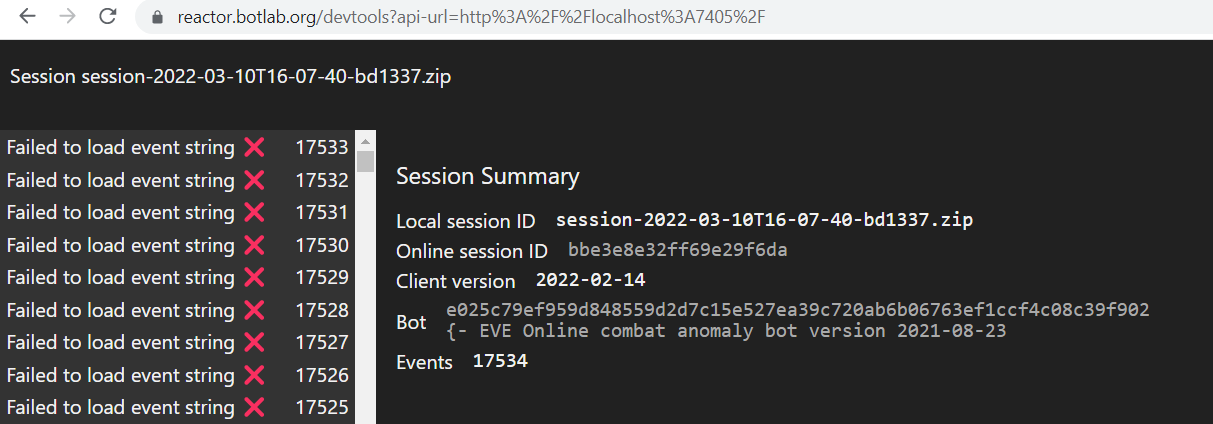
It would be better to expand the user interface to display a warning on that session recordings representation.
When you send me a session with a complete recording, I will look into that to see what the problem was with your game client.
Besides, I recommend you switch to this newer anomaly bot: https://catalog.botlab.org/333bd3db82d6fc94 since it contains many improvements compared to e025c79ef9