

 ViewTube
Captcha not working
Hey guys,
Captcha doesnt seem to load in a docker compose container on a synology nas.
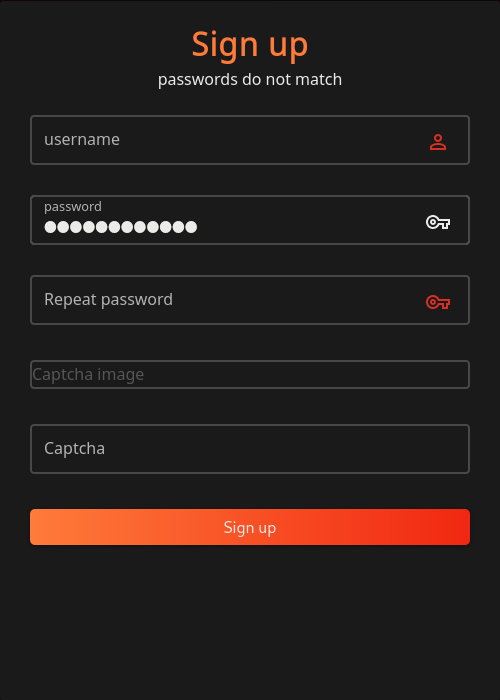
any idea?


I'm also having this issue running in Podman on Fedora. Can't find anything glaring in the docker/podman logs for the containers.

In Developer console I see the following:
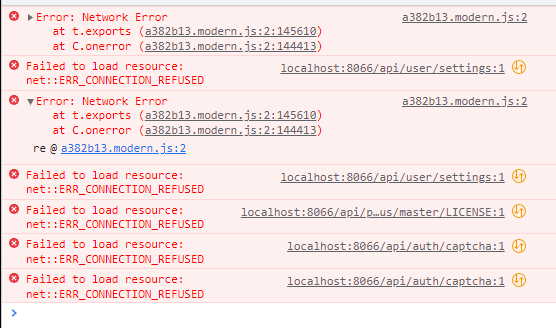
I can get to the API page just fine through my Traefik proxy.
In my personal deployment, I had to use Viewtube_URL=http://localhost:8066 and in my Traefik YAML I'm pointing tube.domain.com to my container host. If I put https://tube.domain.com in my container configuration, Traefik would bark about an internal connection issue even though browsing to the local http://ip-address:8066 would load just fine.
Perhaps as a workaround add an option to disable CAPTCHA option for new accounts? I (and others) can always throw Authelia or another auth service in front of this one before moving it public.
Edit: Trying some more configuration, there appears to be some issues if running a proxy (at least in my environment). I can't get the container running when inputting any https variable for the URL: https://tube.domain.com https://localhost:8066 https://ip-address:8066
The page throws an error stating it needs to be reloaded with any of the above configuration. It runs fine as http. I was even able to register an account and the CAPTCHA worked browsing to http://ip-address:8066, but as soon as I flipped over to my https://tube.domain.com and logged in with said account, I'm given a mixed mode error when the API tries to serve up an HTTP page over HTTPS:


Hey @Zanathoz
Did you configure the enviroment variable VIEWTUBE_ALLOWED_DOMAIN in any way? If you specifically only allowed a http:* domain it would refuse any other protocol as well.

Hi @cyacedev - I have not. I actually just got it working while playing around with some header options in my Traefik YAML configuration and the URL variable, but it's busted again. Of course this was due to making too many changes and being impatient. So this does seem to work for me, it's just something on my Traefik configuration I need to sort out.
I assume it could be something similar to the other users who reported, but there's not enough information for their deployment to go on.
Edit: I should mention that I got this working with the https://tube.domain.com as the URL variable, so it's most likely my proxy config. Once I get it sorted I'll post my fix in case anyone else runs into the same issue.
Captcha is now working for me using docker on unRAID, with no changes required to my SWAG proxy configuration. 👍
VIEWTUBE_URL = https://tube.mydomain.com VIEWTUBE_ALLOWED_DOMAIN = /^mydomain.com|.mydomain.com$/
I had to step away last night but figured it out this morning. I did not need the Allowed Domain variable for the viewtube container. In the Traefik configuration my mistake was passing the service as https instead of http. I also did not need any middleware's set for headers (I'm passing original through elsewhere in my configuration). Most of my other services work pointing to the https address but this one was an outlier.
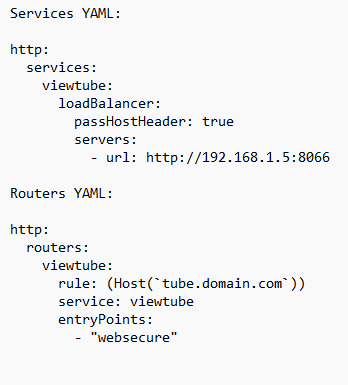
(I can't get the YAML code working in code snippet so I've uploaded the above sample.)
For me is working when i configure the enviroment variable : - VIEWTUBE_URL=http://ipaddres:8066. If there is no port then is not working Captcha

I have started both the command pnpm run serve:server and pnpm run serve:client on the server in separate terminal,
both the services are running but still the Captcha is missing on the site and also showing an error Error loading homepage. The API may not be reachable.

I have started both the command
pnpm run serve:serverandpnpm run serve:clienton the server in separate terminal,both the services are running but still the Captcha is missing on the site and also showing an error
Error loading homepage. The API may not be reachable.
What is the output on the server terminal?

Hi @PrebenL Do these fixes mentioned above work for you as well?
@cyacedev Sorry for late reply, ALLOWED DOMAIN setting worked back then.