

 Venipa
Wrong update request in the app
Operating system
Microsoft Windows [Version 10.0.22621.1105]
YouTube Music Desktop App Version
v0.10.4
Bug description
After updating the app to the latest version, it asks me to update it again. It appears that some files have not been updated.
Screen shot
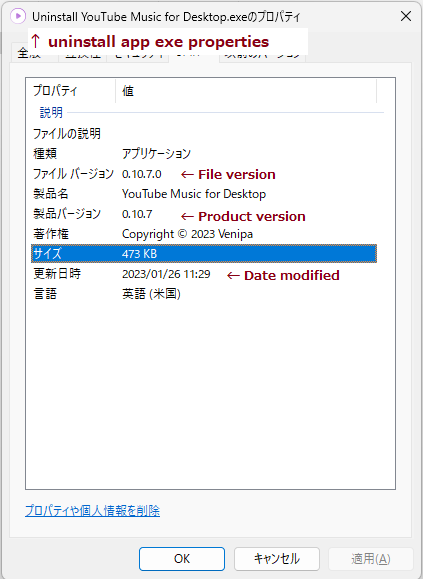
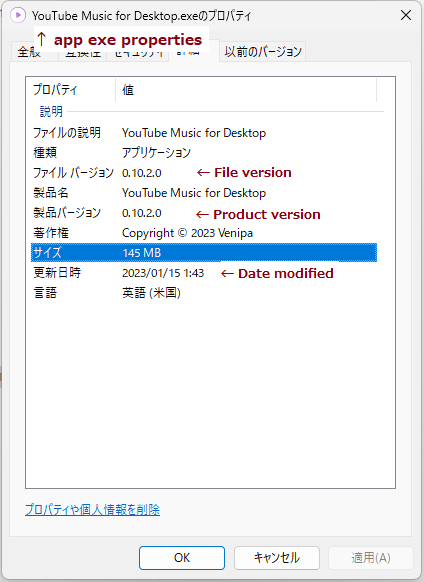
My language setting is Japanese, so I have annotated some of the screenshots.
 |
|
 |
 |
Steps to reproduce
- Launch the application.
- The app will request an update. (e.g. v0.10.2 -> v0.10.4)
- After the update is performed, the app will restart.
- The app will request an update.
Remarks
The version displayed in the app is the same as before the update. However, it is the latest version on the Windows Settings app.
Relevant log output
No response


download manually from the releases for now https://github.com/Venipa/ytmdesktop2/releases/latest might be an issue with windows filesystem permission (uac)

@Venipa I tried it, but I got the same result as I wrote in the issue remarks without uninstalling the existing app first. I've posted some screenshots in the bug description, please see it.
Same for updating 0.10.8 -> 0.10.9, although I must say that the issue has been here for quite a while. If you uninstall and then re-install, everything should work fine.
im unable to reproduce this somehow,
try deleting the remaining update files under:
win+r > type %appdata%\..\Local\youtube music for desktop-updater > enter
I have the same issue. The update popup comes, and it will run sucessfully and afterwards i still have the old version.

Just wanted to give more insight into the issue.
General info:
When updating, no permissions are requested by the app.
Files under %appdata%\..\Local\youtube music for desktop-updater remain the same.
The app still is on the previous version and requests to be updated.
Files under %appdata%\..\Local\Programs\YouTube Music for Desktop remain unchanged.
Your previous suggestion does not fix the issue, and only makes the app behave like you have never clicked the update button before (by this, I mean that it downloads update files, takes a bit longer, etc).
Potentially Fix:
Manually running the .exe under %appdata%\..\Local\youtube music for desktop-updater\pending updates the app just fine, but I would like to note that %appdata%\..\Local\youtube music for desktop-updater\ is not deleted automatically.
I hope this helps :>
im unable to reproduce this somehow, try deleting the remaining update files under: win+r > type
%appdata%\..\Local\youtube music for desktop-updater> enter
This does not fix the issue. Please see the text in my previous comment
The issue persists when trying to update to 0.10.11.
I would like to note that if you try to run the .exe under %appdata%\..\Local\youtube music for desktop-updater\pending, do NOT launch it as admin. If you do, it pops up with an error.
Hi, @doraemoon-bot. I'm Dosu, and I'm helping the ytmdesktop2 team manage their backlog and am marking this issue as stale.
Issue Summary:
- Users reported that the app prompts for an update but remains on the old version after updating.
- @Venipa suggested manually downloading the update and checking file permissions.
- @Nygosaki and I noted that uninstalling the app first helps in applying the update.
- @Nygosaki found that running the update executable from a specific directory without admin rights resolves the issue.
Next Steps:
- Please confirm if this issue is still relevant to the latest version of ytmdesktop2. If so, you can keep the discussion open by commenting here.
- If there are no further updates, this issue will be automatically closed in 14 days.
Thank you for your understanding and contribution!
![dosubot[bot] avatar](https://avatars.githubusercontent.com/in/324583?v=4 "Published by a pub.dev verified publisher")