

 Vector35
Inconsistent tagging in non-code areas
Version and Platform (required):
- Binary Ninja Version: 3.1.3701-dev
- OS: Windows 11
- OS Version: 21H2
- CPU Architecture: x64
Bug Description:
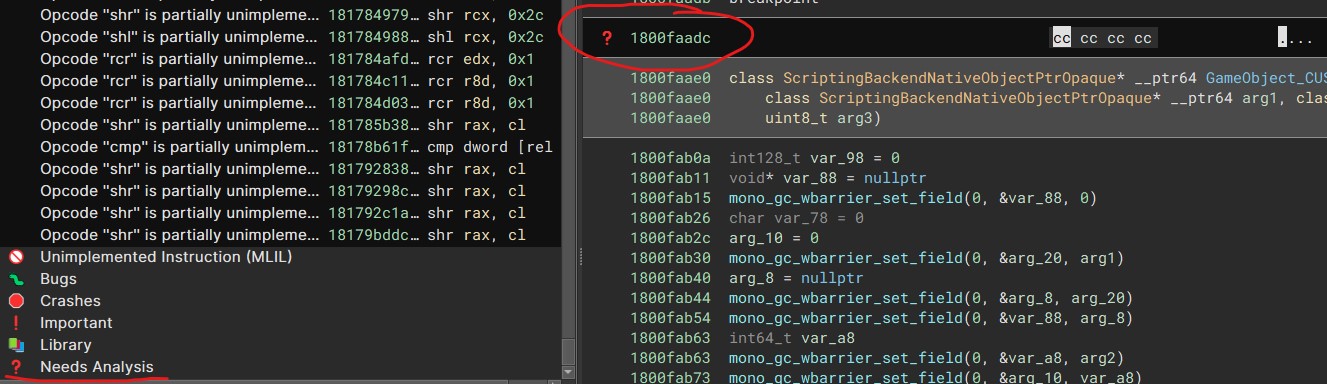
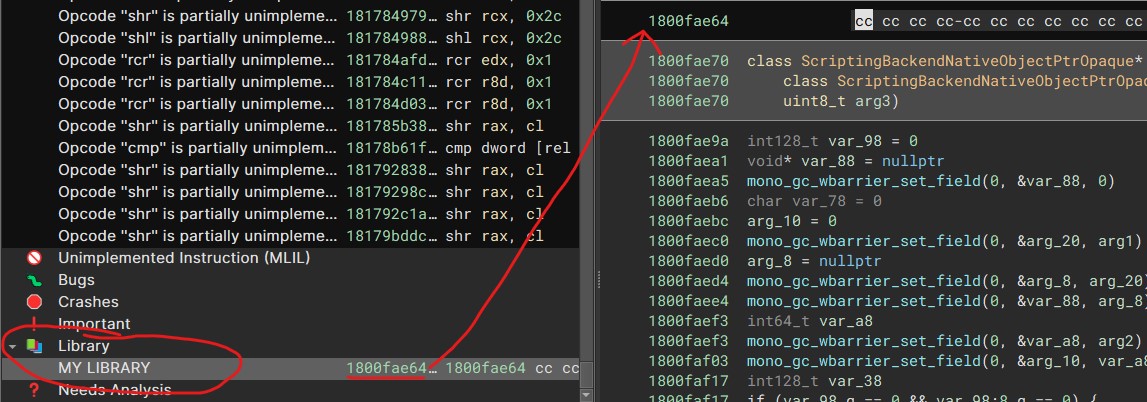
Removing a tag in a non-code (function) does not update the view, leaving the tag icon and the tooltip. Also adding a tag other than a Bookmark does not immediately update the view and the tag's icon only shows up after an update to the view (adding a comment, renaming a symbol, adding another tag).
Steps To Reproduce:
- Go to any non-code section and place a tag/bookmark
- Observe the icon not being placed in the case for non-bookmark tags
- Go to Tags sidebar and delete the tag
- Observe the view not updating and the tag still being present
Expected Behavior: A tag in a non-code section should exhibit the same behavior and be immediately updated with the tag icon and in the case of deletion should be removed.
Screenshots:
No update when removing a tag.
 No update when adding tag.

Iirc we have an existing bug tracking this but will double check later. Does pressing space twice trigger an update and render the tag?

Iirc we have an existing bug tracking this but will double check later.
Only one I could find that was similar was #3228
Does pressing space twice trigger an update and render the tag?
It does not
The existing issue #3228 specifically applies to creating tags via the API, whereas this issue is for data tags created via the UI.

Tested on 3.5.4299-dev and it seems like this has been fixed, closing this as completed.