

 ValveSoftware
UE5 Please

I've been looking into what's holding it back and there are two things I can see right now.
One is SteamAudioSDK.Build.cs has a reference to the Win32 target platform. This entire block can be removed (I think).
The second is two vector conversions throwing errors in lines 107 and 291 of SteamAudioScene.cpp
I'm far from an expert but I'm going to see if I can get the plugin to compile after resolving those issues. There's a good chance I'll hit more snags but if I have luck, I'll report back. :)

I got it to compile with these changes: https://github.com/devhyper/steam-audio/commit/77d58a76a83e00418e3ccb31fee69a48997612cf

I got it to compile with these changes: devhyper@77d58a7
I could get the plugin to compile but the "Steam Audio" Mode doesn't show up (therefore cannot export the scene nor bake reverbs). Did you find a way to make it work in your fork?

I could get the plugin to compile but the "Steam Audio" Mode doesn't show up (therefore cannot export the scene nor bake reverbs). Did you find a way to make it work in your fork?
The steam audio mode shows up for me.
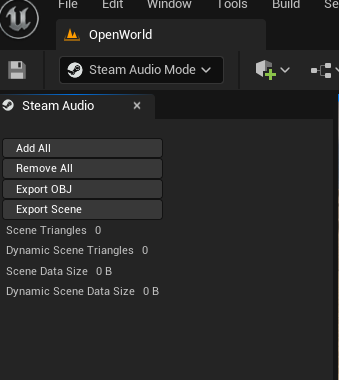
Hey @devhyper that's really great news for me, I was going to use the 2.1.1 version since I couldn't make it work but this really gives me hope!
Sad news is that I tried again and again and I still cannot get the Steam Audio Mode to show up 😭
What I'm doing atm is:
-
Clone your fork
-
Add
shutil.copy("steamaudio/lib/windows-x64/phonon.lib", "src/SteamAudioUnreal/Plugins/SteamAudio/Source/SteamAudioSDK/lib/windows-x64")to line 50 ofsetup.py(without this one the build fails while looking for "phonon.lib", I guess this is the problematic bit!) -
Run
setup.py -
cd buildandmkdir windows-vs2019-x64andcmake-gui ../.. -
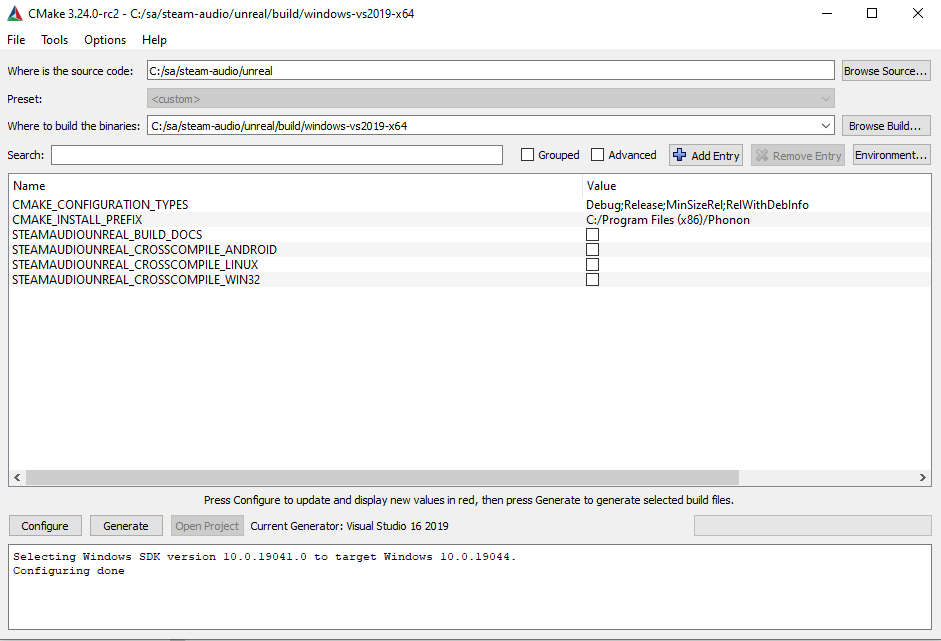
Configured like this
-
Double click on
Phonon.slnand build solution
Build doesnt finish for phonon_unreal_fmod and phonon_unreal_fmod_setup reporting error below, but I guess that should not matter since I won't use Fmod Studio (not sure if that's needed anyway, also not sure of what's breaking the copy process).
Error copying directory from "C:/sa/steam-audio/unreal/src/SteamAudioUnreal/Plugins/FMODStudio" to "C:/sa/steam-audio/unreal/build/windows-vs2019-x64/src/HostProjectFMOD/Plugins/FMODStudio".
Then build finishes for phonon_unreal_win64 and therefore I can open up unreal\build\windows-vs2019-x64\src\HostProject\HostProject.uproject 🙏
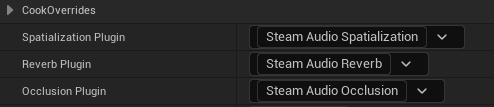
When opened I can select Steam Audio as spatialization plugin in the project settings,
add Steam Audio components to actors ,
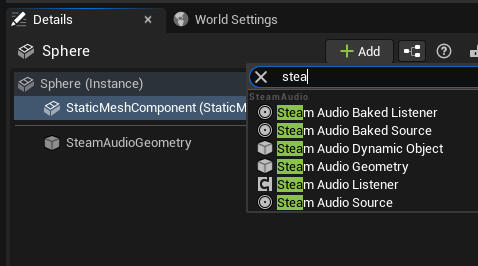
but cannot select the Steam Audio Mode in the dropdown! 😭😭😭
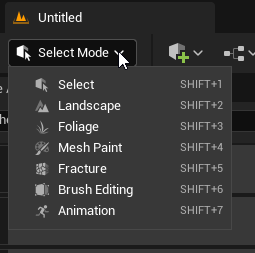
If you have time could you please help me finding what's wrong on my side? And eventually, if that's doable to you, share the working compiled plugin?
Thank you anyway, your screenshot will make me push this until I get it to work anyway
Here is the compiled plugin: https://github.com/devhyper/steam-audio/releases/download/v4.1.1/steam-audio-package.zip
As for the build, I used the build.py script after running setup.py:
- Open steam-audio/unreal/build/FindUnreal.cmake and replace ${UNREAL_EXECUTABLE_DIR} with the path to unrealbuildtool (ENGINEDIR/Engine/Binaries/DotNET/AutomationTool)
- Open build.py and find -DSTEAMAUDIOUNREAL_BUILD_DOCS=TRUE, change it to false
- Open a command prompt in that directory and run
python build.py -o installit will error out, should be fine. - Go to steam-audio/unreal/bin/unreal and copy SteamAudio directory to replace ENGINEDIR/Engine/Plugins/Runtime/Steam/SteamAudio
First of all, thank you a lot for your immediate response, that's very kind of you!
Sad thing is that basically I've been doing same steps you wrote down and the build that come out of that still didn't t show the Steam Audio Mode. So I tried your compiled plugin package and it does behave the same, no Steam Audio Mode available!
I'm not sure what's the error at this point. I repaired my 5.0.3 installation and also tried with 5.1 but that the mode just never appears in the editor 🤔 😭
Continuing with strange behaviours, I noticed that if I go in the Tools dropdown menu with a Level opened up nothing shows up
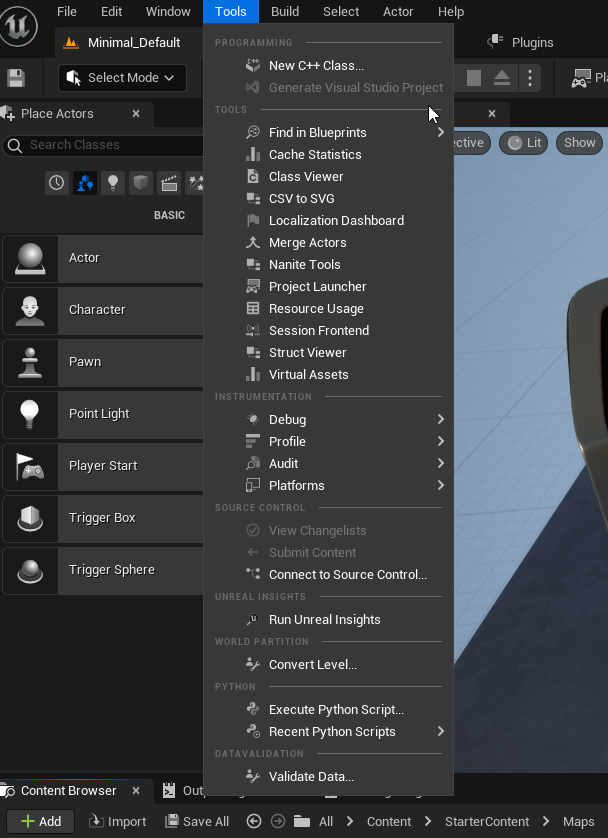
But then, if I move to the Plugins tab and check the Tools dropdown again, a "Bake Indirect Sound" options appears
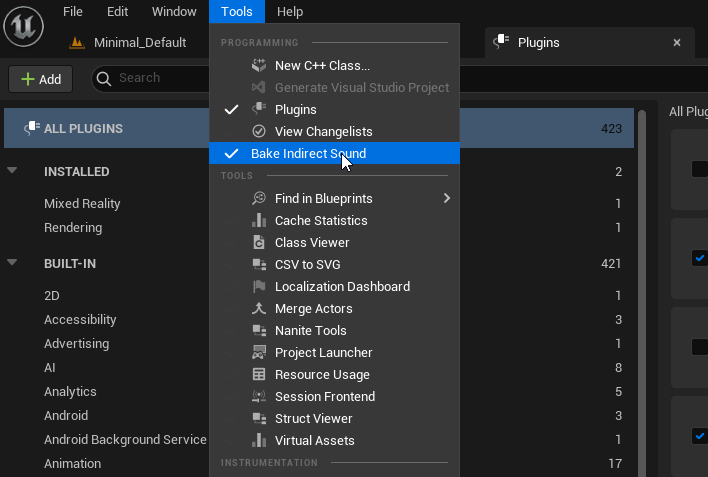
🤔
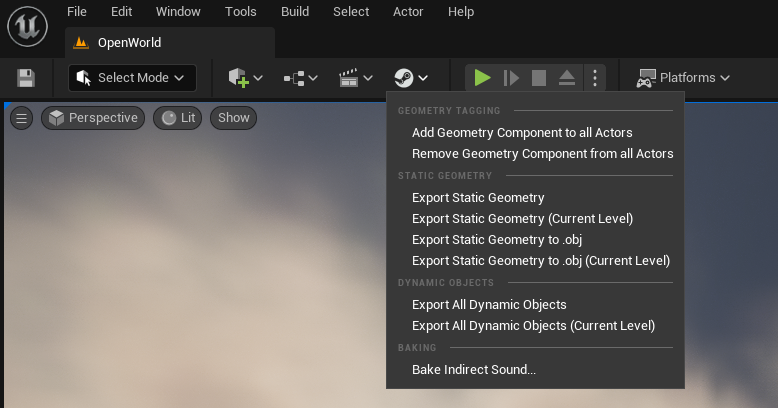
So turns out I was using the 2.0 version of the plugin. When I put my build in I wasn't able to see the Steam Audio Mode either. I did find the issue though. https://github.com/devhyper/steam-audio/commit/2ee6775131b0343cf6d1001da3165e522a78331e The mode is now a toolbar button:
@aptrn
Ohhh, that's SO great! Compiled off your fork, usual two fixes to make it compile and now IT WORKZ 🎉 Thank you a lot for your work, my winter is now unlocked 🤯 🎇
hi, can you give a build for ue5.1?
So turns out I was using the 2.0 version of the plugin. When I put my build in I wasn't able to see the Steam Audio Mode either. I did find the issue though. devhyper@2ee6775 The mode is now a toolbar button:
@aptrn
How about the SteamAudioFMODStudio integration plugin? SteamAudio plugin for unreal works good for me, what is giving me an issue is the integration plugin, and I don't have any idea on how to fix that. I'm trying to use FMOD in UE 5.1 and using the steam audio too as stated in the documentation.

Nevermind, I decided to go back to UE5.0.3, using @devhyper fork, and it works flawlessly now. Thank you!!!
@whostea https://github.com/devhyper/steam-audio/releases/tag/v4.1.2
Doesn't work on my end, it says it was compiled for 5.0.0

@devhyper
After trying to use your prebuild version and following your instructions to compile the plugin, I receive this error no matter what I try.
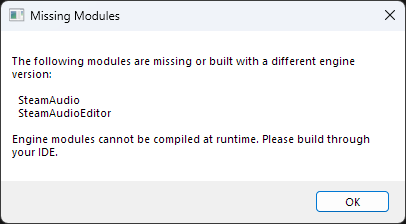
Do you have any suggestions?

@RYRY1002 I had the same issue. Which version of UE5 are u using? Did you try compiling in Visual Code? If so, what errors did it returned?
@googleooer Edit the .uplugin file and change 5.0.0 to 5.1.0
Yeah I tried that, but I get the errors above
@RYRY1002 I had the same issue. Which version of UE5 are u using? Did you try compiling in Visual Code? If so, what errors did it returned?
I used 5.1. Compiled with the build.py script only.
@RYRY1002 I had the same issue. Which version of UE5 are u using? Did you try compiling in Visual Code? If so, what errors did it returned?
I used 5.1. Compiled with the build.py script only.
So, what I did was compiling the project with the plugin, not the plugin itself. To do so, you need a c++ unreal project, I would suggest creating a new project with C++ instead of blueprints just for compiling. Delete SteamAudio plugin folders from the engine installation path. On your project, copy the plugins in the folder "Plugins" (you will need to create that folder next to the .uproject). Then you should add the SteamAudio plugin from @devhyper fork, start the project and enable the plugins, close unreal. Open the .snl created and located next to the project .uproject with visual studio. In a window you will see a list with your project, right click over your project name and choose "Build".
It will try to compile. If it compiles, great, you can just copy the plugins of the project to your project. If not (the most probable one), show us what errors visual studio returns.
Replying to https://github.com/ValveSoftware/steam-audio/issues/210#issuecomment-1364141910
If it worked for you, can you share your successfuly compiled version?
If it worked for you, can you share your successfuly compiled version?
I can, sadly I don't have access to the computer with the compile version until 9 of January. Until then, I cannot share it.
I got it to compile and load, but it's nowhere to be seen in the editor even though it's enabled
Nevermind it worked, i was trying to compile the release instead of the source lol
Replying to #210 (comment)
Thanks! Following this tutorial, I managed to get it to compile.
Here is my compiled version (place in UE_5.1\Engine\Plugins\Runtime\Steam)
Replying to #210 (comment)
Thanks! Following this tutorial, I managed to get it to compile. Here is my compiled version (place in
UE_5.1\Engine\Plugins\Runtime\Steam)
Does it actually work properly for you? Whenever I try to play in editor with my version and a SteamAudioSource is active it crashes with an access violation error related to SteamAudioSourceComponent's BeginPlay code.
Replying to #210 (comment)
Thanks! Following this tutorial, I managed to get it to compile. Here is my compiled version (place in
UE_5.1\Engine\Plugins\Runtime\Steam)Does it actually work properly for you? Whenever I try to play in editor with my version and a SteamAudioSource is active it crashes with an access violation error related to SteamAudioSourceComponent's BeginPlay code.
Yes, assuming you've configured it correctly, it works just fine for me.
Replying to #210 (comment)
Thanks! Following this tutorial, I managed to get it to compile. Here is my compiled version (place in
UE_5.1\Engine\Plugins\Runtime\Steam)Does it actually work properly for you? Whenever I try to play in editor with my version and a SteamAudioSource is active it crashes with an access violation error related to SteamAudioSourceComponent's BeginPlay code.
Send the log and I'll take a look.
Replying to #210 (comment)
Thanks! Following this tutorial, I managed to get it to compile. Here is my compiled version (place in
UE_5.1\Engine\Plugins\Runtime\Steam)Does it actually work properly for you? Whenever I try to play in editor with my version and a SteamAudioSource is active it crashes with an access violation error related to SteamAudioSourceComponent's BeginPlay code.
Send the log and I'll take a look.
phonon
phonon
phonon
phonon
phonon
phonon
phonon
phonon
phonon
UnrealEditor_SteamAudio!USteamAudioSourceComponent::BeginPlay() [Y:\Unreal Engine\Projects\steamaudiocompile\Plugins\SteamAudio\Source\SteamAudio\Private\SteamAudioSourceComponent.cpp:235]
UnrealEditor_Engine
UnrealEditor_Engine
UnrealEditor_Engine
UnrealEditor_Engine
UnrealEditor_Engine
UnrealEditor_Engine
UnrealEditor_UnrealEd
UnrealEditor_UnrealEd
UnrealEditor_UnrealEd
UnrealEditor_UnrealEd
UnrealEditor_UnrealEd
UnrealEditor_UnrealEd
UnrealEditor_UnrealEd
UnrealEditor_UnrealEd
UnrealEditor
UnrealEditor
UnrealEditor
UnrealEditor
UnrealEditor
UnrealEditor
kernel32
ntdll```