

 ValveSoftware
Problem with prio for activated actionsets
@keithbradner asked me to create a new issue for this. Its a spinoff from https://github.com/ValveSoftware/steamvr_unity_plugin/issues/179
Its pretty complex problem so I created a youtube clip instead. But the short version is; Two action sets with same prio conflicts and are disabled by the framework.
https://www.youtube.com/watch?v=lBTpz0MEJlM


Here you go. I stripped away SteamVR etc for space. Basicly the repro code is in Repro.cs its attached to the left hand
Looks like since you have LowPrio activated for priority 0 for ANY the Highprio activated for priority 2 on the left hand is overriding it. I think that makes sense. The issue seems to be that since you also have LowPrio activated for priority 2 for LeftHand that should match the HighPrio. I'll file a openvr bug for this issue but the temporary solution may be to not enable lowprio for any.
@keithbradner I dont think there is a workaround. I need it to default to prio 0 if I start moving I upgrade the moving hand to prio 2 (hardcoded to left hand in this repro but could be any of the two hands). So with our mechanics I need it to work like in the repro.
It seems like the way you're using action sets that you shouldn't have anything activated for Any. (Assuming that translates to passing 0 as the restrictToDevice parameter in the underlying C++ API.)
If you activate your action sets like this:
If not moving:
- Move - Left hand - pri 0
- Item - left hand - pri 2
- item - right hand - pri 2
(I assume you don't have the right hand Move active at all when there's an item held in that hand.)
If moving:
- Move - Left hand - pri 2
- Item - left hand - pri 2
- item - right hand - pri 2
Or you could just leave all the action sets at pri 0 and apply your own prioritization to the resulting action data. The risk there is that you would still get haptics from the binding layer because it wouldn't know that you weren't actually going to use the action data from the move action set on the left hand. Priorities+restrictToDevice is your hint to the runtime about that.

Hi Joe. Here is a state diagram.
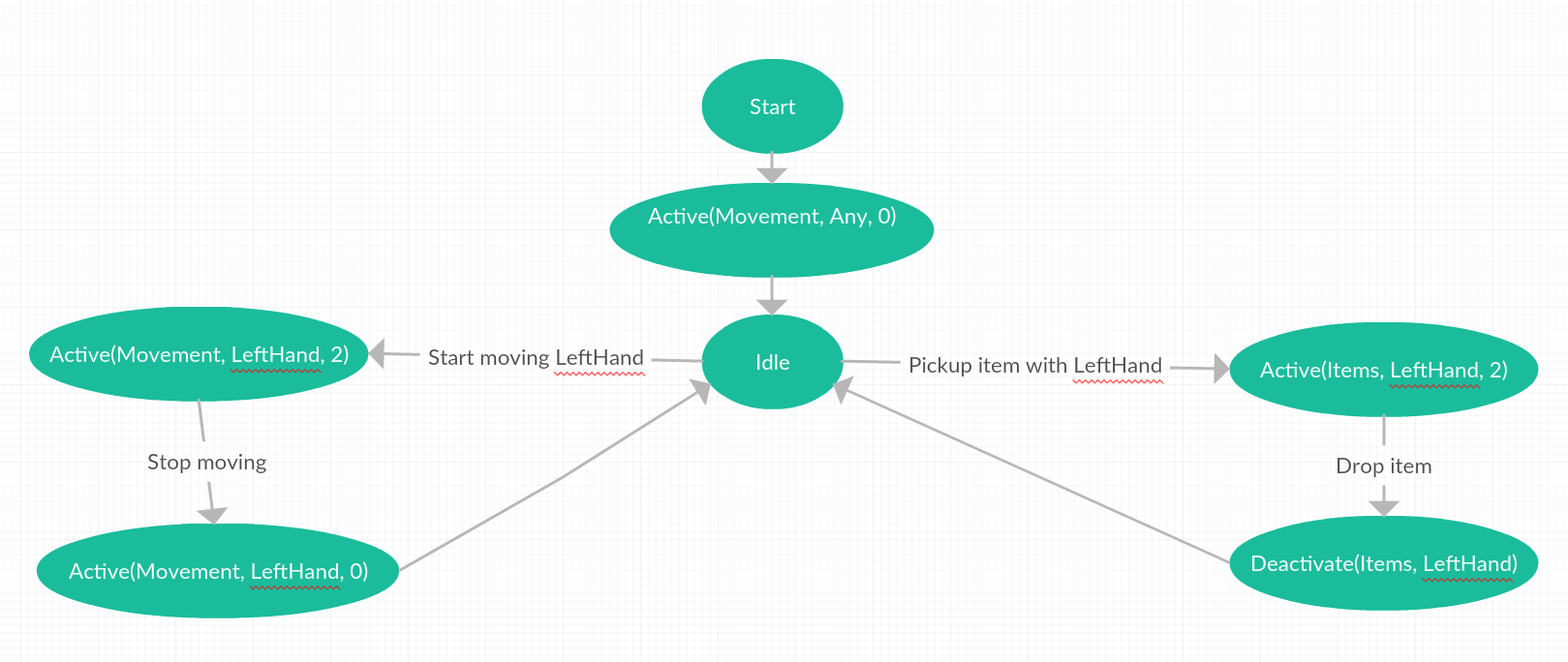
I have also tried activating Left and Right and seperate in the start instead of using Any, no difference. It seems to be a bug in the prioritize feature, even if both Movemen and the item action set have same prio the item wins.
@JoeLudwig as you can see in above diagram I Activate and Deactivate the actions set related to the item in hand. I also tried to at start set it to Activate with prio 0 and then upgrade it to 2 when you pick it up, and degrade it back to 0 when you drop the item. So the diagram instead looks like this
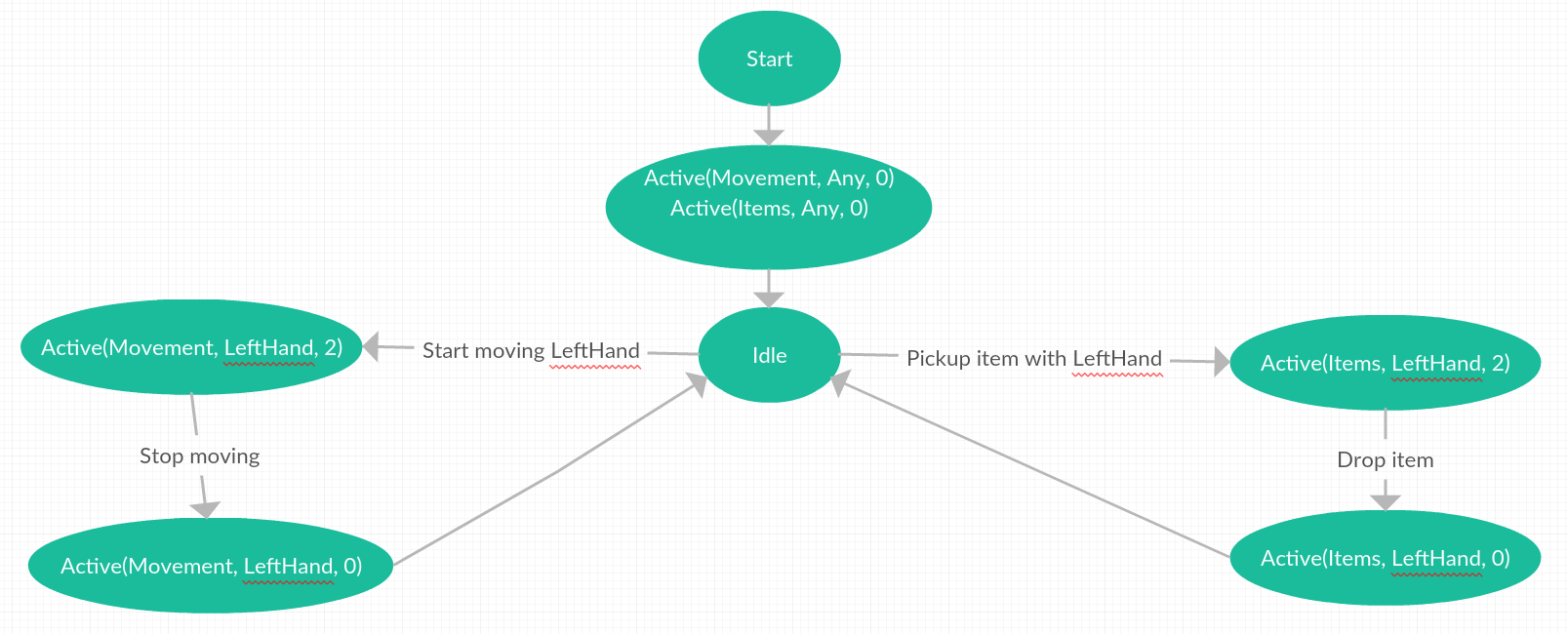
Now the Movement is not disabled when you pickup the item, so Items 2 does not override Movement 0. It seems something is very wrong in either the Unity plugin or the core feature. Thanks.
@JoeLudwig any news on this bug? Its one of our current show stoppers and we really want to merge stamvr 2 branch to master because it's a pain merging in changes
So here is a repro of method 2 above
public class Repro : MonoBehaviour {

    protected void Awake()
    {
        SteamVR_Actions.LowPrio.Activate();
        SteamVR_Actions.HighPrio.Activate();
    }


    private IEnumerator SetDeviceIndex(int index)
    {
        var hand = GetComponent<SteamVR_Behaviour_Pose>();

        yield return new WaitForSeconds(2);
        Debug.Log("please touch anywhere on Trackpad/joystick on relevant controller: " + hand.inputSource);

        SteamVR_Actions.HighPrio.Activate(hand.inputSource, 2); //Simulates grabbing a item in our game

        Debug.Log("please touch anywhere on Trackpad/joystick on relevant controller: " + hand.inputSource);

        while (true)
        {
            Debug.Log(SteamVR_Actions.LowPrio.LowPrioAction.GetActive(hand.inputSource));
            yield return null;
        }
    }
}
SteamVR_Actions.LowPrio.LowPrioAction.GetActive(hand.inputSource) returns true even though I just before set the other action set to a higher prio. If this is not a bug, let me know how I should work with the prioritize system please
Ok, so this seems to work, I need to test it more in the actual game.
public class Repro : MonoBehaviour {


    private IEnumerator SetDeviceIndex(int index)
    {
        var hand = GetComponent<SteamVR_Behaviour_Pose>();

        SteamVR_Actions.LowPrio.Activate(hand.inputSource);
        SteamVR_Actions.HighPrio.Activate(hand.inputSource);

        yield return new WaitForSeconds(2);
        Debug.Log("please touch anywhere on Trackpad/joystick on relevant controller: " + hand.inputSource);

        SteamVR_Actions.HighPrio.Activate(hand.inputSource, 2); //Simulates grabbing a item in our game

        Debug.Log("please touch anywhere on Trackpad/joystick on relevant controller: " + hand.inputSource);

        while (true)
        {
            Debug.Log(SteamVR_Actions.LowPrio.LowPrioAction.GetActive(hand.inputSource));
            yield return null;
        }
    }
}
Only difference is that I feed it with the explicit inputsource at start. It seems very error prone, should work aswell with .Any as input source in my opinion.