

 ValveSoftware
[SteamCMD] Optionally log update/install progress to file
For gameserver control panels moving to SteamCMD, it is impossible to monitor server install/update progress as SteamCMD has flakey STDOUT on Windows and *NIX. It would be a great addition to have a ConVar option to enable writing update progress to (an already existing?) SteamCMD logfile.
Just to be clear, I am talking about the highlighted part in the screenshot that would be written to logfiles so gameserver control panels can poll and show update progress to the end-user.

As STDERR is already logged to a file by default, progress logging would make a valuable addition to SteamCMD.

Digging around the issue could well be that stdout goes fully buffered when stdout isn't a tty. When this happens the buffer size is apparently 1 page size so likely 4k, which ties in with what I've seen when piping the output to a file for large downloads.
The fix could be as easy as adding the following to the code to enforce line buffering of stdout:
setvbuf(stdout, (char *)NULL, _IOLBF, 0);
This still doesn't explain the jumbled output.

SteamCMD uses a number of log files. Not sure where it goes on Windows, but on Linux it does to ~/Steam/logs/ (Where ~ is the user's home directory)
I can see 5 logs sitting there right now:
-rwxrwxr-x 1 tf2 tf2 32074 Aug 26 15:18 appinfo_log.txt
-rwxrwxr-x 1 tf2 tf2  3752 Aug 26 15:20 bootstrap_log.txt
-rwxrwxr-x 1 tf2 tf2  4930 Aug 26 15:20 connection_log.txt
-rwxrwxr-x 1 tf2 tf2 43638 Aug 26 15:20 content_log.txt
-rw-rw-r-- 1 tf2 tf2     0 Aug 26 15:18 stderr.txt
Note that stderr.txt may be empty because I use @ShutdownOnFailedCommand 1 in my steamcmd script.
Note that none of these logs contain what you see in stdout, though.

I don't think it's necessary to use a log file, just to not use such a large buffer for standard output so that it's output can be piped in a sane manner.

steamcmd already sets setvbuf() when creating its console window, but I notice that if it didn't need to create a console window (so depending on how it is launched) you may not be setup right. I'll fix that.

@alfred-valve Glad to see a fix might be coming for this! Is it still on the cards? It would certainly make my life much easier.

Has there been any updates yet? We're currently re-developing our server manager in C# where it seems not possible to get the console output from StandardOutput. That's kinda a big issue to us because we can't check for updates on an app or track the update status.
Process process = new Process();
process.StartInfo = new ProcessStartInfo()
{
    FileName = @"C:\steamcmd\steamcmd.exe",
    Arguments = "+login anonymous +app_info_update 1 +app_info_print 258550 +exit",
    RedirectStandardOutput = true,
    UseShellExecute = false
};
process.Start();
process.WaitForExit();
string statusStructure = process.StandardOutput.ReadToEnd();
The string statusStructure will only contain
Steam Console Client (c) Valve Corporation -- type 'quit' to exit -- Loading Steam API...OK.
Connecting anonymously to Steam Public...Logged in OK Waiting for license info...OK
but none of the relevant stuff.

@dgibbs64 and my dirt simple updater works around this by deleting the local cache before trying to get the remote build version. See https://github.com/dgibbs64/linuxgsm/blob/master/functions/update_check.sh#L121 for linuxgsm's version and https://github.com/SteamLUG/steamlug-gaming-servers/wiki/GS5#update-script for the dirt simple updater.

That didn't work for me. I've found a workaround of executing the same command a couple of times to force the buffer to flush.
+login anonymous +app_info_update 1 +app_info_print 258550 +app_info_print 258550 +exit
This gives me about one and a quarter of the results of the app_info_print command. It's not helping for tracking running updates though.
The issue is that SteamCMD often isn't writing to standard output - under Windows it's writing data directly to the console buffer without using the standard IO streams. This means that in order to capture it's output programmatically you have to do some voodoo black magic with the Win32 console API.
It also outputs the results of things like +app_info_print in one huge write instead of a line at a time, which requires that you have to force the console to have a massive vertical buffer to capture all the output or you'll just end up with the last screen buffers worth of output.
It's the kind of thing I'd do if I were deliberately trying to prevent someone from reading the output programmatically while still being able to read it when executed by hand on a console. I have managed to work around it but it was a significant amount of work.
The issue is that SteamCMD often isn't writing to standard output - under Windows it's writing data directly to the console buffer without using the standard IO streams.
Finally an explanation of the the root cause of this issue that makes sense.
Relates to https://github.com/ValveSoftware/Source-1-Games/issues/1929.
This means that in order to capture it's output programmatically you have to do some voodoo black magic with the Win32 console API... I have managed to work around it but it was a significant amount of work.
@PhonicUK If you managed to collect all the output from steamcmd, any chance you'd be willing to release that work as a wrapper executable?

@zrisher Afraid not since its for my companies commercial control panel so we don't want other vendors to have the same advantage. We had to produce a complex console application that can create and manipulate a virtual console buffer (without an actual console window attached) that it then makes the 'misbehaving' application use, and then it scans the virtual console row by row to get the data and write it to standard output so other applications can read it normally. It's really really messy and uber-hacky but it works just barely well enough to get data out.
This won't help for Windows, but at least in Linux you can capture with a dummy pty. Python code for example:
#!/usr/bin/env python3
# with help from https://stackoverflow.com/a/31968411/3592326
import os
import pty
import sys
import subprocess
output = ''
command = 'steamcmd +login anonymous +app_update 232370 +quit'
master, slave = pty.openpty()
p=subprocess.Popen(command.split(), stdout=slave)
os.close(slave)

while True:
	try:
		# read in a chunk of data
		data = os.read(master, 1024)
		output += data.decode('ascii')
		# print line and cut from output
		for line in output.splitlines():
			print(">>>" + line)
			output=output[len(line):].lstrip('\r\n')
	except OSError as e:
		print ("Finished")
		break

I wonder if "Windows Pseudo Console" (Windows 10, Windows Server 2019) would help with that.
https://blogs.msdn.microsoft.com/commandline/2018/08/02/windows-command-line-introducing-the-windows-pseudo-console-conpty/
https://docs.microsoft.com/en-us/windows/console/pseudoconsoles

@bbigras Justed tested it, works with ConPTY, all output comes through as expected


I solved this problem on a Node.js web app using node-pty.
I'll just leave a snippet of code here that'll hopefully help other people with the same problem.
The output is obtained line by line as it should.
const pty = require('node-pty');
const os = require('os');

const shell = os.platform() === 'win32' ? 'powershell.exe' : 'bash';
var ptyProcess = pty.spawn(shell, [], { handleFlowControl: true });

ptyProcess.on('data', function (data) {
	// Do something
});
ptyProcess.write('steamcmd.exe +login anonymous +app_update ###### validate +quit\r');

Thanks @Napster653 .
It seems node-pty uses the new conpty if it's available or fallback to using the hackish winpty lib.
I tried both conpty and winpty with Rust and it seems to work fine.
If you use winpty and you need winpty-agent.exe, you can get it without having to build it yourself with scoop. It's in the extra bucket.
For those who want, you can use winpty (the github example is here) I've managed a near realtime output.
All you need is to find a way to filter out all the weird extra characters
@Foxlider I think the extra characters are just ANSI control codes, so you can look at https://github.com/chalk/ansi-regex for an expression that can filter those out.
Thanks a lot @PhonicUK ! Now the only thing left is to find a way to get the input texts as well such as SteamGuard Code request or Password Request...
So I came across this comment looking to find an alternative to what I have been using for years... I thought I would share my code with you... Running on windows using latest version of XAMPP. I left in some useful info you may want to use.
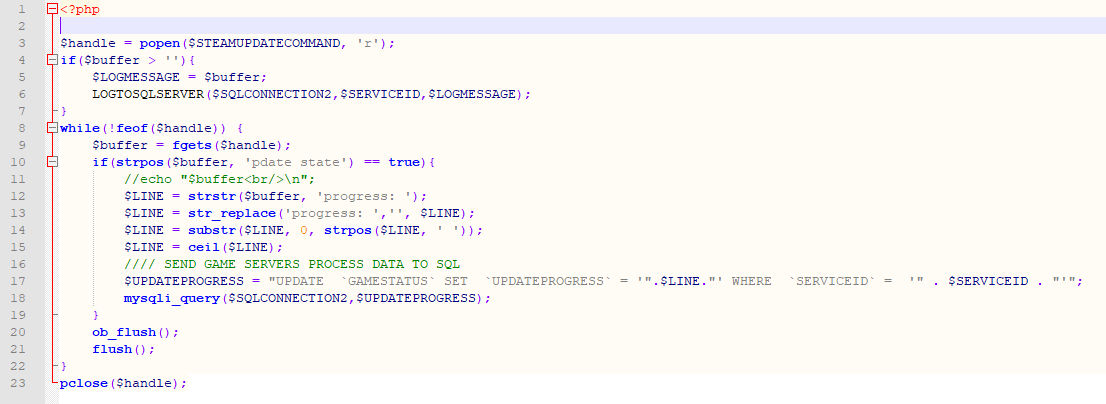

btw, it's better to share code with code blocks. So people can copy paste from it.
I did but when I used the BBCODE ` it is all messed up :) Lucky not too much there.
For Automation I don't think you're supposed to use it interactively. Everything you can enter into it in interactive mode can be supplied as command line flags - so you're expected to generate a full set of flags that does everything you're after. So you attempt to login, if the output indicates that it needs steam guard then you fully restart the process with the command line flag that includes the steam guard code.
How are you suppose to see the Steam Guard request if steamcmd doesn't write it to console in a readable way? How is your automation software going to know to stop the process and add the required info? It can't. The prompt for input does not write to the console in a readable way.
I had to find a workaround that literally reads the characters from an app owned console window because stamcmd does not make requests for Steam Guard code readable.
An automated app will just hang, unable to read the "Steam Guard code:" line from steamcmd output because of the way steamcmd writes to the console when it requests input. Your automation app has no (standard) way of reading that steamcmd output to know that steamcmd wants something.

To demonstrate run the command below to login (fake account name.) steamcmd will prompt for a password
steamcmd +login myusername +quit
Outputs to console:
Redirecting stderr to 'C:\EpochServer\steam\logs\stderr.txt'
Looks like steam didn't shutdown cleanly, scheduling immediate update check
[  0%] Checking for available updates...
[----] Verifying installation...
Steam Console Client (c) Valve Corporation - version 1637624355
-- type 'quit' to exit --
Loading Steam API...OK
Logging in user 'myusername' to Steam Public...
password:
Now run that same command but instead send the output to a text file (gets same output as an automatation script/app would)
steamcmd +login myusername +quit 1> passrequest.txt 2>&1
Outputs to passrequest.txt:
Steam Console Client (c) Valve Corporation - version 1637624355
-- type 'quit' to exit --
Loading Steam API...OK
Logging in user 'myusername' to Steam Public...
The output does not contain the password prompt (while steamcmd is waiting.) This is how it works for all prompts from steamcmd. They are not visible in the output while steamcmd is waiting for the input.
If you kill steamcmd (Ctrl+C while the above command is waiting) then... steamcmd will write the password prompt to the output file.
Steam Console Client (c) Valve Corporation - version 1637624355
-- type 'quit' to exit --
Loading Steam API...OK
Logging in user 'myusername' to Steam Public...
password: src\tier1\fileio.cpp (5086) : m_vecRegisteredWriters.Count() == 0
src\tier0\threadtools.cpp (3594) : Assertion Failed: Illegal termination of worker thread 'CFileWriterThread'
src\tier1\fileio.cpp (5146) : CFileWriterThread already exited
src\tier1\fileio.cpp (5146) : CFileWriterThread already exited
src\tier1\fileio.cpp (5146) : CFileWriterThread already exited
^C
Ah apologies I forgot that steam guard is the exception where you have to be able to read it line-by-line to know if it's required and feed the input. We use a proprietary technique to prevent steamcmd from buffering it's output so our software can read each line as it comes and prompt the user to supply the code, and then subsequently feed the steam guard code in via stdin. I can't tell you exactly how we achieve this, only that it is possible on both Windows and Linux.
But that doesn't really address that this shouldn't actually be necessary.
internal static class Program
{
    public static async Task Main()
    {
        using var process = Process.Start(new ProcessStartInfo
        {
            FileName = "steamcmd",
            Arguments = "+help +quit",
            UseShellExecute = false,
            RedirectStandardOutput = true,
            RedirectStandardError = true,
            CreateNoWindow = true
        });

        var buffer = new char[Console.BufferWidth];
        var outputRead = 1;
        var errorRead = 1;

        while (outputRead > 0 || errorRead > 0)
        {
            if (outputRead > 0)
            {
                outputRead = await process?.StandardOutput.ReadAsync(buffer, 0, buffer.Length)!;
                var output = outputRead > 0 ? new string(buffer, 0, outputRead) : null;
                Console.Write(output);
            }
            if (errorRead <= 0) continue;

            errorRead = await process?.StandardError.ReadAsync(buffer, 0, buffer.Length)!;
            var error = outputRead > 0 ? new string(buffer, 0, errorRead) : null;
            Console.Write(error);
        }

        await process?.WaitForExitAsync()!;
        Console.ReadKey();
    }
}
This pulls the steamcmd stdout in C#, you seem to get it in blocks but it works.

@LostBeard Did you see the solutions for at least the progress and other generic output with conpty/winpty/node-pty higher up in the thread. @ScottKane But does it get steam guard prompt and other prompts?
