

 ValveSoftware
LA Noire (110800)
Does not run, It gives an .Net framework error, that i need to enable something in the configuration panel. It is very unclear and does not say what it exactly means.

I have the exact same issue. Because Proton uses only 64-bit prefixes it is not easy to install the .Net packages. It seems that we need wine-mono, which is currently not included in Proton #18.


I was able to at least get the launcher to start.
I installed dotnet40 using winetricks, because dotnet35 is only installable in 32-bit wineprefixes.
Then I ran the game again and .NET Framework 3.5 started installing. However, after 4 hours I cancelled the installation as nothing was happening. I had to kill a few processes running via wine as the installation wasn't responding.
Then the game launcher appeared, requesting an update:
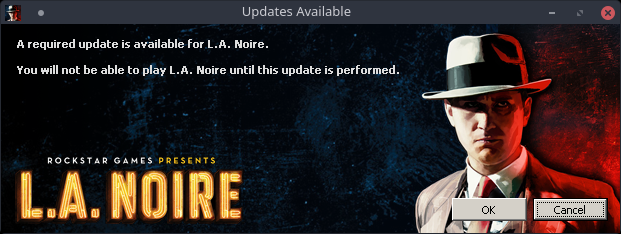
It downloaded the update and then showed an error that it was unable to query DirectX:
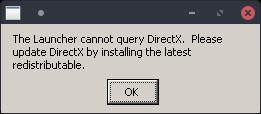
So I installed directx9 with winetricks. That got me to the actual launcher with the Launch Game and Options buttons. After pressing Launch Game the splash screen showing Loading... appeared for a few seconds, then the following error message showed up:
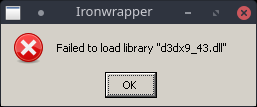
I wasn't able to get around that error message yet, however I checked system32 and the file definitely is present there.
tl;dr
To reproduce my current state:
Install dotnet40 and directx9 using winetricks. Launch the game and cancel the .NET Framework 3.5 installation.
EDIT: Actually don't abort the installation of .NET Framework 3.5 directly, only abort it when the installer is just idling. If the installation aborts with an error start the game again and attempt to repair the installation when steam runs the installation again. In my case it succeeded.
EDIT2: I was able to get around this error message by installing the following DirectX Runtime instead of directx9 via winetricks: https://www.microsoft.com/en-us/download/details.aspx?id=8109
Now the game just exits without any error message after the splash screen.
Proton log: https://gist.github.com/jkhsjdhjs/62392634949e72facc081b169569fc92

I get the following error when trying to launch LA Noire on KDE Neon 5.14 (based on Ubuntu 18.04):

This occurs during the first time setup.

- I installed dotnet35sp1 using winetricks instead of the .NET Framework 3.5 proposed by Steam
- manually installed dll - libraries using user.reg in the prefix folder, after run dxsetup.exe from 'la noire/3rd'
In the when I start, I cancel the installation of the .NET Framework 3.5 and the game starts with the following problems:
- When using Directx9 - Failed to create d3d resource. Please restart your computer.
- when using DIrectx11 - 5 minutes, the game hangs on the 'rockstar la noir' logo, after that it gives an: An unknown error has occurred. please restart the computer The '-windows' parameter suggested on the rockstar support site does not solve the problem.
Tested on Manjaro Linux Kernel: 4.19.13-1 CPU: AMD FX-8320E Eight-Core @ 8x 3.2GHz GPU: GeForce GTX 1060 3GB RAM: 10Gb

here are some logs from my system running into the same .NET 3.5 error.
gist: https://gist.github.com/fsyy/b5a9c0ecd22d26cbfce8faab8b0076f4
protonlog: steam-110800.log
proton version: 3.16-7 Beta


Hello, I can install .Net 3.5 with success if I use protontricks with Proton in XP mode.
Then I launched LaNoire, I obtained this message:
 So I installed the directx package located in the LANoire/3rd folder.
After that step, LaNoire Launcher launched ok but game does not launch, neither Directx9 or 11 mode.
So I installed the directx package located in the LANoire/3rd folder.
After that step, LaNoire Launcher launched ok but game does not launch, neither Directx9 or 11 mode.
I can play this game with Lutris for Wine 3.14 in directx11 (Steam Windows + DXVK).
I joined you my log file. steam-110800.log
https://gist.github.com/legluondunet/8570a65372c3f7b9fea9c365c449cc59

Here is what Lutris script do to launch the game: https://lutris.net/games/install/10782/view

With a manual install of .net3.5sp1 (3.5 still doesn't install for me) & following what the Lutris script does I can actually get the launcher to work, but that's as far as it goes. steam-110800.log https://gist.github.com/lucifertdark/584c14275612e8e3c4a8070d428d8a02

Hello,
Proton-4.2-3b now include wine-mono 4.8.2 i start the game from steam. The launcher LANLauncher.exe throw an exception :
Unhandled Exception: System.TypeLoadException: Could not load type of field 'DownloadManager.ArvatoDownloader:downloader' (0) due to: Could not load file or assembly 'SecureDownloadAPI, Version=1.4.3.19, Culture=neutral, PublicKeyToken=332190ce47338fa8' or one of its dependencies. at DownloadManager.LauncherApp.Init () [0x0007f] in <8c16e98b8a484b468ea882ae2d3e389e>:0 at DownloadManager.Program.Main (System.String[] args) [0x00068] in <8c16e98b8a484b468ea882ae2d3e389e>:0
i joined my log File steam-110800.log
the SecureDownloadAPI is an assembly from Rockstar Social Club or LANoire ? i mean that the SecureDownloadAPI is an assembly from GameShield IronWrap & Patcher
i have installed the game on my windows 7 32 bit and i never seen this assembly on my computer.

This bug has me stumped for exactly that reason. I have no idea where that assembly is supposed to come from.


This is same error Windows users also have, you need to install net3.5sp1manually as administrator to fix the issue. Not sure how to manage that in Wine/Linux.

I havn't had any luck with proton directly, neither d3d11 or 9 want to work even if I run this in the prefix
WINEPREFIX=~/.steam/steam/steamapps/compatdata/110800/pfx/ winetricks d3dx9_42 d3dx9_43 vcrun2008 dotnet35 dotnet35sp1 win7
Give or take the addition of d3d9x
Additionally give or take running the DXSETUP.exe in the "3rd" folder of the game install.
But here's a strange thing, it works perfectly fine under winesteam through lutris with the same winetricks setup. The difference being, I think, that winesteam lurtris uses some additional/modified winemono and gecko, in addition to running on wine version 5.0. I doubt gecko comes into play, and it seems possible but unlikely version 5.0 of wine holds the fix, but if we can find some way to use that modified winemono, that may be the key that's missing. Or there's something else at play with the setup that I'm missing, which is also a reasonable possibility.
Here's the link to the lutris installer for LA Noire in case that helps any. https://lutris.net/games/la-noire/
//edit for whatever the info is worth, I'm running ubuntu 19.04 x11 budgie

Compatibility Report
- Name of the game with compatibility issues: L.A. Noire
- Steam AppID of the game: https://steamdb.info/app/110800/
System Information
- GPU: GTX 760
- Driver/LLVM version: NVIDIA 440.59
- Kernel version: 5.5.4
- https://github.com/shoober420/linux-scripts/blob/main/home/shoober420/sysinfonvidia
- Proton version: 5.0-2
LOG: steam-110800.log
Symptoms
Crash at launch, it doesnt even get to the game launcher for me. Error during install as well.


with dotnetfx35 installed
steam-110800.log
Turn Windows features on or off is fixed by removing dotnetfx35 in the L.A Noire Folder
i installed dotnetfx35 via protontricks
for me i can't run it because of a direct x error.
 L.A_Noire_backtrace.txt
i think this is the error: 5493.823:0039:003a:fixme:msvcrt:__clean_type_info_names_internal (0x64222018) stub 5493.823:0039:003a:fixme:msvcrt:__clean_type_info_names_internal (0x60345094) stub 5493.823:0039:003a:fixme:msvcrt:__clean_type_info_names_internal (0x64209a88) stub 5493.823:0039:003a:fixme:msvcrt:__clean_type_info_names_internal (0x790b22cc) stub 5493.823:0039:003a:fixme:msvcrt:__clean_type_info_names_internal (0x6402f5e8) stub 5493.826:0039:003a:fixme:msvcrt:__clean_type_info_names_internal (0x7a3bec7c) stub

After a lot of tests I finally found a method to play the Steam version of this game on Linux.
I will explain you how even if it exceeds the scope of this discussion. First you have to install Dotnet 3.5sp1 with winetricks in a 64 bits wineprefix: winetricks dotnet35sp1
Then download this specific Wine version: I obtained positive results ONLY with Lutris Wine TKG, I tested all Wine TKG version from 4 to 4.6 (64 bits) with success. I can not test with superior TKG version because Lutris stopped to provide them and I don't know how to compile them myself.
Last thing: I can launch the game only with a Lutris TKG Wine version AND the game should be set in DirectX 11 mode. In DirectX 9, the game simply doesn't launch.
I tried different other Wine version, Proton versions, other forks, less or more recent, without success.
The question now is: what piece of code in Lutris Wine TKG version from 4 to 4.6 make this game playable on Linux? Someone has skills in Valve to answer this question and add L.A. NOIRE game compatibility to current Proton version?
I searched to continue my tests with more recent TKG builds > 5.x but I don't know (for the moment) how to compile it my self and I didn't find binaries.
If you own the Steam game, you could test my script install here: https://lutris.net/games/la-noire/
Hope this help.
Finally I also get the game running with Proton 5.0-6:
- protontricks 110800 -q dotnet35sp1
- cd $HOME/.steam/steam/steamapps/common/L.A.Noire
- protontricks -c '3rd/DXSETUP.exe /silent' 110800
- protontricks 110800 -q win10
- Options -> Renderer -> Directx 11
If you get "can't get line" crash you will need the fix mentioned under the Crash-to-desktop on Windows 8 section: https://www.pcgamingwiki.com/wiki/L.A._Noire

Finally I also get the game running with Proton 5.0-6:
1. protontricks 110800 -q dotnet35sp1

2. cd $HOME/.steam/steam/steamapps/common/L.A.Noire

3. protontricks -c '3rd/DXSETUP.exe /silent' 110800

4. protontricks 110800 -q win10

5. Options -> Renderer -> Directx 11
If you get "can't get line" crash you will need the fix mentioned under the Crash-to-desktop on Windows 8 section: https://www.pcgamingwiki.com/wiki/L.A._Noire
it worked!!! you are the best!
i also needed the crash to desktop fix ;) this is a better link, direct to the line ;) https://www.pcgamingwiki.com/wiki/L.A._Noire#Crash-to-desktop_on_Windows_8 thanks man, i will report it to Proton DB
after everything is set, i renamed the folder "3rd" to "3rd_" so the installer won't start
@legluondunet What you get after the steps? This site https://www.pcgamingwiki.com/wiki/L.A._Noire mentions a lots of problem with the game
Finally it works even with @barni2000 recipe and the fix from https://www.pcgamingwiki.com/wiki/L.A._Noire#Crash-to-desktop_on_Windows_8. In directx11 only but that's not very important. Thank you @barni2000
Bug: If you press escape at the Social Network sign in window, the mouse cursor disappears and never returns.
Download this file containing fixed cases.big.pc and out.wad.pc files.
Someone knows where come this files from? Are they legal?
Bug: If you press escape at the Social Network sign in window, the mouse cursor disappears and never returns.
Download this file containing fixed cases.big.pc and out.wad.pc files.
Someone knows where come this files from? Are they legal?
I think they (the 2 files) where extracted from a Rockstar windows 8 specific update. Some one wrote that if you open up the steam overlay and close it the mouse will work again.
Bug: If you press escape at the Social Network sign in window, the mouse cursor disappears and never returns.
Download this file containing fixed cases.big.pc and out.wad.pc files.
Someone knows where come this files from? Are they legal?
Maybe from this: https://support.rockstargames.com/articles/200149926/L-A-Noire-Patch-Notes-and-Manual-Links-to-Updates AFAIK they don't shipped the fix for the steam version. :(
$ protontricks -c '3rd/DXSETUP.exe /silent' 110800 /bin/sh: 1: 3rd/DXSETUP.exe: Exec format error Don't work for me(
