

 ValveSoftware
ONE PIECE: PIRATE WARRIORS 4 (1089090)
Compatibility Report
- Name of the game with compatibility issues: ONE PIECE: PIRATE WARRIORS 4
- Steam AppID of the game: 1089090
System Information
- GPU: AMD Radeon RX 580 Series
- Driver/LLVM version: Mesa 21.0.3
- Kernel version: 5.12.1-2-MANJARO
- Proton version: tested with 6.3-3 and 5.13-10
I confirm:
- [x] that I haven't found an existing compatibility report for this game.
- [x] that I have checked whether there are updates for my system available.
Symptoms
Starting the game leads to the following error message:
8001-0013 There is a problem with your graphics device. Please check the specifications or if your graphics drivers are installed.
Clicking "ok" closes the game.
Reproduction
Starting the game always leads to this.

Still happening with Proton experimental. Any info on what is causing this?


Same here. Going by the error message (note that I know nothing about proton), there either really is a problem with graphics support or whatever is being reported about graphics info to the game isn't what the game expects. The only error I see in the logs is in OPPW4_d3d11.log (it's also the last line of the log):
108:err: D3D11: CreateGeometryShaderWithStreamOutput: Rasterized stream not supported
I tried starting the game with winedbg_run (nothing reported, the backtrace at the point the warning dialog posted above looks unhelpful, some calls to ntdll coming from oppw.exe.) and looked at the steam log, as well as attached strace and tried to find something suspicious, but no dice. I'd like to investigate further but honestly have no idea what next steps would be?
edit: took a look with ghidra. Not sure if posting if I'm allowed to post anything related to that here.

Issue isn't limited to AMD GPU's; can replicate error w/ Nvidia 2080 Ti using Nvidia's 510.47.03 proprietary drivers

Ran game again on a whim, the game now launches, and one can get to the main menu, but all video clips past the Bandai logo show the rainbow error code:
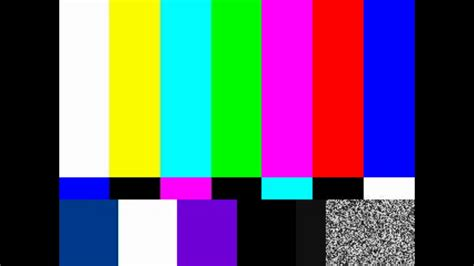
Starting the game ('Dramatic Log') will also show the rainbow error instead of the opening cutscene for about 3 seconds before gameplay starts. I'm guessing the narrative opening cutscene is supposed to be longer than 3 seconds and is supposed to have audio.
Using Proton Experimental and 510.60.2 on XOrg
One other thing found broken while trying the current Proton Experimental on 515.57 still that I forgot to highlight earlier: Gamepaad inputs don't work (Microsoft Xbox One Wireless, 8Bit Do Pro 2) Cutscenes while they no longer show the rainbow error code are still broken as they're skipped over
System Information
- GPU: RTX 3060
- Video driver version: 4.6.0 NVIDIA 575.57.08
- Kernel version: 6.14.6-106.bazzite.fc42.x86_64
- Link to full system information report as Gist: https://gist.github.com/GyomeiHimejima9906/0a738b09040c339c3e30f0e24c524a26
- Proton version: 1749849620 experimental-10.0-20250612c
i have this problem: when play any plasma application "doesn't exit" you can't click them (with mouse) after loading save bay you can see them (no with screenshot) log: steam-1089090.log
log (+x11,+x11drv,+x11drv_server,+x11drv_client,+xinput): steam-1089090+x11,+x11drv,+x11drv_server,+x11drv_client,+xinput.log
vedeos: https://github.com/user-attachments/assets/b0abdb9d-eb62-4cb7-8116-0a9ad0e04fb0 https://github.com/user-attachments/assets/cc90b80b-c2a5-48cd-817c-e9665b058f32
