

 ValveSoftware
Eternal Return (1049590)
Added log steam-1049590.log
Your system information
- Steam client version (build number or date): Feb 24 2021
- Distribution (e.g. Ubuntu): Arch (Fresh install. Linux and linux-zen kernels tried.)
- Opted into Steam client beta?: [Yes/No] Yes (Tried non beta also.)
- Have you checked for system updates?: [Yes/No] Yes
Protons tried: Experimental (as of Feb 24), 5.13-6, 5.13-5, 5.0-10, 4.11-13, 6.1-GE-2
Please describe your issue in as much detail as possible:
Eternal Return: Black Survival connects to Valve hosting or routing servers. Fails. Cannot connect to game servers. Go to server menu, see "Unable to confirm" next to each server, "Cannot find a server. Please check your internet connection." No other networking or multiplayer issues on machine. After title screen, tcpdump shows the game connecting via udp to Valve machines, mostly in Europe (I am on US East Coast), before always settling at the same site near Wichita Kansas, with an unknown ownership, 143.131.179.64. For the final 4.5-5.0 seconds of udp activity, my machine sends 100 byte packets to this site, the site sends 39 byte responses, every time. No further udp activity. UPnP, TCPv6, firewalls, port forwarding, NAT assignment, DNS choice do not effect failure of connection to Valve / Eternal Return servers.
Steps for reproducing this issue:
- Start game
- Monitor udp connections
- Check server menu for connection, or play first tutorial until completion (fails upon final task completion, syncing to servers)
- No connection, no ping, for any server

Hello @errorforever, we're tracking issues with games run with Proton in the Proton issue tracker, so I've transferred this issue here. Please add PROTON_LOG=1 %command% to the game's launch options and attach the generated $HOME/steam-$APPID.log to this issue report as a file. (Proton logs compress well if needed.)

Eternal Return: Black Survival
Issue transferred from https://github.com/ValveSoftware/Proton/issues/4695. @GentooCool posted on 2021-03-26T19:43:44:
Compatibility Report
- Name of the game with compatibility issues: Eternal Return: Black Survival
- Steam AppID of the game: 1049590
System Information
- GPU: GTX 2070 Super
- Driver/LLVM version: Nvidia 460.39 / LLVM 11.1.0
- Kernel version: 5.4.97
- Link to full system information report as Gist: https://gist.github.com/GentooCool/e4dc193cc1cf431f543255709a6b1cf1
- Proton version: 5.13.-6
I confirm:
- [X] that I haven't found an existing compatibility report for this game.
- [X] that I have checked whether there are updates for my system available.
Symptoms
Previously game was wonky -- crashed to desktop often while in lobby -- but for the most part, I could play entire matches. Worked with Proton 5.13 and with Proton 6.2GE
However, after the game's Mar 24 update, nothing works. Most Proton versions won't even load the game. The closest to success is unchecking "force specific Proton version". The game will load, get past splash screens, and right when it reaches the main lobby, will crash to desktop.
I've attached my log file. Hope you could help, and appreciate all Valve has been doing for gaming on Linux! You guys rock!
Reproduction
-Attempt A: force version Proton 5.13: game won't load. Steam goes from Play -> Stop -> Play again. -Attempt B: UNcheck specific Proton version: game will load, gets past splash screens, then crashes to desktop.
Your system information
- Steam Client Version: Apr 27, 2021; 1619570428
- Distribution (e.g. Ubuntu 18.04): Solus
- Link to your full system information (Help -> System Information) in a Gist: https://gist.github.com/jeffrey-xiao/727bda10f678304ec4b96db288043487
- Have you checked for system updates?: Yes
- Are you using the Steam Linux Runtime compatibility tool?: Yes
Please describe your issue in as much detail as possible:
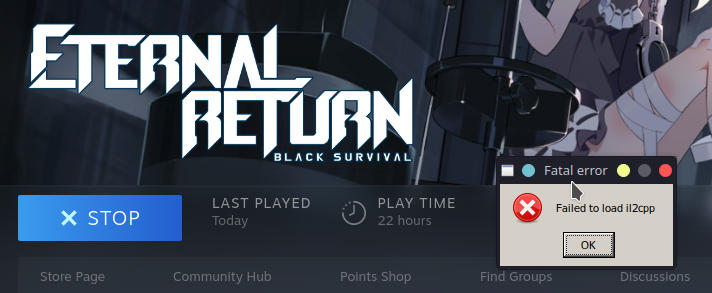
Launching the game with Proton 5.13-6 causes a pop up that says "Failed to load il2cpp". I get the same issue with Proton 6.3-2 and Experimental. Proton 5.0-10 immediately exits. If it's helpful, I can run other Unity games in Proton just fine.
I've attached the proton log when running with Proton 5.13-6.
Steps for reproducing this issue:
- Launch the game.

Eternal Return: Black Survival (#1049590): After 0.31.0/0.31/0a patch, game crashes with Fatal error: "Failed to load il2cpp"
Issue transferred from https://github.com/ValveSoftware/Proton/issues/4783. @tacklebox8 posted on 2021-04-28T23:48:26:
Compatibility Report
- Name of the game with compatibility issues: Eternal Return: Black Survival (build 0.31.0a)
- Steam AppID of the game: 1049590
System Information
- GPU: nvidia Quadro K3000M
- Driver/LLVM version: 418.181.07
- Kernel version: 4.19
- Link to full system information report as [Gist]: https://gist.github.com/tacklebox8/0fbab36520a1fd2413f8dafa654046c3
- Proton version: 6.3-2 (also happens using experimental)
I confirm:
- [x] that I haven't found an existing compatibility report for this game.
- [x] that I have checked whether there are updates for my system available.
Symptoms
Game crashes on load with Windows Fatal error message "Failed to load il2cpp". Problem did not occur with build 0.30.x. Another linux user on the ERBS discord reported the same issue.
Reproduction
Launch the game.
@sjTaylor commented on 2021-04-28T23:57:30:
I am the other Linux user mentioned in the discord. Additionally, someone else DM'd me so there's at least 3 of us.
System Information
- GPU: nvidia GTX 1070
- Driver Version: Driver Version: 460.67
- OS: Pop!_OS 20.04
- Proton version: 6.3-2 (Proton Experimental and 6.5-GE-2 too)
- Kernel version: 5.11.0-7612-generic (from
uname -a)
@jeffrey-xiao commented on 2021-04-29T00:35:29:
I also have the same issue and added a comment to #4653.
i confirm having the same error:
System Information: kireita@SOUCOUYANT OS: Manjaro 21.0.3 Ornara Kernel: x86_64 Linux 5.10.32-1-MANJARO Uptime: 14m Packages: 1641 Shell: bash 5.1.0 Resolution: 5760x2160 DE: KDE 5.81.0 / Plasma 5.21.4 WM: KWin GTK Theme: Breath [GTK2/3] Icon Theme: Flatery-Indigo-Dark Disk: 794G / 1,9T (44%) CPU: AMD Ryzen 7 2700X Eight-Core @ 16x 4.1GHz GPU: GeForce GTX 1060 6GB, GeForce GTX 1050

il2cpp error went away for a patch (0.31.2), but is now back in patch 0.32.0


I'm no longer getting the il2cpp error. however the game still fails to launch OS: Arch Kernel: 5.13.4-arch1-1 64-bit DE: KDE 5.84.0 / Plasma 5.22.3 WM Kwin CPU R9 3900XT Gpu: RX580 4gb

Hello, getting same error also fail to load il2cpp.
OS: Ubuntu 20.04
Proton version: 6.3-6
CPU: i7-8th gen
RAM: 32gb
GPU: Nvdia GTX 1050ti

Wanted to try out this game and getting the same error. Environment is:
OS: Debian 5.14.6-3 (2021-09-28)
Proton Version(s): Experimental, 6.3-7, 5.13-6
CPU: Ryzen 5800x
RAM: 32gb DDR4 3600
GPU: AMD Vega64 (mesa drivers)
Incidentally I tried the 32bit Beta option offered by the developers and while the game launches, it is an out of date build when it attempts to authenticate with the server so there's no way to play currently.

Eternal Return (1049590) HTTP error
Issue transferred from https://github.com/ValveSoftware/Proton/issues/9222. @NebulaFox posted on 2025-11-14T20:47:44:
Compatibility Report
- Name of the game with compatibility issues: Eternal Return
- Steam AppID of the game: 1049590
System Information
- GPU: AMD Radeon 7900 XTX
- Video driver version: Mesa 25.2.6
- Kernel version: 6.17.7
- System Information: https://gist.github.com/NebulaFox/aed276281ca1edd358befb2a65243bfc
- Proton version: 10.0-3, 9.0-4
I confirm:
- [X] that I haven't found an existing compatibility report for this game.
- [X] that I have checked whether there are updates for my system available.
Symptoms
The game launches seems to crash on doing http calls. Works on Proton 9.0-4, crashes on 10.0-3, and fails to do http calls on proton-ge-10-25.
Added some Unity game crash reports as well.
Reproduction
Launch game.
Hello @NebulaFox, wine: Call from 00006FFFFFC0D0C7 to unimplemented function coremessaging.dll.DllGetActivationFactory, aborting looks like the line of interest from your Proton log.
@NebulaFox We think we might have seen this crash once, but now cannot reproduce and the game is working on Proton 10. Could you please try Proton - Experimental and get a new log of the failure if you still see the same crash on launch? And could you also get a log of the game successfully launching on Proton 9?
Just in case it is a network issue - could you get the logs with PROTON_LOG=+wininet,+winhttp,+winsock,+steam,+steamclient,+bcrypt,+secur32,+crypt,+cryptnet,+iphlpapi,+nsi %command%

Have tested again with Proton - Experimental, and everything does seem to be working. Not sure what changed, but thanks.
