
Proton
 Proton copied to clipboard
 ValveSoftware
Garry's Mod (4000)
Compatibility Report
- Name of the game with compatibility issues: Garry's Mod x86_64 branch
- Steam AppID of the game: 4000
System Information
- GPU: 1050 Ti
- Driver/LLVM version: nvidia 430.26
- Kernel version: 5.1.15
- Link to full system information report as Gist: Here
- Proton version: 3.16-9 Beta
I confirm:
- [ X] that I haven't found an existing compatibility report for this game.
- [ X] that I have checked whether there are updates for my system available.
Symptoms
Game stuck on loading screen.
Reproduction
I found a error line in log: 7092.239:0024:0025:err:steamclient:create_win_interface Don't recognize interface name: SteamMatchGameSearch001
And i searched it. Seems it's fixed in newer version proton -here- but Proton 4.x which is doesn't include CEF patch. Proton developers merged this into -here- Proton 3.15+. Garry's Mod x86_64 uses Chromium Embedded Framework which is game need it to render html main menu and in-game things. (also i tried to play on Proton 4.x. Yes, game launched but CEF not worked as expected)
Log file

I tried to launch with latest steam dll and it worked but CEF still not works. CEF patch needs to be merged.
Hello @ardadem, please add a Proton log of the game run with Proton 4.2.

Proton version: 4.2-9 steam-4000.log Also in-game folder exist chromium log, may useful: chromium.log
GloriousEggroll added wine stagging patches to him custom proton build. Now it's works perfectly with him proton build.
Proton 4.11-3

Proton 4.14-GE-2

VrMod For Garry's Mod
Issue transferred from https://github.com/ValveSoftware/Proton/issues/3777. @benrob0329 posted on 2020-04-18T04:36:32:
Compatibility Report
- Name of the game with compatibility issues:
- Steam AppID of the game: Garry's Mod (ID 4000) with the VrMod (https://steamcommunity.com/sharedfiles/filedetails/?id=1678408548)
System Information
- GPU: Nvidia GTX 980ti
- Driver/LLVM version: nvidia 440
- Kernel version: 5.5
- Proton version: 5.0-6
- System Information: https://gist.github.com/benrob0329/6d3aad583d043cc6e10ae2096995525b
I confirm:
- [x] that I haven't found an existing compatibility report for this game. (in this configuration)
- [x] that I have checked whether there are updates for my system available.
Symptoms
The mod is Windows-only, but seems to work for those users just fine. However upon starting it in Proton:
] vrmod_start

[VRMod] lua/autorun/vrutil.lua:390: g_sharedTexture is null
  1. VRMOD_ShareTextureFinish - [C]:-1
   2. VRUtilClientStart - lua/autorun/vrutil.lua:390
    3. unknown - lua/autorun/vrutil.lua:47
     4. unknown - lua/includes/modules/concommand.lua:54

CShaderAPIDX8::BlitTextureBits: couldn't lock texture rect or use UpdateSurface
(these continue for some time)
I have attempted to adjust library overrides, use a real d3d9 library (via Proton tricks) and generally take stabs in the dark but it has not led to any new information unfortunately.
Reproduction
- install Gmod
- Force Use Of Proton
- Install The VrMod As Per Link Above
- Install VrMod Module As Per Workshop Page Instructions
- Use Console To Start VR Mode
I've investigated the behavior of VRMod a little bit and I think I can see where the problem comes from.
As far as I can tell the Lua script component of the addon (vrmod.lua, normally stored inside of a .gma archive and downloaded from the Steam Workshop) calls GetRenderTarget, a function in the Garry's Mod Lua API that gets a render target or creates the render target if it does not already exist. This is used to create the frame that is used for VR. However this function does not return the raw pointer to the resource, which the VRMod DLL (gmcl_vrmod_win32.dll/gmcl_vrmod_win64.dll, downloaded from an external GitHub linked on the workshop page) requires in order to function. In order work around this and to acquire the raw pointer the VRMod DLL uses a library called MinHook to temporarily replace the DirectX 9 CreateTexture function in the shaderapidx9.dll DLL with a thin wrapper. This thin wrapper calls the original CreateTexture function but collects the result for further use in the VRMod DLL. The wrapper is hooked immediately before the Lua script calls GetRenderTarget and unhooked immediately afterwards.
The problem, I suspect, comes from the way the address of CreateTexture is determined. First GetModuleHandleA is used to get shaderapidx9.dll, then GetProcAddress to get a function called CreateInterface, which is then called to create some pointer. The result of CreateInterface is then passed through some fairly complex pointer arithmetic to compute the actual address of CreateTexture. The use of pointer arithmetic (rather than named types, structure members, etc.) and the fact that I cannot find any documentation for the CreateInterface function leads me to believe that this code is interfacing with implementation details which WineD3D/DXVK do not replicate exactly for obvious reasons.
The code in question can be found between lines 143 and 155 of the VRMod DLL source code here: https://github.com/catsethecat/vrmod-module/blob/8df57db09892e18e6b4f0287bc98755f0cf83de5/src/source.cpp I suspect that modifying the VRMod DLL itself (or perhaps using a native shaderapidx9.dll?) would be the only way to get this mod to work on Linux, as replicating such implementation details of DirectX seems likely to be outside of the scope of the WineD3D/DXVK projects.

Chromium menu still not working, i tried using that proton ge version that was specified but instead of game i get no steamuser error...


There seems to be a regression going from proton both 5.0-10 and 5.13-6 have greater performance compared to 6.3-5 and experimental:
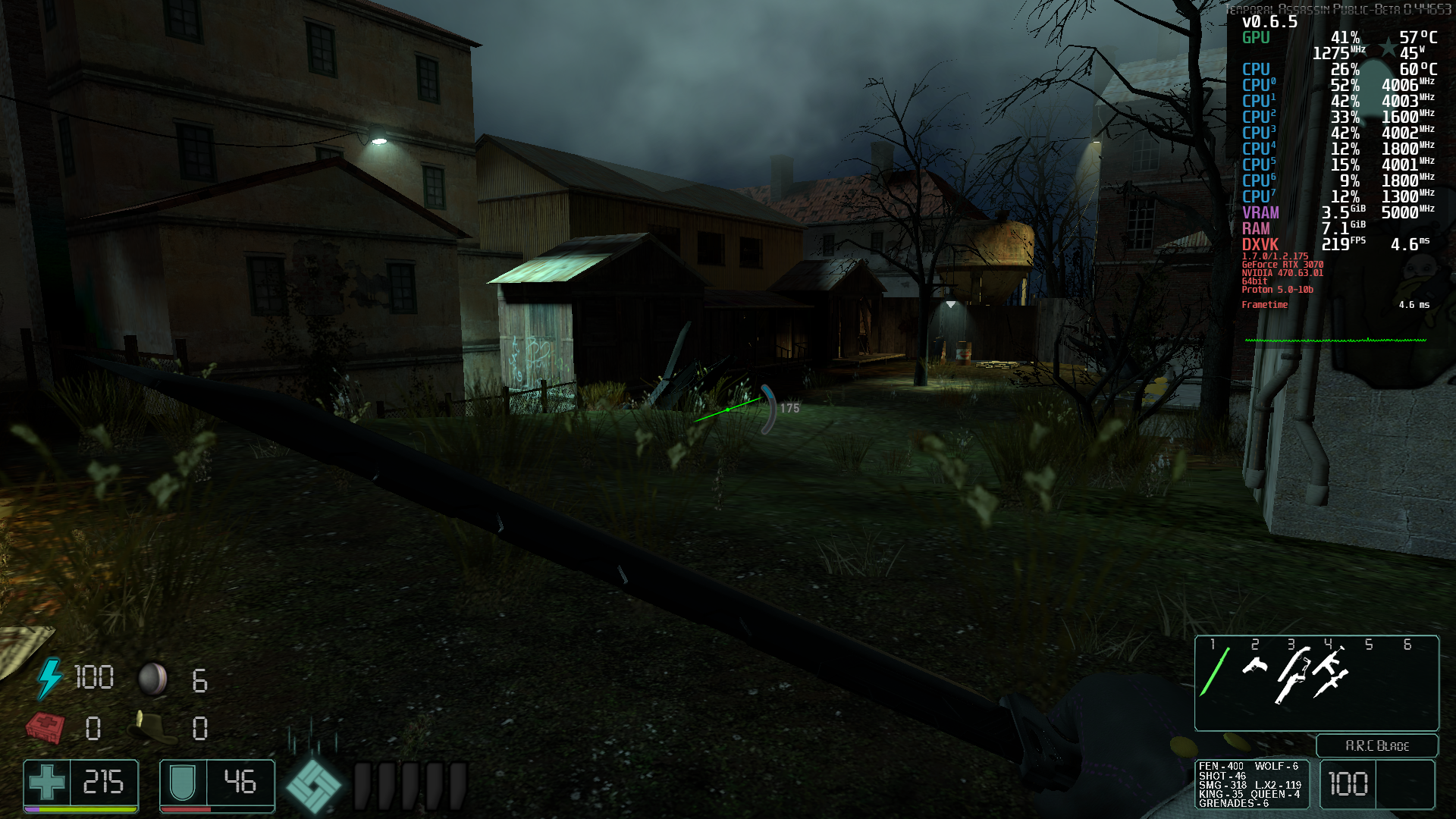
 Note it's not related to DXVK as WineD3D has the same issue for the protons, however there seems to be something with Wine/Proton that affects this game and doesn't have proper gpu utilization resulting in awful frame pacing and frame timing it just jumps up and down as you move around the map.

Hello @kodatarule, please add PROTON_LOG=1 %command% to the game's launch options, reproduce the regression with Proton 6.3, and attach the generated $HOME/steam-$APPID.log to this issue report as a file. (Proton logs compress well if needed.) Also, please copy your system information from Steam (Steam -> Help -> System Information) and put it in a gist, then include a link to the gist in this issue report.
The log got incredibly big, but with the log the performance got even worse steam-4000.tar.gz And here's the gist: https://gist.github.com/kodatarule/819698738f3b4a07e314c8c5c586455f EDIT: The log is done by using Proton 6.3-5.
@kodatarule Could you test Proton 6.3-6c and see if the excessive lag is gone? In my testing, it seems like it was fixed due to some improvements in the last release :)

For the main game it seems fixed, but for the mod temporal assassin the regression is still there.
@kodatarule Sweet! Thank you for testing that :) Could you give me a hint about how to get/use the temporal assassin mod? I don't see it in the Steam workshop, and the one server that mentioned temporal assassin was not an open server.
You can git clone it, but it requires git-lfs for the bigger files from their gitlab page and then you just copy and paste files + overwrite - https://gitlab.com/B1gJohnson/temporal-assassin
@kodatarule Thank you for the info! Unfortunately I'm not seeing a big difference between 6.3-6 and 5.13-6 with that mod. The general fps fluctuation when I was on a server was larger than any potential difference that I saw which makes it very hard to dig into :/
CEF in the x86_64 branch appears to work okay with stock Wine (main menu works), but it's still broken with Proton. Definitely a Proton bug. Or perhaps something to do with pressure-vessel.

Compatibility Report
- Name of the game with compatibility issues: Garry's Mod
- Steam AppID of the game: 4000
System Information
- GPU: AMD ATI Radeon RX 5500/5500M / Pro 5500M
- Driver/LLVM version: Mesa 21.3.1
- Kernel version: 5.15.7-arch1-1
- Proton version: 6.3-8
I confirm:
- [ ] that I haven't found an existing compatibility report for this game.
- [x] that I have checked whether there are updates for my system available.
Symptoms
Garry's Mod crashes upon startup with the "Steam Error: No SteamUGC" error message every time despite having the Steam client being up to date.
Reproduction
Launch Garry's Mod.
Log file

Helo @ge4rsh0t, err:steamclient:create_win_interface Don't recognize interface name: STEAMUGC_INTERFACE_VERSION016 looks like the line of interest from your log. This hints that the game bumped the version of steamworks they're using and lsteamclient in Proton will need a refresh.
I modified the start script for Proton to bypass pressure-vessel. CEF still failed to start. Unless there's some other sandboxing I'm not aware of, I've ruled that out as being a problem. Last known working version was any Proton before 5.13, particularly the GE fork, but Garry's Mod will no longer start on older Proton versions, and the performance was unacceptable anyway.
Hello @ge4rsh0t, it looks like lsteamclient got an update in Proton Experimental 2022-01-03. Please retest.
@kisak-valve I have compiled this particular version of Proton Experimental and I can confirm that the game is now able to launch with this version of Proton. Thanks.
Here is the log file if necessary: steam-4000.log
@kisak-valve Proton on x86_64 branch (chromium) doesn't show the main menu due to CEF. Any assistance?

@kisak-valve Proton on x86_64 branch (chromium) doesn't show the main menu due to CEF. Any assistance?
This has been an issue for some time now, would love to know why exactly this happens - Other CEF apps seem to work properly

Compatibility Report
- Name of the game with compatibility issues: Garry's Mod
- Steam AppID of the game: 4000
Tested on both beta branch x86-64 and on normal stable branch.
System Information
-
GPU: NVIDIA GeForce GTX 1650 SUPER
-
Driver/LLVM version: 515.48.07
-
Kernel version: 5.17.14-1-MANJARO 64-bit
-
Link to full system information report as Gist: https://gist.github.com/Fesiug/515fa93d2f6388c8e34b30516fe468f2
-
Proton version: 7.0-2
-
This is done on a BTRFS partition.
I confirm:
- [ ] that I haven't found an existing compatibility report for this game.
- [x] that I have checked whether there are updates for my system available. steam-4000.zip
Symptoms
Lua auto-refresh doesn't work, making development extremely lengthy and difficult. Editing a Lua file won't refresh the contents in it and requires a long map change.
Reproduction
Putting this file into the GarrysMod/garrysmod/lua/autorun/client directory and then modifying and saving it would change the output in the developer console in Windows versions. This is not done under Proton. TestFile.zip

Chromium seems to be working on the x86-64 branch with Proton Experimental now.
Edit: Oddly enough it works on my Steam Deck but the menus still don't show up on my PC with an Nvidia card, both running Arch.

Even with Proton Experimental, Garry's Mod still wont show CEF menu on the x86-64 branch. Using Ryzen 5 2600 & AMD RX 5600 XT, Archlinux.
[1216/205251.319:ERROR:sandbox_policy_base.cc(359)] Failed to add sandbox rule.
error = 2, subsystem = 0, semantics = 0, pattern = 'Z:\home\david\.local\share\S
team\steamapps\common\GarrysMod/chromium.log'
[1216/205251.328:WARNING:gpu_process_host.cc(1262)] The GPU process has crashed
1 time(s)
Based on a Google search, this is caused by symlinks on the command-line for CEF. If Proton makes extensive use of them in its sandbox, this could narrow it down and also explain why it works with normal Wine.
Thanks to the above comment. I've only done this once and my girlfriend also confirmed it, but I was able to get the CEF menu on x86-64 working in Proton Experimental. I've tried to type it out in a readable format.
Steps inside of steam are:
- Enable Proton (Experimental or 7.0)
- Choose BETA -> "x86-64"
Steps outside of steam are:
cd /path/to/steam/compatdata/4000/pfx- Move your entire game folder from
/path/to/steamapps/common/GarrysModto the newdrive_c/GarrysMod(C:\GarrysMod) ln -s /path/to/steamapps/compatdata/4000/pfx/drive_c/GarrysMod /path/to/steamapps/common/GarrysModThe above creates a symlink from the steamapps/common/GarrysMod to the new drive_c/GarrysMod (C:\GarrysMod)
Edit - Removed unneeded steps, added step to enable Proton, cleaned up text