

 ValveSoftware
Counter-Strike 2 (730)
Compatibility Report
- Name of the game with compatibility issues: Counter-Strike Global Offensive
- Steam AppID of the game: 730
System Information
- GPU: AMD Radeon R7 445
- Driver/LLVM version: Mesa 18.2
- Kernel version: 5.13
- Link to full system information report as Gist:
- Proton version: 4.2-4
I confirm:
- [ ] that I haven't found an existing compatibility report for this game.
- [ ] that I have checked whether there are updates for my system available.
Symptoms
The process starts but game doesn't show up.
Reproduction
-Go to the game tab -Force the game to be played via proton 4.2-4 -Download -Click play
In the log it says: 14595.342:0027:0035:err:ntdll:RtlpWaitForCriticalSection section 0x7bcf7da0 "../../../../proton/wine/dlls/ntdll/loader.c: loader_section" wait timed out in thread 0035, blocked by 0028, retrying (60 sec) .... and the continues to retry.


I would like to see Proton support all "native" source-based titles some day. The internal DirectX9 to OpenGL leaves a lot to be desired in comparison to D9VK and Gallium Nine.

I would like to see Proton support all "native" source-based titles some day. The internal DirectX9 to OpenGL leaves a lot to be desired in comparison to D9VK and Gallium Nine.
Hmmm. But wine translates windows API calls to POSIX and it will be more slowly than native run. Wine run: Game -> WinAPI -> POSIX Native run: Game -> POSIX
Correct me if I'm wrong
@qmmp123 You're technically not wrong, but with the notable additions, such as esync and now fsync, translation of Windows API calls should be fast up to a point where legacy translation layers for DirectX9/11 bottleneck Wine itself. If you can, try to play Garry's Mod, which is one of Source games that work with Proton, using D9VK, the recent addition to Proton 4.11, or Gallium Nine Standalone that is easily installable via Protontricks.
@Bryophyllum I have spoken with some game developers. They said version of directx game may have more optimization than OpenGL version. I meant it is problem in game code . Neither DirectX nor OpenGL does not affect on it. Sorry for english.
Demo viewer from pre 2013 is not working
Issue transferred from https://github.com/ValveSoftware/csgo-osx-linux/issues/2176. @Adenis890 posted on 2019-09-13T04:40:06:
Your system information
- System information from steam (
Steam->Help->System Information) in a gist: https://gist.github.com/Adenis890/51f0c2f46b54ee44d2966713d640481d - Have you checked for system updates?: [Yes/No] Yes
Please describe your issue in as much detail as possible:
Describe what you expected should happen and what did happen. Please link any large pastes as a Github Gist.
So I wanted to try the old csgo from 2013 (on steam, right click csgo, properties, beta and the demo viewer). After i installed it, i tried opening it and it gave me an error and when i tried it with Proton the game opened and it was just a black screen. I remember on Windows i had to open it from the steam folder csgo.exe but here you can't do that. I know it's not a big issue, and it's no longer a supported version but i was thinking that maybe someone knows a solution.

GPU: Nvidia GTX950M Driver: 435.21 Game fails to launch. Creates a black screen and displays an error message box with the following:
Failed to initialize NVAPI with error (0xFFFFFFFE), which is required when running on NVIDIA hardware. Your drivers may be corrupt or out of date.

Game seems to work fine in Proton with D9VK. However, VAC doesn't allow you to play online.
@kisak-valve Is there anything that could be done about? It likely offers much better CPU performance than the OGL port, especially in Danger Zone.

Game launches as a black screen and then crashes with NVAPI error. Tried D9VK, no luck.
Is there anything that could be done about? It likely offers much better CPU performance than the OGL port, especially in Danger Zone.
I'm sitting at 300 FPS @ 4k fullscreen max settings on native. Performs great.


@kiroma Try to update your drivers or reinstall it
Should I also reinstall my drivers?? Every other game runs.
@tsalwierz I think your client missed some libs. Try to launch steam via console and see logs
Compatibility Report
- Name of the game with compatibility issues: Counter-Strike: Global Offensive
- Steam AppID of the game: https://steamdb.info/app/730/
System Information
- GPU: GTX 760
- Driver/LLVM version: NVIDIA 440.44
- Kernel version: 5.4.6
- https://github.com/shoober420/linux-scripts/blob/main/home/shoober420/sysinfonvidia
- Proton version: 4.11-11
Symptoms
Error about VAC after launch, just like @aufkrawall and @xDShot mentioned.
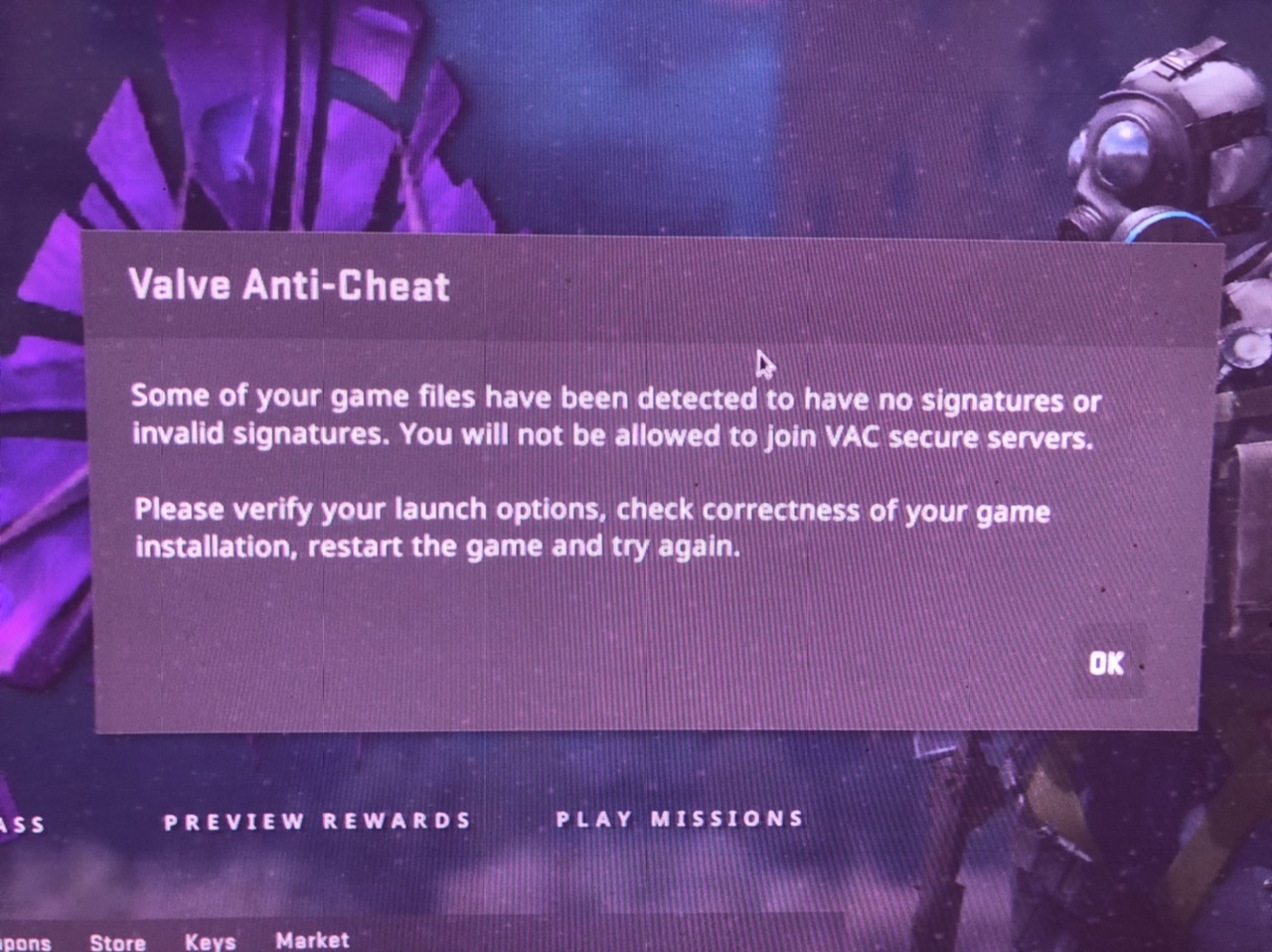
Reproduction
Launch the game
@qmmp123
LOGS: steam-730-d9vk.log "PROTON_USE_D9VK=1" steam-730.log

Demo viewer from pre 2013 is not working
Issue transferred from ValveSoftware/csgo-osx-linux#2176. @Adenis890 posted on 2019-09-13T04:40:06:
Your system information
- System information from steam (
Steam->Help->System Information) in a gist: https://gist.github.com/Adenis890/51f0c2f46b54ee44d2966713d640481d- Have you checked for system updates?: [Yes/No] Yes
Please describe your issue in as much detail as possible:
Describe what you expected should happen and what did happen. Please link any large pastes as a Github Gist.
So I wanted to try the old csgo from 2013 (on steam, right click csgo, properties, beta and the demo viewer). After i installed it, i tried opening it and it gave me an error and when i tried it with Proton the game opened and it was just a black screen. I remember on Windows i had to open it from the steam folder csgo.exe but here you can't do that. I know it's not a big issue, and it's no longer a supported version but i was thinking that maybe someone knows a solution.

demo_viewer - for pre 2013/1/9 demos dont work
Issue transferred from https://github.com/ValveSoftware/csgo-osx-linux/issues/2530. @tanjilk posted on 2020-09-14T08:54:17:
-
System information from steam in a gist: https://gist.github.com/tanjilk/a15210f9c81c1d41171bddf42cbb9c16
-
Have you checked for system updates?: Yes
Please describe your issue in as much detail as possible:
Hello, id like to play the old csgo selecting the beta as here

I forced the use of specific Steam Play compatibility tool with Steam Linux Runtime as here
 And if i run the game it appears that

Also, i tried with all proton versions
 And if i run the game with proton, i recieve an blank screen and it exits after like 30 seconds.
I am getting a FATAL ERROR: Failed to connect with local Steam Client process! error with any proton version. I validated / reinstalled the game, but it didn't do the trick.
I am getting a
FATAL ERROR: Failed to connect with local Steam Client process!error with any proton version. I validated / reinstalled the game, but it didn't do the trick.
Any other games works?
Well I tried TF2, and although I get the common "insecure mode" error message when trying to connect to a server, the game at least launches... Outer Wilds works too, but I don't know if that game even checks for the Steam client.
@tanjilk ya I get the same error when I try to run the game via proton after I discovered that the native linux version also broke. The latest update really did a number on the game.

@tanjilk ya I get the same error when I try to run the game via proton after I discovered that the native linux version also broke. The latest update really did a number on the game.
Are you talking about the counter strike old version?
@kisak-valve is it a general problem with overwatch or is it just broken on linux? I can download and click "review evidence" then it loads the map and as soon as it should open the game I'm back on the main menu.
already re-validated files.
**** Unable to localize '#SFUI_Lobby_StatusAwaitingLocalAc' on panel ''
**** Unable to localize '#SFUI_Lobby_StatusAwaitingLocalAc' on panel ''
**** Unable to localize '#SFUI_Lobby_StatusAwaitingRemoteA' on panel ''
**** Unable to localize '#SFUI_Lobby_StatusAwaitingRemoteA' on panel ''
**** Unable to localize '#SFUI_Lobby_StatusAwaitingRemoteA' on panel ''
**** Unable to localize '#SFUI_Lobby_StatusAwaitingRemoteA' on panel ''
Unknown command "spec_autodirector"
**** Unable to localize '#matchdraft_phase_action_wait' on panel 'id-map-draft-phase-wait'
**** Unable to localize '#DemoPlayback_Restart' on panel descendant of 'HudDemoPlayback'
**** Unable to localize '#DemoPlayback_Back' on panel descendant of 'HudDemoPlayback'
**** Unable to localize '#DemoPlayback_Pause' on panel descendant of 'HudDemoPlayback'
**** Unable to localize '#DemoPlayback_Slow' on panel descendant of 'HudDemoPlayback'
**** Unable to localize '#DemoPlayback_Play' on panel descendant of 'HudDemoPlayback'
**** Unable to localize '#DemoPlayback_Fast' on panel descendant of 'HudDemoPlayback'
**** Unable to localize '#DemoPlayback_Next' on panel descendant of 'HudDemoPlayback'
**** Unable to localize '#Panorama_CSGO_Spray_Cursor_Hint' on panel 'RosettaInfoText'
ChangeGameUIState: CSGO_GAME_UI_STATE_MAINMENU -> CSGO_GAME_UI_STATE_LOADINGSCREEN
Playing demo from myassignedcase.evidence.
PNG load error Interlace handling should be turned on when using png_read_image
Error: Material "___fillrate_0" uses unknown shader "FillRate"
Error: Material "___debugnormalmap_1" uses unknown shader "DebugNormalMap"
Error: Material "___debugdrawenvmapmask_2" uses unknown shader "DebugDrawEnvmapMask"
Error: Material "___debugdepth_3" uses unknown shader "DebugDepth"
Error: Material "___debugdepth_4" uses unknown shader "DebugDepth"
Error: Material "debug/debugluxels" uses unknown shader "DebugLuxels"
Error! Variable "$phongboost" is multiply defined in material "models/player/custom_player/econ/body/tm_jungle_raider/tm_jungle_raider_body_varianta"!
CMaterial::PrecacheVars: error loading vmt file for fmpone/newcache/nc_cinderblock/dizzy_cinderblock_color
CMaterial::PrecacheVars: error loading vmt file for models/darnias/practice_map/3dsky/gray
CMaterial::PrecacheVars: error loading vmt file for models/darnias/practice_map/3dsky/white
CMaterial::PrecacheVars: error loading vmt file for fmpone/newcache/nc_bluedoor/nc_bluedoor
CMaterial::PrecacheVars: error loading vmt file for fmpone/newcache/nc_bluedoor/nc_bluedoor2
SignalXWriteOpportunity(3)
ChangeGameUIState: CSGO_GAME_UI_STATE_LOADINGSCREEN -> CSGO_GAME_UI_STATE_INGAME
ChangeGameUIState: CSGO_GAME_UI_STATE_INGAME -> CSGO_GAME_UI_STATE_INGAME

Host_Error: DataTable_ParseClientTablesFromBuffer failed.
EDIT: 1392 fixes it, thx a lot

@kisak-valve @alexvalve @jeffmvalve @VivekValve the latest update 1395 breaks Linux compatibility and CSGO doesn't start anymore. works on 1391(beta) and 1392(release). using Arch Linux with latest (testing repo) packages. works flawlessly with older versions.
(1391)https://gist.github.com/romanstingler/036610d877e086fed0d5372fa034b968 (1395) https://gist.github.com/romanstingler/77dd654cf696be32d4f6646d30b39e7f
on the first glance the latest version does not output
failed to dlopen /home/blackout/.local/share/Steam/steamapps/common/Counter-Strike Global Offensive/bin/shaderapidx9_client.so error=/home/blackout/.local/share/Steam/steamapps/common/Counter-Strike Global Offensive/bin/shaderapidx9_client.so: wrong ELF class: ELFCLASS32
 failed to dlopen /home/blackout/.local/share/Steam/steamapps/common/Counter-Strike Global Offensive/bin/localize_client.so error=/home/blackout/.local/share/Steam/steamapps/common/Counter-Strike Global Offensive/bin/localize_client.so: wrong ELF class: ELFCLASS32
Created D3D9 device successfully
but outputs
No cached sticky mapping in ActivateActionSet.Installing breakpad exception handler for appid(steam)/version(1638464786)
It would also be much easier if you could open the console and there wouldn't be like 10000 lines of error during 1 short match
PS: verifying files doesn't help :)
Apparently someone forgot to add panorama_gl_client.so https://github.com/ValveSoftware/csgo-osx-linux/issues/2868
CS:GO won't launch on proton
Issue transferred from https://github.com/ValveSoftware/steam-for-linux/issues/8749. @superSTA101 posted on 2022-08-18T15:40:40:
Distro: EndeavourOS (based on arch)
CS:GO won't launch via proton and replies with a error message (attachment).
Yes i have everything up to date.

CS:GO won't launch on proton
Issue transferred from ValveSoftware/steam-for-linux#8749. @superSTA101 posted on 2022-08-18T15:40:40:
Distro: EndeavourOS (based on arch)
CS:GO won't launch via proton and replies with a error message (attachment). Yes i have everything up to date.
same issue. same distro. everything is up to date
Using the steam flatpak because of glibc for rogue company eac

Counter-Strike 2 is receiving a VAC warning and crashing on the loading screen when launched in practice mode.
Issue transferred from https://github.com/ValveSoftware/Proton/issues/7068. @aarshparashar posted on 2023-09-02T13:47:32:
Console output
aarsh@aarsh-Mi-NoteBook-Horizon-Edition-14:~$ steam
steam.sh[14433]: Running Steam on ubuntu 23.04 64-bit
steam.sh[14433]: STEAM_RUNTIME is enabled automatically
setup.sh[14501]: Steam runtime environment up-to-date!
steam.sh[14433]: Steam client's requirements are satisfied
[2023-09-02 19:09:22] Startup - updater built Jul 28 2023 18:44:09
[2023-09-02 19:09:22] Startup - Steam Client launched with: '/home/aarsh/.steam/debian-installation/ubuntu12_32/steam' '-nominidumps' '-nobreakpad'
09/02 19:09:22 Init: Installing breakpad exception handler for appid(steam)/version(1690583737)/tid(14568)
[2023-09-02 19:09:22] Loading cached metrics from disk (/home/aarsh/.steam/debian-installation/package/steam_client_metrics.bin)
[2023-09-02 19:09:22] Using the following download hosts for Public, Realm steamglobal
[2023-09-02 19:09:22] 1. https://client-update.akamai.steamstatic.com, /, Realm 'steamglobal', weight was 1000, source = 'update_hosts_cached.vdf'
[2023-09-02 19:09:22] 2. https://cdn.cloudflare.steamstatic.com, /client/, Realm 'steamglobal', weight was 1, source = 'update_hosts_cached.vdf'
[2023-09-02 19:09:22] 3. https://cdn.steamstatic.com, /client/, Realm 'steamglobal', weight was 1, source = 'baked in'
[2023-09-02 19:09:22] Verifying installation...
[2023-09-02 19:09:22] Verification complete
XRRGetOutputInfo Workaround: initialized with override: 0 real: 0xf08a49c0
XRRGetCrtcInfo Workaround: initialized with override: 0 real: 0xf08a31f0
GetWin32Stats: display was not open yet, good
GetWin32Stats: display was not open yet, good
steamwebhelper.sh[14576]: Runtime for steamwebhelper: defaulting to /home/aarsh/.steam/debian-installation/ubuntu12_64/steam-runtime-heavy
steamwebhelper.sh[14576]: glibc >= 2.34, partially disabling sandbox until CEF supports clone3()
CAppInfoCacheReadFromDiskThread took 18 milliseconds to initialize
/usr/share/themes/Breeze/gtk-2.0/widgets/entry:70: error: unexpected identifier 'direction', expected character '}'
/usr/share/themes/Breeze/gtk-2.0/widgets/styles:36: error: invalid string constant "combobox_entry", expected valid string constant
BRefreshApplicationsInLibrary 1: 1ms
BuildCompleteAppOverviewChange: 186 apps
RegisterForAppOverview 1: 7ms
RegisterForAppOverview 2: 7ms
fsync: up and running.
wine: RLIMIT_NICE is <= 20, unable to use setpriority safely
/bin/sh\0-c\\0/home/aarsh/.steam/debian-installation/ubuntu12_32/reaper SteamLaunch AppId=730 -- /home/aarsh/.steam/debian-installation/ubuntu12_32/steam-launch-wrapper -- '/home/aarsh/.steam/debian-installation/steamapps/common/SteamLinuxRuntime_sniper'/_v2-entry-point --verb=waitforexitandrun -- '/home/aarsh/.steam/debian-installation/steamapps/common/Proton - Experimental'/proton waitforexitandrun  '/home/aarsh/.steam/debian-installation/steamapps/common/Counter-Strike Global Offensive/game/bin/win64/cs2.exe' -steam -vulkan\\0
chdir "/home/aarsh/.steam/debian-installation/steamapps/common/Counter-Strike Global Offensive"
ERROR: ld.so: object '/home/aarsh/.steam/debian-installation/ubuntu12_32/gameoverlayrenderer.so' from LD_PRELOAD cannot be preloaded (wrong ELF class: ELFCLASS32): ignored.
ERROR: ld.so: object '/home/aarsh/.steam/debian-installation/ubuntu12_64/gameoverlayrenderer.so' from LD_PRELOAD cannot be preloaded (wrong ELF class: ELFCLASS64): ignored.
ERROR: ld.so: object '/home/aarsh/.steam/debian-installation/ubuntu12_32/gameoverlayrenderer.so' from LD_PRELOAD cannot be preloaded (wrong ELF class: ELFCLASS32): ignored.
ERROR: ld.so: object '/home/aarsh/.steam/debian-installation/ubuntu12_32/gameoverlayrenderer.so' from LD_PRELOAD cannot be preloaded (wrong ELF class: ELFCLASS32): ignored.
ERROR: ld.so: object '/home/aarsh/.steam/debian-installation/ubuntu12_32/gameoverlayrenderer.so' from LD_PRELOAD cannot be preloaded (wrong ELF class: ELFCLASS32): ignored.
fsync: up and running.
wine: RLIMIT_NICE is <= 20, unable to use setpriority safely
Setting breakpad minidump AppID = 730
Steam_SetMinidumpSteamID:  Caching Steam ID:  76561198047706689 [API loaded no]
Using breakpad crash handler
Setting breakpad minidump AppID = 730
Forcing breakpad minidump interfaces to load
Looking up breakpad interfaces from steamclient
Calling BreakpadMiniDumpSystemInit
Looking up breakpad interfaces from steamclient
Calling BreakpadMiniDumpSystemInit
SteamInternal_SetMinidumpSteamID:  Caching Steam ID:  76561198047706689 [API loaded yes]
SteamInternal_SetMinidumpSteamID:  Setting Steam ID:  76561198047706689
Setting breakpad minidump AppID = 2347771
Fossilize INFO: Overriding serialization path: "/home/aarsh/.steam/debian-installation/steamapps/shadercache/730/fozpipelinesv6/steamapprun_pipeline_cache".
Fossilize INFO: Overriding serialization path: "/home/aarsh/.steam/debian-installation/steamapps/shadercache/730/fozpipelinesv6/steamapprun_pipeline_cache".
09/02 19:09:57 Init: Installing breakpad exception handler for appid(gameoverlayui)/version(20230728184426)/tid(15260)
09/02 19:09:57 Init: Installing breakpad exception handler for appid(gameoverlayui)/version(1.0)/tid(15260)
Fontconfig warning: line 86: saw string, expected number
Fontconfig warning: "Z:\home\\aarsh\\.steam\\debian-installation\\steamapps\\common\\Counter-Strike Global Offensive\\game\\csgo\\panorama\\fonts\\../../../core/panorama/fonts/conf.d/41-repl-os-win.conf", line 148: Having multiple values in
<test> isn't supported and may not work as expected
Fontconfig warning: "Z:\home\\aarsh\\.steam\\debian-installation\\steamapps\\common\\Counter-Strike Global Offensive\\game\\csgo\\panorama\\fonts\\../../../core/panorama/fonts/conf.d/41-repl-os-win.conf", line 160: Having multiple values in
<test> isn't supported and may not work as expected
CAppInfoCacheReadFromDiskThread took 3 milliseconds to initialize
dlmopen steamservice.so failed: steamservice.so: cannot open shared object file: No such file or directory
Setting breakpad minidump AppID = 730
SteamInternal_SetMinidumpSteamID:  Caching Steam ID:  76561197960265728 [API loaded yes]
SteamInternal_SetMinidumpSteamID:  Setting Steam ID:  76561197960265728
Looking up breakpad interfaces from steamclient
Calling BreakpadMiniDumpSystemInit
SteamInternal_SetMinidumpSteamID:  Caching Steam ID:  76561197960265728 [API loaded yes]
SteamInternal_SetMinidumpSteamID:  Setting Steam ID:  76561197960265728
Setting breakpad minidump AppID = 2347771
e\game\\bin\\win64\\cs2.exe: ../src-wine/dlls/ntdll/unix/virtual.c:1571: create_view: Assertion `!((UINT_PTR)base & page_mask)' failed.
pid 15116 != 15115, skipping destruction (fork without exec?)
Game 730 created interface STEAMAPPLIST_INTERFACE_VERSION001 /
Game 730 created interface STEAMAPPS_INTERFACE_VERSION008 /
Game 730 created interface STEAMHTMLSURFACE_INTERFACE_VERSION_005 /
Game 730 created interface STEAMHTTP_INTERFACE_VERSION003 /
Game 730 created interface STEAMINVENTORY_INTERFACE_V003 /
Game 730 created interface STEAMMUSICREMOTE_INTERFACE_VERSION001 /
Game 730 created interface STEAMMUSIC_INTERFACE_VERSION001 /
Game 730 created interface STEAMREMOTESTORAGE_INTERFACE_VERSION016 /
Game 730 created interface STEAMSCREENSHOTS_INTERFACE_VERSION003 /
Game 730 created interface STEAMUGC_INTERFACE_VERSION016 /
Game 730 created interface STEAMUSERSTATS_INTERFACE_VERSION012 /
Game 730 created interface STEAMVIDEO_INTERFACE_V003 /
Game 730 created interface SteamAppDisableUpdate001 /
Game 730 created interface SteamController008 /
Game 730 created interface SteamFriends017 /
Game 730 created interface SteamGameCoordinator001 /
Game 730 created interface SteamGameStats001 /
Game 730 created interface SteamInput006 /
Game 730 created interface SteamMatchGameSearch001 /
Game 730 created interface SteamMatchMaking009 /
Game 730 created interface SteamMatchMakingServers002 /
Game 730 created interface SteamNetworking006 /
Game 730 created interface SteamUser023 /
Game 730 created interface SteamUser023 / User
Game 730 created interface SteamUtils010 /
Game 730 created interface SteamUtils010 / Utils
Game 730 method call count for IClientUGC::AddRequiredTag : 1
Game 730 method call count for IClientUGC::ReleaseQueryUGCRequest : 1
Game 730 method call count for IClientUGC::SendQueryUGCRequest : 1
Game 730 method call count for IClientUGC::CreateQueryUserUGCRequest : 1
Game 730 method call count for IClientHTTP::ReleaseHTTPRequest : 8
Game 730 method call count for IClientHTTP::GetHTTPResponseBodyData : 8
Game 730 method call count for IClientHTTP::GetHTTPResponseBodySize : 8
Game 730 method call count for IClientHTTP::GetHTTPResponseHeaderValue : 1
Game 730 method call count for IClientHTTP::SendHTTPRequest : 8
Game 730 method call count for IClientHTTP::CreateHTTPRequest : 8
Game 730 method call count for IClientGameStats::GetNewSession : 1
Game 730 method call count for IClientGameCoordinator::RetrieveMessage : 11
Game 730 method call count for IClientGameCoordinator::IsMessageAvailable : 22
Game 730 method call count for IClientGameCoordinator::SendMessage : 8
Game 730 method call count for IClientRemoteStorage::FileExists : 2
Game 730 method call count for IClientRemoteStorage::GetFileTimestamp : 12
Game 730 method call count for IClientRemoteStorage::GetFileSize : 4
Game 730 method call count for IClientRemoteStorage::FileWriteAsync : 1
Game 730 method call count for IClientRemoteStorage::FileRead : 2
Game 730 method call count for IClientRemoteStorage::FileWrite : 14
Game 730 method call count for IClientUserStats::DownloadLeaderboardEntries : 8
Game 730 method call count for IClientUserStats::FindLeaderboard : 8
Game 730 method call count for IClientUserStats::GetStat : 244
Game 730 method call count for IClientUserStats::RequestCurrentStats : 1
Game 730 method call count for IClientAppManager::GetCurrentLanguage : 1
Game 730 method call count for IClientAppManager::GetLaunchCommandLine : 2
Game 730 method call count for IClientAppManager::GetAppStateInfo : 34
Game 730 method call count for IClientAppManager::BIsDlcEnabled : 1
Game 730 method call count for IClientUtils::RecordSteamInterfaceCreation : 134
Game 730 method call count for IClientUtils::FilterText : 22
Game 730 method call count for IClientUtils::InitFilterText : 1
Game 730 method call count for IClientUtils::IsSteamChina : 1
Game 730 method call count for IClientUtils::SetOverlayNotificationInset : 2
Game 730 method call count for IClientUtils::SetOverlayNotificationPosition : 2
Game 730 method call count for IClientUtils::GetLauncherType : 1
Game 730 method call count for IClientUtils::GetSteamUILanguage : 1
Game 730 method call count for IClientUtils::GetAPICallResult : 27
Game 730 method call count for IClientUtils::GetAppID : 145
Game 730 method call count for IClientUtils::GetImageRGBA : 42
Game 730 method call count for IClientUtils::GetImageSize : 42
Game 730 method call count for IClientUtils::GetServerRealTime : 3
Game 730 method call count for IClientFriends::GetProfileItemPropertyString : 12
Game 730 method call count for IClientFriends::RequestEquippedProfileItems : 41
Game 730 method call count for IClientFriends::GetFriendPersonaName_Public : 29
Game 730 method call count for IClientFriends::GetFriendSteamLevel : 4
Game 730 method call count for IClientFriends::RequestFriendRichPresence : 12
Game 730 method call count for IClientFriends::GetFriendRichPresenceKeyByIndex : 177
Game 730 method call count for IClientFriends::GetFriendRichPresenceKeyCount : 12
Game 730 method call count for IClientFriends::GetFriendRichPresence : 177
Game 730 method call count for IClientFriends::SetRichPresence : 220
Game 730 method call count for IClientFriends::RequestUserInformation : 42
Game 730 method call count for IClientFriends::GetClanActivityCounts : 3
Game 730 method call count for IClientFriends::GetClanTag : 3
Game 730 method call count for IClientFriends::GetClanByIndex : 6
Game 730 method call count for IClientFriends::GetClanCount : 2
Game 730 method call count for IClientFriends::GetFriendGamePlayed : 378
Game 730 method call count for IClientFriends::GetFriendByIndex : 378
Game 730 method call count for IClientFriends::GetFriendCount : 3
Game 730 method call count for IClientFriends::GetMediumFriendAvatar : 21
Game 730 method call count for IClientFriends::GetSmallFriendAvatar : 21
Game 730 method call count for IClientFriends::GetFriendPersonaState : 127
Game 730 method call count for IClientFriends::GetFriendRelationship : 127
Game 730 method call count for IClientFriends::GetPersonaName : 1
Game 730 method call count for IClientUser::BSetDurationControlOnlineState : 1
Game 730 method call count for IClientUser::BIsSubscribedApp : 34
Game 730 method call count for IClientUser::GetUserDataFolder : 1
Game 730 method call count for IClientUser::GetSteamID : 45
Game 730 method call count for IClientUser::BLoggedOn : 5
Uploaded AppInterfaceStats to Steam

(process:15260): GLib-GObject-CRITICAL **: 19:10:32.677: g_object_unref: assertion 'G_IS_OBJECT (object)' failed
[2023-09-02 19:10:40] Shutdown