

 ValveSoftware
Timelapse (433580)
Compatibility Report
- Name of the game with compatibility issues: Timelapse
- Steam AppID of the game: 433580
System Information
- GPU: GTX 1050
- Driver/LLVM version: nVidia 410.73
- Kernel version: 4.19.1
- Link to full system information report as Gist: https://gist.github.com/Yowlen/1d5ad971119b6363c6c8cfa6444a5783
- Proton version: 3.16-4
I confirm:
- [X] that I haven't found an existing compatibility report for this game.
- [X] that I have checked whether there are updates for my system available.
Symptoms
Gets to dialog about switching to 256 colors, then freezes. When I disable the Steam Overlay, the symptoms get reduced to not even opening a window whatsoever. It's impossible to close the game under both situations, forcing me to exit Steam itself and force the game to shut down with it.
The log here is with the Steam Overlay enabled. With the Steam Overlay disabled, the only message in the log is the one about gameoverlayrenderer.so not getting preloaded.
steam-433580.log
Reproduction
Install & start the game. For the 2nd part, disable the Steam Overlay in the game's properties.

It seems that Proton 6.3 has changed some things for the better. I tested in Proton 6.3-5 just now and was able to actually start up the game. However, it was still ultimately unplayable. So far, it displays the opening movie and brings up the actual game screen. I can even move around successfully, albeit only in a very limited fashion. See, it doesn't actually change the screen resolution. This version of Proton only blanks the screen and puts the game itself in the top-left corner. Here's a screenshot to illustrate:
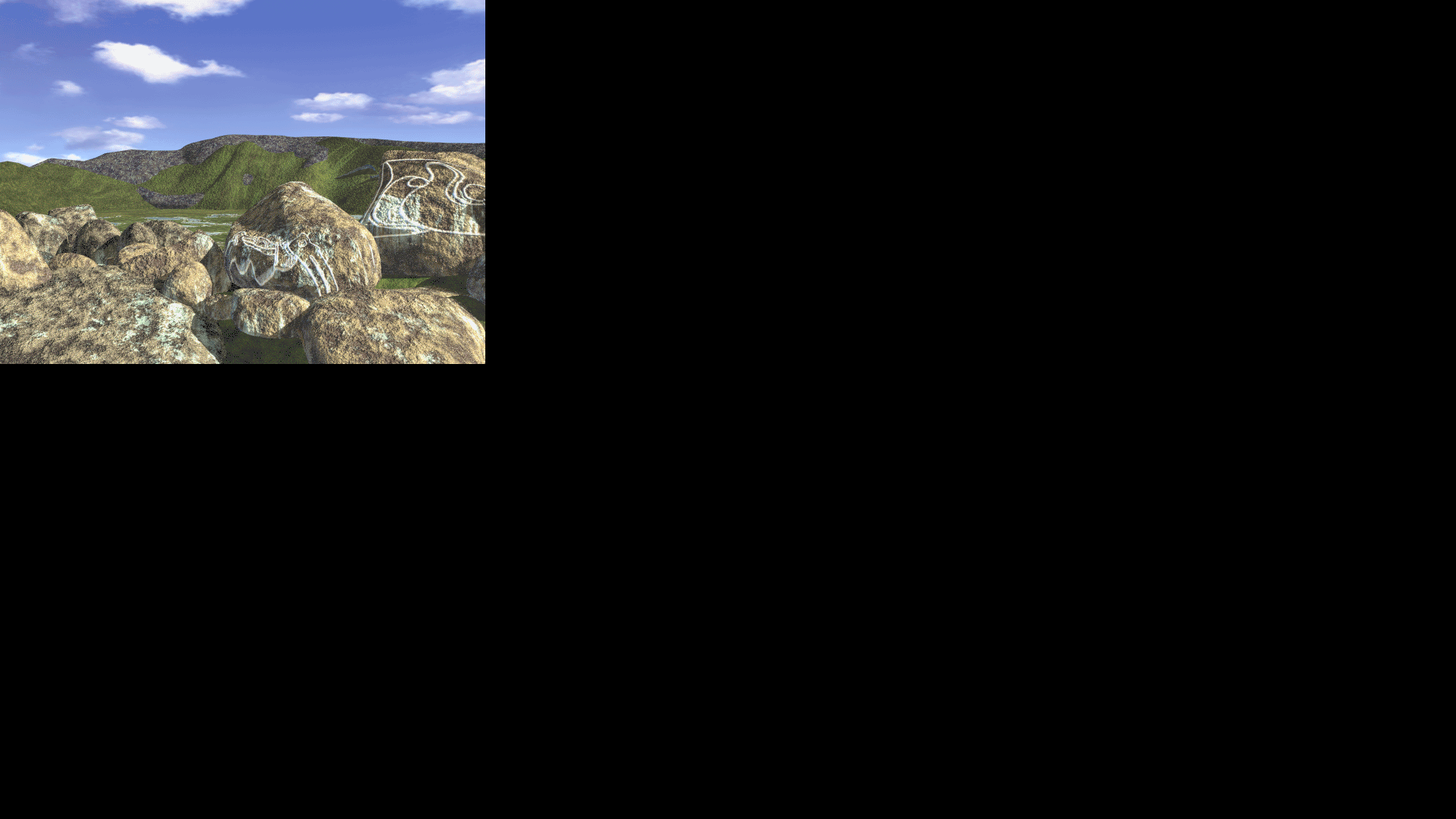
Now for the kicker: The reason I can only move in a limited fashion is because while the mouse cursor changes based on where it is on the entire screen (i.e. left side of the screen turns left, right side turns right, center top moves up, etc.), I can actually only interact with the game in that small 640x480 part of the screen in the top-left. This limits my interaction within the game to turning left/u-turn and moving forward, wherever each are applicable.
The last issue is noticeable when trying to use the spacebar to open the menu. It simply blanks the screen. Pressing the spacebar again will return to the game screen the way it should, but only if don't move the mouse too much. The mouse cursor seems to change as if all the menu options are being presented properly, but they're actually spread across the entire screen, same as the movement detection area. If you move the mouse from one option to another, the game seems to lose the ability to render anything and will just switch between two blank screens, even though the mouse cursor will update for both screens. It only seems to return to the game screen properly if you do not move it onto another option. Moving it in between options to the regular arrow cursor seems fine, but not onto another option where the hand cursor appears again.
Alt-F4 closes the game just as it does in native Windows, so keyboard shortcuts all seem to be working as intended. It's just the graphical issues at this point that, near as I can tell, seem to be caused due to the screen resolution not matching the 640x480 it's intended to run on.
Finally, I also tested this on GloriousEggroll's latest Proton environment (6.10-GE-1 as of this writing) and it still displayed the color selection dialog, although it didn't freeze when selecting an option like Proton 3.16 does. Instead, it just gracefully exits the game.
This is a log I produced using Proton 6.3-5 where I opened the game, moved around a bit inside the part of the screen that recognizes inputs, opened the menu using the space bar, moved the cursor to cause the eternal blank screen, and toggled between the menu and game a few times. steam-433580.log
I've got a workaround that makes the game playable by running it "fullscreen" in a simulated 640x480 display window.
- (1) Use Xephyr to simulate a 640x480 display in a window. in a terminal:
Xephyr -screen 640x480 :1 - (2) Instruct steam to launch Timelapse on that display. Launch options are:
DISPLAY=:1 %command%
Mouse interaction works. I was able to pick up the camera and the journal.
The menu issues that @Yowlen described are still a problem. As a workaround you have to use keyboard shortcuts; CTRL-J for Journal, CTRL-S for Save, CTRL-O for Load Game, etc. I tested that saving and loading works.
And occasionally the screen will go black when moving to a new frame, but moving forward + backward it will load on the second try.
Of course the window is pretty small. I don't think it's possible to scale Xephyr - it really is fixed at 640x480 pixels - but if I scale my display down as low as it goes (1280x720) it looks ok; see screenshot.
Tested on both Proton 8.0-3 and Experimental
OS: Linux Mint 21.2
KERNEL: 5.15.0-83-generic
CPU: Intel Core i5-9600K @ 3.70GHz
GPU: NVIDIA GeForce GTX 1060 6GB
GPU DRIVER: NVIDIA 525.125.06
RAM: 32 GB

The game is very playable now on Proton 9.0-2. It launches in fullscreen and scales the game correctly without cropping the image incorrectly, mouse and keyboard interaction both fully functional.
Remaining issues:
- Menu still doesn't work
- Occasional black screens when moving between stages, but moving forward+backward will load on the second try
Tested and confirmed on my end as well. Some will load with the forward+backward method, but not all of them.
I ran it with PROTON_LOG=1 enabled and these lines are the ones that stand out:
87480.950:012c:0130:err:x11drv:xinerama_get_fullscreen_monitors Failed to get xinerama fullscreen monitor indices. 87480.950:012c:0130:err:x11drv:update_net_wm_fullscreen_monitors Failed to find xinerama monitors at (0,0)-(640,480)
Based on the timestamps on the lefthand side, they're the only lines I can find with consistency at every blank screen I encountered. There were some from shortly after the game loaded up and I tried to enter the menu, and again a few minutes later when I reached the camp area down by the beach and encountered more blank screens.
If I had to guess, this is the reason the screen isn't rendering properly on those scenes. Solve this, and the game will probably work perfectly.
I played it through all of Anazasi but now I am in the Maya's world and the game crashes every time I try to solve the "win three times" minigame with frogs, spiders and scorpions. Sometimes I get a out of memory error message, but in most cases the game just freezes. Has anyone observed this problem? I am currently playing with GE-Proton9-11 but have tried several versions without improvement.

@LysirisMalven if you have the .SAV file handy can you attach it? I can try to reproduce on my system too just to gather more data
Unfortunately I don't have a save file from shortly before that mini game anymore. I solved it under a windows installation of steam.
Just as a small update, I recently switched to KDE and can confirm that Timelapse works in Wayland with Proton 10, but crashes on boot with Proton 9. The black screen issues are still present, so the xinerama thing I mentioned in an above post is likely a symptom, not a cause. I couldn't find anything else in Proton's logs back then, and I can't really find anything now either.
Basically, we're stuck. We'd need some sort of debug tool that isn't part of regular Wine/Proton builds to try to figure anything else out, and I don't have the coding skills necessary to do that.