

 ValveSoftware
Space Engineers - 244850
The latest version of Space Engineers from steam, with app id 244850 seems to require a patch which wine-staging has.
Yes, I did leave out my system specs as it's not important to this issue. (Proton 3.16)
I confirm:
- [x] that I haven't found an existing compatibility report for this game. (Not specifically for this game, and not specifically this error, though it can be seen as a fixme)
- [x] that I have checked whether there are updates for my system available.
Symptoms
Space Engineers uses the GetCurrentPackageId function. SE crashes with en error, which says that the function was invoked with an incorrect parameter. This is caused by a bug in wine which has been ignored, wine-staging does include a patch to solve this problem. I'm not experienced enough to submit a pull request, nor I'd be able to compile proton as I'm kind of incompetent.
Reproduction
Reproduction is really easy, download Space Engineers from steam, install .net 4.7 as described here. After a successful installation of .net and with transform feedback working, you should get an error message like this
Unhandled Exception: 00bb:fixme:ver:GetCurrentPackageId (0x53a800 (nil)): stub System.ArgumentException: Parameter is not valid. at System.Drawing.Image.get_Flags() at System.Windows.Forms.ControlPaint.IsImageTransparent(Image backgroundImage) at System.Windows.Forms.Control.set_BackgroundImageLayout(ImageLayout value) at Sandbox.MyMessageBoxCrashForm.InitializeComponent() at Sandbox.MyMessageBoxCrashForm..ctor(String gameName, String logPath) at Sandbox.MyErrorReporter.ReportGeneral(String logName, String gameName, String id) at Sandbox.MyCommonProgramStartup.PerformReporting() at SpaceEngineers.MyProgram.Main(String[] args) wine: Unhandled exception 0xe0434352 in thread bb at address 0x7b44b08c (thread 00bb), starting debugger... Unhandled exception: 0xe0434352 in 64-bit code (0x000000007b44b08c).
This can easily be solved by either getting the patch upstream to wine (there might be a good reason why it's not upstream) or we could apply the patch directly to proton.

BTW I can confirm that Space Engineers does, in fact, work with wine, as I was able to start SE with wine-staging 3.18 without dxvk. It does crash as the wined3d11 API was not capable of running SE for long enough to actually play, it seemed to crash at random points in time, but this does indicate to me that SE should be functional, once we patch proton.
I tried locating the patch that makes it work under wine-staging, but I was not able to do so. I'm either completely blind or it doesn't exist. It may be that the function not working is a bi-product of some other bug. I'll continue searching
Now I have figured out that SE does crash because of something different, and that function is broken on both wine versions, now I shall figure why does it crash in the first place.
I have decompiled SE and I have figured out where is the problematic code path, it seems that SE thinks that '-report' was passed as a command line argument, but from what I understand from the decompiled source, there should not be a reason for SE to think that.
Ive posted a link to this thread onto the official Space Engineers support page. Will see if anyone over there has any ideas.
Also go upvote that thread on there forum to try get there attention incase its a SE and not a wine issue!
https://support.keenswh.com/spaceengineers/general/topic/improve-compatibility-with-steam-play-and-proton-linux-mac

No, you misunderstood me, let me explain a bit more. SE uses .NET 4.7.1 which IS broken in wine, but it can be made to run with a workaround and a bit of luck. Here is the workaround needed. Then, SE uses Stream Output / Transform Feedback, which is a deprecated feature in DX11, and was probably carried over from the DX9 renderer, which SE has used in the past. Now, Vulkan has recently received this extension "VK_EXT_transform_feedback", which allows Stream Output to work in Vulkan, therefor DXVK now supports Transform Feedback, therefor SE should work in wine, but wine still needs patches to expose this extension. Proton has these patches already, I think, I'm not sure, don't quote me. Mainline wine will get at the next release at it has been already staged which means wine-staging will get it too. Now wine-staging has a patch in place which enables SE to start under opengl, it still crashes as opengl is not capable of sustaining the graphics engine. The problem in proton is not related to Transform Feedback. I can't identify the patch that is responsible for this, as I actually do not know what's the problem. I have decompiled SE and looked at the code which is causing the crash, based on the stacktrace provided by the .net runtime and do not see a clear reason why it crashes. I'll post the relevant functions later.
I know, it tries to notify the user that they should update their graphics drivers. That's why it tries to report something. But still, it does work in wine-staging, so we still need to find the relevant patch.
https://stackoverflow.com/questions/11796082/invalid-parameter-when-setting-an-image and this seems to be related, I'm not any closer to figuring this out tho.
line 914 seems to be the problem, that's the only thing that i can see, the GdiPlus.dll is a wine native dll as can be seen here
GetGdiImageFlags returns invalid parameter if image or flags are empty, as can be seen here, line 5219, so it's probably getting nullified either somewhere in .net or when being passed to the native library from wine.
I think I found it, if I'm understanding this correctly,
GpStatus WINGDIPAPI GdipGetImageFlags(GpImage *image, UINT *flags)
{
    TRACE("%p %p\n", image, flags);

    if(!image || !flags)
        return InvalidParameter;

    *flags = image->flags;

    return Ok;
}
this function should not check if flags is 0, as flags is the output variable, which can be whatever.
I am completely wrong in my last comment, I hate pointers. Anyways, I'm going back up the stacktrace trying to find out why image is null.
I am not sure on the legal ramifications but Space Engineers provides a visible/ open EULA of their source code on github, if you can look through, so you don't have to decompile. Might be worth a look through if it's kosher, to figure out what is blowing up and commit to wine.
https://github.com/KeenSoftwareHouse/SpaceEngineers/blob/master/EULA.txt
Edit: They do have an intertoperability clause which wine falls under as 'compatibility'

Please wait a few months until Valve updates the version of Wine that Proton uses. Valve has some patches on top of Wine and needs to test for stability, so there are reasons that Valve does not immediately update the version of Wine that Proton uses.
@SpookySkeletons That source code has not been updated since 2016.

@aaronfranke This affects Vanilla wine as well as Proton, whichever arrives first can upstream it to the other. Space Engineers has been a major pain for years in any sort of wrapper, even when it did work it was stable as a two legged stool.
Perhaps I just don't know how any of this works but this might be something to look into.
6421.401:0031:0032:trace:module:load_dll Loaded module L"C:\windows\assembly\NativeImages_v4.0.30319_64\mscorlib\386b8793866138dad77588a7399d11c3\mscorlib.ni.dll" (native) at 0x64478000000 The library loads up at 0x64478000000 Some kind of function turns and burns here, sharing a very close trailing memory space with mscorlib.ni.dll:
6421.486:0031:0032:trace:seh:RtlVirtualUnwind type 0 rip 64478454d69 rsp 53b5d0 6421.486:0031:0032:trace:seh:dump_unwind_info **** func 454cf0-454da3 6421.486:0031:0032:trace:seh:dump_unwind_info unwind info at 0x644785364bc flags 3 prolog 0x10 bytes function 0x64478454cf0-0x64478454da3 6421.486:0031:0032:trace:seh:dump_unwind_info 0x10: subq $0x68,%rsp 6421.486:0031:0032:trace:seh:dump_unwind_info 0xc: pushq %rbx 6421.486:0031:0032:trace:seh:dump_unwind_info 0xb: pushq %rsi 6421.486:0031:0032:trace:seh:dump_unwind_info 0xa: pushq %rdi 6421.486:0031:0032:trace:seh:dump_unwind_info 0x9: pushq %r12 6421.486:0031:0032:trace:seh:dump_unwind_info 0x7: pushq %r13 6421.486:0031:0032:trace:seh:dump_unwind_info 0x5: pushq %r14 6421.486:0031:0032:trace:seh:dump_unwind_info 0x3: pushq %r15 6421.486:0031:0032:trace:seh:dump_unwind_info 0x1: pushq %rbp 6421.486:0031:0032:trace:seh:dump_unwind_info handler 0x644783da000 data at 0x644785364d8
It looks like mscorlib.ni.dll is a component for the .NET framework, which is known for being unstable under wine. You might have luck using winetricks to fiddle around with dotnet, but hopefully Ethan Lee will devise a better solution in the future.

With Mesa 18.3.1 with patches applied from here applied to support Transform Feedback and using winetricks to install .NET 4.7.2 I got very close of having the game working using DXVK. The game reached the main menu, running at 120 FPS, and the mouse cursor loads. However, the game crashes before the background video and the menu buttons appear.
The log messages seem to be pretty relevant on this case. The DXVK warn seems closely related to what happened with Wine:
My system information. Please note this is showing a different Mesa version because the 32-bit and the 64-bit Mesa builds are distinct right now.

I've managed to get to gameplay with wine-staging, dxvk, proprietary nvidia drivers. All voxels were horribly malformed and i haven't managed to reproduce it since wine updated.
@FurretUber The latest version of the game locks up after a minute or more. Opt down to the multiplayer overhaul in the beta tab and it will work.
I just upgraded my GC to NVIDIA GeForce GTX 1060 and all my steam games work via steamplay except SE. I press play and SE tries to start then stops. No error message, no sound, and no game window. I have tried all the proton versions that steamplay will run. After reading this thread I at least know that many people are trying to figure it out. Sounds like a new version of proton and wine are needed. I was hoping I could use wintricks or something but it might be more complicated. That's a bummer. Maybe a lib or several libs with winecfg?

This game can launch with wine 4.3 and DXVK 1.0 - But you will need .NET 4.7.2 as additional installation. Lutris installer for the game works flawlessly for new installations. If you have a current installation of space engineer it might not work, i have yet to figure out why that is the case. After that you can play the game but minor errors will still be there such as:
- Crashing when you fly crafts into other crafts or rocks at 20+m/s (report tool for SE appears)
- After splash screen you have to click the mouse a couple of times to get to the main menu since the cinematic wont play else you just have a black screen.
- Minor audio stutters which was mostly fixed with wine 4.3 but will get better as faudio gets futher development.
- Slow loading screens in the beginning due to new shaders need to be cached.
Pastebin here of logs when running and crashing into a planet that crashes the game. https://pastebin.com/tPC8y3tK

I take it that the latest proton beta isn't wine4.3 yet? which is why it won't work via steam directly?

I managed to make Space Engineers working. It is definitively not on a good shape, but it works. I had to:
- Install dotnet472 on Space Engineers WINEPREFIX;
- Build FAudio with xWMA support and libraries on non-default directories. This FAudio build must work with Megadimension Neptunia VIIR;
- Make the built libFAudio.so be used for Space Engineers, be replacing the Proton one from lib64 or LD_PRELOAD;
- Make sure video drivers support Transform Feedback, as Mesa 19.1.0-devel for Intel Gen9;
- Be sure the built FAudio library built WILL NOT work! It can't find the needed libraries when starting Space Engineers;
- Space Engineers should work but with no sound.
There are a few bugs related to graphics as opening video that does not load, on edges that effect because of helmet is buggy, even then it is great considering the GPU is an Intel HD Graphics 520 and had bugs on Windows 10 until very recently.
A lot of bugs regarding terrain generation are happening, all planets and moons are hellish landscapes.
Images:
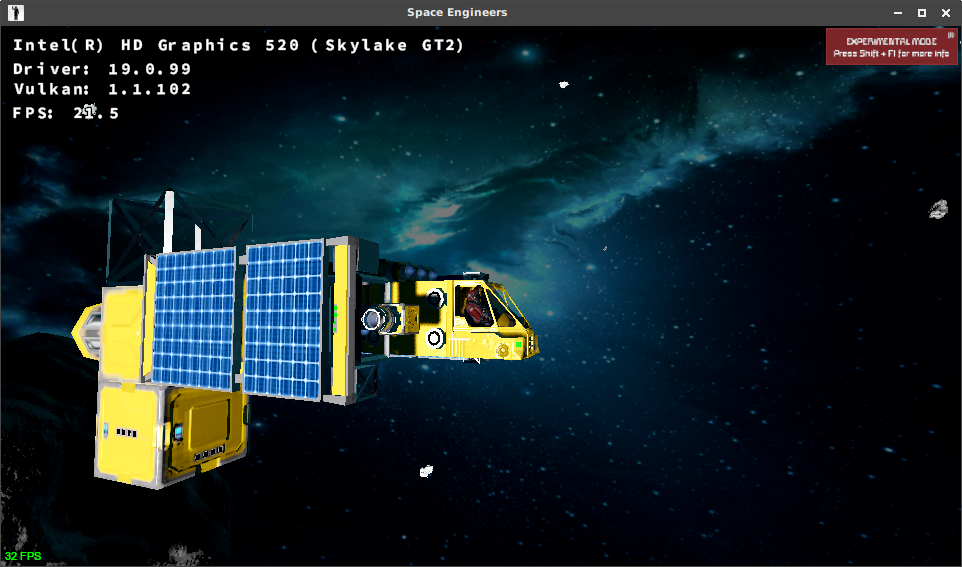


I sort of got it working but fps was real slow at menu (never bothered to play) and audio is crackling. I used https://github.com/Kron4ek/FAudio-Builds but perhaps it failed to install correctly.
EDIT: Didn't install faudio this time around, and no sound so I must have installed it correctly. Perhaps the main menu just does that because it works but as you point out, the terrain generation is completely messed up.
If you install via Lutris ( yeah i know ) It has a tkg build of Wine 4.4 with F-Audio that works wonders.
On Wed, Mar 20, 2019 at 3:25 AM jarrard [email protected] wrote:
I sort of got it working but fps was real slow at menu (never bothered to play) and audio is crackling. I used https://github.com/Kron4ek/FAudio-Builds but perhaps it failed to install correctly.
— You are receiving this because you commented. Reply to this email directly, view it on GitHub https://github.com/ValveSoftware/Proton/issues/1792#issuecomment-474658732, or mute the thread https://github.com/notifications/unsubscribe-auth/AHuHtRix32b6V_NKrATqj1t79SVRJY1Kks5vYZwdgaJpZM4XyGNi .
I'll try and report my findings, it's a shame you can't download wine builds from lutris, without lutris
On Sun, Mar 24, 2019, 15:09 Maltahl [email protected] wrote:
If you install via Lutris ( yeah i know ) It has a tkg build of Wine 4.4 with F-Audio that works wonders.
On Wed, Mar 20, 2019 at 3:25 AM jarrard [email protected] wrote:
I sort of got it working but fps was real slow at menu (never bothered to play) and audio is crackling. I used https://github.com/Kron4ek/FAudio-Builds but perhaps it failed to install correctly.
— You are receiving this because you commented. Reply to this email directly, view it on GitHub < https://github.com/ValveSoftware/Proton/issues/1792#issuecomment-474658732 , or mute the thread < https://github.com/notifications/unsubscribe-auth/AHuHtRix32b6V_NKrATqj1t79SVRJY1Kks5vYZwdgaJpZM4XyGNi
.
— You are receiving this because you authored the thread. Reply to this email directly, view it on GitHub https://github.com/ValveSoftware/Proton/issues/1792#issuecomment-475963063, or mute the thread https://github.com/notifications/unsubscribe-auth/AHonVxCEiLofIF2Jsbrz-HZMdIWpKfgyks5vZ4c2gaJpZM4XyGNi .
Copied wine4.4 faudio protonified into my custom steam compat folder, reinstalled game and dotnet472, loaded up, no audio. Game looks like it might run better but it has this stuttering going on, maybe the non functional audio is to blame. Anyway didn't seem to fix my audio issue, probably need to install precompiled bins from somewhere into the custom proton folder, I'm on arch so likely ones compiled on other distros won't work.
EDIT: I built custom faudio with ffmpeg support, still no luck with sound, probably doing something wrong, shrug. Anyway game is unplayable IMO, all planet bases maps don't work/broken, has stuttering & crashing.. Maybe one day.
I doubt that bins from other distros wont work. They will, just install wine the arch way to get all the dependencies and that should do it.
On Sun, Mar 24, 2019, 23:59 jarrard [email protected] wrote:
Copied wine4.4 faudio protonified into my custom steam compat folder, reinstalled game and dotnet472, loaded up, no audio. Game looks like it might run better but it has this stuttering going on, maybe the non functional audio is to blame. Anyway didn't seem to fix my audio issue, probably need to install precompiled bins from somewhere into the custom proton folder, I'm on arch so likely ones compiled on other distros won't work.
— You are receiving this because you authored the thread. Reply to this email directly, view it on GitHub https://github.com/ValveSoftware/Proton/issues/1792#issuecomment-476010132, or mute the thread https://github.com/notifications/unsubscribe-auth/AHonV0PNKjPrMbFLzUDFBzbXqp2ZjOUNks5vaANBgaJpZM4XyGNi .
Yeah it's just a install issue at my end, I also seem to only be able to build 64bit libs, can't see the 32bit ones unless their the same file (no idea).
When I copied my libFAudio.so file to the proton_wine custom folder and loaded SE it just set all my volume settings to zero, and would not save them if raises so something is a miss.
BUT like I said, the game has major issues under Linux, so not like I could realistically play atm unless its pure space survival with no moons or planets!