

 ValveSoftware
Age Of Empire 3: Complete Collection (105450)
Hello !
I'm trying to install AOE 3 Complete Collection on Steam. The installation goes well, but I get this when I start the game:
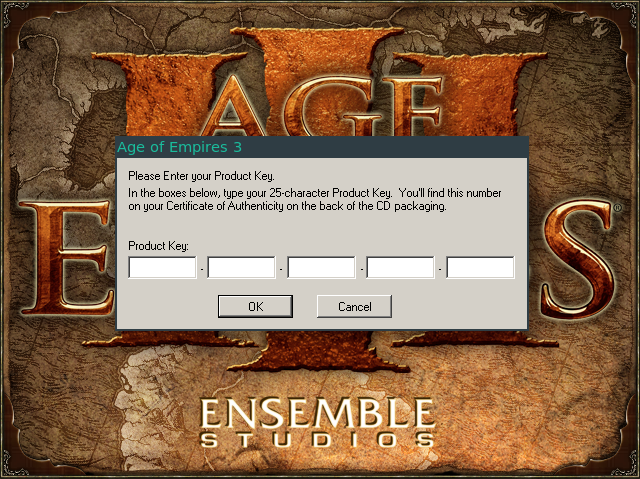
When I type my CD key, I cannot type the first 5 characters. I'm limited to only 4.
I think it's related to this : https://bugs.winehq.org/show_bug.cgi?id=20456. In this, "alexandre.rozier" said
This problem appears when one has not installed the correct windows fonts. By installing with winetricks the "all fonts" package, this problem goes away and one can enter 5 chars into each field.
How can I do that using Proton ?
Thanks a lot. This project is amazing

You can do that like so:
WINEPREFIX=/path/to/steam/steamapps/compatdata/APPID/pfx/ winetricks allfonts
Just replace the path & appid
I've made an issue about winetricks stuff over here: #54

Age of Empires III: Complete Collection - Error loading the PID generator DLL
Issue transferred from https://github.com/ValveSoftware/Proton/issues/369. @Holzhaus posted on 2018-08-24T09:08:39:
After installing and starting Age of Empires III: Complete Collection, the Product Key window pops up. After entering my key, and clicking OK, the following error message pops up:
Error loading the PID generator DLL. The DLL could not be found! Please make sure the file is available int he installation directory and try again.
It's not possible to progress further.
EDIT: Logfile and system info can be found here: https://gist.github.com/Holzhaus/e1a5e7ad8b59d1b5a698a18042c109a8
EDIT 2: I'm using the flatpak installation of steam.
@arzardk commented on 2018-08-24T09:18:15
You need to attach game log file and your system specs via github gist to this issue. You can obtain log file if you running Proton with user settings, which you can find in your /home directory. Path to this folder is something like this /home/arzardk/.steam/steam/steamapps/common/Proton 3.7. In this folder you find file called user_settings.example.py or something similar. Just rename it to user_settings.py and run your game again. You can find log file in your /home directory after that.
@Holzhaus commented on 2018-08-24T09:39:41
Thanks for the info. I added the gist link to my original post.
@Holzhaus commented on 2018-08-24T09:46:10
PidGen.dll does exist:
$ cd ~/.var/app/com.valvesoftware.Steam/data/Steam/steamapps/common/Age Of Empires 3/bin
$ ls -l | grep -i pid
-rwxr-xr-x  1 user user    95248 22. Aug 14:51 mgspid.dll
-rwxr-xr-x  1 user user    92944 22. Aug 14:52 mgspidx.dll
-rwxr-xr-x  1 user user    82968 22. Aug 14:52 mgspidy.dll
-rwxr-xr-x  1 user user    48656 22. Aug 14:52 PidGen.dll
-rwxr-xr-x  1 user user    31040 22. Aug 14:50 PidGenX.dll
-rwxr-xr-x  1 user user    30912 22. Aug 14:49 pidgeny.dll
I already tried symlinking PidGen.dll to PIDGen.dll (filename from the logs), but that didn't help.
@arzardk commented on 2018-08-24T09:56:03
I have problems with flatpak version of Steam, like games with Proton unable to running at all. Have you tried running this game on default Steam?
@Holzhaus commented on 2018-08-24T10:15:39
No, but the issue that flatpak was unable to start any games with Proton should now be fixed: flathub/com.valvesoftware.Steam#152 And I can start games other than AOE3 using flatpak'ed steam, e.g. Fallout: New Vegas or Stronghold Crusader 2.

A comment on winehq says:
All the problems can be solved with the following commands:

winetricks --force corefonts dsound l3codecx quartz
winetricks -q mfc42
winetricks d3dx9 dotnet20

Note that some of those winetricks (dotnet20) are requiring a 32-bits WINEPREFIX.
https://appdb.winehq.org/objectManager.php?sClass=version&iId=29559
Unfortunately, the prefix is 64-bit and dotnet20 requires 32-bit for some strange reason (why doesn't native Windows break the game over this?), so it isn't possible to make this work. If someone could figure out the .NET 2.0 issue, it should be possible to make the game play.

The winetricks issue is here:
https://github.com/Winetricks/winetricks/issues/222
If someone gets that working, I imagine it would be possible to play the game using the files the Steam client installs.
I got it to work. Here are the commands:
# First try starting it from Steam. Then exit as soon as the product ID key is requested.

# Download the .NET framework 2.0
wget http://download.microsoft.com/download/a/3/f/a3f1bf98-18f3-4036-9b68-8e6de530ce0a/NetFx64.exe

# Install the .NET Framework 2.0
/tmp/proton_run $HOME/NetFx64.exe

# Install a bunch of other stuff.
env WINEPREFIX=$HOME/.local/share/Steam/SteamApps/compatdata/105450/pfx/ WINEPATH=$HOME/.local/share/Steam/SteamApps/common/Proton\ 3.7/dist/bin/wine winetricks -q winxp corefonts dsound l3codecx quartz mfc42

# Start it from Steam and enjoy
This was inspired by Lutris' script:
https://lutris.net/games/install/1914/view
It turns out that if you have corefonts installed through your distribution's package manager, you don't need to install them via winetricks. My guess is that distributions are missing a proper substitute for one of the corefonts, so fixing #571 would at least mean one less thing is needed here.
The PIDGen.dll problem can be easily fixed by installing mfc42 via winetricks.


this error of the PIDGen.dll was resolved installing mfc42. Now I have black screen problem.

@juanpmarin You will need to be more specific about how it doesn't work. Maybe you don't have /tmp/proton_run being generated from not using proton 3.7-3. There is also the possibility that you don't have winetricks installed.
I'm also getting the error about the DLL:
Error loading the PID generator DLL. The DLL could not be found! Please make sure the file is available int he installation directory and try again.

@Raulvo you can fix this by installing winetricks and running:
env WINEPREFIX=$HOME/.local/share/Steam/SteamApps/compatdata/105450/pfx/ WINEPATH=$HOME/.local/share/Steam/SteamApps/common/Proton\ 3.7/dist/bin/wine winetricks mfc42
Trying to run winetricks to fix the CD-key issue but in SteamOS I get permissions issues
Terminal i/o: aoe3.log
Should I've to add user steam to sudoers and install wine & wintricks logued-in there?

@P4NCH1 No. Try giving the steam user write access to
/tmp.
It should have, @Holzhaus
desktop@steamos:/$ ls -l | grep tmp
drwxrwxrwt  17 root root  4096 Sep 14 02:17 tmp
My guess: Your first attempt using the desktop user probably created /tmp/early_wine.err.txt. Thus, the steam user can't write to it since it does not have ownership of the file. If so, try to delete it.
I got the game working with
env WINEPREFIX=$HOME/.local/share/Steam/steamapps/compatdata/105450/pfx/ WINEPATH=$HOME/.local/share/Steam/steamapps/common/Proton\ 3.7/dist/bin/wine winetricks -q d3dx9 winxp corefonts dsound l3codecx quartz mfc42
Key activation worked, no blackscreen and game is playable. But I got no sound. Only a few crackling noises.

I think we have to wait for Faudio integration in Proton before to be able to play this one.

@elmo-space I am not sure why you had to install d3dx9. Also, sound works for me. You might want to try setting the dll overrides in winecfg that are used for Rise of Nations in #298. Those are dmime, dmsynth, dmusic, dsound, dswave and l3codecx. I do not recall needing to do that for AoE 3 though.
I've been using linux for almost a decade but WINE is relatively new to me... Never had a need to run it until now.
I am also getting the PID error. I have used the small script ryao provided along with other commands in this thread with no luck.
Tried installing mfc42 manually with the wine prefix and path, it installed successfully but AOE is still reporting the PID error.
Let me know what log files you need to help me troubleshoot. Thanks!
Also I got AOE2, MW3, and a few other games working in steam play. Just can't get this one working!

I still couldn't install mfc42 through winetricks:
steam@steamos:~$ env WINEPREFIX=$HOME/.local/share/Steam/steamapps/compatdata/105450/pfx/ WINEPATH=$HOME/.local/share/Steam/steamapps/common/Proton\ 3.7/dist/bin/wine winetricks -q mfc42

wine cmd.exe /c echo '%ProgramFiles%' returned empty string, error message 'wine: '/home/steam/.local/share/Steam/steamapps/compatdata/105450/pfx' is a 64-bit installation, it cannot be used with a 32-bit wineserver.'
Shouldn't that prefix be a 32-bit prefix?
btw, @Holzhaus , there isn't a /tmp/early_wine.err.txt file but seems that the error now is different.
@P4NCH1 kill all wine program stayed in your memory: $ ps aux |grep wine or simply reboot your computer
then I don't think your winepath is correct, should be: WINEPATH="$HOME/.local/share/Steam/steamapps/common/Proton 3.7 Beta/proton"
steam@steamos:~$ ps aux | grep wine
steam    14553  0.0  0.0  34236  2288 pts/0    S+   03:54   0:00 grep wine
steam@steamos:~$ ls $HOME/.local/share/Steam/steamapps/common/Proton\ 3.7\ Beta/
dist  dist.lock  filelock.py  LICENSE  proton  proton_dist.tar.gz  __pycache__  toolmanifest.vdf  user_settings.sample.py  version
steam@steamos:~$ ls $HOME/.local/share/Steam/steamapps/common/Proton\ 3.7\ Beta/dist
bin  lib  lib64  share  version
steam@steamos:~$ ls $HOME/.local/share/Steam/steamapps/common/Proton\ 3.7\ Beta/dist/bin
wine  wine64  wine64-preloader  wine-preloader  wineserver
steam@steamos:~$ ls $HOME/.local/share/Steam/steamapps/common/Proton\ 3.7/
dist  dist.lock  filelock.py  filelock.pyc  LICENSE  proton  proton_dist.tar.gz  __pycache__  toolmanifest.vdf  user_settings.sample.py  version
steam@steamos:~$ ls $HOME/.local/share/Steam/steamapps/common/Proton\ 3.7/dist
bin  lib  lib64  share  version
steam@steamos:~$ ls $HOME/.local/share/Steam/steamapps/common/Proton\ 3.7/dist/bin
wine  wine64  wine64-preloader  wine-preloader  wineserver
I have SteamOS, @legluondunet
steam@steamos:~$ env WINEPREFIX=$HOME/.local/share/Steam/steamapps/compatdata/105450/pfx/ WINEPATH=$HOME/.local/share/Steam/steamapps/common/Proton\ 3.7/proton winetricks -q mfc42
------------------------------------------------------
wine cmd.exe /c echo '%ProgramFiles%' returned empty string, error message 'wine: '/home/steam/.local/share/Steam/steamapps/compatdata/105450/pfx' is a 64-bit installation, it cannot be used with a 32-bit wineserver.'
------------------------------------------------------
steam@steamos:~$
I just tried it out and it still works, but there have been changes to proton that require adjustments to the old instructions. Here are new instructions:
# Wipe out wine prefix directory to get a fresh one.
rm -r "${HOME}/.steam/steam/steamapps/compatdata/105450"

# Set launch options: PROTON_DUMP_DEBUG_COMMANDS=1 %command%
# Run Age of Empires III and then exit as soon as product key is requested
# You may remove the launch options after doing that.

# Fetch a 64-bit .NET 2.0 package
wget http://download.microsoft.com/download/a/3/f/a3f1bf98-18f3-4036-9b68-8e6de530ce0a/NetFx64.exe

# Install .NET 2.0
/tmp/proton_${USER}/run "${PWD}/NetFx64.exe"

# Fetch winetricks and protontricks
wget https://raw.githubusercontent.com/Sirmentio/protontricks/master/protontricks
wget https://raw.githubusercontent.com/Winetricks/winetricks/master/src/winetricks

# Set them as executable
chmod u+x "${PWD}/protontricks" "${PWD}/winetricks"

# Add final workarounds
WINESERVER="${HOME}/.local/share/Steam/SteamApps/common/Proton 3.7/dist/bin/wineserver" WINETRICKS="${PWD}/winetricks" ${PWD}/protontricks 105450 mfc42 winxp l3codecx corefonts

# Start Age of Empires III, enter the product key and enjoy
Also, sound works for me.
@ryao Hello Richard, could you tell me why you installed dotnet 2? I didn't need to install it to play this game.
my tests results (v2.0 corrected), this game launched with Proton 3.7-6 if: I set OS to XP and install corefonts mfc42 l3codecx with winetricks. I met problem if I installed dsound or quartz with winetricks, the game did not start or had no sound. I tried to install .Net 2 but I obtained an error message: .Net 2 is already installed. So it is not necessary to install quartz, dsound, d3dx9 or .Net 2 with winetricks to play this game. Anyway, I started the tutorial and it freezed at a precise point, I can reproduce this bug each time: when I have to move 3 soldiers, the tutorial voice man shut up and sounds/audio become unstable, I can not continue the tutorial. When I exited, the game stayed in memory, I had to kill it.
@legluondunet I had a crash from it not having .NET at some point, so I installed it and it was happy. I am not sure why it needs it. I haven't studied the binaries. The cinematics play for me.
Try wiping out your prefix and making a new one. You probably have the mono version of .NET installed from an earlier attempt at fixing it. I haven't had any issues with it being unstable or crashing. I have only done a skirmish though. I have not tried using the tutorial.
By the way, it coudl be that you are missing some prerequisite for Wine. Try installing wine from your distribution repository if you haven't already so that you have all of the prerequisites for Proton installed.
Like I said above, the game crashed if I try the tutorial and didn't close properly, I had to kill it. I can reproduce this bug each time with Proton (and Wine vanilla, Wine staging too). I joined you the Proton log: steam-105450.zip My config: https://gist.github.com/legluondunet/0f0a56fb4e9cb743f111385e554fce69
I just discovered the crash is only happened with the french version, not the english one. I declared a bug on WineHQ bugzilla as well https://bugs.winehq.org/show_bug.cgi?id=45889
Any chance we can get these PID fixes baked into proton? Instead of having to do this manual work-around? :( Kind of a pain since my STEAM content directory is mounted on another drive, and not in my user profile.
