
partner-bot
 partner-bot copied to clipboard
 Valks-Bots
Automates partnerships in the big community of discord.

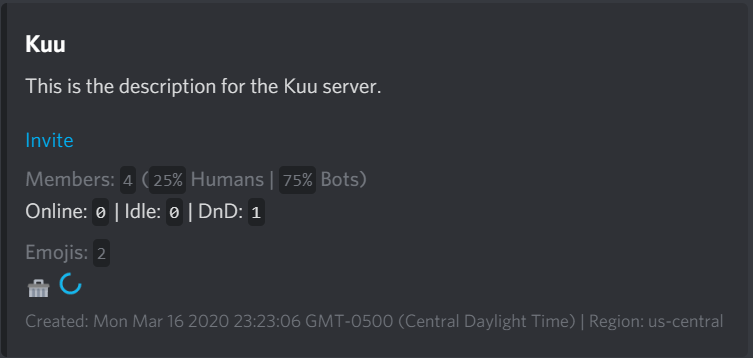
Partner bot is a discord bot that uses discord-js and sqlite to automate partnerships in the big community of discord. When you bump your advertisement, the bot sends it to every guild that has the bot setup with a configurable cooldown. This bot has only been tested on a total of 4 servers, issues may arise if the bot has to handle 100 or more servers all sending messages between each other simultaneously. This project has been discontinued.
Preview of Bump Message
Install on Windows
- Clone
https://github.com/valkyrienyanko/partner-bot.git - Download and install
LTSNode.js - Install yarn with
npm i -g yarn - Run
yarn installin the project root directory - Generate a bot token from the Discord Developers Portal
- Create a
.envfile in thesrcfolder with the following content inside (BOT_TOKEN=BotTokenHere) - Change
ownerIDinconfig.jsto your user ID - Start server with
yarn start - Create an invite link for the bot by grabbing its ID and putting it in the following URL
https://discordapp.com/api/oauth2/authorize?client_id=YOUR_BOT_ID_HERE&scope=bot&permissions=27681 - Invite the bot to at least
2unique guilds - Continue setup with
t!help
Install on Heroku
- Create a Heroku account.
- Create a new App from your Dashboard.
- Download the Heroku CLI.
- Open a terminal in your project and run
heroku login. - Create a Git remote using
heroku git:remote -a <APP-NAME>. - Create a file in your project called
Procfile. (Must be in same folder as index.js) - Insert
worker:node index.jsto the Procfile. - Commit and push using
git add .git commit -m "<Message>"git push heroku master
Install on Glitch
- Create an account on https://glitch.com
- Create new project -> import from GitHub ->
https://github.com/Valks-Bots/partner-bot - Click src folder dots icon to right -> create new file ->
.env-> putBOT_TOKEN=BotTokenHereinside - Change
ownerIDinconfig.jsto your user ID - Go to tools -> open up Terminal -> type
npm start - Create an invite link for the bot by grabbing its ID and putting it in the following URL
https://discordapp.com/api/oauth2/authorize?client_id=YOUR_BOT_ID_HERE&scope=bot&permissions=27681 - Invite the bot to at least
2unique guilds - Continue setup with
t!help
FAQ
Q: How do I increase the max description limit?
A: Edit the max_length config value in src/config.js
Q: I am getting this error in the console "TypeError: Cannot read property 'tag' of undefined", what do I do?
A: Edit the ownerID config value in src/config.js with your user ID.
Q: Every time I restart the bot, all the information I had setup has been wiped?
A: If you're using Heroku, Glitch or any other "free" online hosting service then it's highly likely that the service is deleting the database everytime you restart the bot or if at best deleting it every 12 or 24 hours. If you host the bot on your local machine, you will not run into this problem.
Metadata
Owner
 Valks-Bots
Metadata
Automates partnerships in the big community of discord.