

 VaanaCZ
[V-Patch] error while generating config

I've had multiple people already report this issue, but I am not sure what causes it. I don't understand why V-Patch wouldn't have the permission to write files in the game directory.
My only guess is that somehow the working directory is not the same as the game directory. To test if that is the case, I compiled a special version of V-Patch, that prints out the current directory on startup. Could you try it and confirm that the path it prints is indeed the path to your game installation?
LANVP_WorkingDirectoryTest.zip

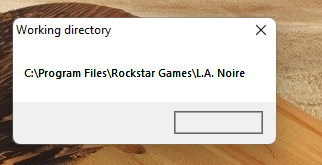
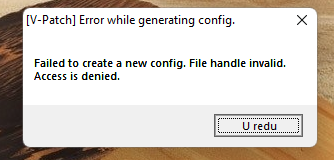

I see now. The problem is that the game is located in Program Files, and so it cannot create the file, because Program Files is handled differently from the rest of the system, permission-wise.
Alright, I shall consider saving the config to a fallback location such as the user folder. For now, try to run the game in admin mode, or create the config file (lanvp.ini) manually. https://pastebin.com/xKUTxXe5
Even after creating config file manually it still gives me error but it works fine in game with and without config anyways
Alright, I shall consider saving the config to a fallback location such as the user folder.
Hey. The best location would be the "userfolder/AppData/Roaming" folder. Its purpose is to store small, per-user config files.
You can get it via the Windows environment variable APPDATA.
There's also ALLUSERSAPPDATA which does it in a folder that all users have read-write access to (if I am not mistaken).
https://docs.microsoft.com/en-us/windows/deployment/usmt/usmt-recognized-environment-variables
You could make a settings-folder called something like L.A. Noire V-Patch in there.
PS: There's supposed to be a 2nd dot in L.A. Noire, the game is not called L.A Noire :)

I see now. The problem is that the game is located in Program Files, and so it cannot create the file, because Program Files is handled differently from the rest of the system, permission-wise.
Can't the DLL request Administrator permissions once to create that config file?
The way I solved this issue was I simply took ownership of the folder (from Properties, Security, Advanced) and granted "Users" rights to edit.

With the next release, the config will be shipped along with the patch, so this error should disappear.