

 VSCodeVim
Go To Reference activates visual mode
Describe the bug Go To Reference activates visual mode
To Reproduce Steps to reproduce the behavior:
- Run GoToReferences on function
- Select reference
- See mode
Expected behavior I think It should not activate visual mode
Screenshots
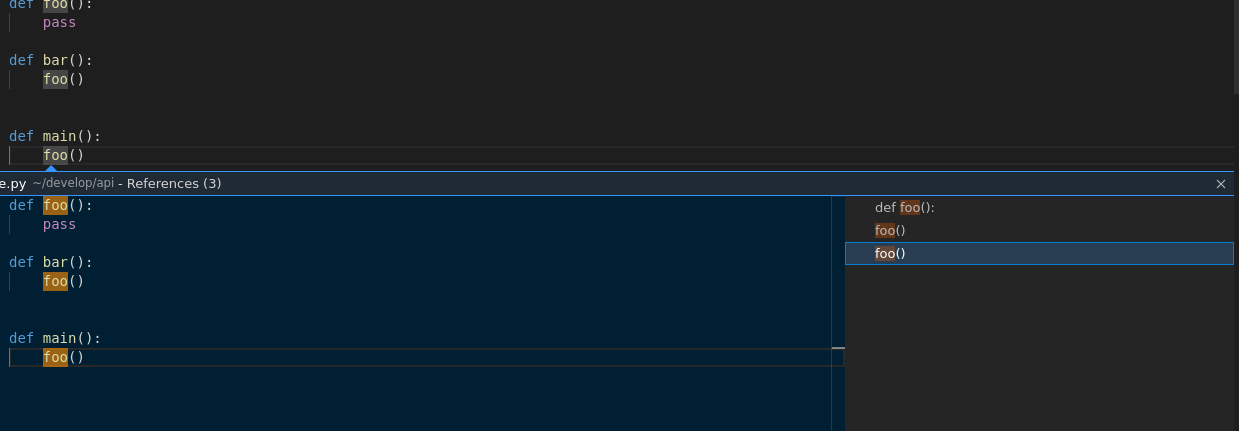

Environment (please complete the following information):
- Extension (VsCodeVim) version: 1.21.10
- VSCode version: 1.61.2
- OS: Ubuntu 20.04
Additional context Code to reproduce
def foo():
    pass

def bar():
    foo()

def main():
    foo()  # <- Run Go To References


@piojanu Hi. No, I did not. I had to use neovim-vscode. https://github.com/asvetliakov/vscode-neovim

This seems to come from the default behavior of VS Code when using peek for listing references. Even with the Vim extension disabled, it leaves a text selection around the selected reference.
Couldn't find a way to disable this behavior.

I solved it by using references-view.findReferences instead of editor.action.goToReferences. So I don't use peek UI at all and work-around the issue. I switch from the editor view to the reference view sidebar on the left by pressing Ctrl+w+h from the editor view in vim normal mode. You can also use Cmd+0/Cmd+1 to toggle focus between main editor window and the sidebar. When the focus is on the sidebar, type j and k to move and select with enter. Cmd+B to toggle hide/show the sidebar.
settings.json:
  "vim.normalModeKeyBindingsNonRecursive": [
    {
      "before": ["g", "r"],
      // "commands": ["editor.action.goToReferences"]
      "commands": ["references-view.findReferences"]
    },
]

hello, in case someone got as annoyed as i did with this - https://github.com/ad044/Vim - i found the part responsible for this behavior and removed it, the problem is that i have no idea when/if this part is called for other functionality, in which case that would also be affected. so far i've yet to come across such behavior. to install this fork just clone it, do npm install, vsce package and in vscode press ctrl+shift+p and select install via vsix or something among along those lines and select the output file from running vsce package (should be located in the root directory of the cloned repo iirc)

I solved this by using editor.action.referenceSearch.trigger instead of editor.action.goToReferences. It does basically the same, except that pressing Enter does not close the window, so I mapped it manually.
settings.json:
{
    "before": ["g", "r"],
    "commands": ["editor.action.referenceSearch.trigger"]
},
keybindings,json
{
  "key": "ctrl+n",
  "command": "goToNextReference",
  "when": "inReferenceSearchEditor || referenceSearchVisible"
},
{
  "key": "ctrl+p",
  "command": "goToPreviousReference",
  "when": "inReferenceSearchEditor || referenceSearchVisible"
},
{
  "key": "enter",
  "command": "closeReferenceSearch",
  "when": "inReferenceSearchEditor || referenceSearchVisible"
},

我和上面那位老哥差不多,但是他的enter键触发关闭窗口不会跳转过去再关闭,我利用ryuta46.multi-command插件解决了这个问题。 settings.json
{
  "before": ["g", "r"],
  "commands": ["editor.action.goToReferences"]
},

"multiCommand.commands": [
  {
    "command": "multiCommand.GoToReference",
    "sequence": [
      "revealReference",
      "closeReferenceSearch",
      "extension.vim_escape"
    ],
  },
],
keybindings,json
{
  "key": "enter",
  "command": "multiCommand.GoToReference",
  "when": "inReferenceSearchEditor || referenceSearchVisible",
},

