
Vim
 Vim copied to clipboard
 VSCodeVim
Text cursor is moved to the start of the line after the indentation is done by another extension
Describe the bug The other extension is Calva. On Vim v1.21.5, whatever cursor position Calva set upon hitting Enter was preserved. On Vim v1.21.6, the cursor is always moved to the start of the line.
To Reproduce Steps to reproduce the behavior:
- Install Calva and Vim
- Open an empty directory in VSCode
- Create a new file there and type in
(ns a.b) - Put the text cursor on
), enter the Insert mode (the cursor should be before the)) - Hit Enter
Expected behavior
It should end up looking like this, with | representing the cursor position:
(ns a.b
  |)
But instead it looks like this:
(ns a.b
|  )
Screenshots
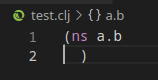
Environment (please complete the following information):
- Extension (VsCodeVim) version: v1.21.6
- VSCode version: 1.59.0
- OS: Ubuntu 20.04
Additional context Perhaps it is related to how Calva does that indentation. Relevant lines in its code:
- https://github.com/BetterThanTomorrow/calva/blob/01b50b95214bd55809285a1fe9e099db8b9ac944/src/calva-fmt/src/extension.ts#L12
- https://github.com/BetterThanTomorrow/calva/blob/01b50b95214bd55809285a1fe9e099db8b9ac944/src/calva-fmt/src/format.ts#L82
If you know of a better way to indent the code and put the text cursor at the right position when editing Clojure files, regardless of any other extensions and VSCode settings, please do tell.


The problem occurs not only with the (ns) form but also other forms.
For example, when we define the function with defn,
(defn some-func|)
Pressing <Enter> when the caret is at | would give
(defn some-func
|  )
Instead of
(defn some-func
  |)
Which basically means it is no longer practical to write Clojure (Calva) with the Vim v1.21.6
Perhaps important - the initially described behavior seems to be erratic. Suddenly, I can't reproduce it using the original steps.
However, pressing o in the Normal mode still results in the suboptimal behavior, and it seems that the cursor is placed not at the beginning of the line but at the position of the indentation of the previous line. But using o might be a different thing altogether.

Moving my finding from Calva slack to this issue. It seems that disabling the New Indent Engine setting of Calva has “fixed” this issue for me, at least in the enter case.
Will copy @PEZ response for posterity:
You could add that finding to the issue, @cjsauer , that the old indent engine works for you. Though I think it might be a matter of timing. The old engine is much slower so “wins“ over the VIM extension by getting later to the party.
Can others confirm/deny that disabling this setting is a workaround? It might aid in diagnosing the root issue.

Thanks @cjsauer, I can confirm that the issue disappears when the =new indent engine= is disabled!
Perhaps important - the initially described behavior seems to be erratic. Suddenly, I can't reproduce it using the original steps. However, pressing
oin the Normal mode still results in the suboptimal behavior, and it seems that the cursor is placed not at the beginning of the line but at the position of the indentation of the previous line. But usingomight be a different thing altogether.
I think a decent workaround for the above is to put the following in the vscode settings.json (essentially has the same effect as pressing tab manually after pressing o):
    "vim.normalModeKeyBindings": [
        {
            "before": [
                "o"
            ],
            "after": [
                "o",
            ],
            "commands": [
                "calva-fmt.formatCurrentForm"
            ]
        }
    ]

Still seeing this issue with calva 2.0.353 and vim 1.25.2. @Dexterminator thanks for the tip. Your keybindings worked better for me than disabling the new indent engine. In particular, two cases that worked better were pressing 'o' after a try and pressing 'o' after a let binding whose value is set by (->> ..)
