

 VSCodeVim
[Feature Request] navigate peeked definitions
Is this a BUG REPORT or FEATURE REQUEST? (choose one):
- Feature Request
What happened: I've recently become quite a fan of the peek definition feature in vscode but noticed that vim doesn't gain focus/no cursor is placed inside the window. It'd be nice to be able to navigate and scroll through the peeked definitions with vim key commands.
How to reproduce it (as minimally and precisely as possible): Use the peek definition command and try and navigate with vim key commands.

Adding @ecotner's description from #4187 as it gives a clearer view of the request
Is your feature request related to a problem? Please describe.
I frequently find myself using the "peek reference" and "peek definition" shortcuts to inspect function definitions that I don't want to scroll up to or open a new file in order to view. However, when I do use these peek commands, if I want to scroll or edit the code in the popup, I need to click into the popup with my mouse, which is frustrating because it takes my fingers away from the home row.
Describe the solution you'd like
I would like if upon using one of the peek commands (especially "peek definition") I could immediately start scrolling or manipulating text in the popup rather than having to click into it with the mouse first.
Describe alternatives you've considered
As mentioned before, clicking into the popup transfers control to the popup, which I can then use vim commands in. It's not that bad but breaks my flow.
Additional context
When I say "popup", this is what I mean (which I get by using Alt + F12):
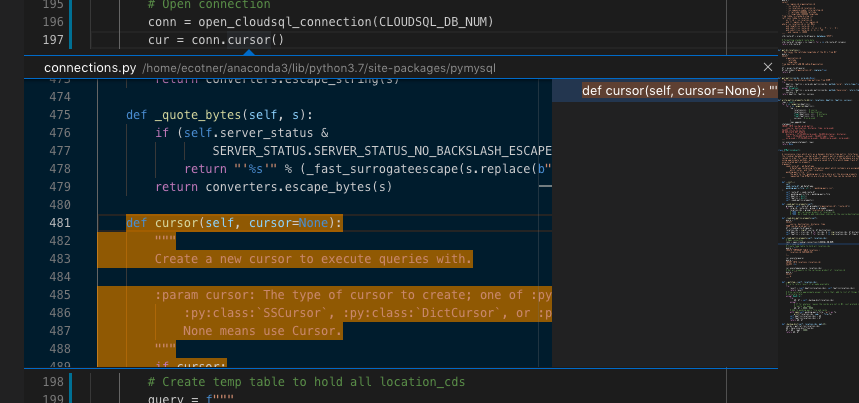
VS Code by default focuses the tree view (the view to the right in the "popup"). You can by default switch to the editor with Cmd/Ctrl+K F2.
You can also configure VS Code to by default focus the editor when quick peek is opened. Change the setting of editor.peekWidgetDefaultFocus to editor.

I added the following keybinding to make Tab toggle focus between the right side tree view and the peek editor:
  {
    "key": "tab",
    "command": "togglePeekWidgetFocus",
    "when": "inReferenceSearchEditor && vim.active && vim.mode != 'Insert' || referenceSearchVisible"
  },

The above keybinding is great, however switches focus to the nav list when pressing tab in insert mode.
This is because referenceSearchVisible is always true when the peek popup is open.
This version fixes that by checking:
isPeekPopupOpen&isEditorFocused&isVimInInsertMode- or
isPeekPopupOpen&!isEditorFocused(e.g. focused on the sidebar nav) - see vscode where clauses for reference
{
  "key": "tab",
  "command": "togglePeekWidgetFocus",
  "when": "referenceSearchVisible && inReferenceSearchEditor && vim.active && vim.mode != 'Insert' || referenceSearchVisible  && !inReferenceSearchEditor"
}
