

 UnknownShadow200
Entity shading not changing when "looking around"
When an entity like a another player looks around, moves around or simply just by looking at your hand in first person. When looking around in ClassiCube, the lighting effect on the block you are holding in first person entirely changes (block entirely changes to a brighter shade looking up, then darker shade looking down) while in Minecraft Classic and even the old ClassiCube client, the block you are holding has a different shade on each side.
Entities on CC like players don't change shade on any side at all when looking around and the dynamic entity lighting remains static.
To better explain, here's a couple of videos comparing between the two versions, focus on the block being held and watch how it behaves. ClassiCube: https://youtu.be/4KO-29cPMo8
Minecraft Classic: https://youtu.be/JeU9SW-Usys

To add more detail here,
the original Minecraft classic essentially does something like this with entity shading:
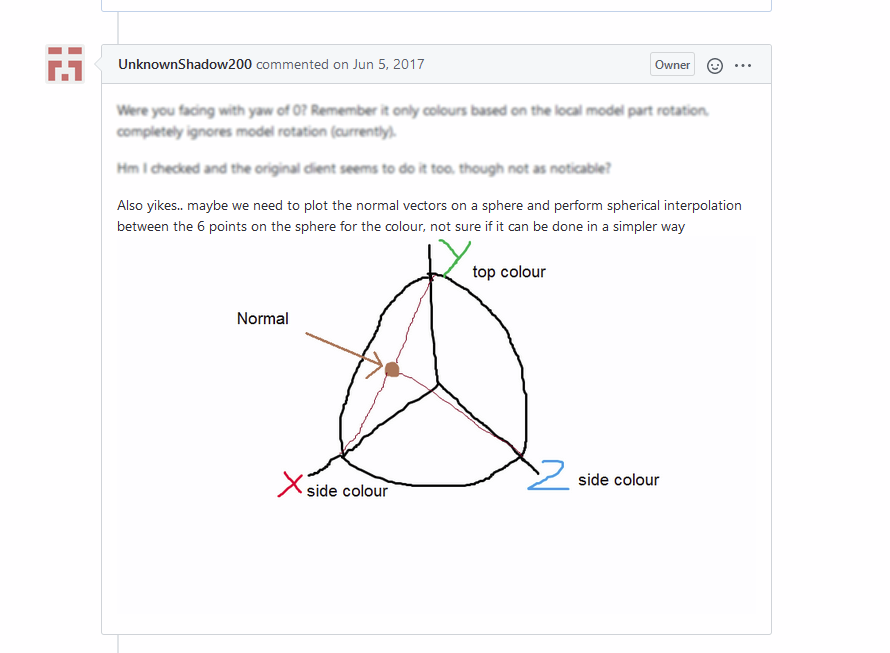 The following are the correct tints (found from WoM, but they should be identical to the original client...) that would need to be applied to perfectly emulate it:
Positive-facing x-side: B3B3B3 Negative-facing x-side: B3B3B3
Positive-facing y-side: F7F7F7 (top face) Negative-facing y-side: B3B3B3
Positive-facing z-side: B3B3B3 Negative-facing z-side: D5D5D5 (if pitch and yaw are 0, 0, this side is the player's face)
That being said, this type of shading, if applied, would make entities with block models look inconsistent, because the X Y Z side shading of static blocks is different from that of entities. This is not the case in modern Minecraft, though, where entities have the exact same shading values applied as the block faces do. So a decision would have to be made if we wanted consistency and better blending-in block models, or strict accuracy to the original Minecraft Classic.

Since there are current improvements to the block lighting in the recent commits in Modern-Lighting, along with the additions of LampLight and LavaLight in MCGalaxy.
Would proper entity shading be considered? Maybe in "Lighting Mode" or another option?
I changed the title as changing the entity shading to be strictly accurate to Minecraft Classic isn't on the table unless that is used for Classic Mode where block models aren't a concern.
With this being said, I would feel that consistent shading on Enhanced Mode, along with possibly having classic shading reserved only for Classic Mode would be the best way to go.