

 Unity-Technologies
Is the simulation speed slow?
I am testing the WallJump scenario with the following code
import tqdm
import mlagents

from mlagents_envs.registry import default_registry

env_id = "WallJump"

env = default_registry[env_id].make()

env.reset()


# We will only consider the first Behavior
behavior_name = list(env.behavior_specs)[0]
print(f"Name of the behavior : {behavior_name}")
spec = env.behavior_specs[behavior_name]

decision_steps, terminal_steps = env.get_steps(behavior_name)

env.set_actions(behavior_name, spec.action_spec.empty_action(len(decision_steps)))

env.step()

done = False

env.reset()
decision_steps, terminal_steps = env.get_steps(behavior_name)
tracked_agent = -1 # -1 indicates not yet tracking
done = False # For the tracked_agent
episode_rewards = 0 # For the tracked_agent

for i in tqdm.tqdm(range(1000000)):
	# Track the first agent we see if not tracking
	# Note : len(decision_steps) = [number of agents that requested a decision]
	if tracked_agent == -1 and len(decision_steps) >= 1:
		tracked_agent = decision_steps.agent_id[0]

	# Generate an action for all agents
	action = spec.action_spec.random_action(len(decision_steps))

	# Set the actions
	env.set_actions(behavior_name, action)

	# Move the simulation forward
	env.step()

	# Get the new simulation results
	decision_steps, terminal_steps = env.get_steps(behavior_name)
	if tracked_agent in decision_steps: # The agent requested a decision
		episode_rewards += decision_steps[tracked_agent].reward
	if tracked_agent in terminal_steps: # The agent terminated its episode
		episode_rewards += terminal_steps[tracked_agent].reward
		done = True
	if done:
		env.reset()
		decision_steps, terminal_steps = env.get_steps(behavior_name)
		tracked_agent = -1 # -1 indicates not yet tracking
		done = False # For the tracked_agent
		episode_rewards = 0 # For the tracked_agent
However, it seems that the simulation speed is 11 time steps per second, and it will take 25 hours to run the 1M steps with a random policy, which I think is very slow compared with other simulators.
The specs of the machine:
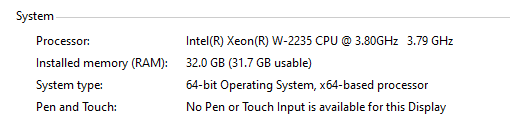
Do you have any ideas to improve the simulation speed?

That's very slow. Have you tried increasing the time scale? This can be done through the engine configuration side-channel: https://github.com/Unity-Technologies/ml-agents/blob/main/docs/Python-API.md#engineconfigurationchannel

That's very slow. Have you tried increasing the time scale? This can be done through the engine configuration side-channel: https://github.com/Unity-Technologies/ml-agents/blob/main/docs/Python-API.md#engineconfigurationchannel
Hi, I increased the time scale to 2.0, and the speed now is 110 steps/second, much faster. For 1M steps, it will take 2.5 hours to complete. Does increasing the time scale affect the accuracy of simulation?
@ervteng
Interestingly, with the built .exe environment file, even without setting the time scale, it still can achieve 100 steps/second. Here is my code.
import tqdm
import mlagents

from mlagents_envs.registry import default_registry

env_id = "WallJump"


from mlagents_envs.environment import UnityEnvironment
from mlagents_envs.side_channel.environment_parameters_channel import EnvironmentParametersChannel

channel = EnvironmentParametersChannel()

env = UnityEnvironment(file_name=env_id, side_channels=[channel])

# channel.set_float_parameter("parameter_1", 1.0)
# env = default_registry[env_id].make()

env.reset()


# We will only consider the first Behavior
behavior_name = list(env.behavior_specs)[0]
print(f"Name of the behavior : {behavior_name}")
spec = env.behavior_specs[behavior_name]

decision_steps, terminal_steps = env.get_steps(behavior_name)

env.set_actions(behavior_name, spec.action_spec.empty_action(len(decision_steps)))

env.step()

done = False

env.reset()
decision_steps, terminal_steps = env.get_steps(behavior_name)
tracked_agent = -1 # -1 indicates not yet tracking
done = False # For the tracked_agent
episode_rewards = 0 # For the tracked_agent

for i in tqdm.tqdm(range(1000000)):
	# Track the first agent we see if not tracking
	# Note : len(decision_steps) = [number of agents that requested a decision]
	if tracked_agent == -1 and len(decision_steps) >= 1:
		tracked_agent = decision_steps.agent_id[0]

	# Generate an action for all agents
	action = spec.action_spec.random_action(len(decision_steps))

	# Set the actions
	env.set_actions(behavior_name, action)

	# Move the simulation forward
	env.step()

	# Get the new simulation results
	decision_steps, terminal_steps = env.get_steps(behavior_name)
	if tracked_agent in decision_steps: # The agent requested a decision
		episode_rewards += decision_steps[tracked_agent].reward
	if tracked_agent in terminal_steps: # The agent terminated its episode
		episode_rewards += terminal_steps[tracked_agent].reward
		done = True
	if done:
		env.reset()
		decision_steps, terminal_steps = env.get_steps(behavior_name)
		tracked_agent = -1 # -1 indicates not yet tracking
		done = False # For the tracked_agent
		episode_rewards = 0 # For the tracked_agent
I think maybe using the env = default_registry[env_id].make() can slow down the simulation speed?

Hi, you can even increase the time scale to 10 or 20.
Thanks. Do you have any suggestions to increase the simulation speed?
We use 20 for most of our example environments. If you go too fast, the physics gets kind of wonky, and sometimes objects/agents will go through each other.
The default mlagents-learn command will set the time-scale to 20, so that might explain why it seems faster.
We use 20 for most of our example environments. If you go too fast, the physics gets kind of wonky, and sometimes objects/agents will go through each other.
The default
mlagents-learncommand will set the time-scale to 20, so that might explain why it seems faster.
Thanks.
Hi. Does increasing the time scale affect the accuracy of the simulation if I used fixed update and physics ?
