
com.unity.netcode.gameobjects

com.unity.netcode.gameobjects copied to clipboard
 Unity-Technologies
When NetworkManager.StartHost() is called with invalid ConnectionData in Unity Transport, the NetworkManager is irrecoverably shutdown
Description
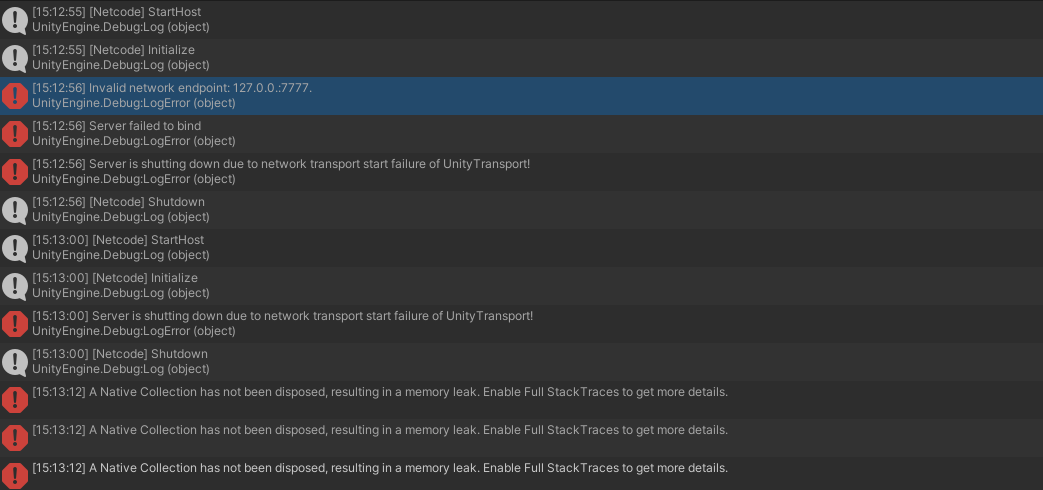
If we call NetworkManager.StartHost() and it fails to connect due to invalid IP address format (e.g. "127.0.0."), then the NetworkManager shuts itself down and seems to be unable to retry a connection even if the ConnectionData is fixed
Reproduce Steps
- Have a NetworkManager
- Add a Unity Transport
- Set ConnectionData.Address to "127.0.0." (invalid IP address)
- Call NetworkManager.StartHost()
- Set ConnectionData.Address to "127.0.0.1"
- Call NetworkManager.StartHost()
Actual Outcome
StartHost() fails and there appears to be a memory leak as well
Expected Outcome
StartHost() is successful
Screenshots
Environment
- OS: Windows 10
- Unity Version: 2021.3.1
- Netcode Version: 1.0.0-pre.8


