

 UnigramDev
Unigram keeps playing audio, prevents Modern Standby devices from entering DRIPS sleep
Describe the bug In some cases, Unigram appears to keep an audio stream open despite nothing happening, causing Modern-Standby-enabled Windows devices to drain the battery during sleep.
To Reproduce Steps to reproduce the behavior:
- Open Unigram on a device that uses Modern Standby.
- Use Unigram for a while. At the end, ensure Unigram is not playing audio (e.g. an audio file you received).
- Put your device into modern standby.
- Wait multiple hours.
- Wake your device.
Expected behavior Unigram should prevent the device from entering DRIPS, the most power-saving Modern Standby state, only when the user has triggered continuous audio playback.
Screenshots
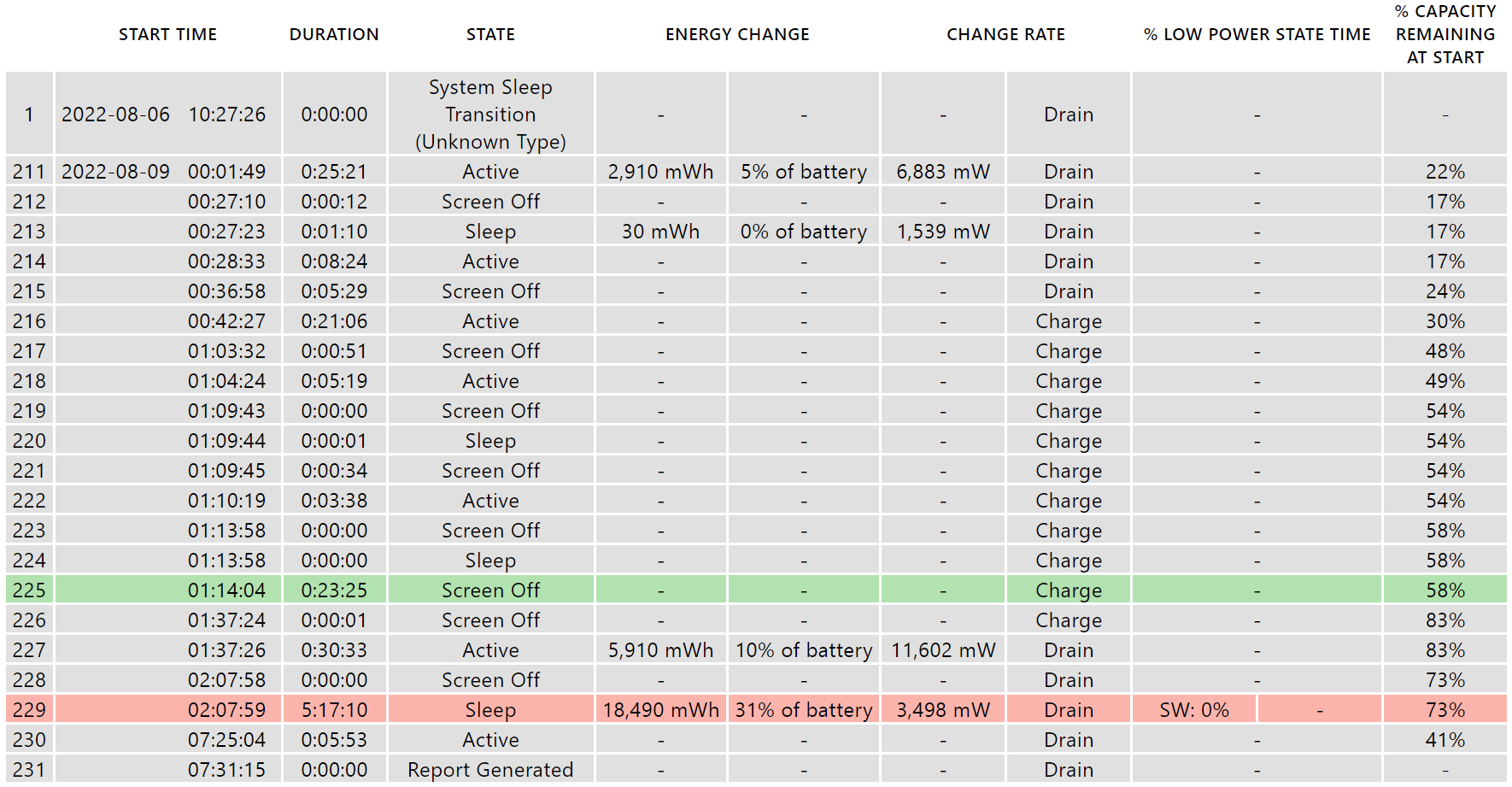
After a Modern Standby session, powercfg /sleepstudy can be used to create a sleep study report.
The sleep study shows how my device drained 31% of its battery for a 5 hour sleep session, not spending any time in DRIPS:
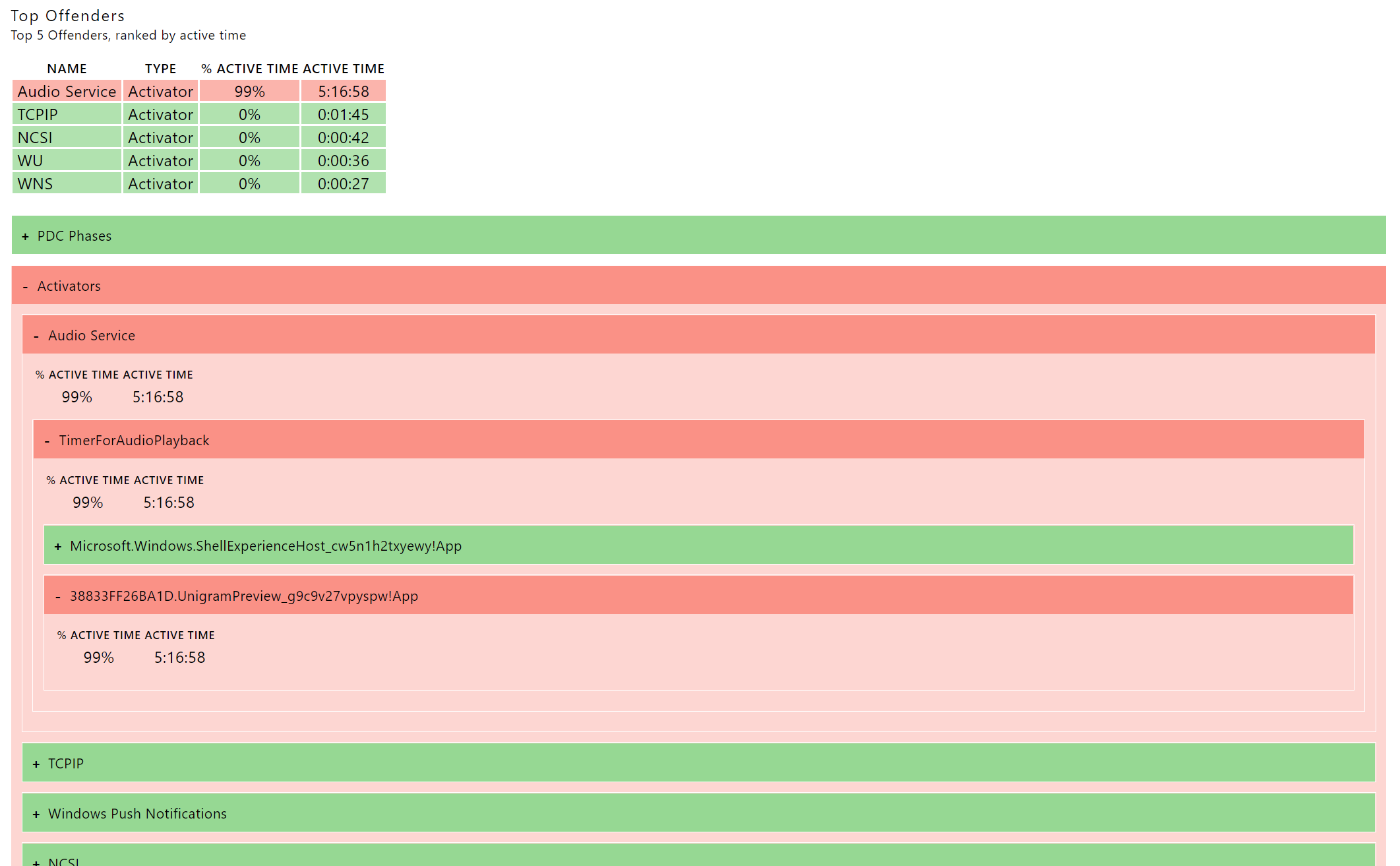
The sleep study also analyzes “offenders”, i.e. reasons why the device was kept from entering DRIPS. For this sleep session, the only relevant offender is the Audio Service activator, which claims it had to keep the device in a high-power state for two reasons: The Shell Experience Host was playing audio for 1 second, and… Unigram played audio throughout the whole sleep session:
Version Info
- Unigram: 8.8 (7438) X64
- Windows: Windows 11, Version 21H2, OS Build 22000.832
Additional context I am experiencing this problem on a Surface device.
I don't recall intentionally playing any audio in Unigram during that session (no voice messages etc.), so I think the only reason for Unigram to open any audio stream was notification sounds. Unigram was in the background when I entered sleep.

I don't think this is due to notifications sound... I will investigate this further

Thank you so much! I've had to stop using Unigram because of this for now – reliable sleep is, in the end, more important than a better Telegram client.
If there's anything I can do to help, let me know. (Maybe I can try to catch a memory dump of Unigram after such an energy-eating sleep session?)
Could you please explain me the repro steps? Such as:
- Window was active
- Window was minimized
- Actions performed in the app
As far as I can understand you can reproduce this issue quite well.
Unfortunately, I don't know reliable repro steps. Determining whether the issue is there requires about 15 minutes of sleep, so it is really hard to test systematically. In practice, I usually have Unigram open all the time, often sitting minimized to the taskbar, sometimes just sitting behind other (fullscreen) apps. I occasionally interact with it – just writing and receiving messages and stickers, I typically don't receive video (and audio is an absolute rarity) – but most of the time, it's sitting minimized or in the background. When I sleep my device, it often sleeps absolutely fine (loosing maybe 1% battery a day). When the bug hits me, the Surface churns through battery. Every time I noticed this and checked the sleep study report, Unigram was the activator that kept the device awake.
#2625 has a comment saying it's the tray icon that causes the problem. Disabling it seems to fix it for me.

Thanks for the comment, @trs80. I guess that disabling the tray icon can be a good workaround. It, in fact, prevents the app from being suspended, and this is by design.
Thank you! (And sorry that I did not find that other ticket.) I disabled the tray icon and resumed my use of Unigram – I'll report back if I get another battery drain.
Recently did quite a lot of changes to audio stuff in the app. Does the problem still occur?
Thank you! I updated to the most recent version of Unigram available in the store and re-enabled the system tray icon. I'll monitor the situation and let you know if another drain occurs.
Oh, right, sorry, it's about system tray icon. Having that, there's no way that modern standby can possibly work. There's no way around this.
Huh, weird! I have other apps that show tray icons, can play audio, and do not cause this battery drain. (Looking at the sleep study, it does not look like the tray icon itself is the blocker, but the system thought that Unigram was continuously playing audio.)
@fefrei Unigram is not a normal app, because UWP apps don't support tray icon. So this is done by an hack, and there's no other way around this.
This just happened to me. Drained my laptop to 0% overnight.
Prior to this, sleep mode has been fine even with Unigram open.
I don't think this is because of the tray icon. Something is playing audio and not closing the audio context, most likely related to notifications or reactions.

@ds84182 It’s actually the system tray icon, you can disable it and you will see that your laptop will sleep as expected :) (There’s no audio involved with notifications or reactions)
@ds84182 I’m saying this with some confidence because UWP apps (UWP is the technology used to build Unigram) are not allowed to run in the background and to have a tray icon, so we do this by using an hack that consists in spawning a classic win32 process that hosts the tray icon and forces the main process to stay open (as is: it launches it again as soon as it gets terminated)
No, it's definitely audio related. Older versions of Unigram depended on C# GC to finalize AudioGraphs used for the message send sound, etc. Of course GC finalization is nondeterministic so if you send a telegram message and then put your laptop to sleep, this happens.
@ds84182 But now AudioGraphs are disposed as soon as the stream has been played. Having them as weak references caused a huge amount of crashes, so this had to be changed.
@ds84182 But now AudioGraphs are disposed as soon as the stream has been played. Having them as weak references caused a huge amount of crashes, so this had to be changed.
Right. And having them as weak references caused this bug because they weren't being explicitly disposed. I'm not sure if the latest build has the fixes in it but I've just updated Unigram today. Will report back if I encounter this again.
@ds84182 Unigram doesn’t use weak references since a while, since before yesterday for sure 😁
@FrayxRulez Would be glad to know that AudioGraph is actually the issue to be honest, but I’m quite confident that this isn’t the case 🥲
Reporting back, haven't hit the bug since updating so the AudioGraph refactor fixed this! Also fwiw this isn't typically a problem for UWP apps unless they declare background audio perms, which Unigram does iirc