

 UnigramDev
Partial drag of "Record voice message" button causes recording UI to soft-lock
Describe the bug If you drag (Click then release when it's up) "Record voice message" only a part of needed distance to lock, instead of sending recorded message or canceling recording if it's too small (like on mobile)
To Reproduce Steps to reproduce the behavior:
- Go to any chat where you can send voice messages
- Click and hold on "Record voice message" Button
- Pull it up just a bit
- Release
- You've got recording bar soft-locked until you reopen the app/change account
Expected behavior Stop recording, or send recorded part of voice message, or lock at any height that's higher than message bar.
Screenshots
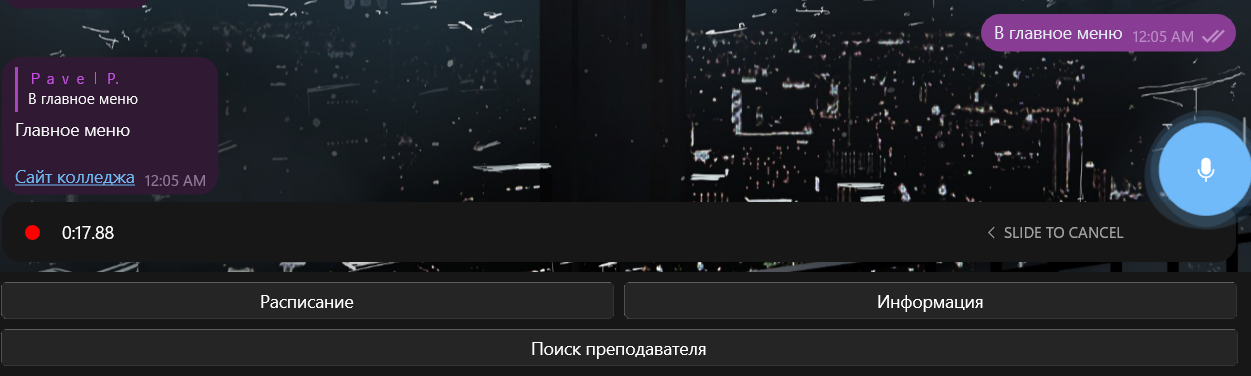
Also a video of it here
Version Info
- Unigram: v 8.5 6984 x64 Direct (pls update the template)
- Windows: 11 22000.527 21H2 (at least Windows version, since it's going to be unsupported with release of 8.6 stable or next direct build)
Additional context Thanks to @HibikiShuhasu for reporting this problem here

*additional note - if you return to same account without resetting the app it actually still records message, and to send next you have to record a "new" message (it won't show UI, even if you drag or press and hold, or press Ctrl+R), if you then click again to send it - you will have a whole recording from the moment you started it before switching accounts.
So it's also expected to stop recording if you switch accounts and reset the cache.
