

 UnigramDev
High battery usage while running in background
During these days I often leave my laptop closed after some calls with by gf and when I go back to it after some hours it is really hot on the back and the battery decreased considerably (7-15% / hour). Windows 11 in the last hour (when I never used the PC and it was in sleeping state) reports to me 8% battery draining with 98% caused by Unigram in the background. I'm running Windows 11 on a Dell Xps 15 9510 (I7 11800H).

You can disable system tray icon to improve battery life in this situations

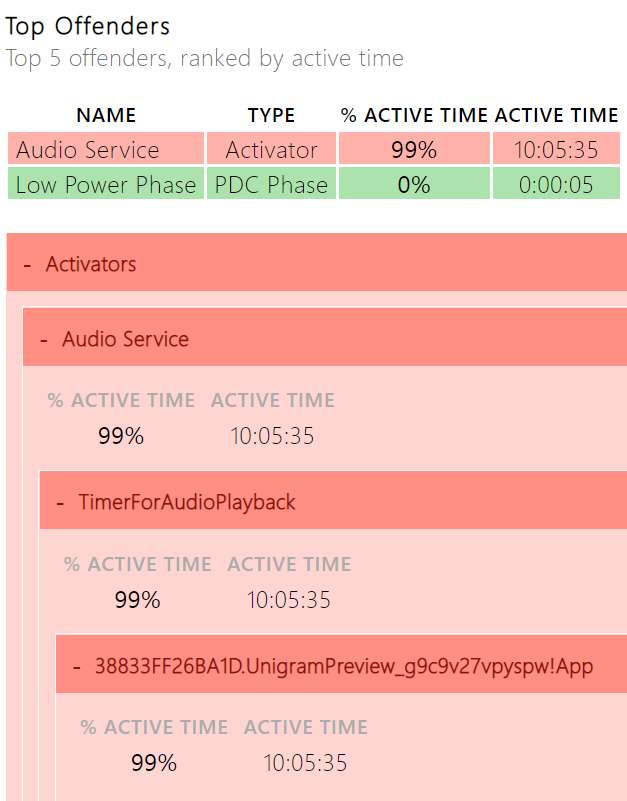
What situation? Everyone who has a laptop that wants to close it without the battery draining as if it was on all the time? I was trying to work out why my laptop was draining the battery when closed, powercfg /sleepstudy shows that it's Audio Service - TimerForAudioPlayback - 38833FF26BA1D.UnigramPreview_g9c9v27vpyspw!App.

I used the command you suggested, but couldn't find the information about Unigram process could you be more detailed?

Expand the Activators for a period of sleep with high power draw and you should see it:
Marking this ticket as a duplicate of #2801 as the newer ticket is slightly more detailed.