

 UniSharp
route /laravel-filemanager/jsonitems takes too much time to fetch files and directories from server
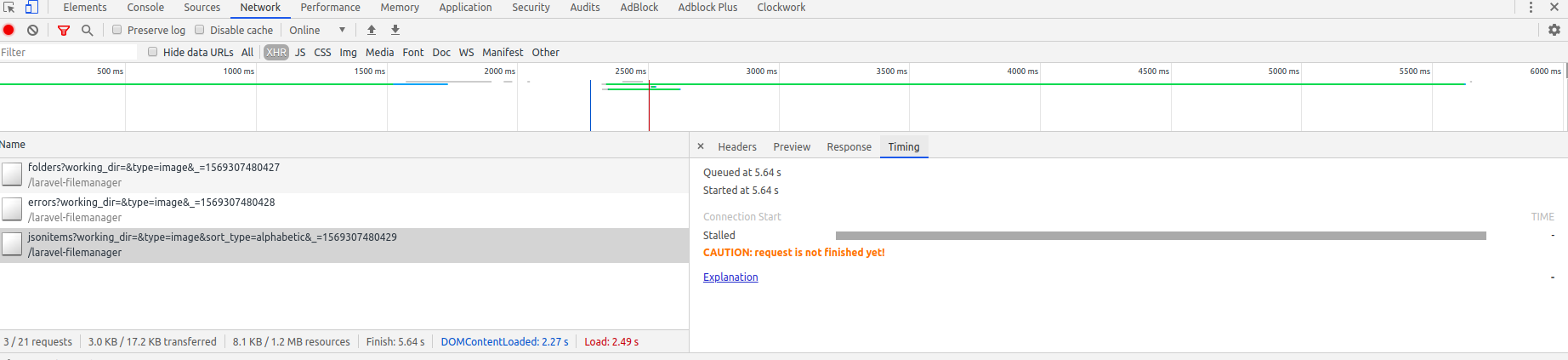
I have around 200 files and folders(much of which are files) in working directory. Response from all other routes are fast but this route laravel-filemanager/jsonitems?working_dir=&type=image&sort_type=alphabetic&_=1569306421343 takes too much time (around a minute most of the times and sometimes a timeout error occurs) to fetch items.
Operating system : Linux
Laravel version : 5.8.*
Package version : v2.0.0-alpha8
Steps to reproduce your issue :
- Install lfm in a laravel project.
- Upload around 200 images in index directory and create few folders in index directory.
Screenshots of browser console :


If you click away to another folder, you will get thrown back to the initial folder that was loading, so you end up being forced to wait for it to finish loading if you do not want to be thrown back. There's definitely some performance improvements to be made, for example CKFinder file manager feels faster browsing individual folders.
Additionally I think there should be option to disable the "Shared files" as it seems to be going through all files just to compile that view, when it might not be even that necessary.

I am also experiencing performance issues, I have just over 300 images in a folder for a blog application and it takes around 1-2 minutes to display all the images. They aren't large files either, they're ~50kb per image

@dissolvdgrl the problem is not the size of the files, but that this library is trying to compose objects with additional information that is obtained only when reading each file (width, height, format, etc.)
as one of the directions, this is the initial rendering of the main information (which is available through SplFileObject), and if you need to display a thumbnail, you can make additional requests that the browser will execute as it loads (LazyLoad + time marker for preview)


I have the same problem. I have a folder for user upload avatars, after a period of use, I have about 300 files in one folder, and now it loads very slowly. When checking networking, I realize that laravel-filemanager loads all files in a folder at once -> it's a bad practice.
My temporary solution: If the daily upload is not massive ( ex. less than 20), when the user uploads the image, it automatically creates a folder by date. The key: makes sure each folder doesn't have too many items.
