

 Ultimaker
Multimaterial Printing: Current Primepillar solution not working properly
Is your feature request related to a problem?
If printing with more than one material the primepillar is not working properly. This has been brought up in the ultimaker community before: https://community.ultimaker.com/topic/31763-prime-tower-gap/ https://community.ultimaker.com/topic/31173-strange-purging-behavior-with-a-prime-tower/
An additional problem is that when printing with more than 2 extruders in one layer the nozzles are not primed every layer but alternate instead. The pillar may easily fail.
Are there already any feature requests or is this something that is beeing worked on somewhere?
Describe the solution you'd like
PrimePillar strategy like in Simplify3D or prusaslicer: Different materials/Colors are stacked upon each other on a tower.
Describe alternatives you've considered
Affected users and/or printers
All printers with 2+ extruders
Additional information & file uploads
No response

Hey @aimzaimz,
What an interesting feature request.
The prime tower used to be called the purge tower because the inside of the prime tower catches purged material. That is why the inside rings do not stack. This is done by design. The inside is allowed to be messy because it's intended to be thrown away.
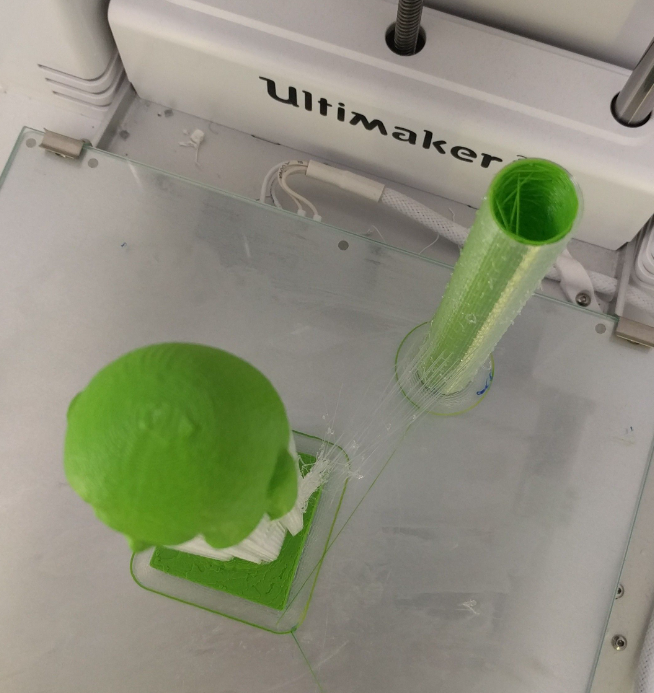
Can you share how the current solution fails for you? Does it fall over or does it not prime correctly for you? Do you have a model that shows a failed prime tower? Perhaps a picture of the print job that failed because of the failed prime tower?
Perhaps it's something that we can fix just by tuning settings. Thank you. 😄

This issue has been automatically closed because there has been no response to our request for more information from the original author. With only the information that is currently in the issue, we don't have enough information to take action. Please reach out if you have or find the answers we need so that we can investigate further.
![github-actions[bot] avatar](https://avatars.githubusercontent.com/in/15368?v=4 "Published by a pub.dev verified publisher")