

 Ultimaker
Organize Print Setting Profiles in Folders
Is your feature request related to a problem?
I have a lot of models that are variations of one another where each variation requires slightly different settings. (support settings, adhesion, speeds, etc...) Having to re-do or reconfigure settings each time is a pain. I also don't want to have to search through an endless list of print profiles to find the one I want.
Describe the solution you'd like
I'd like to be able to organize my print profiles into folders.
Describe alternatives you've considered
The only alternative is to keep a note elsewhere, on my phone or computer of all the settings which have to be changed for each print. This can get cumbersome.
Affected users and/or printers
All users would benefit from this change, especially those who own print farms.
Additional information & file uploads
No response

If you create the print profiles correctly and not just save the changes in a profile, then you can create something like folders (Default, Visual, Engineering, Draft). If everything has been there for a long time, you just have to use it properly!"
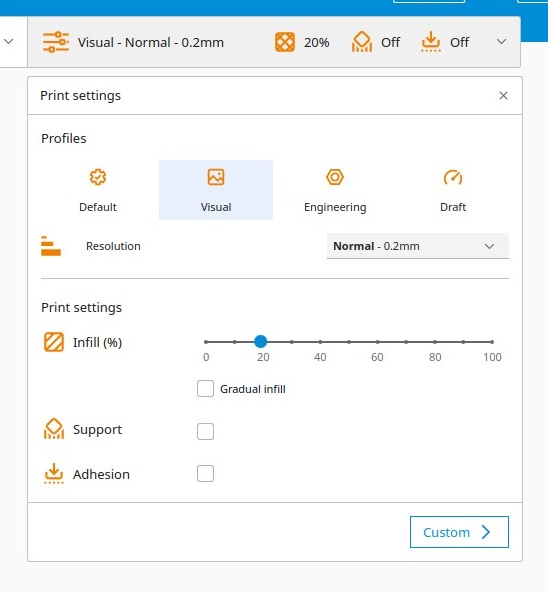

I think that you have misunderstood my request. The profiles I’m wanting to store in folders have nothing to do with changes solely for the sake of quality.
These are profiles that are fine tuned to print specific models or parts because my default profiles can’t do it or can’t produce the results I want.
It would be much more convenient and efficient to be able to store profiles for my most often printed parts, challenging prints, or other groups in folders. Starting from my default print settings every time I print something can be tedious.
Sent from my iPhone
On Aug 16, 2022, at 4:44 AM, M4L @.***> wrote:
If you create the print profiles correctly and not just save the changes in a profile, then you can create something like folders (Default, Visual, Engineering, Draft). If everything has been there for a long time, you just have to use it properly!"
— Reply to this email directly, view it on GitHub, or unsubscribe. You are receiving this because you authored the thread.
And, while you could store model specific g-code files on a hard drive, that doesn’t give you the freedom to make changes over time. Or, if you make any upgrades or replacements or anything to your printer, there is the chance that all your g-code becomes obsolete.
Being able to store the profiles as I’ve described in cura is a superior solution.
Sent from my iPhone
On Aug 16, 2022, at 7:02 PM, Joshua Johnson @.***> wrote:
I think that you have misunderstood my request. The profiles I’m wanting to store in folders have nothing to do with changes solely for the sake of quality.
These are profiles that are fine tuned to print specific models or parts because my default profiles can’t do it or can’t produce the results I want.
It would be much more convenient and efficient to be able to store profiles for my most often printed parts, challenging prints, or other groups in folders. Starting from my default print settings every time I print something can be tedious.
Sent from my iPhone
On Aug 16, 2022, at 4:44 AM, M4L @.***> wrote:
If you create the print profiles correctly and not just save the changes in a profile, then you can create something like folders (Default, Visual, Engineering, Draft). If everything has been there for a long time, you just have to use it properly!"
— Reply to this email directly, view it on GitHub, or unsubscribe. You are receiving this because you authored the thread.
Hey @weaseljohnson,
Thanks for your Feature Request. I understand the need for saving and re-using often used settings. Have you considered actively saving your project files in different folders instead of your profiles?
Personally, I use the Ultimaker Digital Library for navigating the settings I used in previous models.
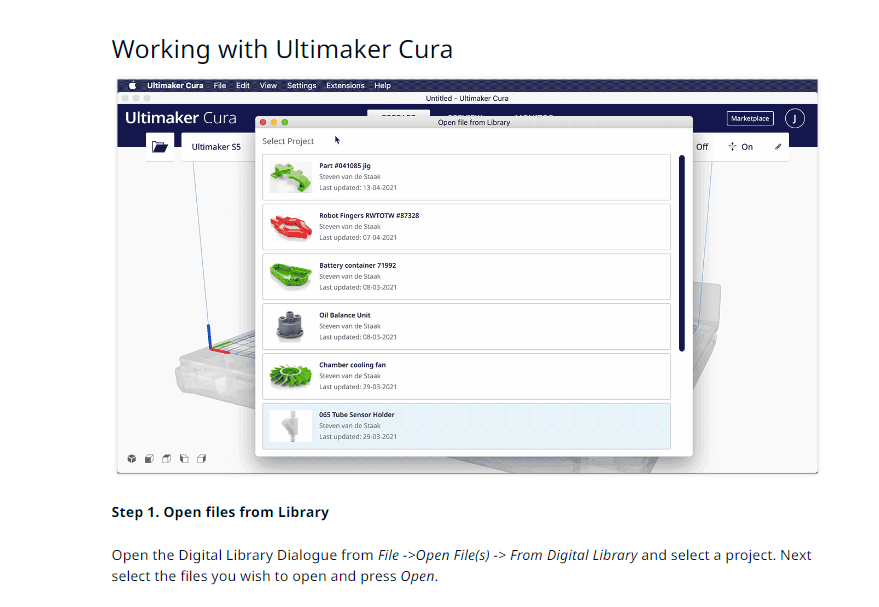 https://support.ultimaker.com/hc/en-us/articles/360020993859-Collaborate-distribute-parts-using-the-Digital-Library
I can bring your request up to the team, but I suspect that since we have an alternative in place that the issue will be deferred. Fingers Crossed 🤞

I brought your request up to the team and we believe we will not work on this anytime soon and will therefore defer this issue.
Since Cura is open source, you or anyone else is more than welcome to work on this issue and create a pull request yourself. I hope you understand. 🙏
Hi 👋, We are cleaning our list of issues to improve our focus. This feature request seems to be older than a year, which is at least three major Cura releases ago. It also received the label Deferred indicating that we did not have time to work on it back then and haven't found time to work on it since.
If this is still something that you think can improve how you and others use Cura, can you please leave a comment? We will have a fresh set of eyes to look at it.
If it has been resolved or don't need it to be improved anymore, you don't have to do anything, and this issue will be automatically closed in 14 days.
![github-actions[bot] avatar](https://avatars.githubusercontent.com/in/15368?v=4 "Published by a pub.dev verified publisher")
This issue was closed because it has been inactive for 14 days since being marked as stale. If you encounter this issue and still have a need for this, you are welcome to make a fresh new issue with an updated description.