

 Ultimaker
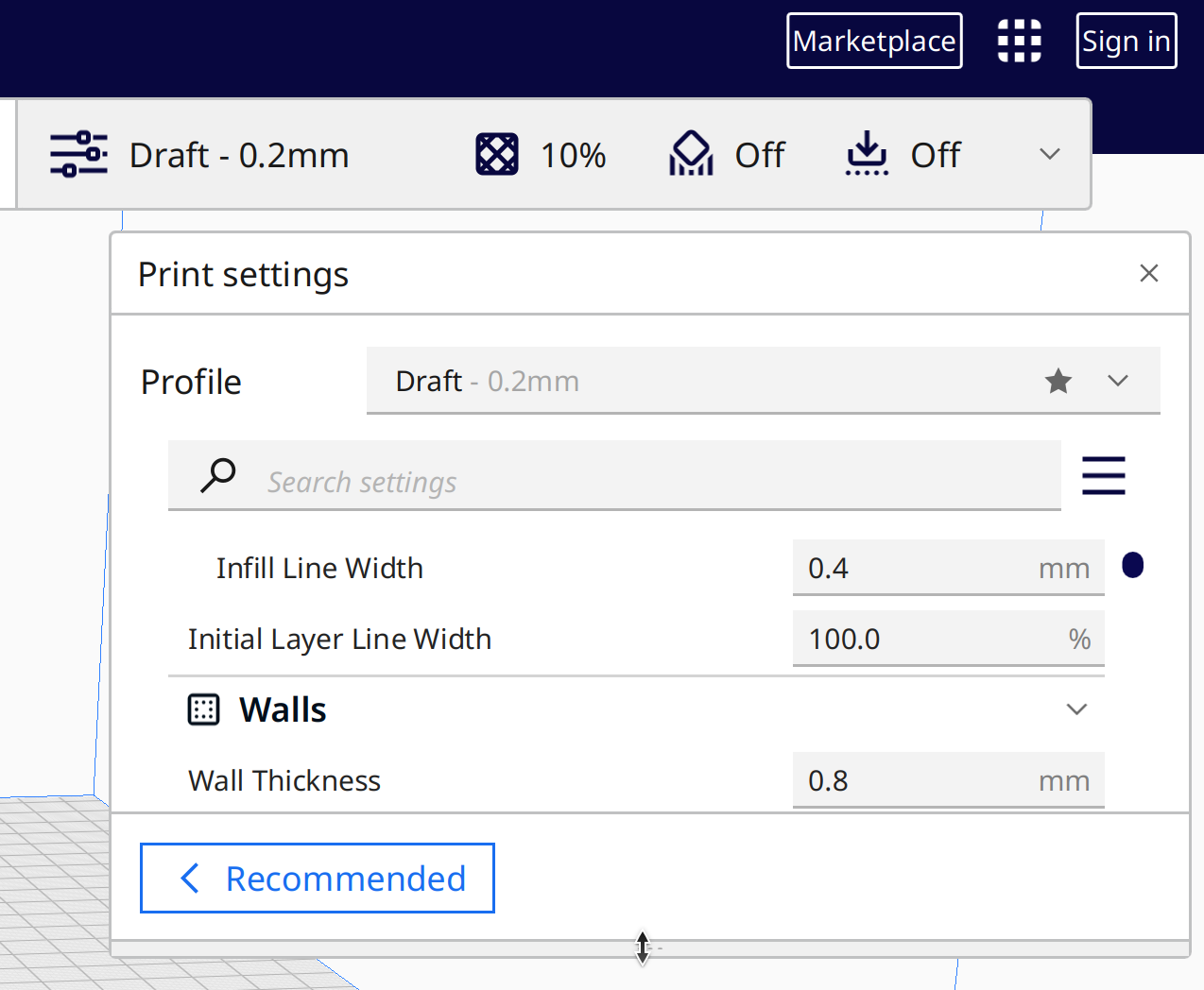
Unable to resize the print settings window
Application Version
5.0.0
Platform
Windows 11
Printer
Creality Ender 3
Reproduction steps
- Expand the Print Settings window.
- Change any print setting.
- Select the bar at the bottom of the window to expand it so you can see more settings.
- Try to drag it up and down.

Actual results
The resize bar doesn't move - you can't drag it up and down to resize the settings.
Expected results
The bar should resize the settings window.
Checklist of files to include
- [ ] Log file
- [ ] Project file
Additional information & file uploads
I was using a plugin in Cura 4 that was mounting settings to the sidebar to work around this since it's been a problem for some time, but that plugin hasn't been updated for v5 yet.

Some people have reported an offset between the mouse position on screen and where Cura thinks it is. Do you have a similar issue? Could you try if there is a spot close by where it does work.
If you hover over it, the mouse should change into a "drag" pointer.

When I hover over it, it does change to the double-ended-arrow "resize" or "drag" pointer, but holding down the left mouse button when it changes and dragging up and down doesn't yield results. The mouse cursor moves but the resize doesn't happen. I can try doing a drag somewhere near it without actually clicking on the bar, but the cursor won't be the right one. Maybe that doesn't matter. I'll give that a shot shortly.
Just tried a bunch of stuff, none of it worked.
- Verified that the cursor changes to the move/drag double-ended-arrow only when the mouse is over the bottom bar.
- Tried dragging up/down at both ends of the bar, in the center, and in a few areas along the bar (horizontally). No luck.
- Tried dragging starting a couple of pixels above/below the bar (though the cursor was not the correct one) in the center, edges, and at a few points in between. No luck.
- Tried dragging starting in the middle of the bottom bar where the "Recommended" button is (though the cursor was not the correct one). No luck.
- Tried double-clicking on the drag area to see if I'd get lucky and have it "maximize" (not sure if that's a feature, but that'd be nice). No luck.
- Closed and reopened the settings window, tried all those things again. No luck.
I'm not sure what else I can try. This is pretty much the same as I found in later versions of Cura 4 and the only thing that rescued me was that plugin to pin the whole thing to the side of the screen and not have to fiddle with resizing.
All the other drag operations in the UI work - I can move the viewport around, I can move models around on the platform, etc. It's just this one resize issue, but it's kinda big because it makes the program unusable.
Oh, I also tried dragging the settings window around to different locations on the screen to see if that'd make a difference. I am able to drag the settings window around without issue, but it did not affect the ability to resize it.
Huh. That is super weird. We literally use the same code for those components.
In all honesty, I wouldn't even know where to start looking in order to debug this. This is especially considering that you've had this issue for a long time and we've not really had reports from other people that also had this issue.
I'm not sure where I even heard of that sidebar GUI plugin the first time, but I feel like it was on a forum somewhere that I was complaining about this and @fieldOfView popped in and said to work around it with that plugin. It's been quite some time and I've never looked back, so I didn't pursue it.
Are there any sort of persisted settings that may have gotten corrupted over time that I could go in and remove? Something to do with window position and size? Note I don't want to wipe everything out because I have custom materials and profiles and things I really don't want to lose.
Is there any trickiness around high DPI displays? I do usually have things scaled to 200% but I did try resetting to 100% and that didn't fix it. (Similar issues in things like Inkscape with high DPI and resize/menus.) Some sort of setting I should try?
Could there be a "double-click the resize bar and have the window maximize" sort of behavior added? I really just want the thing as tall as it'll go. I don't resize it other than to just make it bigger and then leave it. Maybe integrate that sidebar plugin right into the UI as a view option? (Totally spitballing, don't even know if that's possible.)
Any sort of debug info I could capture? I'm not a UI dev, to be honest, but I've done my fair share of debugging and troubleshooting over the years and may be able to do something like capture events with Spy++ or whatever if that'd help.
Are there any sort of persisted settings that may have gotten corrupted over time that I could go in and remove?
Maaaybe the preferences file, but it's a long shot. You can find it via help -> show config folder. If you move the "cura.cfg" file somewhere else, it should try to re-create the preferences. All other stuff will survive that (but as aways, be on the safe side and make a backup of the entire config folder!)
Is there any trickiness around high DPI displays? I do usually have things scaled to 200% but I did try resetting to 100% and that didn't fix it. (Similar issues in things like Inkscape with high DPI and resize/menus.)
That's pretty much the last thing I could think of. I'm pretty much grasping at straws here.
Alternatively, you could also go into the preferences config file and change the "settings_list_height" setting to something that is the right size for you.
The sidebar plugin is pending review from us, so it will be back for 5.0 soon.
The sidebar GUI does not leave behind settings that would affect the normal GUI in this way.
While the new version of Sidebar GUI is in review, a prerelease is available here: https://community.ultimaker.com/topic/40313-fieldofview-plugins-for-cura-50/

Weird thing for the day: I fired up Cura to do this test, then decided to try it on my second monitor (I have a dock that I sometimes use). I left Cura open and docked.
Suddenly I'm able to resize that settings bar. And I can resize it on my regular laptop monitor or on the second monitor, so it's not a primary/secondary display thing. I undocked and can still resize.
I'm not sure what changed, if perhaps some setting got updated/overwritten when the second monitor appeared or what. I don't know if I've ever tried leaving the app open while docking, I think I was always either already docked or already undocked while running it.
In any case, super weird, but it looks like I'm fixed in some unintentional way.
Just to complete the circle, I did install the beta sidebar GUI plugin and that does appear to work, so yay!
Thanks for the help and the patience, I do appreciate it.
Issue still exists in version: 5.1.0-beta.
UI window can be moved, closed, reopened, interacts normally but height cannot be adjusted. When the bug occurred first time, with any attempt to enlarge the height, on click the bottom border jumped up the screen a few lines. In the end the result is a mini-window that is almost useless :/
The only reproduce-able workaround I could find out is:
- quit Cura
- restart Cura
- do not maximize window (manually resize the window)
- resize settings UI
- then maximize windows
- do not resize the UI any more
How to reproduce:
- once the bug occurred (I have no clue what triggers it; noticed the behaviour after several days of usage 5.1.0-beta)
- maximize window
- try to resize the settings UI
- settings UI will becomes shorter and shorter with each attempt to adjust height
Screenshot of the settings UI after several attempts to adjust height:
Notes:
- Ubuntu 22.04 (up to date as of 8. July .2022)
- Monitor: 2x 4k
- Nvidia driver 510.73.05

@tillig Is it possible to re-open the issue since it still exists in 5.1.0-beta?
I don't mind reopening it as long as folks realize I won't be shepherding it through to completion or necessarily providing any more info than I already have.
I also ran into this issue right after installing 5.2.1 on Windows. I was able to use the workaround provided by @rubienr

Can confirm that issue still exists with UltiMaker-Cura-5.3.1-linux-modern.AppImage.
- another workaround: Sidebar GUI plugin
I've just encountered this bug in 5.6.0 on a Macbook Pro M1. Workaround by @rubienr worked, thanks so much!

Yep, that issue happen very randomly and not often, even restarting Cura does not help. BUT.
@tillig mentioned trying to resize it on another monitor and it worked. As I had no second monitor atm I instantly tried to click "Restore window" then "Maximize" again (the middle one button between "Minimize" and "Close" window in Windows). And guess what - I was able to resize "Print settings" again. :)
version: 5.6.0

Hi, I also encountered this in cura elegoo 5.6; made the print settings window smaller, and then couldn't get it larger again.
Moving the cura-window to another monitor helped, now back to proper size!
Thanks for this tip!

I am having this problem in 5.10.0 as well. When I used the workaround provided by @rubienr is seemed ok (at least for now, who knows whether it will come back). I am using a multi-monitor setup as well, and the problem only occurred on my external monitors.
