
PdfPig
 PdfPig copied to clipboard
 UglyToad
Interactive forms text not found! Please help
Hi,
I have a pdf with interactive forms. PdfPig is not getting text inside these forms.
I've tried with:
        ExtractTextWithNewlines.Run()
        OpenDocumentAndExtractWords.Run()
        AdvancedTextExtraction.Run()
        GetFormContents.Run()
No one is getting that text. The last "GetFormContents" finds forms but not those, unfortunately.
That class is switching these:
                   case AcroTextField text:
                        str.Append($"Found text field on page 1 with text: {text.Value}.\n");
                        break;
                    case AcroCheckboxesField cboxes:
                        str.Append($"Found checkboxes field on page 1 with {cboxes.Children.Count} checkboxes.\n");
                        break;
                    case AcroListBoxField listbox:
                        var opts = string.Join(", ", listbox.Options.Select(x => x.Name));
                        str.Append($"Found listbox field on page 1 with options: {opts}.\n");
                        break;
Does PdfPig have more form types? Does anyone know how to get a text from interactive forms?
Any help is appreciated; thanks.

I've been working to use PdfPig to strip all pdf field content for a PDF - > SQL database program I'm building, and am having maybe a similar issue to you.
I'm trying to replicate the field extraction I was getting with an evaluation trial of Aspose (Too expensive so moved on to alternatives).. and while I'm able to detect the correct Field Count and pull a majority of the correct values -- But I'm having some fields across multiple .pdfs being detected as UglyToad.PdfPig.AcroForms.Fields.AcroFieldType.Unknown when they are simple checkboxes or textboxes when I look at the pdf. I don't currently have an Acrobat Pro license-- so I can't check the detailed field info on that side.
PdfPig finds the field and lets me get the name, but since the type is unknown I'm not sure how to pull the value from those (should be either checkbox or textbox but casting as either one doesn't let me pull the value.) Example of # of unknown type fields from one of the pdfs I'm extracting. PDF should be only checkbox and textbox fields yet here we are with 12 "Unknown" form fields. Total field count: 142 Fields with unsupported field types count:12
This is the code I'm using, went a different way than the switch statement in the example in PdfPig/examples/GetFormContents.cs
`Dictionary<string, string> formCollection = new Dictionary<string, string>();
        List<String> longColumnNames = new List<String>();
        List<String> dupeColumnnames = new List<String>();
        List<String> unsupportedFields = new List<String>();

        var unsupportedFieldTypeCount = 0;
        using (PdfDocument document = PdfDocument.Open(filename))
        {

            AcroForm form;
            bool containsforms = document.TryGetForm(out form);

            if (containsforms)
            {
                fieldcount = form.Fields.Count;
                var fieldnameTooLongCount = 0;

                string fieldname = String.Empty;
                string fieldvalue = String.Empty;

                foreach (UglyToad.PdfPig.AcroForms.Fields.AcroFieldBase field in form.Fields)
                {
                     fieldname = String.Empty;
                     fieldvalue = String.Empty;
                    //have to check for each field type.
                    //text box
                    if (field.FieldType == UglyToad.PdfPig.AcroForms.Fields.AcroFieldType.Text)//typeof(UglyToad.PdfPig.AcroForms.Fields.AcroCheckboxField))
                    {
                        fieldname = field.Information.PartialName;
                        fieldvalue = ((UglyToad.PdfPig.AcroForms.Fields.AcroTextField)field).Value == null ? "" : ((UglyToad.PdfPig.AcroForms.Fields.AcroTextField)field).Value.ToString();


                    }
                    //checkbox
                    else if (field.FieldType == UglyToad.PdfPig.AcroForms.Fields.AcroFieldType.Checkbox)//typeof(UglyToad.PdfPig.AcroForms.Fields.AcroCheckboxField))
                    {`
etc , for each the field types below.
These are the types it looks like pdfpig pulls. UglyToad.PdfPig.AcroForms.Fields.AcroFieldType.Text AcroFieldType.Checkbox AcroFieldType.Checkboxes AcroFieldType.ComboBox AcroFieldType.ListBox AcroFieldType.PushButton AcroFieldType.RadioButton AcroFieldType.RadioButtons AcroFieldType.Signature AcroFieldType.Unknown
I'm new to github so I might need to make a separate issue/discussion thread for my AcroFieldType.Unknown issue... But maybe the fields that aren't hitting your AcroFieldType.Text switch are AcroFieldType.Unknown for some reason? Worth a check.

First off, thank you so much for sharing your code. I can detect the field via code now; It's an unknown type, as you told me. I have access to the field name via
fieldname = field.Information.PartialName;
I can't cast it out as UglyToad.PdfPig.AcroForms.Fields.AcroFieldType.Text because it's a UglyToad.PdfPig.AcroForms.Fields.AcroNonTerminalField, and I didn't find a way to get its text Value yet.
So yeah, I have the same issue as yours. I'm now looking for a way out to get that value from an Unknown field type. I hope someone will join this issue and bring to light more solutions. I'll surely share my progress if I make any.
Without having looked into this in detail or having worked with fields much, perhaps you can have a look what the input is and how this relates to the PDF reference [section 8.6.2].
Maybe this can tell you how the fields are stored and where PdfPig decides it's an Unknown type.

After finally getting an Adobe Pro License to check out the form fields, I've solved my issue.
In the .pdf fields, it appears if a Field Name contains a '.', pdf pig won't be able to grab it's field type.
Some example field names that were causing AcroFieldType.Unknown. checkboxfield.0 checkboxfield.1 textbox.Comments or even one that was a full sentence, containing the '.'.
I'm pretty new to pdfs, but it looks like when a field name has a '.' in it, Adobe tries to make it a "parent", the Acrobat fields UI will attempt to group it under a header. I imagine PDFPig is picking up this grouping header and not the "children" (actual field) associated.
Here's a an example screenshot from the form editor (right)
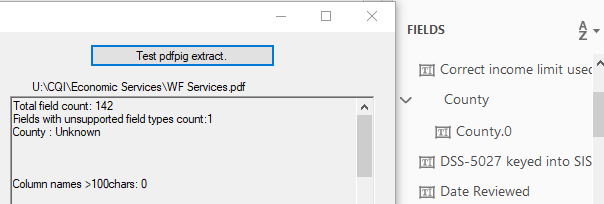
pdfpig will detect County.0 field as Unknown. Removing the .0 detects it as a textbox and returns the value.
I'm not knowledgeable enough to explain why, just tried to find a fix. Hope it helps.
Sorry to hear about this bug, does anyone have a sample file to share, I don't have any examples of this naming scheme for fields in my archive so it's hard to know which fix would work.

Sorry to hear about this bug, does anyone have a sample file to share, I don't have any examples of this naming scheme for fields in my archive so it's hard to know which fix would work.
Hi Eliot,
Here's an example pdf. It has 218 total fields, and 18 fields that return as AcroFieldType.Unknown because of a '.' character in the field name. Going to Adobe Pro and removing the '.'s from the field names allows the correct field type to be detected and data extracted accordingly.
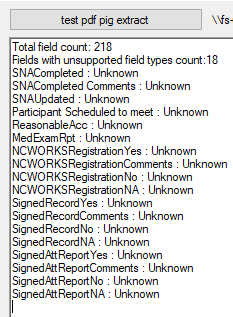
Note.. when pulling the field.Information.PartialName, the period in the field name is not there.
I honestly could just be missing something, maybe have to go a level deeper on the fieldtype to get the actual form object for those "parent" type fields. I'm pretty new to working with pdfs like this. However, just changing the names of the fields fixed my issues with field value extraction, so work goes on, for me. I'd be curious if the same fix worked for OP.
@ESSMITH2 thanks for the example file. I think this might just be an API confusion. The Unknown field type is for non-leaf fields. An AcroForm is a tree where the leaf nodes should not have AcroFieldType.Unknown but the non-leaf nodes can be used to group one or more leaf nodes.
The Fields list is basically all nodes connected to the root of the form so you want to handle this something like:
if (form.Fields[0] is AcroNonTerminalField container)
{
    foreach (var child in container.Children)
    {
        // Grouped children of non-unknown type.
    }
}
Let me know if you need additional clarification.
@EliotJones Thanks a ton.
I know I'm like four months late here but I figured out a way to get what I needed for the project done so I forgot to return to the thread. You are correct in that this was an "API confusion" haha. I was smart enough to figure out that the way I was handling field extraction was being defeated by the non-leaf nodes, but not smart enough to dig into the API and see that the AcroNonTerminalField had the Children fields grouped within. I'll have to go back and clean my project up to read them properly.
I'm not OP of this issue but you definitely helped me solve my problem. Thanks!