

 UglyToad
CcittFaxDecodeFilter Implementation
Hi.
For my work I implemented the CcittFaxDecodeFilter for retrieving correct bytes data in Tiff format from XObjectImage.
This is the XObjectImage.ToString()
XObject Image (w 284,08, h 450):
<DecodeParms, <Rows, 1093>,<BlackIs1, True>,<Columns, 690>, <K, -1>>,
<Filter, /CCITTFaxDecode>
<Width, 690>
<BitsPerComponent, 1>,
<Height, 1093>,
<Subtype, /Image>,
<Length, 17305>,
<ColorSpace, /DeviceGray>,
<Type, /XObject>
I'm not very proficient with Github and I don't know if and how I can request an integration in main code.
I ultimately used a direct implementation from RawBytes in my code, because I don't like to have modified third party libraries in my code.
This is the implementation
namespace UglyToad.PdfPig.Filters
{
    using System;
    using System.Collections.Generic;
    using System.IO;
    using System.Linq;
    using Tokens;
    using UglyToad.PdfPig.Util;

    internal class CcittFaxDecodeFilter : IFilter
    {
        /// <inheritdoc />
        public bool IsSupported { get; } = true;

        const short TIFF_BIGENDIAN = 0x4d4d;
        const short TIFF_LITTLEENDIAN = 0x4949;

        const int IfdLength = 10;
        const int HeaderLength = 10 + (IfdLength * 12 + 4);

        /// <inheritdoc />
        public byte[] Decode(IReadOnlyList<byte> input, DictionaryToken streamDictionary, int filterIndex)
        {
            if (input == null)
            {
                throw new ArgumentNullException(nameof(input));
            }

            var bytes = input.ToArray();

            var parameters = DecodeParameterResolver.GetFilterParameters(streamDictionary, filterIndex);

            using (MemoryStream buffer = new MemoryStream(HeaderLength + bytes.Length))
            {
                // TIFF Header
                buffer.Write(BitConverter.GetBytes(BitConverter.IsLittleEndian ? TIFF_LITTLEENDIAN : TIFF_BIGENDIAN), 0, 2); // tiff_magic (big/little endianness)
                buffer.Write(BitConverter.GetBytes((uint)42), 0, 2);         // tiff_version
                buffer.Write(BitConverter.GetBytes((uint)8), 0, 4);          // first_ifd (Image file directory) / offset
                buffer.Write(BitConverter.GetBytes((uint)IfdLength), 0, 2); // ifd_length, number of tags (ifd entries)

                // Dictionary should be in order based on the TiffTag value
                WriteTiffTag(buffer, TiffTag.SUBFILETYPE, TiffType.LONG, 1, 0);
                WriteTiffTag(buffer, TiffTag.IMAGEWIDTH, TiffType.LONG, 1, (uint)streamDictionary.GetInt(NameToken.Width));
                WriteTiffTag(buffer, TiffTag.IMAGELENGTH, TiffType.LONG, 1, (uint)streamDictionary.GetInt(NameToken.Height));
                WriteTiffTag(buffer, TiffTag.BITSPERSAMPLE, TiffType.SHORT, 1, (uint)streamDictionary.GetInt(NameToken.BitsPerComponent));

                // CCITT Group 4 fax encoding.
                WriteTiffTag(buffer, TiffTag.COMPRESSION, TiffType.SHORT, 1, (uint)4);

                var blackIs1 = false;
                if (parameters.TryGet(NameToken.BlackIs1, out BooleanToken blackIs1Token))
                {
                    blackIs1 = blackIs1Token.Data;
                }
                // BlackIsOne
                WriteTiffTag(buffer, TiffTag.PHOTOMETRIC, TiffType.SHORT, 1, blackIs1 ? (uint)1 : (uint)0);

                WriteTiffTag(buffer, TiffTag.STRIPOFFSETS, TiffType.LONG, 1, HeaderLength);
                WriteTiffTag(buffer, TiffTag.SAMPLESPERPIXEL, TiffType.SHORT, 1, (uint)streamDictionary.GetInt(NameToken.BitsPerComponent));
                WriteTiffTag(buffer, TiffTag.ROWSPERSTRIP, TiffType.LONG, 1, (uint)streamDictionary.GetInt(NameToken.Height));
                WriteTiffTag(buffer, TiffTag.STRIPBYTECOUNTS, TiffType.LONG, 1, (uint)streamDictionary.GetInt(NameToken.Length));

                // Next IFD Offset
                buffer.Write(BitConverter.GetBytes((uint)0), 0, 4);

                buffer.Write(bytes, 0, bytes.Length);
                return (buffer.GetBuffer());
            }
        }

        private static void WriteTiffTag(Stream stream, TiffTag tag, TiffType type, uint count, uint value)
        {
            if (stream == null) {
                return;
            }

            stream.Write(BitConverter.GetBytes((uint)tag), 0, 2);
            stream.Write(BitConverter.GetBytes((uint)type), 0, 2);
            stream.Write(BitConverter.GetBytes(count), 0, 4);
            stream.Write(BitConverter.GetBytes(value), 0, 4);
        }
    }

    internal enum TiffTag
    {
        /// <summary>
        /// Subfile data descriptor.
        /// </summary>
        SUBFILETYPE = 254,

        /// <summary>
        /// Image width in pixels.
        /// </summary>
        IMAGEWIDTH = 256,

        /// <summary>
        /// Image height in pixels.
        /// </summary>
        IMAGELENGTH = 257,

        /// <summary>
        /// Bits per channel (sample).
        /// </summary>
        BITSPERSAMPLE = 258,

        /// <summary>
        /// Data compression technique.
        /// </summary>
        COMPRESSION = 259,

        /// <summary>
        /// Photometric interpretation.
        /// </summary>
        PHOTOMETRIC = 262,

        /// <summary>
        /// Offsets to data strips.
        /// </summary>
        STRIPOFFSETS = 273,

        /// <summary>
        /// Samples per pixel.
        /// </summary>
        SAMPLESPERPIXEL = 277,

        /// <summary>
        /// Rows per strip of data.
        /// </summary>
        ROWSPERSTRIP = 278,

        /// <summary>
        /// Bytes counts for strips.
        /// </summary>
        STRIPBYTECOUNTS = 279
    }
    internal enum TiffType : short
    {
        /// <summary>
        /// 16-bit unsigned integer.
        /// </summary>
        SHORT = 3,

        /// <summary>
        /// 32-bit unsigned integer.
        /// </summary>
        LONG = 4
    }
}

Hi there, thanks very much for the contribution, this is very useful.
If you want to have the contribution recorded against your GitHub account I'd suggest the following steps, first fork this repository:

Once you have a fork grab the repository URL from the Code button on the repository page, I've used the main PdfPig as an example here but yours will probably be called mind-ra/PdfPig:
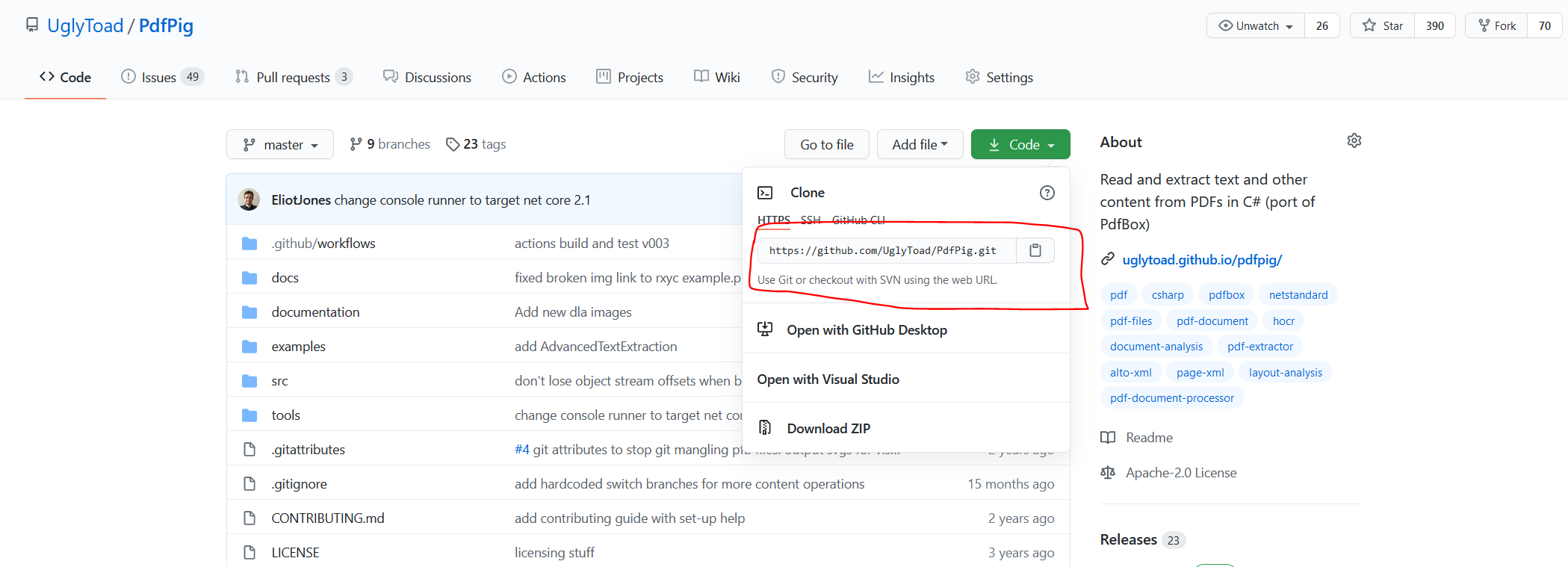
So the remote URL will most likely be https://github.com/mind-ra/PdfPig.git
Use git to clone the forked repository locally:
git clone https://github.com/mind-ra/PdfPig.git
Now create a branch in your local repository, add your changes then push to your branch, e.g.
git checkout -b my-ccittfax-branch
// Do changes
git add .
git commit -m "adds the ccittfax filter implementation"
git push -u origin my-ccittfax-branch
Then when you navigate back to this repository https://github.com/UglyToad/PdfPig GitHub should automatically suggest if you want to create a pull request. Alternatively in your fork you can open a new pull request against the parent repository from the pull requests tab:

However if you're not worried about having the contribution recorded I'm happy to add the code myself. Let me know what you decide and if you get stuck I'll try to help out.

As @mind-ra stated this looks like it's just converting the data to tiff format. This is useful for extracting images from PDFs that are encoded only using CCITTFaxEncoding (or as the last filter) but would not work as a general purpose CcittFaxDecodeFilter as the filter should return the raw byte data not the data encoded as TIFF.

As far as I understand the bytes of the XObjectImage do not need any decoding/transformation for further processing.
In this case the filter simply must return the rawBytes?
To get the image out you must use the XObjectImage dictionary of metadata. Instead of implementing this transformation in the filter is better to use the TryGetPng or a similar methods?
Ah sorry I misunderstood when I was scanning the issue, in that case yeah I think it makes sense to have something like:
public static class PdfImageHelper
{
   public static bool TryGetTiff(IPdfImage image, out byte[] bytes)
   {
        // Implementation here.
   }
}
Since the TIFF image type is rarely encountered (in my experience) I don't think it justifies inclusion on the IPdfImage interface but having a utility class to do that in the library will help people out who need it, unless you also want to write a TIFF to PNG converter 😆
I modified the code, creating a PdfImageHelper inside UglyToad.PdfPig.Util with the encoding code.
Then I modified the filter as this
class CcittFaxDecodeFilter : IFilter
    {
        /// <inheritdoc />
        public bool IsSupported { get; } = true;

        /// <inheritdoc />
        public byte[] Decode(IReadOnlyList<byte> input, DictionaryToken streamDictionary, int filterIndex)
        {
            if (input == null)
            {
                throw new ArgumentNullException(nameof(input));
            }

            return input.ToArray();
        }
    }
I don't think is necessary to write a converter. Using System.Drawing is one line of code.
System.Drawing.Bitmap.FromStream(tiffStream).Save(pngStream, System.Drawing.Imaging.ImageFormat.Png);
Hi there, sorry for the lack of progress from my side on this. Someone has submitted a PR which implements the CCITTFaxDecode filter #324 fully. Please give 0.1.5-alpha002 https://www.nuget.org/packages/PdfPig/0.1.5-alpha002 a try and let me know,.