

 Tyrrrz
Not working with /p:PublishSingleFile=true apps
If a project is built as a single file:
dotnet publish -c Release -r win-x86 /p:PublishSingleFile=true
zip -j $zip_file ./bin/Release/netcoreapp3.1/win-x86/publish/myapp.exe
then the app is not updated with this code:
using (var manager = new UpdateManager(
	new WebPackageResolver(Config.update_manifest_url),
	new ZipPackageExtractor()))
{
	var result = await manager.CheckForUpdatesAsync();
	if (result.CanUpdate)
	{
		// Prepare an update by downloading and extracting the package
		// (supports progress reporting and cancellation)
		await manager.PrepareUpdateAsync(result.LastVersion);

		// Launch an executable that will apply the update
		// (can be instructed to restart the application afterwards)
		manager.LaunchUpdater(result.LastVersion);

		// Terminate the running application so that the updater can overwrite files
		Environment.Exit(0);
	}
}
It correctly detects the new version, downloads it, runs LaunchUpdater, but the actual file is not replaced with the new version. It works fine without /p:PublishSingleFile=true.


Right, thank you for pointing to that issue. Anyhow I think this case deserves to be either documented or handled automatically.
You are right. I will try to improve this area when I get around to it. I'll leave this issue open to track it.
Just some experiments:
using (var manager = new UpdateManager(
	AssemblyMetadata.FromAssembly(
		Assembly.GetEntryAssembly(),
		System.Diagnostics.Process.GetCurrentProcess().MainModule.FileName),
	new WebPackageResolver(Config.update_manifest_url),
	new ZipPackageExtractor()))
this presumably should do it, but app.updater.exe is then stuck forever. (My wild guess is that it waits for the wrong assembly to exit.)
Can you try the approach suggested in this comment for getting the file path? https://github.com/Tyrrrz/Onova/issues/26#issuecomment-565358404
Yes, I tried it, too. The two methods, from #26:
Path.Join(Directory.GetCurrentDirectory(), Assembly.GetExecutingAssembly().GetName().Name + ".exe")
and the one I was using:
System.Diagnostics.Process.GetCurrentProcess().MainModule.FileName
normally yield the same result, but the first method is clearly less reliable. It depends on the current directory which is not necessarily the directory where the executable file resides (e.g. if you start the app as bin\app.exe the first method will report incorrect path).
Could be some useful information in this thread: https://github.com/dotnet/coreclr/issues/25623
It seems people are suggesting to use Process.GetCurrentProcess().MainModule.FileName. I can't check right now, what path does it resolve to?
Also, Onova logs could be useful. They should be at %localappdata%/Onova/<your app>
Both methods above resolve to correct path (to the actual self-containing exe). GetCurrentProcess method is just more reliable in the long run.
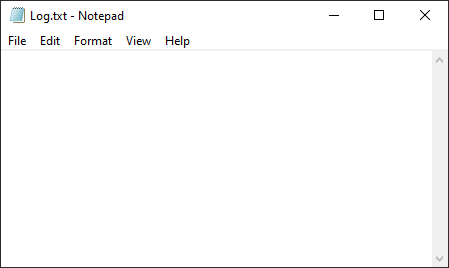
The log file was there but it was empty. (I'll check this once more in a bit.)
Ok I see. So the main issue is that the updater hangs. If the log is empty, that would probably mean it didn't even reach the first log entry. Even if the process is exited forcefully, it should still flush the data to file.
I'm getting the updater hanging too as well as the empty log file...
I guess it is occurring on this line in the Updater:
while (!FileEx.CheckWriteAccess(updateeFilePath))
I'm not sure how to debug it though... Is there a way I can work around this? I really want to use single file deployment with this library

@levitatejay when the updater hangs, can you check whether the .exe file it's trying to update is still running? If it's not, can you check if you can delete it?
@Tyrrrz My application closes itself with Environment.Exit(0) after calling _updateManager.LaunchUpdater
When I try to delete the .exe I get: "The action can't be completed because the file is open in Onova.Updater"
I just tried it out with
AssemblyMetadata.FromAssembly(
                    Assembly.GetEntryAssembly(),
                    System.Diagnostics.Process.GetCurrentProcess().MainModule.FileName)
and it worked.
Does anything happen differently if you pass false to _updaterManager.LaunchUpdater?
Still can't reproduce this on my end :( Could any of you provide a minimal repro project that exhibits the problem?
I have WPF.Net Core 3.1 project which has a problem in auto-update with Onova when the project published as a single file! I check the execute path and find that the application created and unpacked itself in below path and when the update occurred the update files has also copied in below path:
C:\Users\USERNAME\AppData\Local\Temp\.net\APPNAME\xxxxxxxxx
So, another time when the user executes the application then old app runs. I thought maybe this could help you fix it too.

No, my update manager codes:
Manager = new Onova.UpdateManager(
                new WebPackageResolver(AppSetting.BaseUrls.PackagesManifest),
                new ZipPackageExtractor());
Try
Manager = new Onova.UpdateManager(
	AssemblyMetadata.FromAssembly(
		Assembly.GetEntryAssembly(),
		System.Diagnostics.Process.GetCurrentProcess().MainModule.FileName),
	new WebPackageResolver(AppSetting.BaseUrls.PackagesManifest),
	new ZipPackageExtractor());
I tested the below code:
Manager = new Onova.UpdateManager(
	AssemblyMetadata.FromAssembly(
		Assembly.GetEntryAssembly(),
		System.Diagnostics.Process.GetCurrentProcess().MainModule.FileName),
	new WebPackageResolver(AppSetting.BaseUrls.PackagesManifest),
	new ZipPackageExtractor());
But I don't know why updater can't change anything!
Sorry, I tested it on my main app that didn't work. Now I have made a small version of it so that I can send it to you instead of the original project, which I saw works perfectly. Maybe the problem is with my original app. Let me check more and if it doesn't work, I'll send you a copy. Sorry about the time you left.
Still can't reproduce this on my end :( Could any of you provide a minimal repro project that exhibits the problem?
https://github.com/levitatejay/self-contained-update-stuck
Steps to reproduce:
- Create a 1.0.0.0 self contained exe
- Create a 2.0.0.0 self contained exe, zip it and place it as "c:/UpdateTest/Packages/SelfContainedUpdate-v2.0.0.0.zip"
- Run v1 and select "Yes"
The SelfContainedUpdate.exe closes itself and if you try to delete it says its in use by Onova The Onova process never closes
I think it is getting stuck here: https://github.com/Tyrrrz/Onova/blob/master/Onova.Updater/Updater.cs#L39
I need to see why the Updater doesn't have Write Access even though the exe not running anymore
I followed the steps to reproduce, got a prompt to update to v2.0.0.0, and then got this:
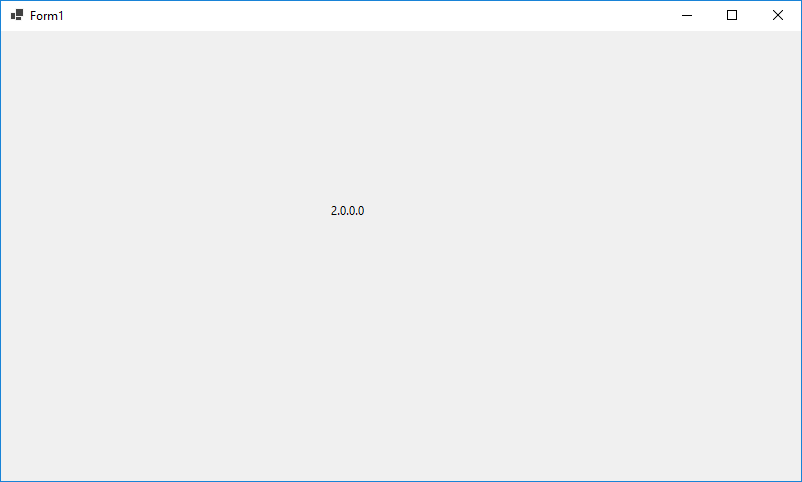
Didn't change the code in any way. The update process took about 3-4 seconds, because the package is so large.
Okay I've tried the following:
- Builds with VS2019 Community & VS2019 Preview Community
- Two separate computers running Windows 10 & Windows Defender
- Different directories (My Documents, C:/, D;/ etc )
Is there a way I can see more info on why it doesn't have write access?
I believe if you start CMD as admin, you can run openfiles /query /fo table to see the list of open file handles and the owner processes. Alternatively, I think you can use Process Explorer.
I tried running SelfContainedUpdate.exe inside the AppData/Local/Onova/SelfContainedUpdate directory but that made no difference.
When I select "Yes" to update it and after a long of time I see Onova.Updater is still running and the exe hasn't updated. Below is state its in when its stuck
From openfiles:

When trying to delete SelfContainedUpdate.exe:
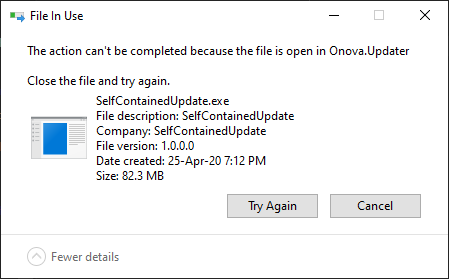
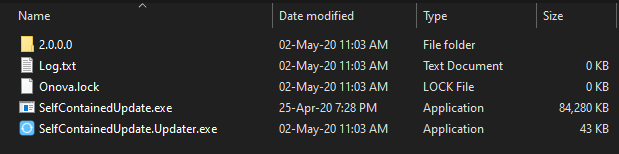
Inside C:\Users\...\AppData\Local\Onova\SelfContainedUpdate:
Empty log.txt:
Do you have some other ideas I could try?