

 TumblThreeApp
Lost my blogs and cannot authenticate
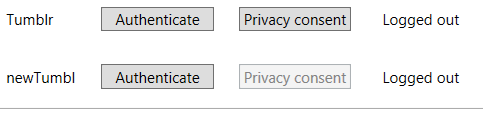
Describe the bug A clear and concise description of what the bug is. Lost my blogs. They were there before but now not. Cannot authenticate. Go to settings, connection, authenticate and select Thumblr. I get the log on screen, log on and that works fine. When ever I go back to this screen by selecting settings, connection, authenticate. it shows that I am still authenticated. But right of the Privacy button, it keeps on saying "logged out"
The privacy button only shows me a nice window of tumblr and I can make out that I am logged in. But there is nothing seen about privacy.
EDIT: Additional error: After adding some blogs again, clicking on the download button has no other effect than that the button get disabled. The download does not start.
To Reproduce Steps to reproduce the behavior:
- Go to settings, connection, authenticate
- Click on authenticate.
- Scroll down to the username and password entry fields. Enter the password and username. See the blogs in the window that indicate that the authentication worked. Exit this window and see that the text Logged out is still there right of the Privacy button.
Also try the privacy button. see that it shows a window with Tumble blogs. And see that there is nothing shown where you can agree or disable with privacy related matters. 5. See error No privacy related matters shown and Logged out is still shown after logging in.
Expected behavior A clear and concise description of what you expected to happen. After logging in, the text Logged out will change to Logged in. Clicking the privacy button will produce some kind of privacy related question. Screenshots If applicable, add screenshots to help explain your problem.
Desktop (please complete the following information):
- TumblThree version: [e.g. 1.0.11.3] 2.8.0.347
- OS: [e.g. Windows 10 Home] Windows 10 pro
- Browser [e.g. Chrome, Safari, IE, Edge] Firefox 104.0.2 (64-bit)
- Version [e.g. 22]
Additional context
Add any other context about the problem here.

Did you check your download location in the settings? Is it the same folder as before? Do you have your folder as a subfolder of the TumblThree installation or on a totally different location (better)? Normally, if the folder changed and the blogs are missing, you can just point it to the old location and all blogs are back again.
In the window of the privacy button an overlay/popup can appear, after a second or when starting to scroll down. But recently not so often.
Regarding the login problem, you can go to the profile folder (%LOCALAPPDATA%\TumblThree\Settings) and delete the file Cookies.json. Maybe an old cookie is stuck there. Then start the app again and log in again.
Normally, a normal blog can be downloaded even without logging in. If even that doesn't work currently at your side, I don't know what is preventing your downloads.
Have you checked the log file (in %LOCALAPPDATA%\TumblThree) for an error?
I just tested it on my current installation and on a totally fresh pc. On both the login and download worked.

Did you find your blogs again and the login works with the current version?
The issue has been closed. You can still comment. Feel free to ask for reopening the issue if needed.