

 TumblThreeApp
Columns width keep resetting to minimum value
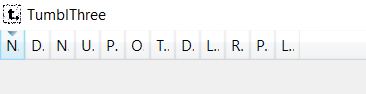
Describe the bug Every time I open the app, all the columns have minimum depth so I always need to manually resize all the columns to be able to actually see the data.
To Reproduce For me, I just need to close and reopen the app.
Expected behavior I expect the column width to remain the same after restarting the app or at least default to the size that will allow the data to fit.
Screenshots
Desktop (please complete the following information):
- TumblThree version: 1.5.2.151 (was not introduced by this version)
- OS: Windows 10 Education N

Hello, please have a look on your file settings.json (%LOCALAPPDATA%\TumblThree\Settings or local folder for portable mode). The part should look like:
  "ColumnSettings": [
    {
      "Key": "Name",
      "Value": {
        "m_Item1": 0,
        "m_Item2": 180,
        "m_Item3": 0
      }
    },
What is the value of "m_Item2"? Do your other TumblThree settings from the settings dialog persist on app restart, or are they reset too?

Hi,
What is the value of "m_Item2"?
1 for all columns.
Do your other TumblThree settings from the settings dialog persist on app restart, or are they reset too?
Other settings persist.
Edit: I noticed that after changing the file, the column width was different but because I set all columns to 180, I had to reduce the width of some columns by double clicking on the header (like you can do on Google Sheets / Excel) and after restarting, the columns I resized are now defaulting to 1 again. However, if I resize manually (moving the cursor) the width persists after restarting so I'll just do that instead.
As before this one is for first-timers-only. That means that we will only accept a PR for this one from someone who's never contributed to open source before. This one is particularly easy (but don't make that statement make you feel bad if you have a hard time with it, there's more to contributing to open source than changing lines of code, especially if it's your first time). We walk you through it if you need help. :-) Here are the steps to get a PR merged (see also our guide).
When double-clicking on the column header to set it to the optimal width, the column width is reset on next app start. But when the column header is dragged with the mouse to its new width, the column width keeps the same after an app restart.
- [x] Create a fork of the repository
- [x] Clone it to your local disk and create a new branch (e.g. 152-column-width-keeps-resetting)
- [x] Look which view is dealing with the blog list. Where are the column widths set after start of the app? Where are they read for persisting them in the settings? What is the problem and how can it be solved?
- [x] Add your solution
- [x] Build the app and run it
- [x] Resize the column headers by both ways described in this issue
- [x] Close and restart the app again
- [x] Validate that your chosen column widths are retained
- [x] Commit your changes mentioning "issue #152" somewhere in your commit message title or description
- [x] Push your changes to your fork, create a PR, get merged, celebrate??
We are happy to support you if you need help.

Hi Kartik, thanks for your interest to work on this issue. I'll assign it to you.
Hello, I would like to work on this issue. It's my first time contributing to open source. thanks

Hello, at the moment Kartik is working on it. But you can keep an eye on it, if you like.
Hi, sorry for no response I dont have experience with C# so progress is slow, I will try to do it during the weekend.
@thomas694 I am able to reproduce the bug and looks like when the column width is set using the double click, the width is not properly set in the settings JSON, and instead reset to 1 (which might be the default value), so perhaps the part responsible to send this variable is sending a null or invalid value in this case. But I don't know where this value is set (who writes to the json?) and I'm not sure what a 'view' means in this context from the instructions written above.
The global settings object is updated in the view model and written to file in the ModuleController. View in this context means "dialogs" or UI parts of the total window in this case, so the actual view in the TumblThree.Presentation project and its corresponding view model in TumblThree.Applications project. The json is only the storage, so I think it's going wrong somewhere before, the value written to the settings object is already not correct.