

 Try
Try
MacOS/Metal bringup


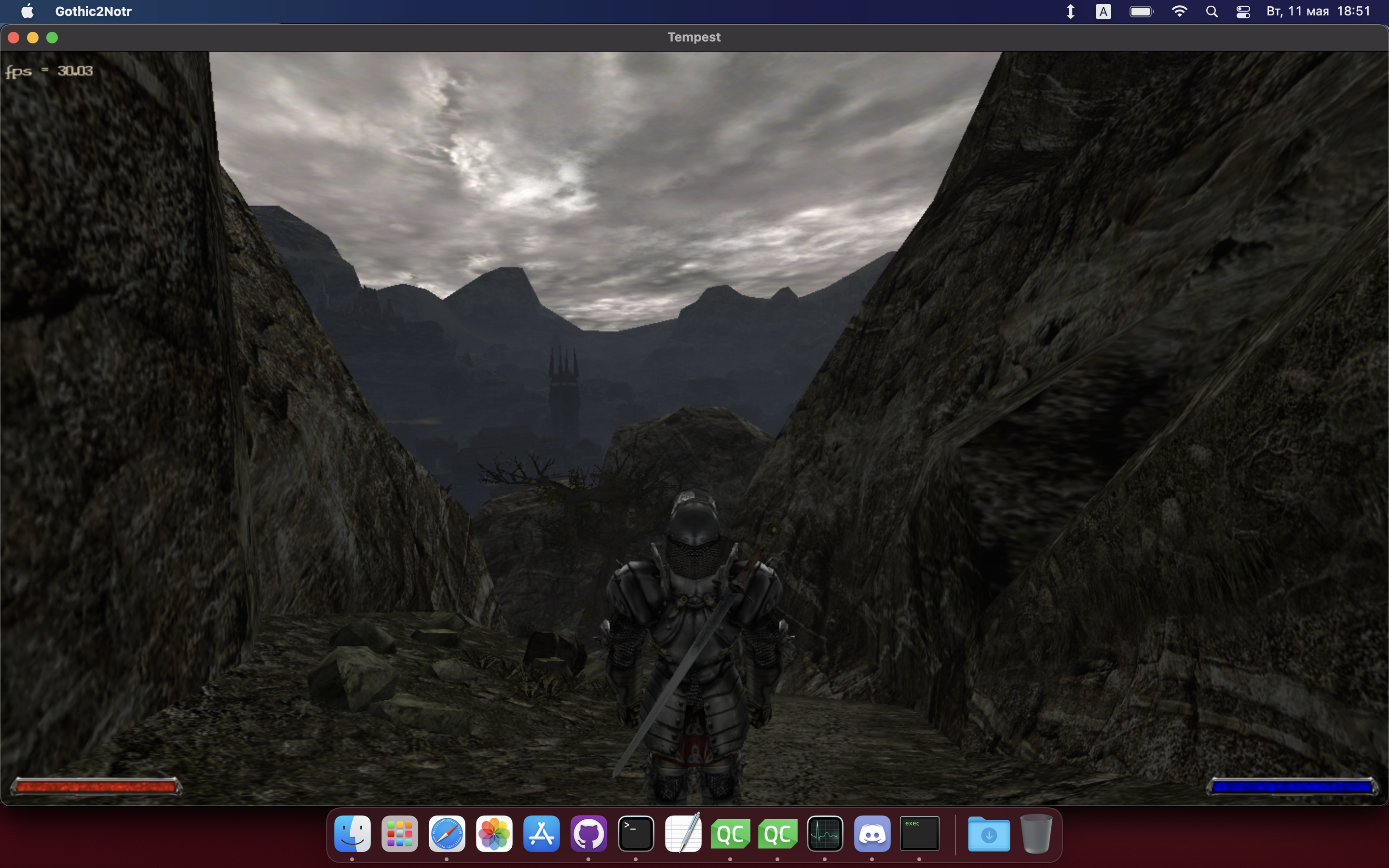
Status:
- 3D is mostly working
- Keyboard is done
- No error in validation layer
Missing:
- Sound is absent
- Most of compute shaders are broken
- No fullscreen
- Hazard tracking is set to auto, what is not performant way to work with metal

Hi, @rafi16jan ! Apples Silicon, aka M1 is compatible with x86 (via emulation or something a like) - so game will run. When it comes compile for M1, that not suppose to be a big issue: M1 is basically aarch64 in nutshell. The game code is written to be portable, can be a few memory aliment slip-ups, but only a few.
OMG I'm so excited The lack of games that run native on Mac OS is so frustrating. Really great to see that people care <3
I'm not a programmer but I'd somehow like to contribute testing if that is helpful? Unfortunately I don't know what I might need to get startet

Hi, @audiocrush and thanks for excitement :)
At this point it a too early to test MacOS version, mostly because there is not autobuild at this point - you have to build the game by your self, to even run it

2 main reasons: completeness and performance.
On completeness side: it's nice to have all 3 main api's implemented into the engine. On performance side: engine already do extra work(like resource state tracking) to build user-friendly api on top of vulkan, but this is not needed in metal.
Hey, I wanted to thank you for your work. It's my favorite game of all time and I miss it greatly, but since I have moved to MacOS (the new M1 chip) I am not able to play it anymore. It runs extremely slow on CrossOver and Parallels is a bit too expensive for me, especially that I only plan to play Gothic. This is why I am extremely interested in your work and I wonder what is the way to run it on Macs with M1 chip? I can't get it to work with CrossOver (starts the menu, but then it crashes) and I can't build it from source code because there are directives that fail when the OS architecture is not amd64 or i386. Any info would be greatly appreciated. Thanks again and keep up this awesome work!

Hi, @nitevatt !
Actually screen https://github.com/Try/OpenGothic/issues/142#issuecomment-838825662 is made on M1. You can build game for x86 and run it on M1 just fine, and aarch64 build is just something yet to be done for now.
@Try, thank you for your quick reply. How can I build for x86 when I am on ARM?
Something, like this should do the job:
# make sure to use x64 compiler, not the arm
export CC=/usr/bin/clang
export CXX=/usr/bin/clang++

cmake -H. -Bbuild -DCMAKE_OSX_ARCHITECTURES=x86_64 -DCMAKE_BUILD_TYPE:STRING=RelWithDebInfo
# set target explicitly: dynamic version of physfs is not really needed, but causing troubles
cmake --build ./build --target Gothic2Notr
Thank you, this worked! Amazing!
It would be nice to put these build instructions on the Wiki page in case anyone else needs them.
I have an issue that my mouse constantly moves upwards even with minimal mouse input. Otherwise everything that should work works. Build with cmake like described on M1 Max.


On Mac we have quite an issue with sound: OpenGothic uses openAL internally. But is' not a "normal" openal, instead this is quite old fork that doesn't have any suitable backend. It would make sense to simple update to newer openal, except I've done some changes to the library itself: I've add multi-threading support. And losing threading is no good.
So possible solutions are:
- Implement macos sound-output backend exclusively for modern mac
- Switch to other sound library completely
Don't know what it will be atm: search havent found any good opensource sound libraries and continue with openal is also less than ideal.
Thank you for explaining the challenge with audio on mac, I can see it's not a quick fix. Great work so far though. I was able to compile on mac and give it a quick run, really awesome to see G2 running native on mac. Would love to see complete version with sound and everything some day.
I got an fps of about 30 outdoors, about same as if I run G2 through parallels on Macbook Air M1 16GB. I would have expected/hoped a native client to have a bit higher fps than when running through virtual machine. Compiled for x86. Is it possible to support arm64 in the future? Not sure if compiled it with the proper settings though, couldn't find a guide for compiling on mac. I used the config posted by you previously. Then looked at the arch guide in the readme and installed (what I think is the correct) deps with brew:
brew install glslang vulkan-headers alsa-lib libx11 libxcursor libglade
Are these the proper deps, or anything missing?
to support arm64 in the future?
Already there ;) - just compile it without redefining CC/CXX
I got an fps of about 30 outdoors
Atm my only mac is M1 (the most basic edition). Without SSAO(cloud shadows) it's 50-60 fps normally. Apart from that, need to wait until Metal3 release, so we can start to use mesh shaders - this should improve performance quite significantly.
Perfect, thanks. I received 50-60 fps as you said when following your instructions compiling for native arm64.
Exciting project! Built it for mac m1, runs great, but unfortunately, couldn't play without audio. Ended up running Windows executable via Crossover 22 - no issues whatsoever, great framerate.

Audio is now fully functional with newer OpenAL - tested on MacM1. All other mandatory features(game/basic graphics) are also on board.
Apart from that, need to wait until Metal3 release, so we can start to use mesh shaders - this should improve performance quite significantly.
If I'm not mistaken, Metal 3 has been released for some time. Just wonder if game engine already use Mesh shaders or that is still in status "planned"?

Hi, @Civil !
I have a translation layer patch for spirv-cross here: https://github.com/KhronosGroup/SPIRV-Cross/pull/2074 Yet, Metal3 performance is horrible: it's roughly 2-3 times slower than brute-force vertex-fragment pipeline.
Also here: https://developer.apple.com/forums/thread/722047 some says that mesh-shader is done there via drive-level emulation, what practically defeats the purpose
Hm, I'm absolutely unfamiliar with shaders, but if there is a way to test performance, I can try with both M1 and M2 devices. However I can try only if there is either good "getting started" guide or step by step instructions.
@Civil
However I can try only if there is either good "getting started" guide or step by step instructions.
In theory, this should be like:
- enable mesh-shading by uncommenting line 203 in mtdevice.cpp:
  if(dev.supportsFeatureSet(MTL::FeatureSet_macOS_GPUFamily2_v1)) {
    //prop.meshlets.meshShader = true;   <----
    prop.meshlets.maxGroups = prop.compute.maxGroups;
    prop.meshlets.maxGroupSize = prop.compute.maxGroupSize;
    }
- Run game with
-ms 1, so engine will pick mesh shading instead of vertex (mesh is implemented for most types of objects) - Measure FPS (XCode gpu tools do not support mesh-shader anyway). Ideally with all effect, like SSAO/Sky disabled.
In reality - checked right now, it doesn't work anymore, what is somewhat expected since code was abandoned sometime ago. Can take a look, at why they broke if you really interested.
I've tried to actually compile version from commit around the time when you've implemented mesh shaders (b301f95afd7c4dfa8303921bc0f44896ffe4c32e to be precise), but it was not working correctly if I uncomment that line (same problems as with current master - basically all textures disappear).
I think that depends on if you want to verify if on M2 anything has changed in terms of Mesh Shaders performance. If that's too much of a hassle - I'm personally perfectly fine with current state of things.
@Civil I've fixed immediate issue - rendering should work now. You can start testing now, and I'm gonna update Tempest to same commit as used in spirv-cross PR
If that's too much of a hassle
Hard to say. Short-term testing is fine, but in long term would be hard to merge it upstream. Hans Kristian is not happy with my solution for mesh-shader translation:
Looking over this, I'm not very excited about the prospect of merging this.
The impedance mismatch with the mesh type is a disaster for performance,
and I'm not particularly excited about having to maintain painful workarounds
like this. The tessellation code is bad enough as it is, with ridiculous heroics,
but we are somewhat forced to implement it.
Even, if M2 performance suddenly good, translation complexity is too high, and spirv-cross people do not want to support it in upstream
PS: Updated to latest PR - actually it just works, but emits copy pass on all meshlets, even on empty ones
Thanks. I've tried to run it with mesh shader enabled and indeed I haven't noticed any problems anymore, but in terms of performance... well... It's about 4x slower than without them.
It's not very easy to test performance as vsync seems to be always enabled, but I have external screen that supports 120Hz, on it without mesh shared I was getting stable 120 FPS (M2 Max) almost always with very few exceptions when it dropped to about 100 FPS. With Mesh shaders - it is mostly stable at 30 FPS, with occasional drops to ~25-26.
@Civil may you also check e9ea0e7 commit of Tempest?
Basically, I'm trying to narrow down and check, if there are performance loses in translation layer. Now copy pass is skipped for empty meshes (up to 40 fps on M1 now!) Also it's worth check, if instead of for loop can be used one single assignment(valid on our subset of shader)
In the same scene on M2 Max I get 32-45 FPS, so that's much better than before, but still far from ~120 without Mesh.