

 TrackerControl
Internet connectiivity down when 'Block trackers' is enabled
I have two devices:
- FP2: FairPhone2 running Fairphone [sic] OS 21.12.0-rel.1, a not-so-much modified AOSP 9.
- Tablet: Huawei BAH-W09 with EMUI 5.1.2, a heavily modified Android 7.0 from Huawei.
FP2 currently has TC from GH (v2021.12.09), but it used to have the one from F-Droid. The tablet has the one from F-Droid. Both have the same TC configuration(entries marked with NO are disabled):
- Strict Blocking
- Notify on new install (not that I really think it affects anything).
- NO Subnet Routing (I have no idea what this is).
- NO Disable on Call.
- NO Reload on every connectivity change.
- NO DBB
- NO Manage System Apps
- Search for new trackers
- Blocks trackers + on UDP
- NO Seamless VPN handover
- NO SOCKS5 proxy
I think that's all I can say about both installations.
The bug is very simple, and I discussed with KK et al at the Telegram channel: Once I turn on TC on the FP2, no internet connection succeeds. Also, the phone heats up a lot and it starts eating away the battery, so I'm guessing there's a tight loop somewhere.
I have tested with applications that have no trackers; in particular, I have used Termux's ping to 1.1.1.1 to make sure the traffic is effectively shut off (because there is no DNS resolution, it's just sending traffic directly to the destination). I have even pinged my own home router's external IP, it also stops (screenshot soon).
I have also gone to Settings > Netwok > Advanced > VPN > TrackerControl and enabled Always-on VPN, but not sure that helps. I also Turned on Block connections without VPN, but TC told me to disable it.
I have some logs here, got them with adb logcat. I cleaned them up a little, I hope I didn't remove anything critical. There are a couple of TrackerControl.JNI: connect error 101: Network is unreachable that look really suspicious. Also, some logs from applications failing to connect to their servers.
I would add more data, but it's almost midnight. Maybe tomorrow.

Thank you for the really good bug report.
This might be a known problem. Have you checked issue #23 ?

Yeah, I didn't have time to add all the links I read about it. Not that one in particular, but f.i. https://github.com/guardianproject/orbot/issues/151
Maybe, you have to delete the app data of TrackerControl. There was a change in the blocklist functionality to Beta 13
This seems to have fixed it for me :) I was completely sure that it was the OS update from A7 to A9 (that I forgot to mention; FP2 has come all the way down from A5.1 :)
ping 1.1.1.1 works now, but ping one.one.one.one does not. the phone is warming up a little and there seems to be some extra battery usage, but nothing that I can see trickle down. I'll try a few more things and report.
In short, try this app (use at your own risk): https://github.com/bluetrees2/novpn/releases/download/v1.0/NoVPN-v1.0.apk
You need root and in the app, you need to apply it to TrackerControl (inside the NoVPN app).
I don't have root. I still haven't read the root cause for this. I'll try to put some time later.
oh, https://gitlab.com/LineageOS/issues/android/-/issues/2193 "VPN mode not working due to missing kernel patches" but I don't have LineageOS. I'll ask in the FairPhone forums.
oh, https://gitlab.com/LineageOS/issues/android/-/issues/2193 "VPN mode not working due to missing kernel patches" but I don't have LineageOS. I'll ask in the FairPhone forums.
I think FOS has similarities with LineageOS. At least, the makers of Fairphone maintain a LOS build.
I asked in FP2's kernel community and one of the guys involved in porting LOS to FP2 confirmed me that the commit is in the git log of at least on of the files impacted by that patch in the version of the kernel I'm running.
So the root cause for https://github.com/guardianproject/orbot/issues/151 is not valid on my current OS. Anything else we could try?
I asked in FP2's kernel community and one of the guys involved in porting LOS to FP2 confirmed me that the commit is in the git log of at least on of the files impacted by that patch in the version of the kernel I'm running.
So the root cause for guardianproject/orbot#151 is not valid on my current OS. Anything else we could try?
Another thing that we might try is whether the problem also exists when using NetGuard. The underlying VPN functionality is forked from this project.
I just upgraded to the latest release from github. I stil have the same. One thing I noticed this time is that at least I have DNS:
$ ping one.one.one.one
PING one.one.one.one (1.1.1.1) 56(84) bytes of data.
64 bytes from one.one.one.one (1.1.1.1): icmp_seq=15 ttl=59 time=25.8 ms
64 bytes from one.one.one.one (1.1.1.1): icmp_seq=16 ttl=59 time=25.5 ms
64 bytes from one.one.one.one (1.1.1.1): icmp_seq=17 ttl=59 time=37.1 ms
64 bytes from one.one.one.one (1.1.1.1): icmp_seq=18 ttl=59 time=25.4 ms
64 bytes from one.one.one.one (1.1.1.1): icmp_seq=19 ttl=59 time=38.0 ms
^C
--- one.one.one.one ping statistics ---
19 packets transmitted, 5 received, 73% packet loss, time 18003ms
rtt min/avg/max/mdev = 25.410/30.403/38.092/5.891 ms
ping resolbes inmediately, but then 15s pass until I disable TC. Of course, this just means that TC itself can connect to the upstream DNS server.
I just upgraded to the latest release from github. I stil have the same. One thing I noticed this time is that at least I have DNS:
$ ping one.one.one.one
PING one.one.one.one (1.1.1.1) 56(84) bytes of data.
64 bytes from one.one.one.one (1.1.1.1): icmp_seq=15 ttl=59 time=25.8 ms
64 bytes from one.one.one.one (1.1.1.1): icmp_seq=16 ttl=59 time=25.5 ms
64 bytes from one.one.one.one (1.1.1.1): icmp_seq=17 ttl=59 time=37.1 ms
64 bytes from one.one.one.one (1.1.1.1): icmp_seq=18 ttl=59 time=25.4 ms
64 bytes from one.one.one.one (1.1.1.1): icmp_seq=19 ttl=59 time=38.0 ms
^C
--- one.one.one.one ping statistics ---
19 packets transmitted, 5 received, 73% packet loss, time 18003ms
rtt min/avg/max/mdev = 25.410/30.403/38.092/5.891 ms
pingresolbes inmediately, but then 15s pass until I disable TC. Of course, this just means that TC itself can connect to the upstream DNS server.
Hi there, Thanks for the update! I must confess I'm not sure how to investigate this further.
In https://gitlab.com/LineageOS/issues/android/-/issues/74#note_348693533 it shows rules like:
12000: from all fwmark 0x0/0x20000 iif lo uidrange 0-10185 lookup tun0
this is for orbot, while TC has:
12000: from all fwmark 0x0/0x20000 iif lo uidrange 0-10230 lookup 1073
Could tun0 vs 1073 be the problem? I enable NG instead and the rules also look like 1074 instead of tun0, so maybe it's not that, but I also notice NG sets up more rules than TC:
11000:	from all iif tun1 lookup 97
12000:	from all fwmark 0x0/0x20000 iif lo uidrange 0-10013 lookup 1074
12000:	from all fwmark 0x0/0x20000 iif lo uidrange 10015-10195 lookup 1074
12000:	from all fwmark 0x0/0x20000 iif lo uidrange 10197-10231 lookup 1074
12000:	from all fwmark 0x0/0x20000 iif lo uidrange 10233-99999 lookup 1074
12000:	from all fwmark 0xc00e2/0xcffff lookup 1074
13000:	from all fwmark 0x100e2/0x1ffff iif lo uidrange 0-10013 lookup 1074
13000:	from all fwmark 0x100e2/0x1ffff iif lo uidrange 10015-10195 lookup 1074
13000:	from all fwmark 0x100e2/0x1ffff iif lo uidrange 10197-10231 lookup 1074
13000:	from all fwmark 0x100e2/0x1ffff iif lo uidrange 10233-99999 lookup 1074
13000:	from all fwmark 0x100e2/0x1ffff iif lo uidrange 0-0 lookup 1074
14000:	from all iif lo oif tun1 uidrange 0-10013 lookup 1074
14000:	from all iif lo oif tun1 uidrange 10015-10195 lookup 1074
14000:	from all iif lo oif tun1 uidrange 10197-10231 lookup 1074
14000:	from all iif lo oif tun1 uidrange 10233-99999 lookup 1074
vs
11000:	from all iif tun1 lookup 97
12000:	from all fwmark 0x0/0x20000 iif lo uidrange 0-10230 lookup 1073
12000:	from all fwmark 0x0/0x20000 iif lo uidrange 10232-99999 lookup 1073
12000:	from all fwmark 0xc00e0/0xcffff lookup 1073
13000:	from all fwmark 0x100e0/0x1ffff iif lo uidrange 0-10230 lookup 1073
13000:	from all fwmark 0x100e0/0x1ffff iif lo uidrange 10232-99999 lookup 1073
13000:	from all fwmark 0x100e0/0x1ffff iif lo uidrange 0-0 lookup 1073
14000:	from all iif lo oif tun1 uidrange 0-10230 lookup 1073
14000:	from all iif lo oif tun1 uidrange 10232-99999 lookup 1073
for some reason NG is leaving more uids open. Blokada leaves open even more uids. Maybe it's some system uids that they know they better not touch?
A10 is arriving to my phone in the next weeks, maybe I'll have some updates.
Thanks for the update. TC and NG don't really interact with the underlying iptables functionality. What the apps, however, do, is to exclude certain uids from the logging. In TC, this is the feature 'Disable Monitoring', which excludes certain uids from being redirected to the traffic. This this then, likely, has the affect of an app's uid being excluded from the uidrange in the iptables.
In other words, the difference between NG and TC likely stems from the fact that you included/excluded different apps in the monitoring.
One other thing that might be interested to test is whether NG still works if you enable the 'Filter traffic' option from the 'Advanced settings'. In TC, this option is called 'Block trackers' and is enabled by default. You might need to GitHub/F-Droid version of NG for this, because it's a paid feature in the Play Store version of NG (if I remember correctly).
That's it! So what does this thing actually do?
This enables the custom TCP/IP stack of TC/NG for traffic analysis and blocking. The problem is that many Android devices implement network functionality slightly differently, so TC/NG break on devices.
I guess I can live without that setting, as not much traffic is plain text nowadays? What type of analysis does it do?
I guess I can live without that setting, as not much traffic is plain text nowadays? What type of analysis does it do?
Depends on what you what to do with TC. If you disable "block trackers", no more trackers will be blocked.
Hi to everyone. I'm really quite a noob when it comes to routing, vpn, etc. But reading your post did point me to the default vpn ipv6 address in TC settings that is
fd00:1:fd00:1:fd00:1:fd00:1
I tried to ping it but no package at all was going through. Then after some research I entered the value:
fd00::1
which gave me good ping resaults. No idea if this is useful. Just wanted to mention Here's a screenshot. Also by turning off TC, the address was not reachable anymore (you can see the missing TC Symbol🤔 in status bar) So I think that could be the right vpn adress. I'll check if I'm still getting wifi losses. Regards
Samsung S10 (SM-G973F) LineageOS: 18.1 lineage_beyond1lte-userdebug 11 RQ3A.211001.001 eng.root.20220401.191914 dev-keys

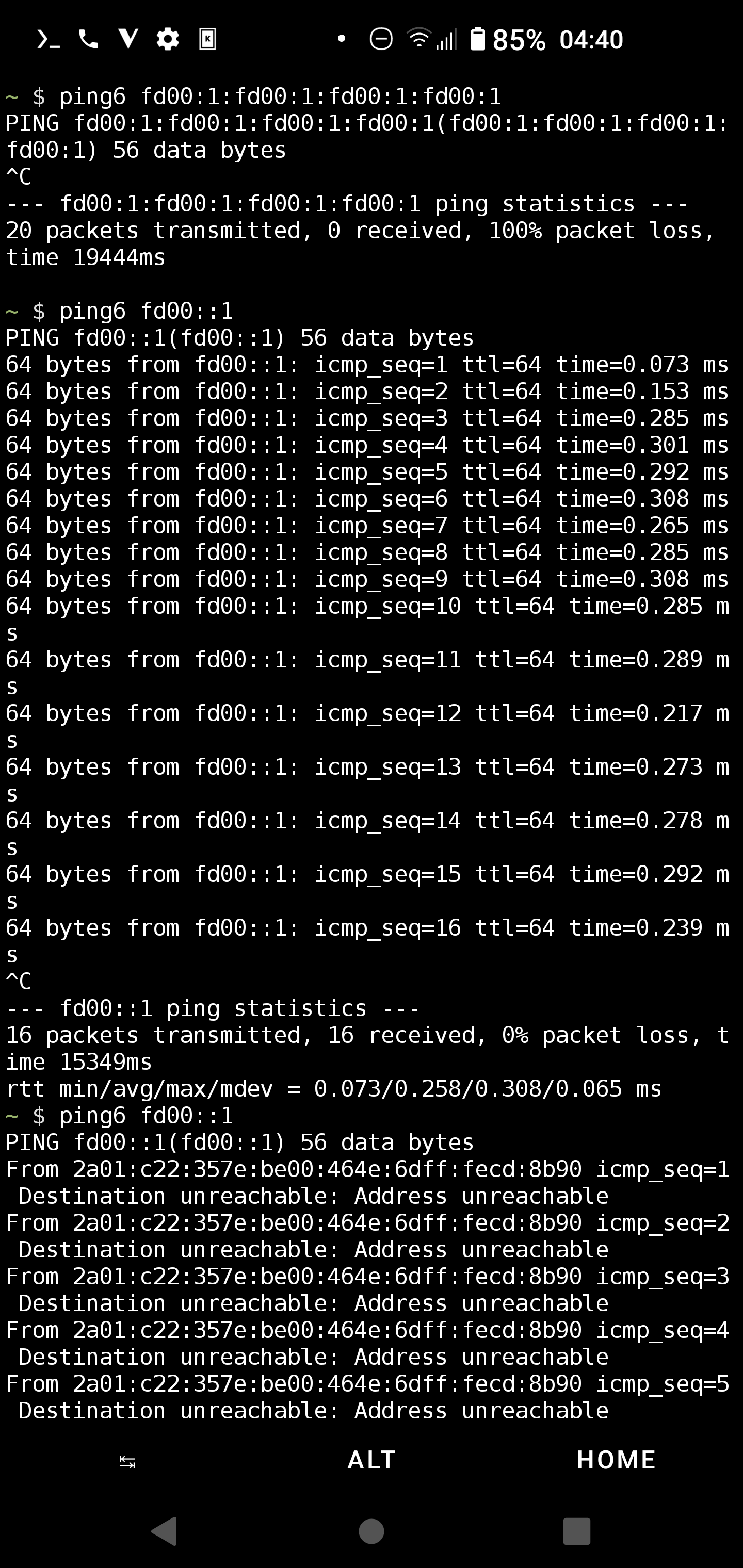
Hi. Just wanted to report after applying the change.
No more wifi loss until now
So maybe this issue could be considered solved?