

 TortugaPower
Bug: Next item does not autoplay if screen is locked and item was imported through airdrop
Environment
- OS Version: 14.7.1
- App Version: 4.1.0
Description
While listening with the screen locked, when the item finishes playing the lock screen player disappears and the next item in the playlist does not begin playing.
This happens if the items were imported directly in to BookPlayer through airdrop and also if items were airdropped in to iOS Files and then imported in to BookPlayer using the share sheet.
Autoplay works if items were instead imported by drag dropping them in MacOS finder to iPhone -> Files -> BookPlayer. Also if the folder was zipped before airdropping in to BookPlayer.
Steps to reproduce the behavior
- Airdrop a folder container multiple mp3 or m4b items in to BookPlayer.
- Play item and lock the screen.
- On item end next item will not play and Lock Screen player will close.

Hi,
I can confirm having the same bug, also the workaround provided is ok.

@BatsaxIV i found that zipping the folder prior to airdropping works as well. Which I find more convenient than using the finder drag drop method.
@jbcoventry @BatsaxIV can you test on the version that was released today (v4.1.1)? that contains a fix where folder contents are being also set with the proper file protection key to allow the app while in background and locked to access the files and continue playback

@GianniCarlo Autoplay now functions properly after airdropping a folder. However BookPlayer now appears to be the only option for opening airdropped folders when it was one of several before. Even when I tried a folder only containing a few text files.
Previously it would be one of many like this. Which I still get if I airdrop a single file.
Now if I airdrop a folder I only get this.
@jbcoventry can you try turning off and back on your phone? I've had airdrop fail to receive any files in general before, and having it cancelled (don't know why), but after rebooting, it worked fine.
For transparency sake, these are the type of files we registered that the app can accept (This can be viewed from Xcode → Target BookPlayer → Info → Document Types):
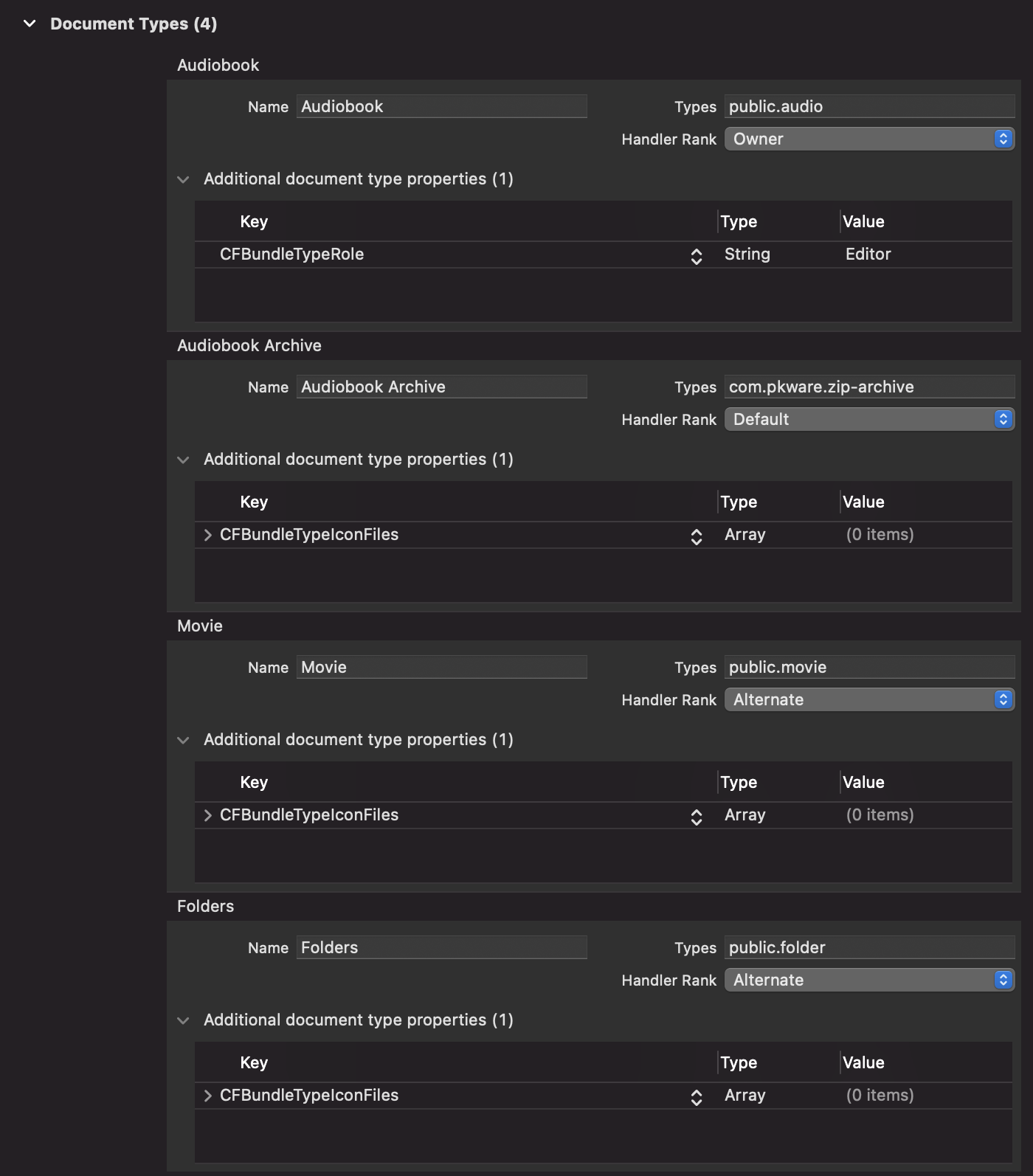
we are not even saying that we are a primary source that handles folders, just an alternate 🤷♂️
not sure then :/ that change regarding folders type was introduced in v4.0.0, and we don't have a direct way in the code to trigger/modify airdrop, we can only register to receive files
can you try launching VLC, then airdropping? maybe their type of documents registration got wiped? I'm just speculating, there are no docs regarding how iOS handle these things
Didn't help. Also tried reinstalling BookPlayer using the unload app feature in iPhone storage settings and still nothing.

@oricoh not yet, but anyone is welcomed to tackle this issue 👍 we can provide guidance on the codebase over on our Discord