

 Torrunt
Suppress taskbar icon (silent mode)
Hi there,
wow, that's an amazing app - I'm as grateful as impressed especially speaking of the possibility to show animated GIFs with a transparent background and the fact it runs highdpiaware by default. Almost no software for windows is capable of doing these. :)
But there is one thing left I'd like you to ask for - I plan to use your software like a splash viewer. My image should be displayed but there shouldn't be any instance of vimage visible in the taskbar. With other words - the user shouldn't be able to interact with the program.
-> Please, can you add an parameter to make vimage runs without taskbar icon, e.g. like -silent or something like that?

There's the -taskbarIcon command which you can use as a launch argument or custom action. If you make a custom action you can either bind it to a button or add it to the context menu.

I'm afraid, this doesn't work for me.
"C:\Users\Drago\Downloads\vimage\vimage.exe" "C:\Users\Drago\Downloads\vimage\custom.gif" -taskbarIcon -toggleSync -clickThrough -alwaysOnTop
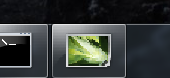
As you can see, the taskbar icon isn't hidden. Did I something wrong with the paramaters? I also tried the -taskbarIcon command only and start with a fresh config.txt but here is the taskbar icon visible too.
Those parameters are correct and should work. Does it work if you go to settings, create a custom action with that parameter then activate it with the context menu / binding?
What version of Windows are you using?
Not key binding with the parameter doesn't work too. My computer is Windows 7 Pro x64 and I don't like to change.
But now I tested it in my Vmware Windows 10 - here it works... maybe you can adjust it for Windows 7 too, that would be very great.
I don't have a machine with Windows 7 on it so I wouldn't be able to test it.
The project's open source so you could have a go if you wanted.
Here's how it currently works: https://github.com/Torrunt/vimage/blob/master/vimage/Source/Display/DWM.cs#L20-L36
Using user32.dll SetWindowLong function.
Thanks you very much, but unfortunately I'm not much of a common-language programmer - I'm more active in scripting. So I wouldn't go so far as to say that I can do it better myself. I'll have a look at it by time, a try can't hurt...
I fixed it
Line 20-36 have to be changed to:
        [DllImport("user32.dll")]
        static extern bool ShowWindow(IntPtr hWnd, int nCmdShow);
        private const int SW_HIDE = 0x00;
        private const int SW_SHOW = 0x05;

        public static void TaskBarIconSetVisible(IntPtr hWnd, bool visible)
        {

            TaskbarIconVisible = visible;
            if (TaskbarIconVisible)
            {
                SetWindowLong(hWnd, GWL_EX_STYLE, (GetWindowLong(hWnd, GWL_EX_STYLE)) & ~WS_EX_TOOLWINDOW & ~WS_EX_APPWINDOW);
            }
            else
            {
                ShowWindow(hWnd, SW_HIDE);      // Makes hiding possible in Windows Vista/7
                SetWindowLong(hWnd, GWL_EX_STYLE, (GetWindowLong(hWnd, GWL_EX_STYLE) | WS_EX_TOOLWINDOW) & ~WS_EX_APPWINDOW); // Hiding TaskBar-Icon
                ShowWindow(hWnd, SW_SHOW);      // Makes hiding possible in Windows Vista/7
            }
        }
It makes Windows Vista/7/8 can launch vimage.exe without TaskIcon with the parameter -taskbarIcon.
But this is about starting silent only. It don't fixes the bug that TASKBAR TOGGLE key binding isn't possible in the first place - neither on Windows 10 nor on Windows 7.
I'm satisfied so far, so for myself I don't need to toggle it.
Nice!
Maybe when adding the fix there should be a OS check so it only does those extra commands if on Windows 7 or older. Something like this:
bool isOlderThanWindows8 = Environment.OSVersion.Version < new Version(6, 2);
The TASKBAR TOGGLE key bind might be wrong in the "Custom Actions" tab. It should just be set to -taskbarIcon.
I'm gonna close this issue now. I accidently already pushed the fix for it in d1696199503758738d71adb94ad73adc1f54985b.
I added the isOlderThanWindows8 check and made it hide/show the window like we mentioned. The toggle button doesn't work still in Windows 7 but I don't think that will affect anyone. Pretty much no one uses Windows 7 anymore and I don't think anyone uses that toggle button anyway,