

 ThirteenAG
[NFSMW] 32:9 Broken Dynamic Shadows
Dynamic shadows phase in and out at different camera angles and are blocky at 32:9 5120x1440:
 Video
Video
The shadows work fine at 16:9 2560x1440. I've tried adjusting the different shadow settings in the .ini file but I couldn't find anything that could fix it.

My reply didn't go through because it was through an email, but to me it appears to be an extension of the old issue we had with stretched shadows.
I've never actually played with shadow code in MW so my knowledge is limited. Maybe expanding the current implementation would fix the problem.
If it's anything like Undercover's code, I assume it's because the shadow cascade texture gets broken.
But to answer your question directly - yes it can be fixed.
To my knowledge the game doesn't have shadow cascades; it's a single shadow map that horizontally stretches with the FOV. And so the higher the FOV (aspect ratio), the worse it looks.

In previous versions of the widescreen fix, we weren't scaling the shadow map with the FOV at all. This resulted in really nasty looking artifacts on the edge of the screen, where the edges of the shadow map were clearly visible.

Xbox 360 has the same issue, but it's not as noticeable because the shaders make the edges of the shadow map invisible. So as far as I'm concerned, this can't be fixed. But xan1242 is a talented dude that has done things I previously thought was impossible, so I'd wait to see what he has to say about it.

Until there is a real fix for the dynamic shadows I recommend turning the in-game shadow detail setting to minimum. It will turn on baked shadows, but they are functional and look way better than the distorted mess you get with the broken dynamic shadows.
EDIT: Screenshots
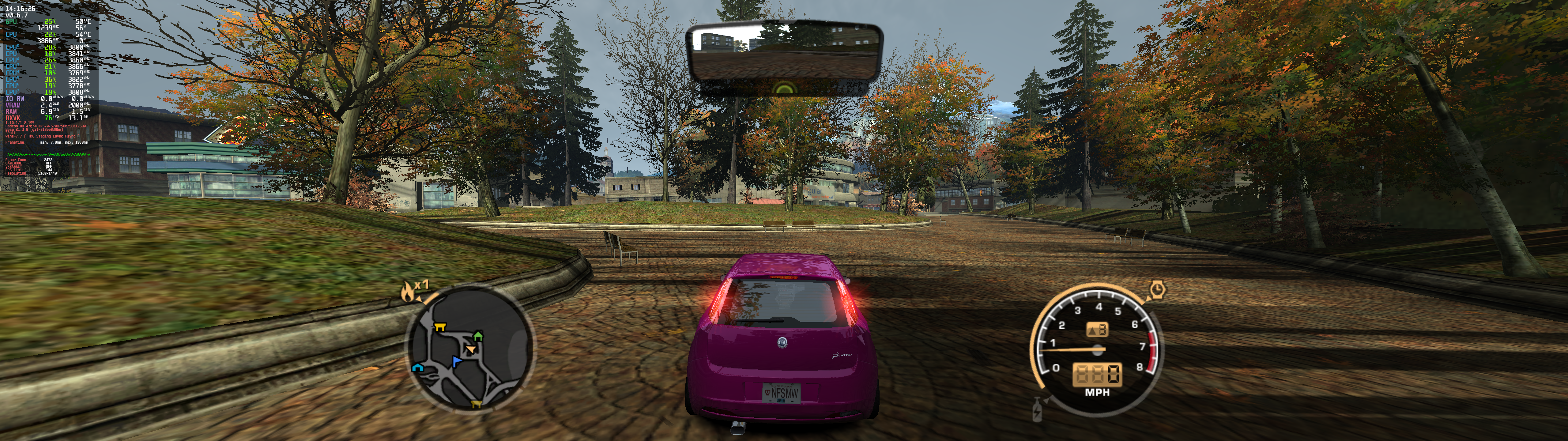
Dynamic:
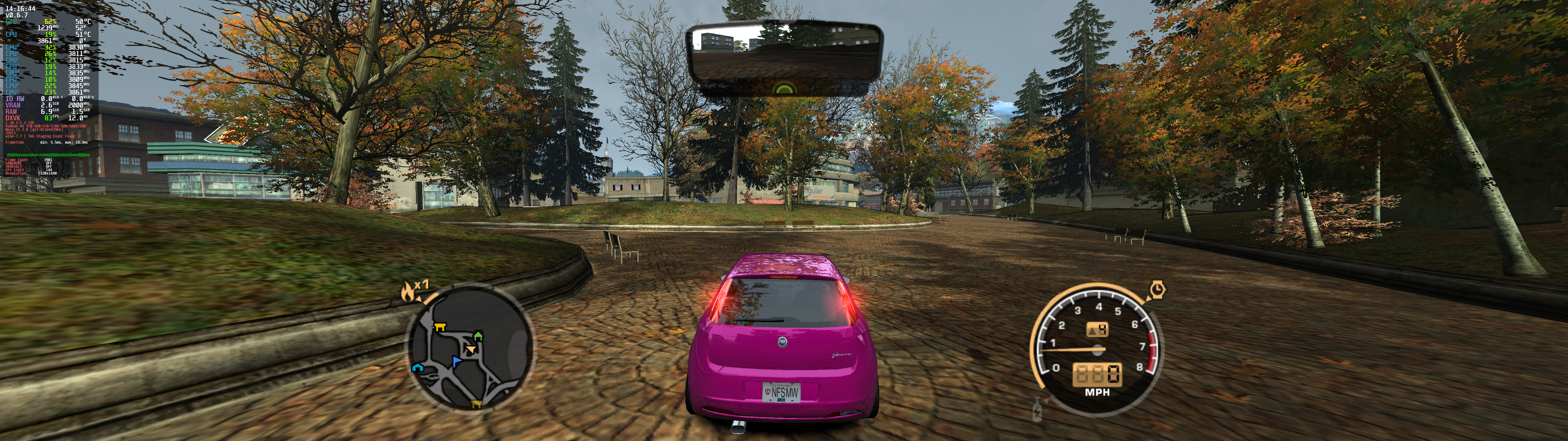
Baked:


Here's a video example: Link
It seems the shadow transformation breaks with the camera view, which suggests broken matrix calculations somewhere.
Disabling FixFOV also removes this issue, so it's as @AeroWidescreen had said, it's the FOV calculations causing the shadows to be wacky.
EDIT: commenting out the tearing fix also fixes this issue, so the problem is with these calculations here
Just to note one more thing - this also may be due to the same issue with flickering cars when there's too much geometry displayed on screen at once.
I believe this issue and the issues in NFS Undercover flickering shadows/scenery/envmap are related. Maybe increase in some memory pool(s) will resolve this issue, or a change in some sorting algo it uses for drawing.
Hmm, needs checking out. Looks like a similar issue to the one we had before with 16:9. I had never tested or poked shadow code, but I'll look into the existing WS fix code as a starting point.
On Sat, 28 May 2022 at 10:46, Sergey P. @.***> wrote:
@AeroWidescreen https://github.com/AeroWidescreen @xan1242 https://github.com/xan1242 do you think anything can be done?
— Reply to this email directly, view it on GitHub https://github.com/ThirteenAG/WidescreenFixesPack/issues/1085#issuecomment-1140214234, or unsubscribe https://github.com/notifications/unsubscribe-auth/AB5ESDJXQUASEEUFUK7IB2TVMHMODANCNFSM5XGKPCOA . You are receiving this because you were mentioned.Message ID: @.***>
-- Lovro Pleše
@xan1242 and everyone who interested. I found a weird fix for 32:9 shadows that works for me. I see no shadow glitches on borders on the screen too.
in shadow tearing fix part that you mentioned above https://github.com/ThirteenAG/WidescreenFixesPack/blob/735765955efee02995b631f9a0641249c4e52428/source/NFSMostWanted.WidescreenFix/dllmain.cpp#L299 multiply all Screen.fShadowRatio by 2 and then by 0.85.
I'm not a C++ programmer, and do not really know the algorithm, so I was just experimenting with different values, and this combination worked for me. 2 is just a guess, and 0.85 value I found in line 241: Screen.fShadowRatio = (Screen.fHeight / Screen.fWidth) / 0.85f; which is used as division value, so I multiplied it back.
Final code looks like this:
        struct ShadowFOVHookEAX
        {
            void operator()(injector::reg_pack& regs)
            {
                int ebxC4 = *(int*)(regs.ebx + 0xC4);
                regs.eax = (ebxC4 / Screen.fShadowRatio * 2 * 0.85f);
            }
        };
        struct ShadowFOVHookECX
        {
            void operator()(injector::reg_pack& regs)
            {
                int ebxC4 = *(int*)(regs.ebx + 0xC4);
                regs.ecx = (ebxC4 / Screen.fShadowRatio * 2 * 0.85f);
            }
        };
        struct ShadowFOVHookEDX
        {
            void operator()(injector::reg_pack& regs)
            {
                int ebxC4 = *(int*)(regs.ebx + 0xC4);
                regs.edx = (ebxC4 / Screen.fShadowRatio * 2 * 0.85f);
            }
        };
P.S I'm pretty much sure that this will break something for other aspect ratios, but I don't really care because I have 32:9 monitor. I just hope that it will help you guys figure out proper solution.
P.P.S Also dropping compiled NFSMostWanted.WidescreenFix.asi for anyone who want a fix for their 32:9 monitor.
NFSMostWanted.WidescreenFix.zip

@inaeviternum
I'm assuming you're using an incredibly high value for ShadowsRes to achieve this, right? Because my tests show that this makes the shadows a blurry mess at 21:9 unless I go for the maximum 16384 shadow resolution. It's fine if you have the hardware for it, but not everyone has that option.
I think for now the best choice is to limit the amount scaling that occurs for the shadow maps. Set the aspect ratio limit to 16:9, so that shadows will remain visible for people using 21:9 or 32:9 monitors. The downside is that you'd see those aforementioned glitches on the edges of the screen, but it would be far better than the current situation.
@AeroWidescreen Correct, I'm not using default ShadowRes setting, it's 8K. Yea, hardware is not an issue for me, running on 4070ti with >240 fps which is more than my monitor can display.
After playing for couple of days I can say that shadow glitches are still visible sometimes while playing, but only on distant objects on ceratin camera angles. In general it's more than playable, so I'm satisfyied with what I have.
This reminds me of the shadowmap glitches in Undercover again.
IMO whatever is being done in WS fix with shadows needs to be redone from scratch.
The setup of the stencil buffer is one thing, but that shouldn't have to be adjusted. The stencil buffer size (resolution) should stay constant and not rescale with your monitor's aspect ratio. These being 1:1 shouldn't affect anything if they're being applied correctly.
What actually needs to get fixed are the matrices that cast the models onto the stencil itself and the matrices that apply that to the screen.
Well for now I've made a pull request that at least gets the shadows working again for ultra-wide aspect ratios. You'll still see glitching at the edges of the screen, but it's far better than what was shown in the OP. Feel free to review if you want to make changes as I know my C++ isn't particularly good.
https://github.com/ThirteenAG/WidescreenFixesPack/pull/1350

Things like this make things very unreadable and hard to deal with:
        injector::MakeInline<ShadowFOVHookEAX>(pattern.count(15).get(11).get<uint32_t>(0), pattern.count(15).get(11).get<uint32_t>(7));
        injector::MakeInline<ShadowFOVHookECX>(pattern.count(15).get(12).get<uint32_t>(0), pattern.count(15).get(12).get<uint32_t>(7));
        injector::MakeInline<ShadowFOVHookECX>(pattern.count(15).get(13).get<uint32_t>(0), pattern.count(15).get(13).get<uint32_t>(7));
        injector::MakeInline<ShadowFOVHookEDX>(pattern.count(15).get(14).get<uint32_t>(0), pattern.count(15).get(14).get<uint32_t>(7));
I'll look into rewriting this part of the code anyway.
For now, I suggest you merge your PR, but merge if and only if your PR doesn't break other common aspect ratios (4:3 and 16:9).
About Fov: After using many values in NFS db & ini etc I think need something like Fov scale for any camera with any aspect ratio ...
( See it in iii_classic_axis.asi for gta 3 ) ; This value controls the Field Of View. (Default is 70.0f). fFOV = 70.0f etc
It's just mega convenient solution to change Fov Multiplayer without db editing . And for 4:3 - need bigger fov values ( because We see world around not fully ) , and lower for 16:9 & especially for 31:9 like at this pics or tripple monitors ( fish eye effect too large with fixed fov by default IMO ) .

It's actually quite simple what's going on, here's a visual representation. All of the existing patches to the WS fix have been disabled here, including the shadow resolution, which is 1024x1024 by default.
At a super wacky resolution, 2503x534 the shadows look like this by default.
Why? Well, if you look at the stencil buffer directly you see this:
The texture is getting stretched because the shadow's camera matrix didn't scale proportionally to the aspect ratio, so it's drawing whatever is the last data in there.
When we do scale it proportionally, it's fixed:
But if you notice, the quality suffered because the contents are quite literally smaller in the shadow map itself:
Due to the implementation of the shadow map texture, there is no properly fixing this without cascading it onto multiple textures (this is in case we want 16384 res shadows in any aspect ratio without quality loss).
So the only way to work around this is to scale the X resolution proportionally up to 16384. This is a requirement to keep the shadow quality intact, not optional.
I'll rewrite the existing patches with simpler code which should do the trick for most users.
Should be fixed with this: https://github.com/ThirteenAG/WidescreenFixesPack/pull/1355
Everyone - please check with the latest dev build once it finishes building! If everything works, we can close this issue (and make a new release).
(You can check the dev build status here: https://github.com/ThirteenAG/WidescreenFixesPack/actions)
Thank you for your work @xan1242 ! Will test your fix today and report back in this thread.
So , now shads looks like more jagged at some angles after update ? BUT also I saw empty shadows from tyres before . Now it looks correct , so good stuff . ( Wrong shade direction of rear wing for M3 GTR at dusk / sunset sun position - still in )
Ps : hehe Testers .. don't hurry , set dusk / sunset timecycle ( max to left or right in graphics option ) , and drive at other locations , like "S" roads in radarmap at first City , after tunnels etc ... But ok , maybe it's sunset timecycle issue of NFS MW .
Noticed that game started crashing from time to time. I'm not sure if it's connected to the recent changes, but I made it to blacklist 6 with 0 crashes, and now it crashed twice in one hour in random places.
Yeah, please provide a crash dump from the ASI loader's exception handler!
Make a folder "CrashDumps", and add "DisableCrashDumps = 0" to the global.ini
So , now shads looks like more jagged at some angles after update ? BUT also I saw empty shadows from tyres before . Now it looks correct , so good stuff . ( Wrong shade direction of rear wing for M3 GTR at dusk / sunset sun position - still in )
This is probably because of the camera corrections that were applied. This will even affect 16:9.
This is exactly why the auto scaling for the resolution is made (and I suggest you enable it).
Seems unrelated. This is a crash somewhere within a sound thread.
When did this happen in the game?
Also second question - what is your CPU and do you happen to use frequency scaling on it? This might be related to another issue with these games entirely and I intend on figuring that out too.
Yeah from my preliminary research, this is a crash that could be solved by setting "process affinity" to 1 or 2 cores.
From what I can see, the game only creates a few threads in normal gameplay:
- Main thread
- Sound thread
- Memory card thread
(In multiplayer it creates more networking threads)
This is the same for UG2 and MW. I suspect it may have something to do with scheduling and timing, which causes issues such as a value from the main thread being null (it's a DirectSound related thing that crashed in your case).
I believe this could be fixed by scheduling it differently or creating a messaging system between the threads that will wait until the main thread is ready. This would also eliminate the need for the "single core affinity" stuff.
This isn't caused by the shadow fixes, therefore it's unrelated, but good to know this nonetheless.
Do send any more crash logs if you experience any (and try setting core affinity to one of the cores to see if it prevents the crashes). If all is well, then I'd say this case is closed.
I feel like we can close this issue. I hadn't have had any crashes on my end.
@ThirteenAG & @AeroWidescreen your opinions? Is it OK to close?
Alrighty then, closing.
Fixed in https://github.com/ThirteenAG/WidescreenFixesPack/pull/1355