
Ultimate-ASI-Loader
 Ultimate-ASI-Loader copied to clipboard
 ThirteenAG
ASI Loader with a DX7 game (Hitman Codename 47)
I want to use the loader with a DX7 game and also use DSOAL (dsound.dll). How do I rename the loader .dll? DDraw.dll isn't an option since I'm also using dgVoodoo2.
Everything I tried (dinput, etc.) hasn't been hooked. I tried renaming the DSOAL .dlls into .asis and putting them and the corresponding ini in a properly set-up scripts folder, but DSOAL didn't work. The scripts folder contains a global.ini:
[GlobalSets]
FindModule=1
and I'm already hooking a widescreen fix .asi so it should be working.

I had opened a problem a while ago: https://github.com/ThirteenAG/WidescreenFixesPack/issues/1024


This game also has an OpenGL render that doesn't suffer from the same problems as DirectX7 with Windows 10/11. Unfortunately the Widescreen fix only works with DirectX7.
Hitman.zip Kappa971's .exe doesn't work for me, so here's mine. Basically my issue is that I'm using D3DImm.dll and DDraw.dll from dgVoodoo2 and dsound.dll from DSOAL. Is there any way I can rename the ASI loader, so that it works with the game?
The game works perfectly as you can see, maybe your game is another version, this is version b192:
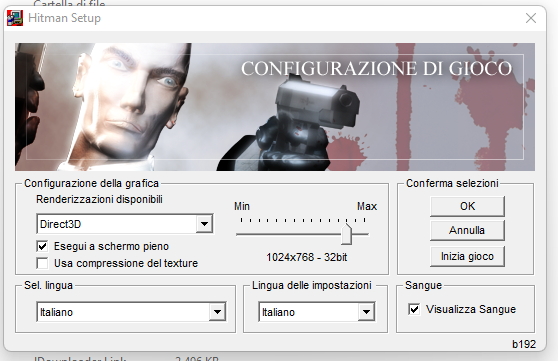

Basically my issue is that I'm using D3DImm.dll and DDraw.dll from dgVoodoo2 and dsound.dll from DSOAL. Is there any way I can rename the ASI loader, so that it works with the game?
I guess the developer needs to make some changes to Ultimate ASI Loader. A Widescreen fix for OpenGL rendering would perhaps be better (but I guess more complex) instead of using the existing Widescreen fix in DirectX7.
EDIT Your executable is dated November 22, 2000, mine is dated December 18, 2000, so your version of the game is probably older than mine.
Unfortunately those don't have original imports table, so I checked with debugger, I think msacm32.dll, version.dll or winmm.dll should still work.
I think msacm32.dll, version.dll or winmm.dll should still work.
I think I have already tried to rename the Ultimate ASI Loader dll in all the names present in the description on the first page, only ddraw.dll (and dsound.dll even if I have not tried it personally, as that dll is already in use from DSOAL) seem to load the Widescreen fix. Maybe @vrubayka can confirm it.
Unfortunately those don't have original imports table
Can I help in any way?
I think I have already tried to rename the Ultimate ASI Loader dll in all the names present in the description on the first page, only ddraw.dll (and dsound.dll even if I have not tried it personally, as that dll is already in use from DSOAL) seem to load the Widescreen fix. Maybe @vrubayka can confirm it.
Then I guess there's nothing I can do?
Then I guess there's nothing I can do?
I guess not, unless you create a Widescreen fix for OpenGL renderer, if possible. If it isn't possible, I think that this issue and mine opened previously, can be closed. Anyway, thank you for your patience.
Yeah only dsound and ddraw get hooked sadly. Anyway hopefully somebody will get this to work maybe with a different wrapper or something.
Yeah only dsound and ddraw get hooked sadly. Anyway hopefully somebody will get this to work maybe with a different wrapper or something.
A Widescreen fix for OpenGL would be perfect as:
- You can turn on anti-aliasing without corrupting the text.
- It is more compatible with new versions of Windows and allows you to activate an fps limiter (in case you have a Freesync/G-Sync display with high refresh rate).
But I think that if it hasn't been done so far, maybe it isn't possible (or too complex).