

 TheOdinProject
Easy Fix: Clarify instructions in fundamentals-2.md Ex.2
Complete the following REQUIRED checkboxes:
- [x] I have thoroughly read and understand The Odin Project Contributing Guide
- [x] The title of this PR follows the
location of change: brief description of changeformat, e.g.Intro to HTML and CSS lesson: Fix link text
Complete the following checkboxes ONLY IF they are applicable to your PR. You can complete them later if they are not currently applicable:
- [x] I have previewed all lesson files included in this PR with the Markdown preview tool to ensure the Markdown content is formatted correctly
- [x] I have ensured all lesson files included in this PR follow the Layout Style Guide
1. Because:
- The shell is unresponsive, and users must view console logs via their browser dev tools.
- Three within the top 5 comments (on the unforked Repl) mention this problem, so it is a fairly common issue.
2. This PR:
- Proposed edit would append the following to line 52: "and you will need to use your browser's developer tools in order to check the console."

You'll have to create a free replit account and fork the file to access the console. You can only run the unforked file, you can't access it's console.
Hi @SauravJalui, thanks for your response, but your assumption was incorrect.
I already had a Replit account, and I already forked the file; then I realized none of the results were logging in the shell. I didn't realize the shell is supposed to function as the console.
I will revise my PR to reflect this more accurate wording of the issue: the shell is unresponsive, and users must view console logs via their browser dev tools.
I've attached a short screen recording illustrating the problem, and I also uploaded it to youtube (in case anyone is uncomfortable downloading videos from strangers):
Youtube: https://youtu.be/94T-20b4BMI (HD available)
Download: shell-unresponsive.mov.zip
Edit: I urge you to fork and compare exercise 2 to exercise 4--both have a shell, but exercise 4 shows a console tab which actually displays printed messages. This console tab does not exist in exercise 2, and despite my best efforts, I have been unable to figure out a way to make it display. I think it has to do with the fact that exercise 2 is a different type of repl than exercise 4: EX 2 is for html5, js, css; EX 4 is for js.
I am still a novice, and I apologize if my (potentially) flawed understanding of shell/console makes this confusing.
@kdevay while opening the actual browser devtools does work, the experience is a bit better when you open the developer tools within replit, which you can do using the button in the below screenshot:
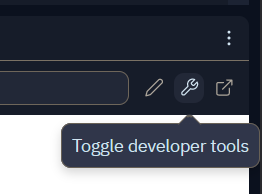
I agree that this isn't clear at the moment though, could you update your suggestion here to point users to that button? Once you've done that I think this will be good to go in.

could you update your suggestion here to point users to that button?
@wise-king-sullyman thanks for the clarification! I updated my PR following your suggestion. Hopefully my language is clear enough.